এক নজরে পারোPaaro at a glance
পারো কী, কেন, আর কোন ভিত্তিতে তৈরি।What Paaro is, why it exists and what it is built on.
পারো হলো ১২ শ্রেণি পর্যন্ত বাংলাদেশের শিক্ষার্থীদের জন্য একটা শেখা-সহায়তার ব্যবস্থা। ওয়েবসাইট paaro.net। শিক্ষার্থী যেকোনো ফোনে ছোট একটা কুইজ দেয়, ক্লাসে বা বাসায়। সাধারণত কুইজে ৮টা প্রশ্ন থাকে। এরপর শিক্ষক, প্রধান শিক্ষক আর শিক্ষা অফিসাররা নিজের নিজের স্তরে দেখতে পারেন কে কোথায় আছে।
Paaro is a learning-support engine for Bangladeshi students up to class 12. The website is paaro.net. A student takes a short quiz on any phone, in class or at home. A quiz usually has 8 questions. Teachers, head teachers and education officers then see where every student stands, each at their own level.
কর্তৃপক্ষ হিসেবে আপনি দেখবেন পুরো দেশের ছবি: কত প্রতিষ্ঠান যুক্ত হয়েছে, কত শিক্ষার্থী নিয়মিত কুইজ দিচ্ছে, আর বিষয়ভিত্তিক শেখা কোন ধাপে আছে। এখান থেকে বিভাগ, জেলা, উপজেলা হয়ে স্কুল পর্যন্ত নামতে পারবেন। সব জায়গায় আপনি সংখ্যা আর ধাপ দেখবেন। কোনো শিক্ষার্থীর নাম দেখবেন না।
As the authority, you see the national picture: how many institutions have joined, how many students take quizzes regularly, and which stage learning has reached in each subject. From there you can go down through division, district and upazila to a single school. Everywhere you see numbers and stages. You never see a student's name.
এই বইয়ের জাতীয় স্ক্রিনশট সম্পর্কেAbout the national screenshots in this manual
জাতীয় পাতার ছবিগুলো পুরো দেশে চালু হলে কেমন দেখাবে তার নমুনা। প্রতিষ্ঠানের সংখ্যা আসল, BANBEIS ২০২৪ থেকে নেওয়া: মোট ৩৬,২০৬ প্রতিষ্ঠান, এর মধ্যে ৩৩,২১৬টিতে ৬ থেকে ১২ শ্রেণি চলে, ৬৪ জেলা, ৫৬২ উপজেলা ও থানা। বাকি সব সংখ্যা নমুনা। পাইলট চলবে কর্তৃপক্ষের বেছে দেওয়া ৪ থেকে ৫টি প্রতিষ্ঠানে।
The national screens show a sample of what full rollout would look like. Institution counts are real, from BANBEIS 2024: 36,206 institutions in total, 33,216 of which run classes 6 to 12, across 64 districts and 562 upazilas and thanas. All other numbers are sample. The pilot runs in 4 to 5 institutions chosen by the authority.
কর্তৃপক্ষের কাজে পারো কী দেয়What Paaro gives the authority
- সাপ্তাহিক ছবি: কোথায় শিক্ষার্থীরা নিয়মিত এগোচ্ছে, আর কোথায় থেমে আছে।A weekly picture: where students are learning regularly, and where it has stalled.
- বিষয়ভিত্তিক ধাপ: কোন বিষয়ে সারা দেশে বা কোনো জেলায় বেশি সাহায্য দরকার।Stages by subject: which subject needs more help, nationally or in a district.
- রোলআউটের অগ্রগতি: BANBEIS তালিকার কতগুলো প্রতিষ্ঠান যুক্ত হয়েছে।Rollout progress: how many institutions on the BANBEIS list have joined.
- শিক্ষকদের অংশগ্রহণ: কতজন শিক্ষক প্রশ্ন যাচাই করে ভান্ডার গড়ছেন।Teacher involvement: how many teachers are building the bank by verifying questions.
চারটি বিষয়, এবং কেন এই চারটিFour subjects, and why these four
পারো চারটি বিষয় দিয়ে শুরু করেছে: বাংলা, ইংরেজি, গণিত আর আইসিটি। বই হলো এনসিটিবির ২০২৬ সালের পাঠ্যবই।
Paaro starts with four subjects: Bangla, English, maths and ICT. The books are the NCTB 2026 textbooks.
- বাংলা আর ইংরেজি বই সব ধারায় একই। তাই একই প্রশ্ন সব শিক্ষার্থীর কাজে লাগে, আর ধারা মিলিয়ে তুলনা করা সহজ।Bangla and English books are the same in every stream. So the same questions serve every student, and comparing across streams is easier.
- গণিত আর আইসিটির ইংলিশ ভার্সন বই বাংলা বইয়ের অনুবাদ। তাই প্রতিটি গণিত ও আইসিটি প্রশ্নে বাংলা আর ইংরেজি দুই লেখাই আছে।The English-version maths and ICT books are translations of the Bangla books. So every maths and ICT question carries both Bangla and English text.
- এই চার বিষয়ে একটা প্রশ্নভান্ডার দিয়ে প্রায় সব শিক্ষার্থীর কাছে পৌঁছানো যায়।With these four subjects, one question bank reaches almost every student.
চারটি ধারাFour streams
- সাধারণ (বাংলা মাধ্যম)General (Bangla medium)
- ইংলিশ ভার্সনEnglish version
- মাদ্রাসা (দাখিল ও আলিম)Madrasah (dakhil and alim)
- কারিগরিTechnical
ছয়টি ধাপSix stages
পারো নম্বরের জায়গায় ধাপ দেখায়। প্রতিটি শিক্ষার্থী প্রতিটি অধ্যায়ে ছয় ধাপের কোনো একটায় থাকে। নিচ থেকে ওপরে ধাপগুলো এমন, প্রতিটির নিজের রং আছে। জাতীয় পাতার সব ধাপ-বারে এই রংগুলোই দেখবেন।
Paaro shows stages instead of marks. Each student is at one of six stages in each chapter. From lowest to highest the stages are as below, each with its own colour. Every stage bar on the national page uses these colours.
কোনো অধ্যায়ে ৩ নম্বর ধাপের নিচে থাকলে শিক্ষার্থী আপনা থেকেই একটা সহজ পথ পায়: সহজ প্রশ্ন আর পাঠ, তারপর আবার মূল কুইজ। মানে যারা পিছিয়ে আছে, তারা বাড়তি সাহায্য পায় কারো আলাদা নির্দেশ ছাড়াই।
A student below stage 3 in a chapter automatically gets an easier path: easy questions plus the lesson, then the main quiz again. Students who are behind get extra help without anyone having to arrange it.
প্রশ্ন আর কুইজQuestions and quizzes
- ১২ ধরনের প্রশ্ন আছে: একটা উত্তর বাছাই, সব ঠিক উত্তর বাছাই, সত্য/মিথ্যা, ক্রমে সাজানো, জোড়া মেলানো, শব্দভান্ডার থেকে শূন্যস্থান, সংখ্যা লেখা, শব্দ লেখা, দলে ভাগ করা, ভুল শব্দে ট্যাপ, শুনে লেখা (ইংরেজি), অনুচ্ছেদ পড়ে উত্তর।There are 12 question types: single choice, select all, true/false, put in order, match pairs, fill gaps from a word bank, type a number, type a word, sort into groups, tap the wrong word, listen and type (English), and read a passage and answer.
- সব কাজ ট্যাপ করে হয়, টেনে নিতে হয় না। কম দামের অ্যান্ড্রয়েড ফোনে আর ক্লাসের স্মার্ট বোর্ডে চলে।Everything is tap-based; there is no dragging. It works on a ordinary Android phone and on a classroom smart board.
- প্রতিটি প্রশ্নে বইয়ের ছাপা পৃষ্ঠা নম্বর থাকে, যেখানে উত্তরটা আছে। কুইজের পরে শিক্ষার্থী ঠিক উত্তর আর পৃষ্ঠা দেখতে পারে।Every question carries the printed book page where the answer is found. After a quiz, the student can see the right answer and the page.
- উত্তর মেলানো হয় সার্ভারে। জমা দেওয়ার আগে শিক্ষার্থী উত্তর দেখতে পারে না।Answers are checked on the server. Students cannot see answers before submitting.
প্রশ্নভান্ডার আজ কোথায়Where the question bank stands today
এখন ভান্ডারে ৭৬৬টি খসড়া প্রশ্ন আছে, এনসিটিবির ২৭টি বই থেকে: ৬, ৭, ৮ আর ৯-১০ শ্রেণির বই, সঙ্গে ১১-১২ শ্রেণির বাংলা। প্রতিটি বইয়ের প্রথম ২-৩টি অধ্যায় থেকে প্রশ্ন নেওয়া হয়েছে। শিক্ষকেরা যাচাই করার পরেই প্রশ্ন চালু হয়। এর নিয়ম অধ্যায় ৬-এ আছে।
The bank holds 766 draft questions from 27 NCTB books: the class 6, 7, 8 and 9-10 books, plus Bangla for classes 11-12. Questions cover the first 2-3 chapters of each book. A question goes live only after teachers verify it. Chapter 6 explains the rules.
পারোতে ঢোকাGetting in
আপনার লিংক, লগইনের নিয়ম আর সহকর্মীদের অ্যাকাউন্ট।Your link, how login works and accounts for your staff.
আপনার লিংকYour link
কর্তৃপক্ষের জাতীয় পাতার লিংক হলো paaro.net/dshe। ব্রাউজারে এটা লিখলেই জাতীয় ড্যাশবোর্ড খোলে, লগইনের পরে। পারোতে প্রত্যেক মানুষের একটা সহজ লিংক আছে। নিয়মগুলো নিচের টেবিলে।
The authority's national page is at paaro.net/dshe. Type it in a browser and the national dashboard opens, after login. Every person on Paaro has one easy link. The rules are in the table below.
| কার পাতাWhose page | লিংকLink | উদাহরণExample |
|---|---|---|
| কর্তৃপক্ষAuthority | paaro.net/dshe | paaro.net/dshe |
| জেলা অফিসDistrict office | paaro.net/[district] | paaro.net/mymensingh |
| উপজেলা অফিসUpazila office | paaro.net/[district]/[upazila] | paaro.net/mymensingh/muktagachha |
| স্কুল / প্রধান শিক্ষকSchool / head teacher | paaro.net/[EIIN] | paaro.net/900101 |
| শিক্ষকTeacher | paaro.net/[EIIN]/[name] | paaro.net/900101/nasrin |
| শিক্ষার্থীStudent | paaro.net/[name+4 digits] | paaro.net/rafi2031 |
| অভিভাবকGuardian | paaro.net/[student]/guardian | paaro.net/rafi2031/guardian |
- জেলা আর উপজেলার নাম ইংরেজিতে, ছোট হাতের অক্ষরে। ফাঁকা জায়গা হাইফেন হয়, যেমন
mymensingh-sadar।District and upazila names are in English, lowercase, with spaces turned into hyphens, for examplemymensingh-sadar. - পুরোনো বানানও কাজ করে।
paaro.net/chittagongখুললেpaaro.net/chattogramখোলে। comilla, barisal, jessore আর bogra একইভাবে কাজ করে।Old spellings still work.paaro.net/chittagongopenspaaro.net/chattogram. comilla, barisal, jessore and bogra work the same way. - EIIN হলো স্কুলের ৬ অঙ্কের সরকারি নম্বর। যেকোনো স্কুলের পাতা
paaro.net/এর পরে EIIN লিখলেই পাওয়া যায়।EIIN is a school's 6-digit government number. Any school's page ispaaro.net/followed by its EIIN.
সভায় বা চিঠিতে কোনো জেলা বা স্কুলের কথা উঠলে লিংকটা সরাসরি লিখে দিতে পারেন, যেমন paaro.net/mymensingh বা paaro.net/900101। যিনি খুলবেন, তাঁর অনুমতি থাকলেই ভেতরের তথ্য দেখবেন।
When a district or school comes up in a meeting or a letter, you can write its link directly, such as paaro.net/mymensingh or paaro.net/900101. Whoever opens it sees the data only if they have permission.
লিংক শেয়ার করাSharing a link
প্রতিটি পাতার ওপরে ডানে পাতার লিংক আর কপি বোতাম থাকে। কপি চেপে লিংকটা ইমেইল, চিঠি বা মেসেজে বসিয়ে দিতে পারেন। লিংক শেয়ার করলে তথ্য শেয়ার হয় না। যিনি পাবেন, তাঁকে নিজের অ্যাকাউন্টে লগইন করতে হবে, আর অনুমতি থাকলেই তিনি পাতাটা দেখবেন।
Every page has its link and a Copy button at the top right. Tap Copy and paste the link into an email, letter or message. Sharing a link does not share the data. The person who receives it must log in with their own account, and sees the page only if they have permission.
লগইনLogin
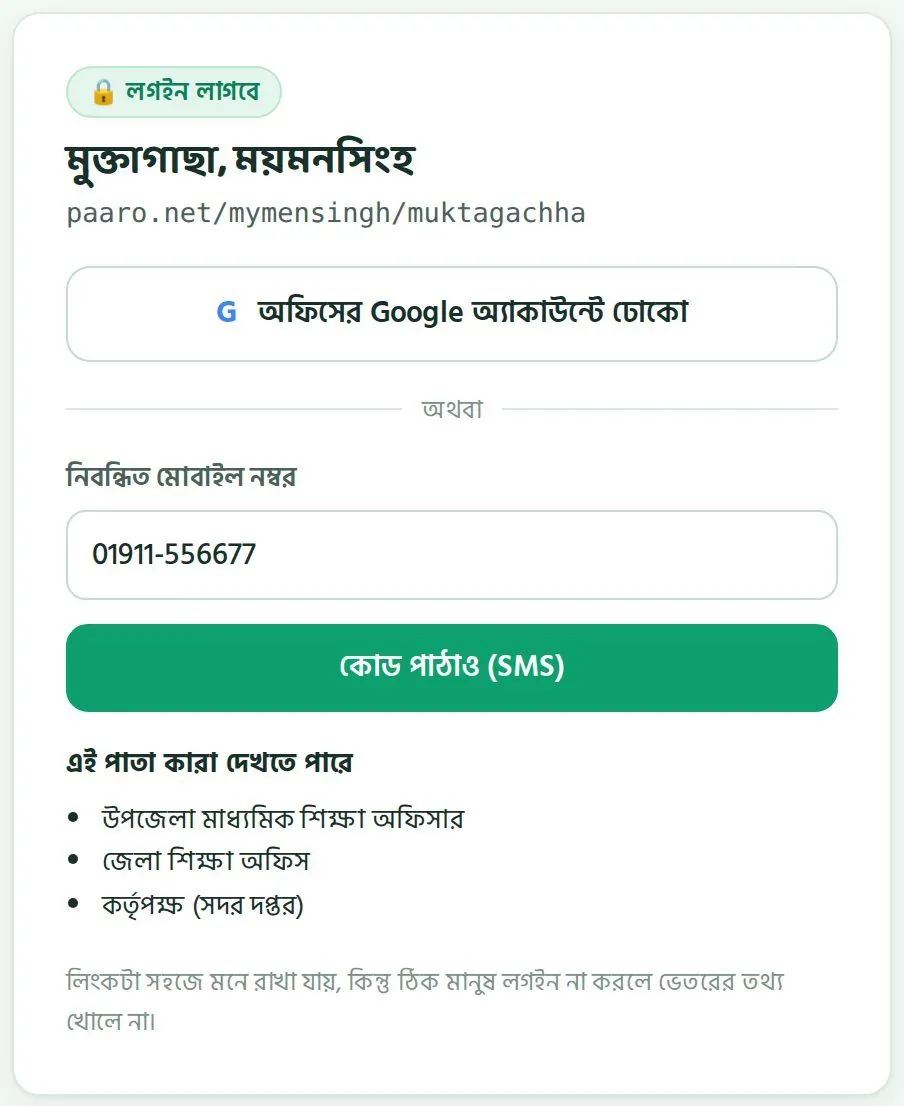
প্রতিটি পাতা খোলার আগে লগইন লাগে। লিংক মনে রাখা সহজ, কিন্তু ঠিক মানুষ লগইন না করলে ভেতরের তথ্য খোলে না। কর্মকর্তারা দুইভাবে ঢুকতে পারেন।
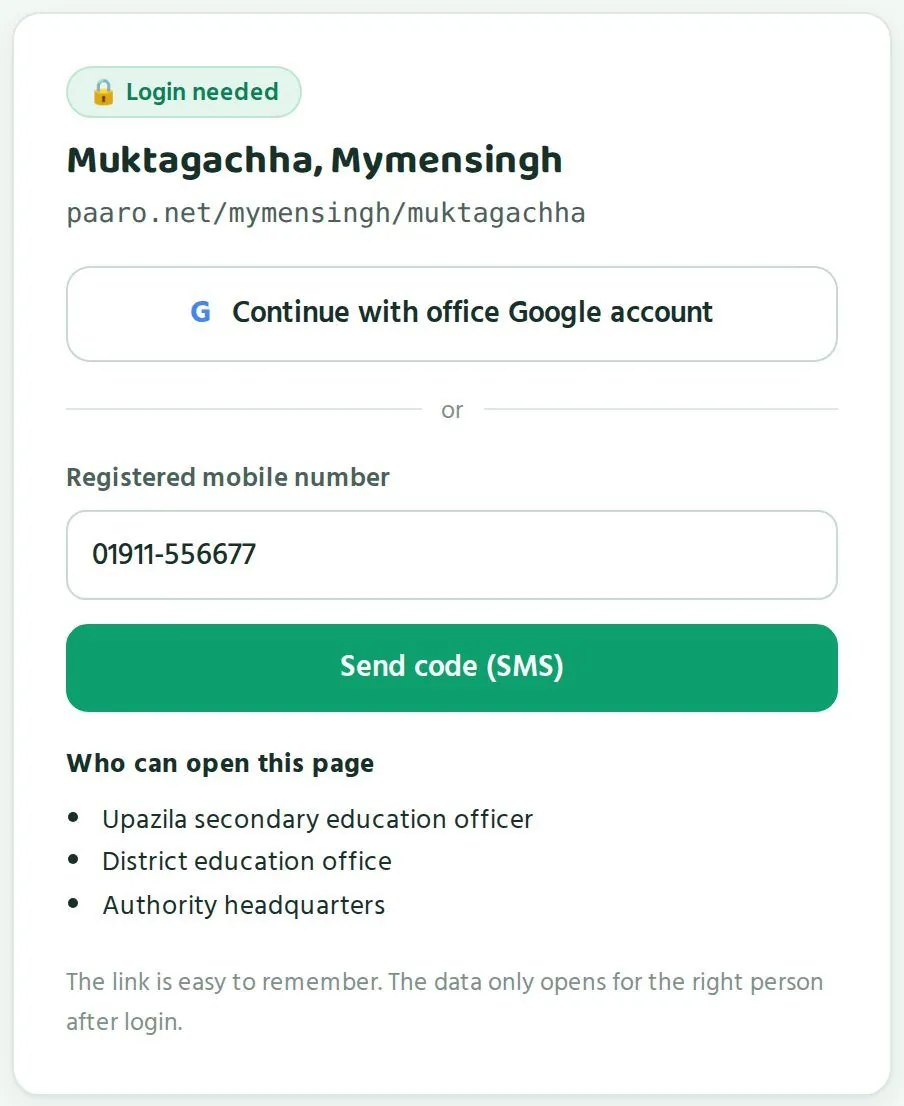
Every page asks for login before it opens. The link is easy to remember, yet the data opens only for the right person. Officers can log in in two ways.
paaro.net/dsheখুলুন।Openpaaro.net/dshe.- অফিসের Google অ্যাকাউন্টে ঢোকো চাপুন, আর আপনার অফিসের Google অ্যাকাউন্ট বেছে নিন।Tap Continue with office Google account and choose your office Google account.
- অথবা নিবন্ধিত মোবাইল নম্বর ঘরে আপনার নম্বর লিখে কোড পাঠাও (SMS) চাপুন।Or type your number in Registered mobile number and tap Send code (SMS).
- SMS-এ আসা ৬ অঙ্কের কোড লিখুন। কোড ৫ মিনিট কাজ করে।Enter the 6-digit code from the SMS. The code works for 5 minutes.
- জাতীয় ড্যাশবোর্ড খুলবে। ওপরে বাংলা/ইংরেজি বদলানোর সুইচ আছে।The national dashboard opens. The Bangla/English switch is on every page.
- এক নম্বরে ঘণ্টায় সর্বোচ্চ ৩টি কোড পাঠানো যায়। কোড না এলে কয়েক মিনিট অপেক্ষা করুন।A number can receive at most 3 codes per hour. If a code does not arrive, wait a few minutes.
- শুধু নিবন্ধিত নম্বরে কোড যায়। নম্বর বদলালে পারো টিমকে জানান।Codes go only to a registered number. If your number changes, tell the Paaro team.
- উপজেলা বা জেলার পাতায়ও লগইন পাতা দেখায় কারা পাতাটা খুলতে পারেন। কর্তৃপক্ষ সেই তালিকায় থাকে।Upazila and district login screens also list who can open them. The authority is on that list.
সহকর্মীদের জন্য অ্যাকাউন্টAccounts for your staff
কর্মকর্তা আর প্রধান শিক্ষকদের অ্যাকাউন্ট অনুমোদন করে পারো টিম। সদর দপ্তরের কোনো সহকর্মীর অ্যাকাউন্ট লাগলে পারো টিমকে লিখুন: hello@paaro.net।
Accounts for officers and head teachers are approved by the Paaro team. If a colleague at headquarters needs an account, write to the Paaro team at hello@paaro.net.
- সহকর্মীর নাম, পদ আর দপ্তর লিখুন।Give the colleague's name, post and office.
- তাঁর অফিসের Google অ্যাকাউন্ট, অথবা যে মোবাইল নম্বরে SMS কোড যাবে, সেটা দিন।Give their office Google account, or the mobile number that will receive the SMS code.
- কোন স্তরের পাতা লাগবে বলুন: জাতীয়, নাকি কোনো নির্দিষ্ট জেলা।Say which level they need: national, or a particular district.
- পারো টিম অনুমোদন দিলে সহকর্মী
paaro.net/dsheখুলে লগইন করতে পারবেন।Once the Paaro team approves, the colleague can openpaaro.net/dsheand log in.
কেউ বদলি হলে বা দায়িত্ব ছাড়লে পারো টিমকে জানান, যাতে তাঁর প্রবেশাধিকার বন্ধ করা যায়।
When someone is transferred or leaves the role, tell the Paaro team so their access can be closed.
ভুল লিংক দিলেIf a link is wrong
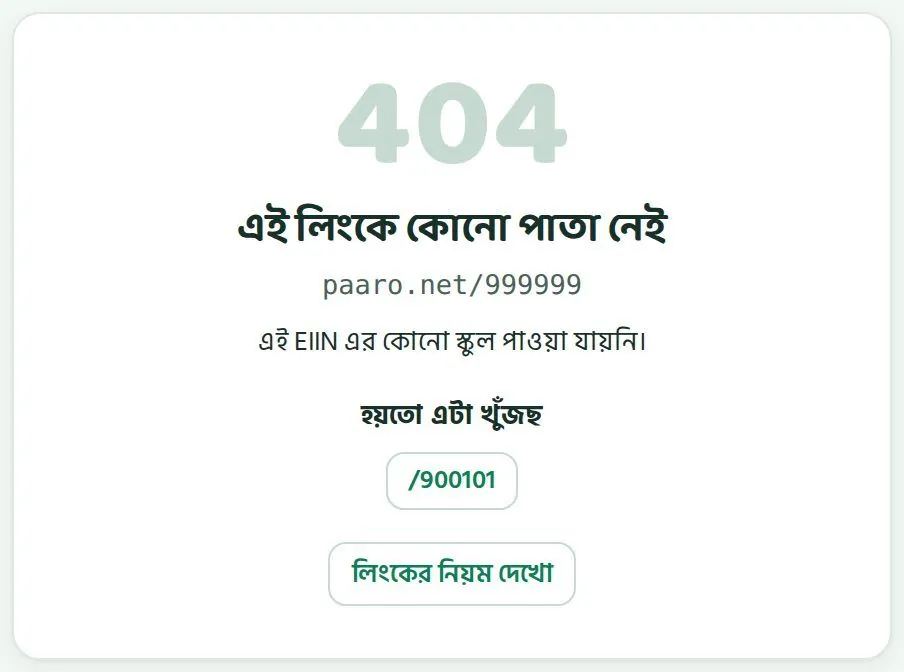
ভুল লিংক খুললে পারো একটা পাতা দেখায়: এই লিংকে কোনো পাতা নেই। সেখানে কাছাকাছি সঠিক লিংকের পরামর্শ আর লিংকের নিয়ম দেখো বোতাম থাকে।
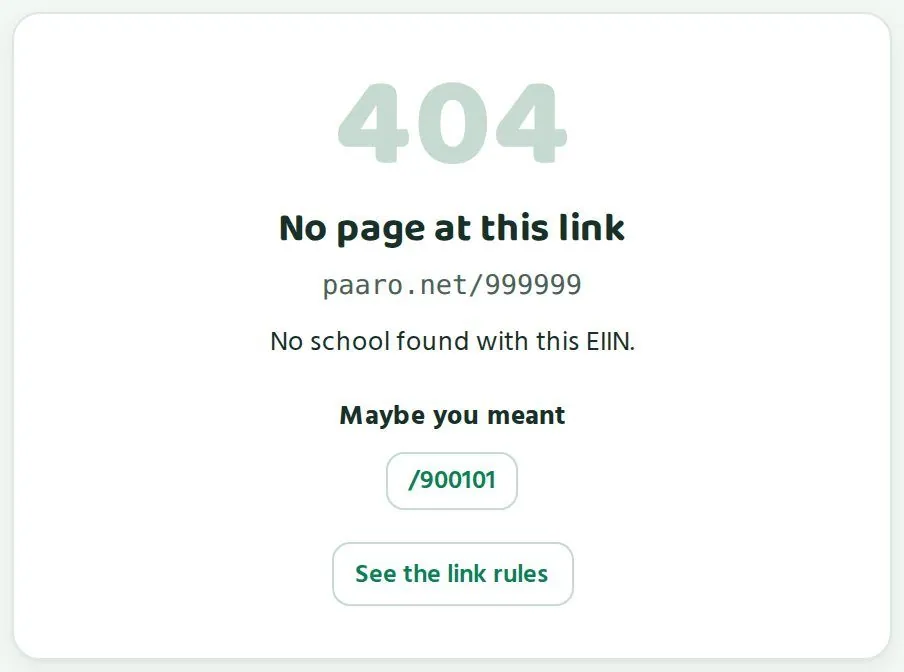
A wrong link shows a page that says No page at this link. It suggests a close match and has a button to see the link rules.
জাতীয় ড্যাশবোর্ডThe national dashboard
এক পাতায় সারা দেশ: সংখ্যা, অংশগ্রহণ, ধাপ, বিভাগ আর জেলা।The whole country on one page: numbers, participation, stages, divisions and districts.
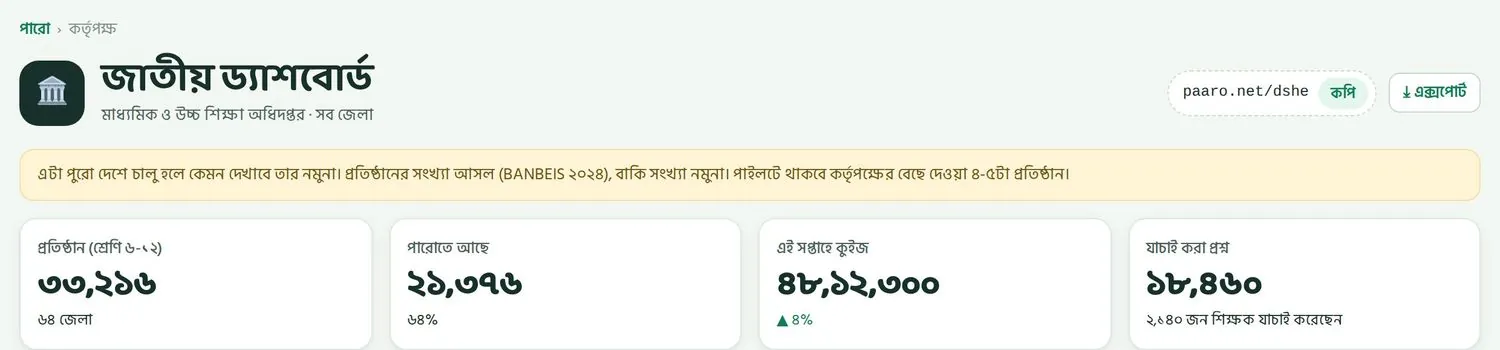
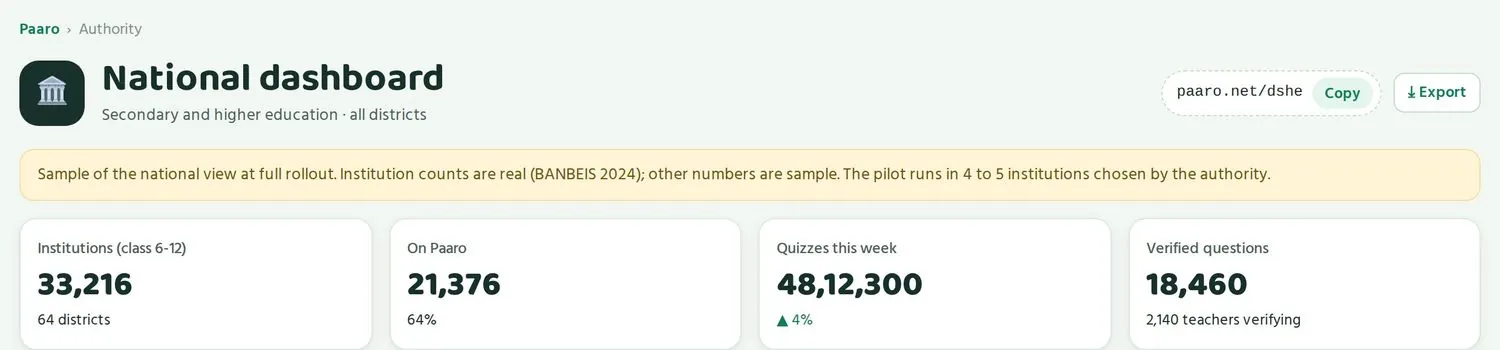
paaro.net/dshe খুললে ওপরে থাকে জাতীয় ড্যাশবোর্ড। ডানে পাতার লিংক, কপি বোতাম আর এক্সপোর্ট বোতাম। তার নিচে হলুদ ঘরে মনে করিয়ে দেওয়া হয় যে সংখ্যাগুলো নমুনা। এরপর চারটি সংখ্যার ঘর।
paaro.net/dshe opens with National dashboard at the top. On the right are the page link, a Copy button and an Export button. A yellow box underneath reminds you that the numbers are sample. Then come four number cards.
চারটি সংখ্যাThe four numbers
| ঘরCard | কী দেখায়What it shows | কীভাবে পড়বেনHow to read it |
|---|---|---|
| প্রতিষ্ঠান (শ্রেণি ৬-১২)Institutions (class 6-12) | দেশে ৬ থেকে ১২ শ্রেণি চলে এমন প্রতিষ্ঠান: ৩৩,২১৬, ৬৪ জেলায়Institutions running classes 6-12 nationally: 33,216 in 64 districts | এটা আসল সংখ্যা, BANBEIS ২০২৪ থেকে। মোট লক্ষ্য এটাই।This is a real figure from BANBEIS 2024. It is the full target. |
| পারোতে আছেOn Paaro | কতগুলো প্রতিষ্ঠান যুক্ত হয়েছে, আর মোটের কত শতাংশHow many institutions have joined, and what share of the total | রোলআউট কতদূর এগোল, সেটা বোঝায়Shows how far rollout has gone |
| এই সপ্তাহে কুইজQuizzes this week | এই সপ্তাহে কতগুলো কুইজ দেওয়া হয়েছে, আর গত সপ্তাহের চেয়ে কত বদলেছেHow many quizzes were taken this week, and the change against last week | ব্যবহার বাড়ছে না কমছে, সেটা এক নজরেWhether use is rising or falling, at a glance |
| যাচাই করা প্রশ্নVerified questions | কতগুলো প্রশ্ন যাচাই শেষে চালু, আর কতজন শিক্ষক যাচাই করছেনHow many questions are verified and live, and how many teachers are verifying | প্রশ্নভান্ডার কত দ্রুত বাড়ছে, আর শিক্ষকেরা কতটা যুক্তHow fast the bank is growing and how involved teachers are |
কুইজে অংশগ্রহণ, সারা দেশQuiz participation, whole country
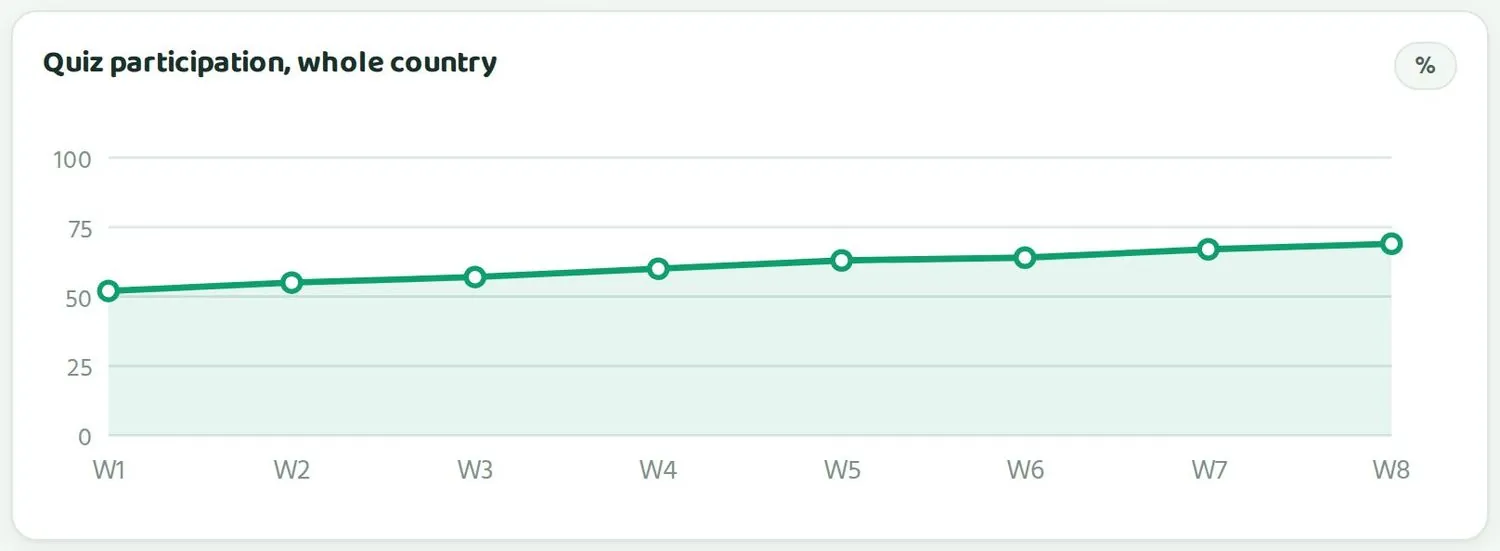
এই চার্টে গত ৮ সপ্তাহের অংশগ্রহণ শতাংশে দেখায়। মানে, যুক্ত শিক্ষার্থীদের মধ্যে কত শতাংশ সেই সপ্তাহে অন্তত একটা কুইজ দিয়েছে। নমুনায় রেখাটা ধীরে ধীরে ওপরে উঠছে, প্রথম সপ্তাহে ৫০ শতাংশের একটু ওপরে, অষ্টম সপ্তাহে ৭০ শতাংশের কাছে।
This chart shows participation over the last 8 weeks, as a percentage: the share of students on Paaro who took at least one quiz that week. In the sample the line rises slowly, from just above 50% in week 1 to close to 70% in week 8.
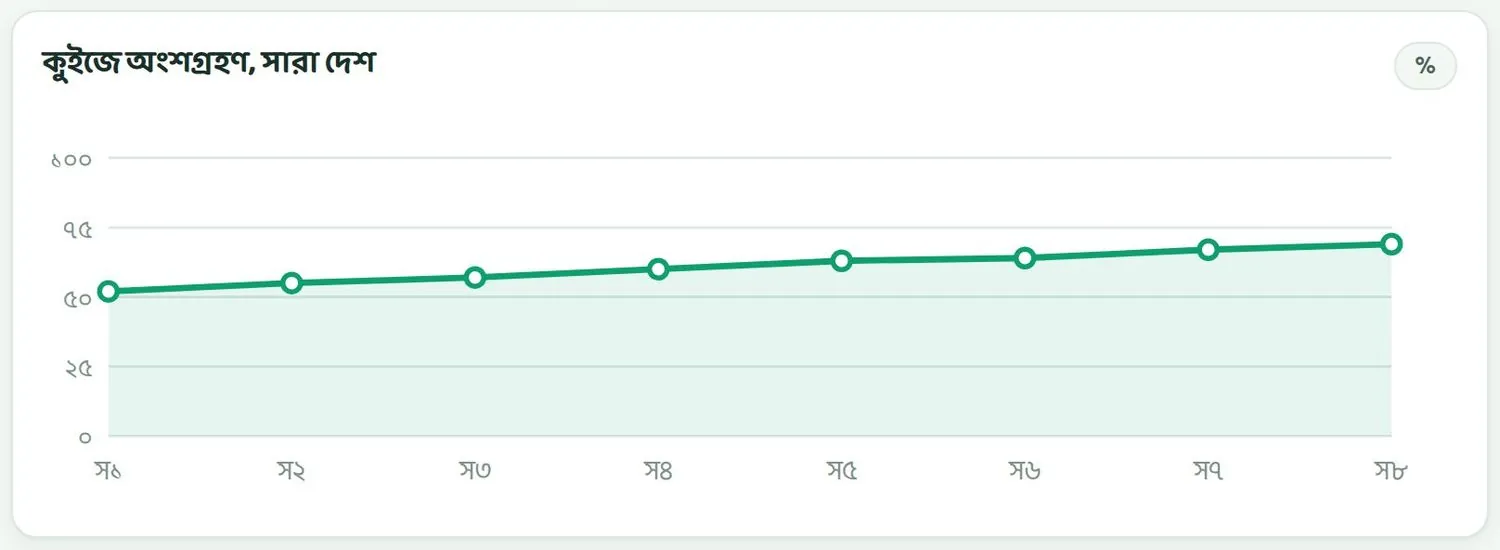
রেখা যদি কয়েক সপ্তাহ ধরে সমান থাকে বা নামে, তাহলে কোন বিভাগ বা জেলা এটা টেনে নামাচ্ছে তা নিচের টেবিলে দেখুন। ছুটি বা পরীক্ষার সপ্তাহে অংশগ্রহণ কমা স্বাভাবিক।
If the line stays flat or drops for several weeks, look at the tables below to find which division or district is pulling it down. A dip in holiday or exam weeks is normal.
বিষয়ভিত্তিক ধাপ, সারা দেশStage by subject, national
প্রতিটি বিষয়ের জন্য একটা রঙিন বার। বারের প্রতিটি রং একটা ধাপ, লাল থেকে গাঢ় সবুজ। কোনো রঙের অংশ যত লম্বা, সেই ধাপে তত বেশি শিক্ষার্থী।
Each subject has one coloured bar. Each colour is a stage, from red to dark green. The longer a colour's section, the more students are at that stage.
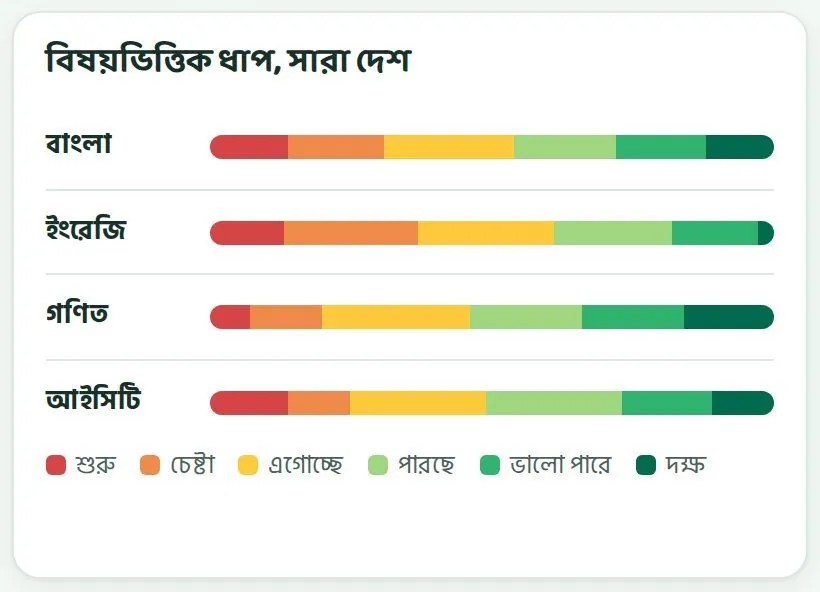
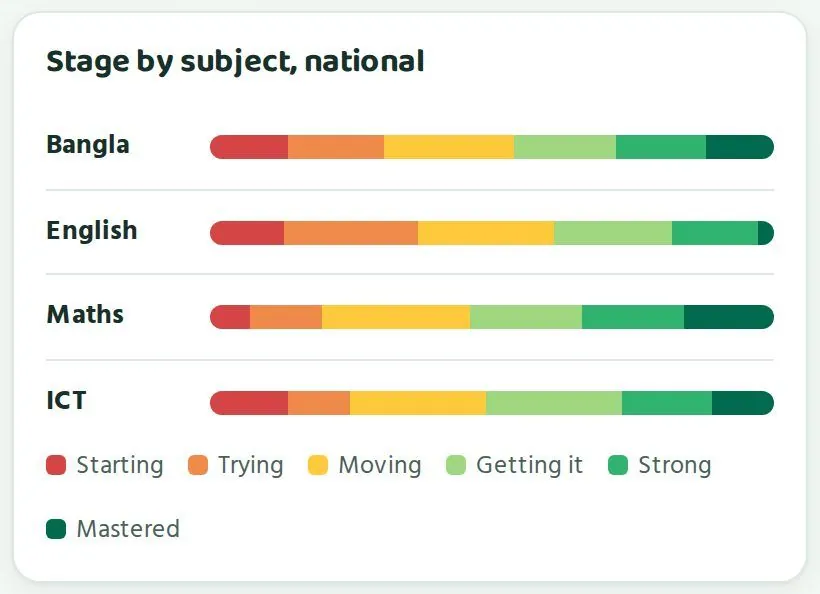
- বাঁ দিকের লাল আর কমলা অংশ দেখুন। এটা শুরু আর চেষ্টা ধাপের শিক্ষার্থী, যাদের সবচেয়ে বেশি সাহায্য লাগে।Look at the red and orange on the left. These are students at Starting and Trying, who need help most.
- নমুনায় ইংরেজিতে কমলা অংশ বড়, আর গাঢ় সবুজ অংশ সবচেয়ে ছোট। এমন ছবি পেলে বোঝা যায় ইংরেজিতে সহায়তা আগে দরকার।In the sample, English has a large orange section and the smallest dark green one. A picture like this suggests English needs support first.
- ডান দিকের সবুজ অংশ বড় হওয়া মানে বেশি শিক্ষার্থী ওপরের ধাপে উঠেছে।A larger green section on the right means more students have reached the higher stages.
বিভাগDivisions
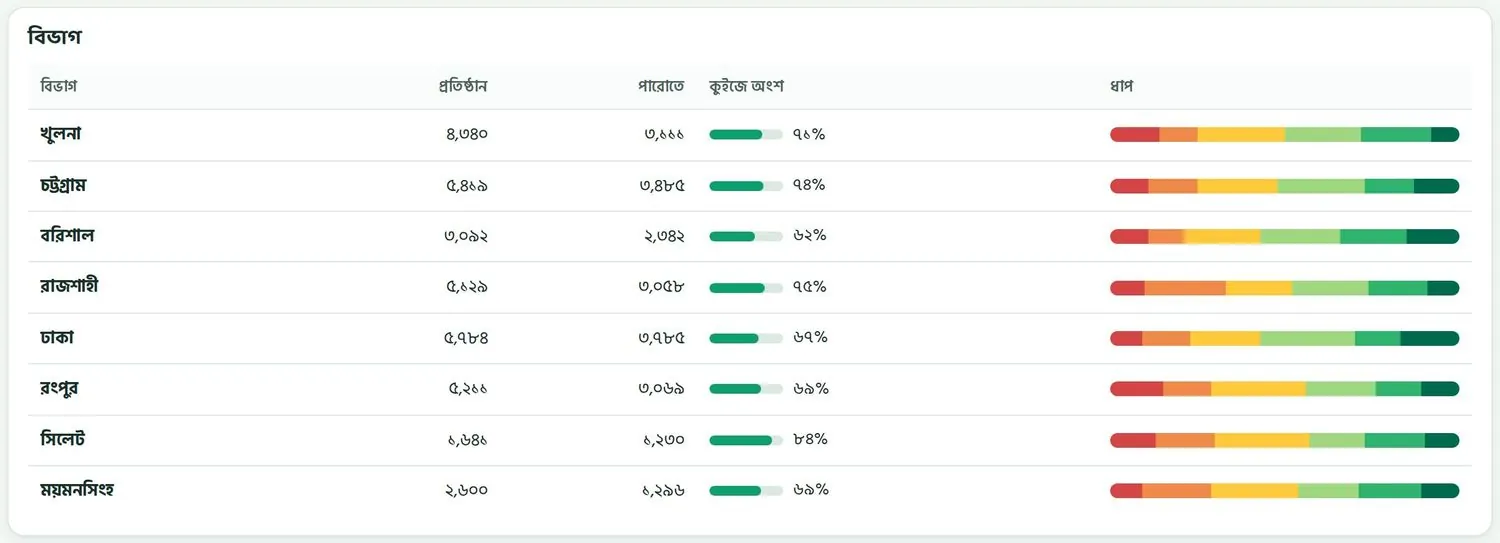
আটটি বিভাগের টেবিল। কলামগুলো: প্রতিষ্ঠান (BANBEIS অনুযায়ী মোট), পারোতে (যুক্ত হয়েছে), কুইজে অংশ (এই সপ্তাহের অংশগ্রহণ, বার আর শতাংশ), আর ধাপ (বিভাগের সব শিক্ষার্থীর ধাপের বার)।
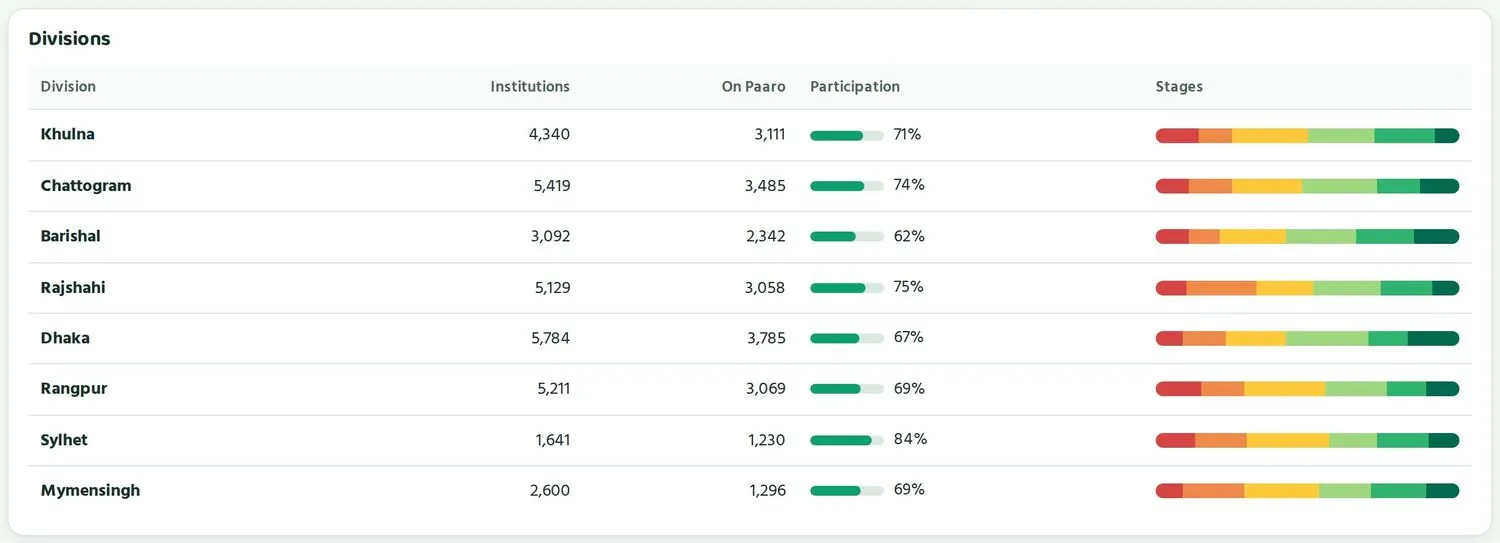
A table of the eight divisions. The columns are Institutions (total from BANBEIS), On Paaro (joined), Participation (this week, as a bar and a percentage) and Stages (a stage bar for all students in the division).
৬৪ জেলাAll 64 districts
সব জেলার টেবিল, কলাম বিভাগের টেবিলের মতোই। সবচেয়ে কম অংশগ্রহণের জেলা থাকে সবার ওপরে, তাই যাদের নজর দরকার তারা আগে চোখে পড়ে। অংশগ্রহণ কম হলে বারটা কমলা হয়।
A table of every district, with the same columns as the divisions table. The district with the lowest participation is at the top, so the ones that need attention come first. A low participation bar turns orange.
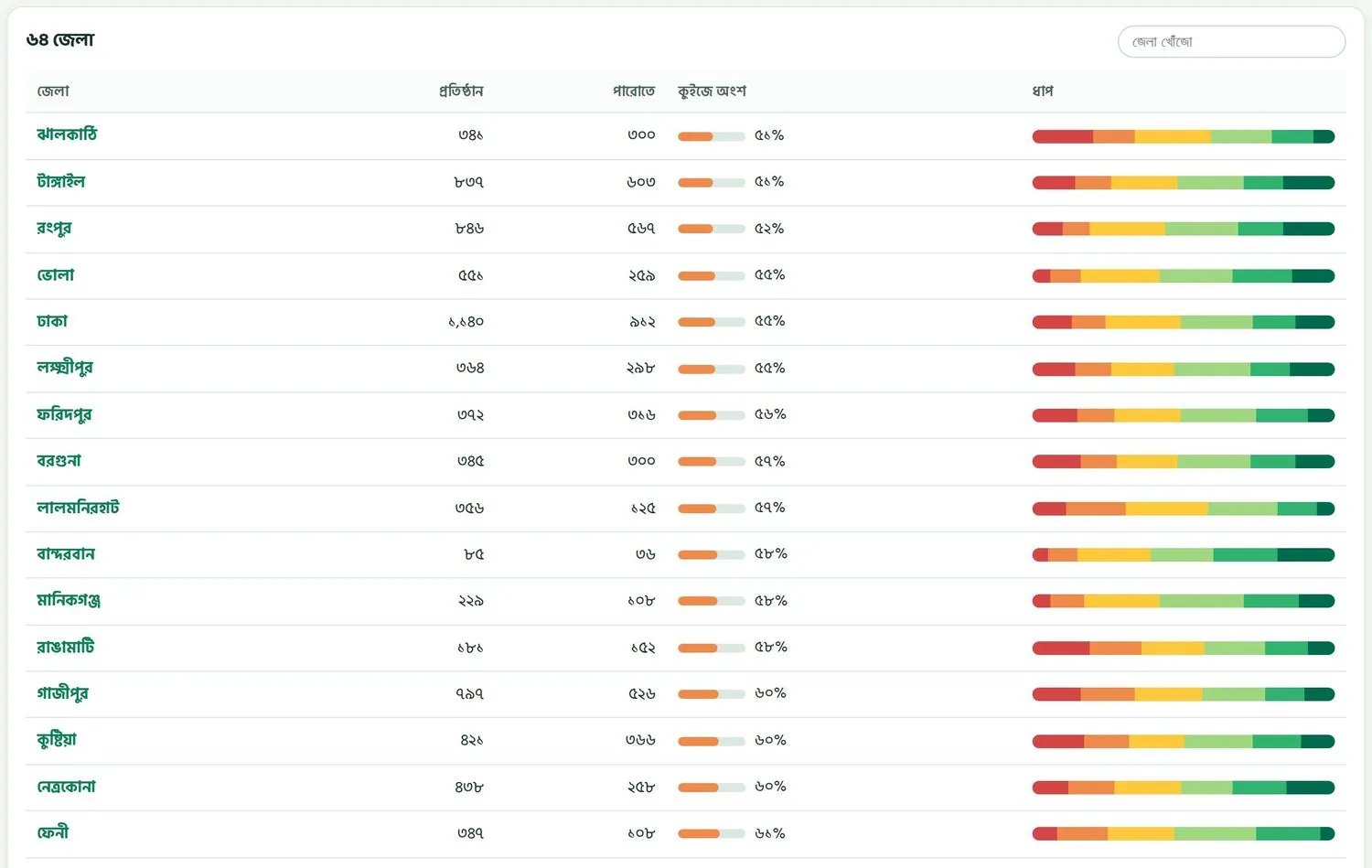
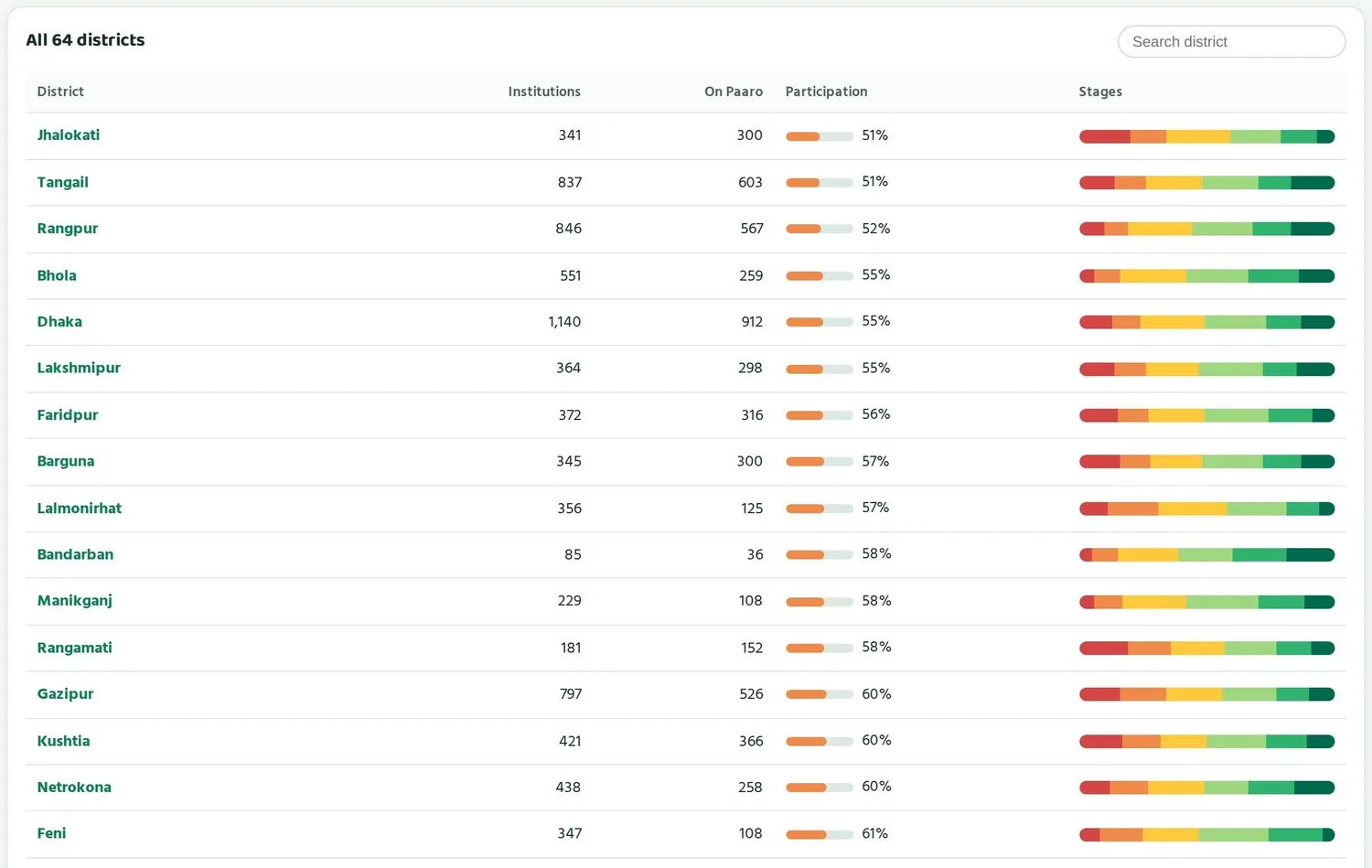
- ডানে ওপরে জেলা খোঁজো ঘরে জেলার নাম লিখুন।Type the district name in the Search district box, top right.
- টেবিলে শুধু মিলে যাওয়া জেলা থাকবে।The table shows only the matching districts.
- জেলার নামে চাপলে সেই জেলার পাতা খোলে।Tap a district name to open its page.
ধাপ-বার আর অংশগ্রহণ একসাথে পড়ুনRead stage bars and participation together
দুটো সংখ্যা আলাদা প্রশ্নের উত্তর দেয়। কুইজে অংশ বলে কতজন আসলে কুইজ দিচ্ছে। ধাপ বলে যারা কুইজ দিয়েছে, তারা কতটা শিখেছে। অংশগ্রহণ কম হলে ধাপ-বার অল্প কিছু শিক্ষার্থীর ছবি দেখায়, তাই সেটা পুরো জেলার ছবি হিসেবে ধরবেন না।
The two numbers answer different questions. Participation tells you how many students actually take quizzes. Stages tell you how far the students who took them have learned. When participation is low, the stage bar reflects only a few students, so do not read it as the whole district.
| যা দেখছেনWhat you see | সম্ভাব্য মানেLikely meaning | প্রথম পদক্ষেপFirst step |
|---|---|---|
| অংশগ্রহণ কম, ধাপ ভালোLow participation, good stages | অল্প কিছু আগ্রহী শিক্ষার্থী কুইজ দিচ্ছেA few keen students are taking quizzes | আগে অংশগ্রহণ বাড়ান, তারপর ধাপ দেখুনRaise participation first, then look at stages |
| অংশগ্রহণ কম, ধাপ দুর্বলLow participation, weak stages | শুরুই হয়নি ঠিকমতোUse has not really started | জেলা অফিসের সাথে কথা বলুনTalk to the district office |
| অংশগ্রহণ ভালো, ধাপ দুর্বলGood participation, weak stages | শিক্ষার্থীরা নিয়মিত, কিন্তু বিষয়ে সাহায্য লাগবেStudents are regular and need subject support | কোন বিষয়ে লাল-কমলা বেশি, সেটা দেখুনSee which subject has most red and orange |
| অংশগ্রহণ ভালো, ধাপ ভালোGood participation, good stages | কাজ চলছেIt is working | কী কাজ করছে জানুন, অন্যদের জানানLearn what works and share it |
ডানে ওপরে এক্সপোর্ট বোতাম দিয়ে জাতীয় পাতার তথ্য ডাউনলোড করা যায়। অধ্যায় ৮-এ এর ব্যবহার আছে।
The Export button, top right, downloads the national page data. Chapter 8 covers how to use it.
প্রথম পাঁচ মিনিটে যা দেখবেনWhat to look at in the first five minutes
- ওপরের চার ঘর দেখুন। পারোতে আছে আর এই সপ্তাহে কুইজ গত সপ্তাহের চেয়ে বাড়ল কি না, তীর চিহ্ন বলে দেয়।Look at the four cards. The arrow tells you whether On Paaro and Quizzes this week went up since last week.
- অংশগ্রহণ চার্টে শেষ তিন-চার সপ্তাহের দিক দেখুন।Check the direction of the participation chart over the last three or four weeks.
- বিষয়ভিত্তিক ধাপে কোন বিষয়ে লাল আর কমলা সবচেয়ে বেশি, দেখুন।See which subject has most red and orange in stage by subject.
- বিভাগের টেবিলে সবচেয়ে কম অংশগ্রহণের বিভাগ খুঁজুন।Find the division with the lowest participation in the divisions table.
- ৬৪ জেলার টেবিলের ওপরের কয়েকটা জেলা লিখে রাখুন। এরাই পরের আলোচনার বিষয়।Note the few districts at the top of the 64-district table. They are the subject of your next conversation.
জেলা থেকে স্কুল পর্যন্তFrom district down to school
জাতীয় পাতা থেকে ধাপে ধাপে ক্লিক করে যেকোনো স্কুলে পৌঁছানো যায়, সব সময় সংখ্যায়।You can click down from the national page to any school, always as numbers.
পারোতে পাতাগুলো একটার ভেতর আরেকটা: সারা দেশ, জেলা, উপজেলা, স্কুল। প্রতিটি পাতার ওপরে একটা পথ-রেখা থাকে, যেমন কর্তৃপক্ষ › ময়মনসিংহ › মুক্তাগাছা। যেকোনো নামে চাপলে সেই স্তরে ফিরে যাবেন।
Paaro's pages sit inside each other: country, district, upazila, school. Each page has a breadcrumb at the top, such as Authority › Mymensingh › Muktagachha. Tap any name to go back to that level.
জেলার পাতাThe district page
জাতীয় পাতার জেলা টেবিলে জেলার নামে চাপলে, বা সরাসরি paaro.net/mymensingh খুললে, জেলার পাতা আসে। ওপরে চারটি ঘর: প্রতিষ্ঠান (BANBEIS) আর উপজেলা-থানার সংখ্যা, পারোতে আছে, এই সপ্তাহে কুইজ দিয়েছে, আর গড় ধাপ, গত মাসের সাথে তুলনা করে। ডানে Excel ডাউনলোড বোতাম।
Tap a district name in the national table, or open paaro.net/mymensingh directly, to reach the district page. At the top are four cards: institutions (BANBEIS) and the number of upazilas and thanas, on Paaro, did a quiz this week, and average stage compared with last month. The Excel download button is on the right.


নিচে আছে জেলার ৮ সপ্তাহের অংশগ্রহণ চার্ট, ধারাভিত্তিক ধাপ (সাধারণ, মাদ্রাসা, কারিগরি, ইংলিশ ভার্সন) আর উপজেলাগুলো টেবিল।
Below are the district's 8-week participation chart, stage by stream (general, madrasah, technical, English version) and the Upazilas table.
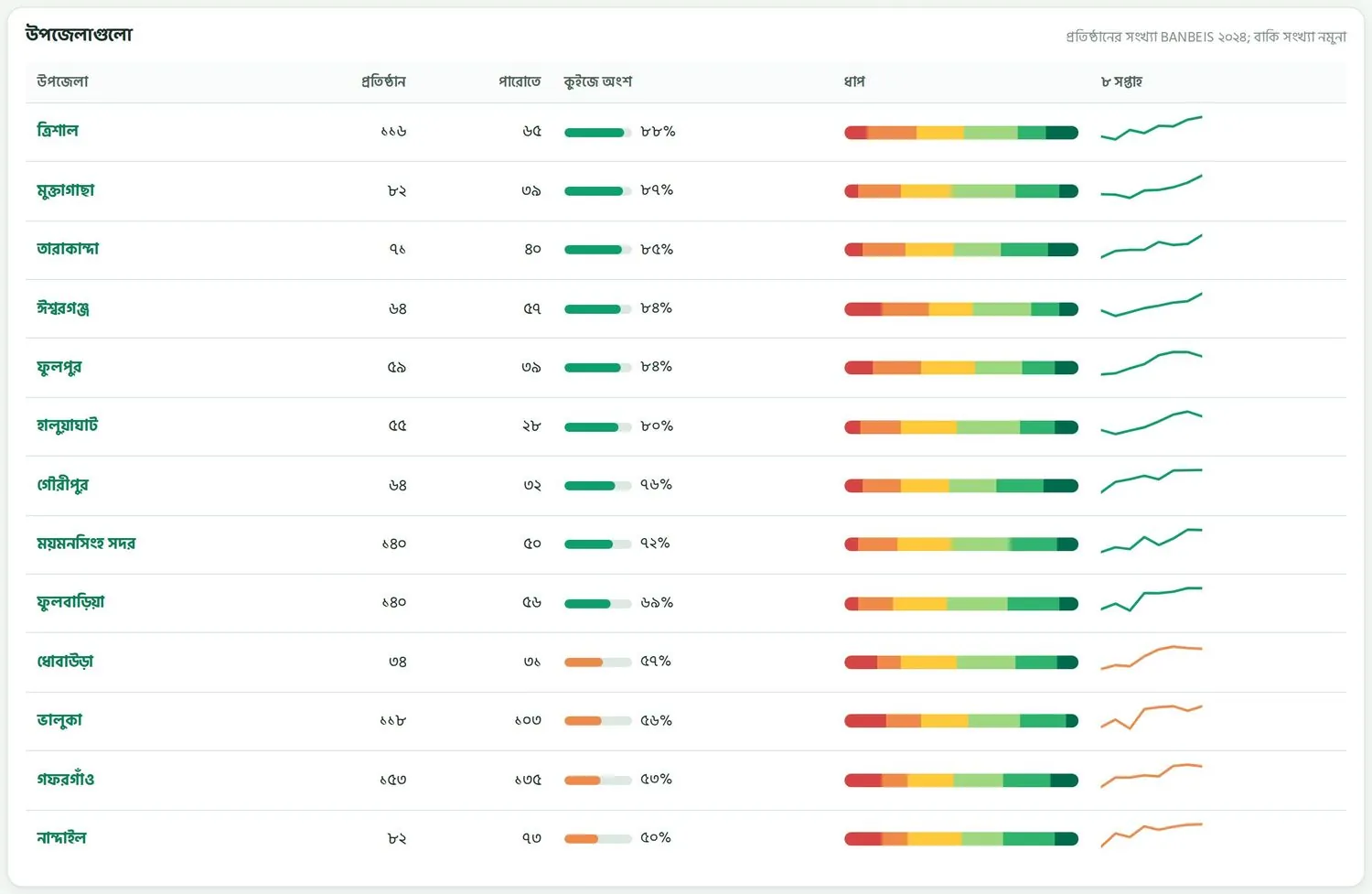
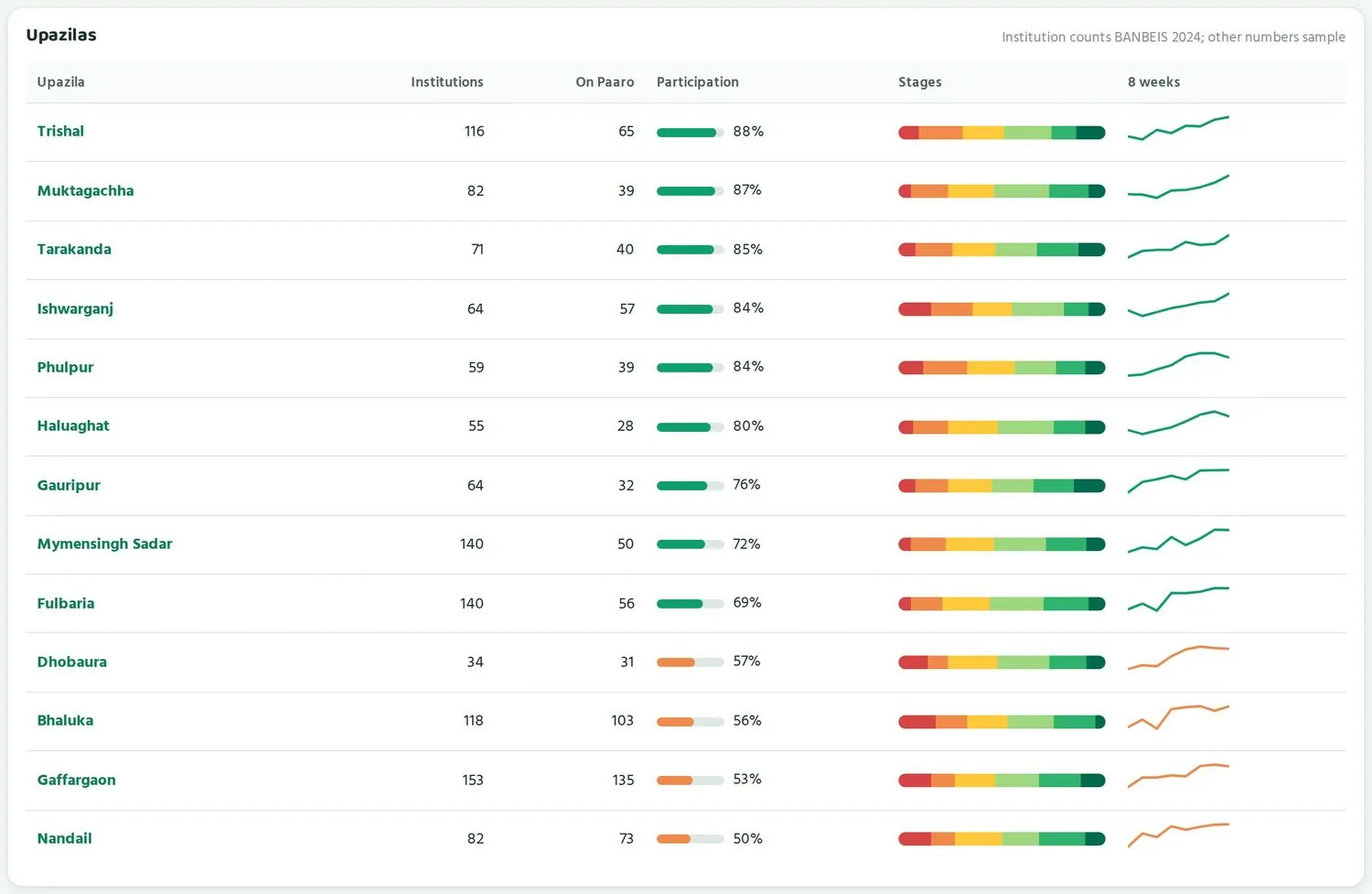
- প্রতিটি সারিতে উপজেলার প্রতিষ্ঠান, পারোতে কতগুলো, কুইজে অংশ, ধাপ আর ৮ সপ্তাহের ছোট রেখা থাকে।Each row shows the upazila's institutions, how many are on Paaro, participation, stages and a small 8-week line.
- ৮ সপ্তাহের রেখা দেখায় উপজেলা কোন দিকে যাচ্ছে। শতাংশ কম হলেও রেখা ওপরে উঠলে বোঝা যায় উন্নতি হচ্ছে।The 8-week line shows which way an upazila is heading. A low percentage with a rising line means things are improving.
- উপজেলার নামে চাপলে উপজেলার পাতা খোলে।Tap an upazila name to open its page.
উপজেলার পাতাThe upazila page
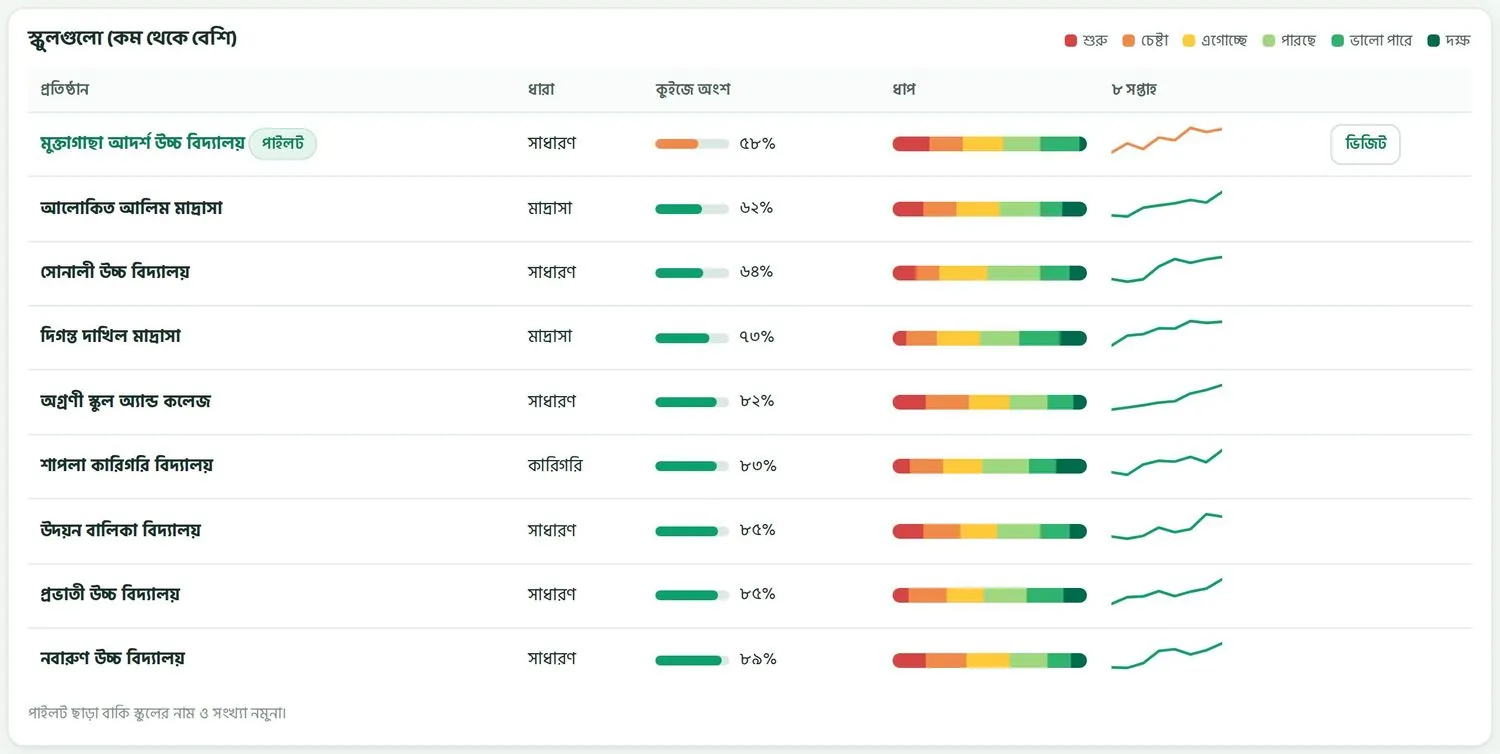
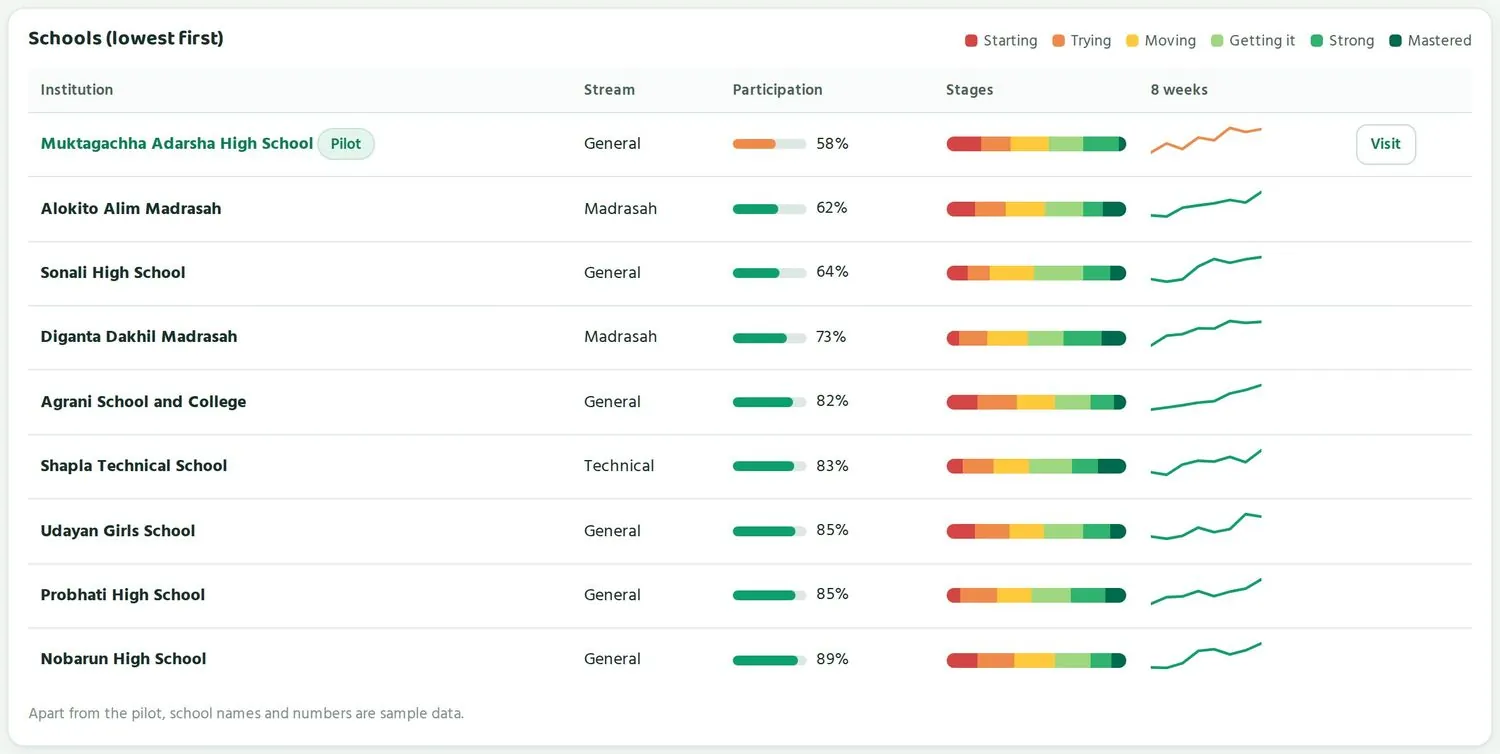
উপজেলার পাতায় (paaro.net/mymensingh/muktagachha) ওপরে থাকে উপজেলায় ৬ থেকে ১২ শ্রেণি চলা প্রতিষ্ঠান (BANBEIS ২০২৪), পারোতে কতগুলো, এই সপ্তাহে কুইজ, আর কতগুলো স্কুলের সহায়তা লাগবে। যে স্কুলে অংশগ্রহণ ৬২ শতাংশের নিচে, সেটা সহায়তা-দরকার স্কুল হিসেবে গোনা হয়।
The upazila page (paaro.net/mymensingh/muktagachha) shows at the top the institutions running classes 6-12 in the upazila (BANBEIS 2024), how many are on Paaro, quizzes this week, and how many schools need support. A school with participation below 62% counts as needing support.
এরপর স্কুলগুলো (কম থেকে বেশি) টেবিল। সবচেয়ে কম অংশগ্রহণের স্কুল ওপরে। কম অংশগ্রহণের স্কুলের পাশে ভিজিট বোতাম থাকে। উপজেলা অফিস এটা চেপে স্কুলটাকে পরিদর্শন পরিকল্পনায় যোগ করে। পাইলট স্কুলের নামের পাশে পাইলট লেখা থাকে।
Then comes the Schools (lowest first) table. The school with the lowest participation is at the top. Low schools have a Visit button; the upazila office uses it to add the school to its visit plan. A pilot school carries a Pilot tag next to its name.
নিচে থাকে পুরো উপজেলার বিষয়ভিত্তিক ধাপ, আর এখনো যোগ দেয়নি তালিকা। এই তালিকার কাজ অধ্যায় ৭-এ আছে।
Below are stage by subject for the whole upazila and the Not on Paaro yet list. Chapter 7 explains that list.
স্কুলের পাতাThe school page
স্কুলের নামে চাপলে, বা paaro.net/ এর পরে EIIN লিখলে, স্কুলের পাতা খোলে। ওপরে থাকে স্কুলের নাম, EIIN, ধারা, প্রধান শিক্ষকের নাম, আর মাসিক রিপোর্ট ডাউনলোড। চারটি ঘরে দেখায়: পারোতে কত শিক্ষার্থী (মোটের মধ্যে কতজন), এই সপ্তাহে কত শতাংশ কুইজ দিয়েছে, গত ৭ দিনে কতজন শিক্ষক সক্রিয়, আর এই স্কুলের শিক্ষকেরা কতগুলো প্রশ্ন যাচাই করেছেন।
Tap a school name, or type paaro.net/ followed by the EIIN, to open the school page. At the top are the school name, EIIN, stream, head teacher's name and a Monthly report download. Four cards show students on Paaro (out of the total), the share who did a quiz this week, active teachers in the last 7 days, and questions verified by the school's teachers.


- পারোতে শিক্ষার্থী ঘরে দেখুন স্কুলের কত শিক্ষার্থী যুক্ত হয়েছে। অনেকে বাকি থাকলে প্রধান শিক্ষককে তালিকা তুলতে বলুন।The Students on Paaro card shows how many of the school's students have joined. If many are missing, ask the head teacher to import the list.
- সক্রিয় শিক্ষক কম হলে কুইজ নিয়মিত হবে না। শিক্ষকেরা যুক্ত হলেই শিক্ষার্থীরাও নিয়মিত হয়।If Active teachers is low, quizzes will not be regular. Students become regular once teachers are involved.
- যাচাই করা প্রশ্ন দেখায় স্কুলের শিক্ষকেরা প্রশ্নভান্ডারে কতটা অবদান রাখছেন।Questions verified shows how much the school's teachers contribute to the question bank.
নিচে ক্লাসভিত্তিক টেবিল, খেয়াল রাখার তালিকা, শিক্ষকদের টেবিল আর বিষয়ভিত্তিক ধাপ থাকে। আপনি এসব দেখবেন সংখ্যা আর ধাপ হিসেবে।
Further down are the class-by-class table, the needs-attention list, the teachers table and stage by subject. You see all of this as numbers and stages.
উপজেলা থেকে ওপরের কোনো স্তরে শিক্ষার্থীর নাম দেখায় না। স্কুলের পাতা খুললেও কর্তৃপক্ষ শুধু মোট সংখ্যা আর ধাপ দেখে। কোনো শিক্ষার্থীর নির্দিষ্ট তথ্য দরকার হলে সেটা প্রধান শিক্ষকের দায়িত্ব।
From upazila level upwards, student names are never shown. Even on a school page, the authority sees only totals and stages. Anything about an individual student is the head teacher's responsibility.
উদাহরণ: জাতীয় পাতা থেকে একটা স্কুলেExample: from the national page to one school
paaro.net/dsheখুলে ৬৪ জেলা টেবিলে জেলা খোঁজো ঘরে লিখুন: ময়মনসিংহ।Openpaaro.net/dsheand type Mymensingh in the Search district box of the All 64 districts table.- জেলার নামে চাপুন। ময়মনসিংহ জেলার পাতা খুলবে।Tap the district name. The Mymensingh district page opens.
- উপজেলাগুলো টেবিলে কমলা বারের উপজেলাগুলো দেখুন। ৮ সপ্তাহের রেখা উঠছে কি না খেয়াল করুন।In the Upazilas table, look at the upazilas with orange bars and check whether their 8-week lines are rising.
- মুক্তাগাছায় চাপুন। উপজেলার পাতায় স্কুলগুলো (কম থেকে বেশি) টেবিলের ওপরের স্কুলটা দেখুন।Tap Muktagachha. On the upazila page, look at the top school in Schools (lowest first).
- স্কুলের নামে চাপুন। স্কুলের পাতায় ক্লাসভিত্তিক সংখ্যা আর ধাপ দেখবেন।Tap the school name. The school page shows class-by-class numbers and stages.
- ফিরতে পথ-রেখায় কর্তৃপক্ষ চাপুন।To go back, tap Authority in the breadcrumb.
প্রতিটি স্তরের অফিস কী করেWhat each office does
| স্তরLevel | মূল কাজMain job |
|---|---|
| জেলা অফিসDistrict office | উপজেলাগুলোর অগ্রগতি দেখে, পিছিয়ে থাকা উপজেলার সাথে কথা বলে, Excel রিপোর্ট পাঠায়Follows upazila progress, talks to lagging upazilas, sends the Excel report |
| উপজেলা অফিসUpazila office | কম অংশগ্রহণের স্কুল পরিদর্শন পরিকল্পনায় যোগ করে, নতুন স্কুলকে আমন্ত্রণ পাঠায়Adds low-participation schools to its visit plan and invites new schools |
| প্রধান শিক্ষকHead teacher | শিক্ষক আর শিক্ষার্থী যোগ করে, ক্লাসভিত্তিক অবস্থা দেখে, মাসিক রিপোর্ট নেয়Adds teachers and students, follows each class, takes the monthly report |
| শিক্ষকTeacher | কুইজ ঠিক করে, পিছিয়ে থাকা শিক্ষার্থীকে সাহায্য করে, প্রশ্ন যাচাই করেSets quizzes, helps students who are behind, verifies questions |
কে কী দেখে, আর তথ্যের সুরক্ষাWho sees what, and data protection
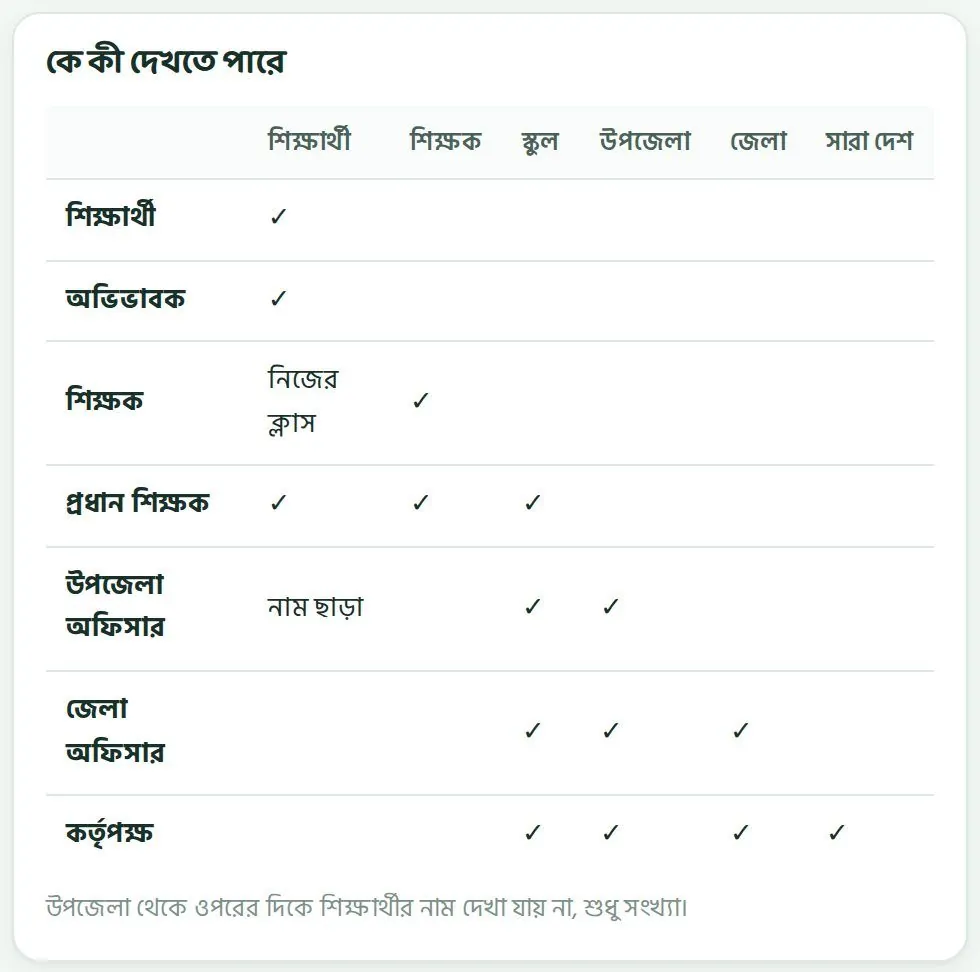
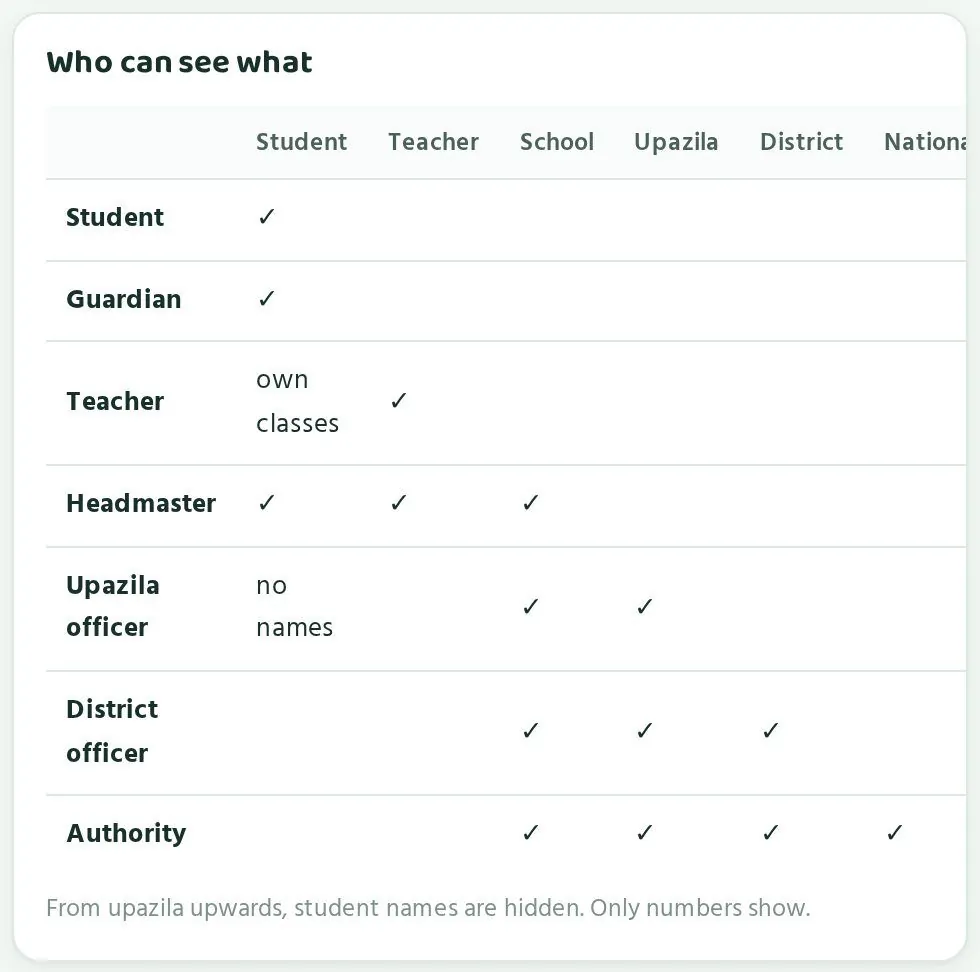
প্রত্যেকে শুধু নিজের অংশ দেখে; ওপরের স্তরে কোনো শিক্ষার্থীর নাম যায় না।Everyone sees only their own part; no student name travels above the school.
পারোর তথ্য-নিয়ম সহজ। যার কাজ যতটুকু, সে ততটুকু দেখে। শিক্ষার্থী আর অভিভাবক শুধু নিজেদের পাতা দেখে। শিক্ষক নিজের ক্লাস দেখেন। প্রধান শিক্ষক পুরো স্কুল দেখেন। উপজেলা, জেলা আর কর্তৃপক্ষ দেখে সংখ্যা আর ধাপ, কোনো শিক্ষার্থীর নাম ছাড়া।
Paaro's data rule is simple: each person sees what their job needs. Students and guardians see only their own pages. Teachers see their own classes. Head teachers see the whole school. Upazila, district and authority see numbers and stages, without any student names.
| কেViewer | কী খুলতে পারেনCan open |
|---|---|
| শিক্ষার্থীStudent | নিজের পাতাOwn page |
| অভিভাবকGuardian | নিজের সন্তানদের পাতাOwn children's pages |
| শিক্ষকTeacher | নিজের পাতা, নিজের ক্লাসের শিক্ষার্থীOwn page; students in own classes |
| প্রধান শিক্ষকHead teacher | স্কুলের পাতা, স্কুলের সব শিক্ষক আর শিক্ষার্থীSchool page, all teachers and students of the school |
| উপজেলা অফিসারUpazila officer | উপজেলা আর তার স্কুলগুলো, সংখ্যা আর ধাপে, নাম ছাড়াUpazila and its schools, as numbers and stages, no names |
| জেলা অফিসারDistrict officer | জেলা, তার উপজেলা আর স্কুল, সংখ্যায়, নাম ছাড়াDistrict, its upazilas and schools, as numbers, no names |
| কর্তৃপক্ষAuthority | সব কিছু, সংখ্যায়, নাম ছাড়াEverything, as numbers, no names |
প্রতিটি লিংকে লগইনLogin on every link
লিংক মনে রাখা সহজ, তাই যে কেউ লিংক জানতে পারে। এজন্য প্রতিটি পাতা খোলার আগে লগইন চায়। লগইন পাতায় লেখা থাকে কারা পাতাটা খুলতে পারেন। ঠিক মানুষ লগইন না করলে ভেতরের কোনো তথ্য খোলে না।
Because links are easy to remember, anyone can know one. That is why every page asks for login first. The login screen lists who may open the page. Nothing inside opens until the right person logs in.
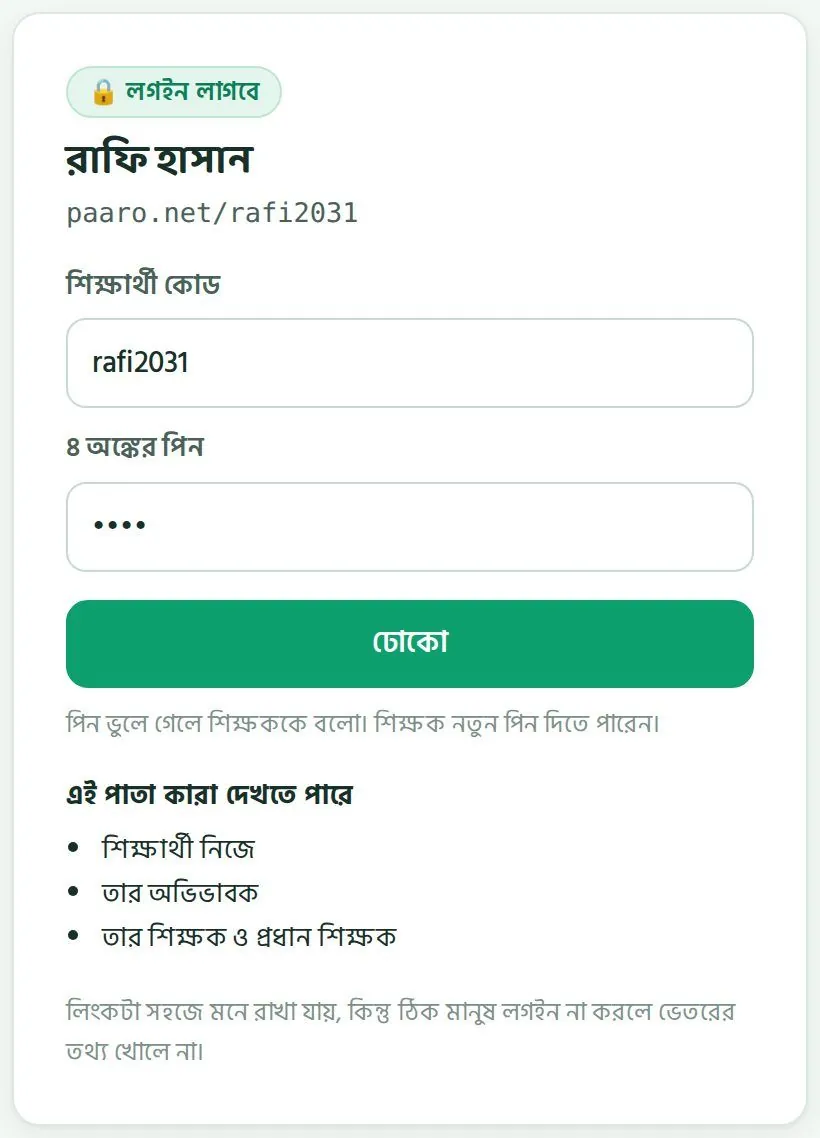
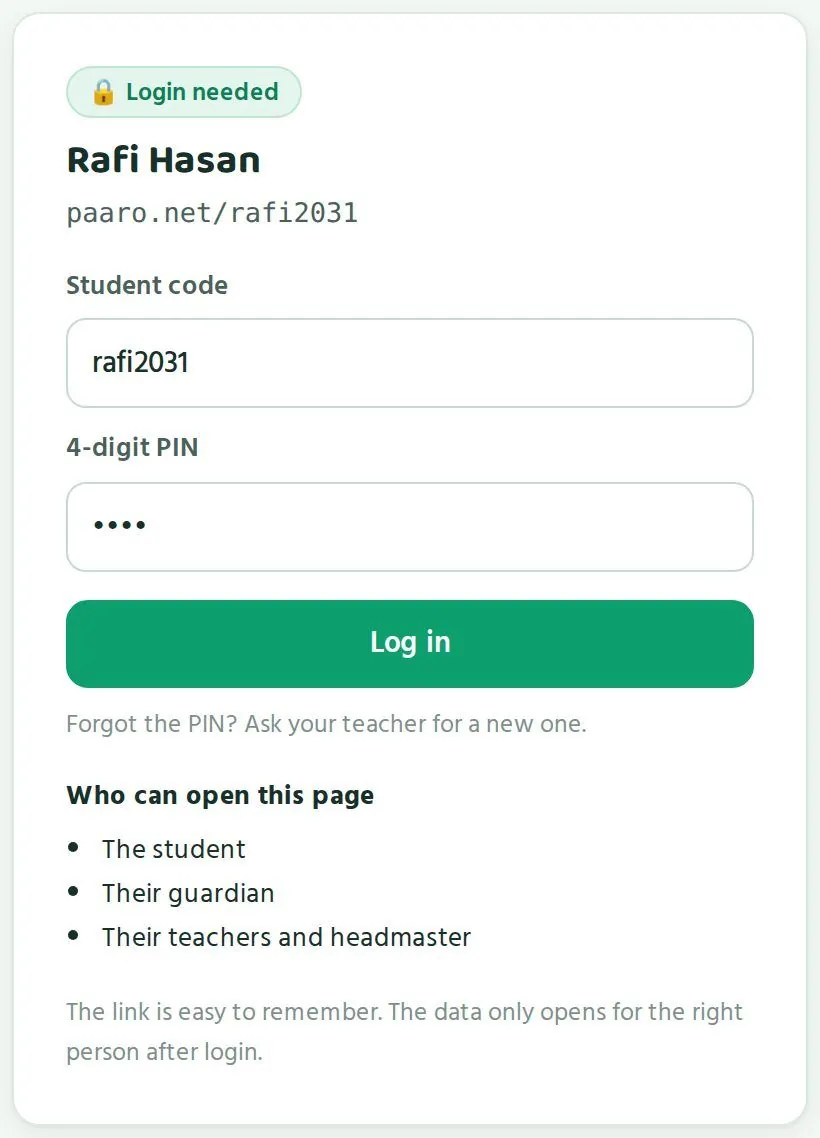
- শিক্ষার্থী ঢোকে শিক্ষার্থী কোড আর ৪ অঙ্কের পিন দিয়ে। প্রথমবার ঢুকে পিন বদলাতে হয়।Students log in with their student code and a 4-digit PIN, and must change the PIN at first login.
- পরপর ৫ বার ভুল পিন দিলে অ্যাকাউন্ট ১৫ মিনিট বন্ধ থাকে। শিক্ষক বা প্রধান শিক্ষক নতুন পিন দিতে পারেন।Five wrong PINs lock the account for 15 minutes. A teacher or head teacher can give a new PIN.
- অভিভাবক ঢোকেন মোবাইল নম্বর আর SMS কোড দিয়ে। কোড যায় শুধু শিক্ষার্থীর সাথে নিবন্ধিত নম্বরে।Guardians log in with a mobile number and an SMS code. The code goes only to the number registered with the student.
- নতুন শিক্ষককে অনুমোদন দেন প্রধান শিক্ষক। প্রধান শিক্ষক আর কর্মকর্তাদের অনুমোদন দেয় পারো টিম।New teachers are approved by their head teacher. Head teachers and officers are approved by the Paaro team.
শিক্ষার্থীর লিংক কিছু ফাঁস করে নাA student link gives nothing away
শিক্ষার্থীর লিংক হলো ইংরেজি নামের প্রথম অংশ আর ৪টি অঙ্ক, যেমন paaro.net/rafi2031। কোডটা থাকুক বা না থাকুক, লগইন পাতা দেখতে একই রকম। তাই কেউ লিংক বানিয়ে বানিয়ে বের করতে পারবে না কোন শিক্ষার্থী পারোতে আছে।
A student link is an English first name plus 4 digits, such as paaro.net/rafi2031. The login screen looks the same whether the code exists or not. So nobody can guess links to find out which students are on Paaro.
নথি আর ব্যাকআপRecords and backups
- প্রশাসনিক প্রতিটি কাজের নথি থাকে: কে কখন কী করেছেন।Every admin action is logged: who did what, and when.
- পাইলটের সময় তথ্য নিরাপদে রাখা হয়, প্রতিদিন ব্যাকআপ হয়।During the pilot, data is stored securely with daily backups.
- SMS যায় বাংলাদেশি একটি SMS সেবার মাধ্যমে। অভিভাবক সপ্তাহে কয়েকটার বেশি SMS পান না, আর শুধু যেগুলো তিনি চালু করেন।SMS goes through a Bangladeshi SMS provider. Guardians get at most a few SMS a week, and only the ones they switch on.
- উত্তর মেলানো হয় সার্ভারে। জমা দেওয়ার আগে শিক্ষার্থী উত্তর দেখতে পারে না।Answers are checked on the server. Students cannot see answers before submitting.
যে সিদ্ধান্ত কর্তৃপক্ষের সাথে ঠিক হবেWhat remains to be agreed with the authority
তথ্য কোথায় রাখা হবে, সেই প্রশ্নটা এখনো খোলা। এটা কর্তৃপক্ষের সাথে আলোচনা করে ঠিক করা হবে। পুরো দেশে চালুর আগে এই সিদ্ধান্ত নেওয়া দরকার।
Where the data will be stored is still an open question. It will be agreed with the authority. The decision should be taken before national rollout.
আলোচনায় যে প্রশ্নগুলো তুলতে পারেন: তথ্য কোন দেশে থাকবে, কতদিন রাখা হবে, প্রশাসনিক নথি কে দেখতে পারবে, আর কোনো শিক্ষার্থী চলে গেলে তার তথ্যের কী হবে।
Questions you may raise: which country the data sits in, how long it is kept, who can read the admin log, and what happens to a student's data when they leave.
আপনার নিজের করণীয়Your own part
- নিজের লগইন কোড কাউকে দেবেন না। সহকর্মীর দরকার হলে তাঁর জন্য আলাদা অ্যাকাউন্ট চান।Never give your login code to anyone. If a colleague needs access, request a separate account for them.
- ডাউনলোড করা ফাইল অফিসের নিয়ম মেনে রাখুন। এতে শিক্ষার্থীর নাম না থাকলেও এটা দাপ্তরিক তথ্য।Keep downloaded files according to office rules. They contain no student names, yet they are still official data.
- কোনো পাতায় এমন তথ্য দেখলে যা আপনার দেখার কথা নয়, সঙ্গে সঙ্গে পারো টিমকে জানান।If a page ever shows you data you should not see, tell the Paaro team at once.
প্রশ্নের মান আর শিক্ষকদের ভূমিকাContent quality and teachers
প্রতিটি প্রশ্ন বইয়ের পাতার সাথে মেলানো, দুই স্কুলের দুই শিক্ষক যাচাই করেন।Every question is tied to a book page and checked by two teachers from two schools.
পারোর প্রশ্ন আসে এনসিটিবির বই থেকে, আর প্রতিটি প্রশ্নে বইয়ের ছাপা পৃষ্ঠা নম্বর থাকে। এখন ভান্ডারে ২৭টি বই থেকে ৭৬৬টি খসড়া প্রশ্ন। খসড়া প্রশ্ন শিক্ষার্থীর কাছে যায় না। আগে শিক্ষকেরা যাচাই করেন।
Paaro's questions come from NCTB books, and every question carries its printed book page. The bank now holds 766 draft questions from 27 books. A draft question does not reach students. Teachers verify it first.
যাচাইয়ের নিয়মHow verification works
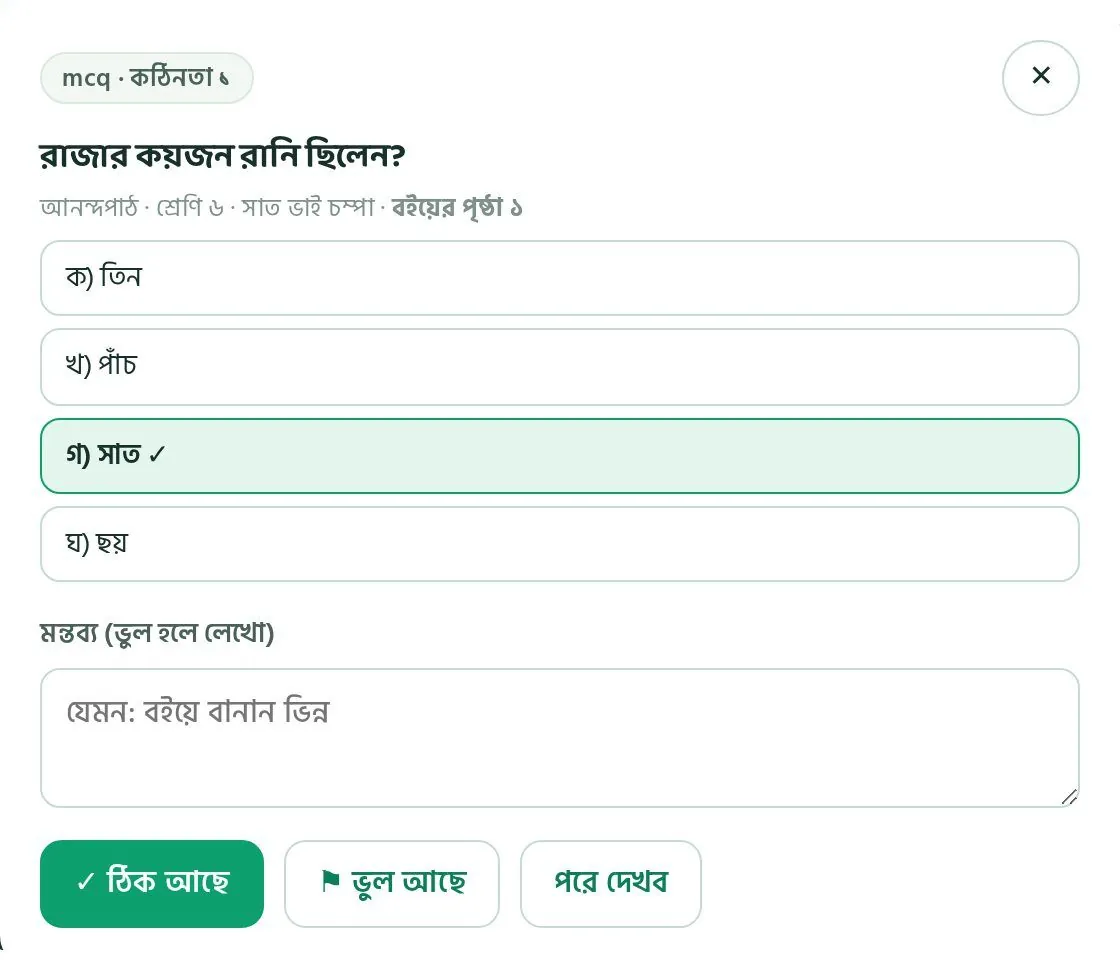
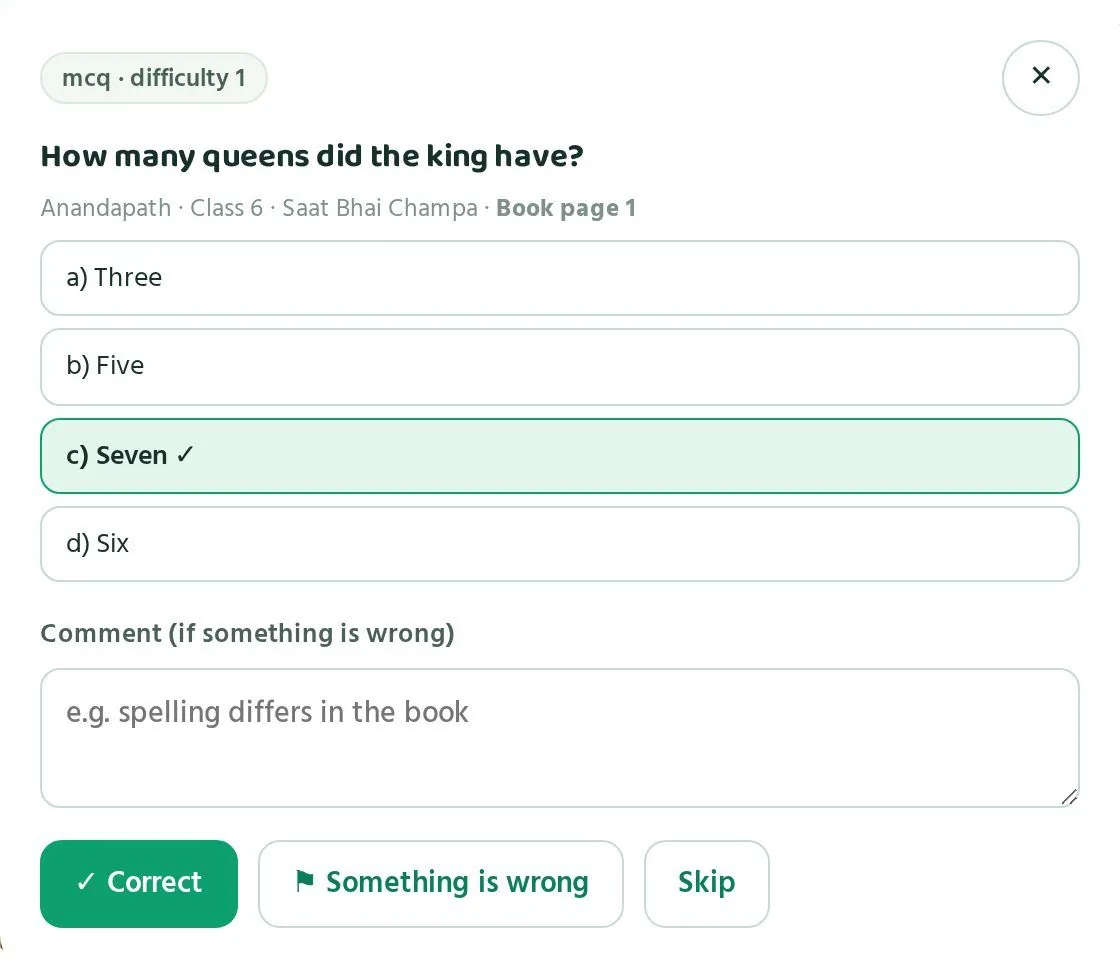
- শিক্ষক বইয়ের পৃষ্ঠা খুলে প্রশ্নের সাথে মেলান।The teacher opens the book page and matches it with the question.
- দুই ভিন্ন স্কুলের দুজন শিক্ষক ঠিক বললে প্রশ্ন চালু হয়।A question goes live after two teachers from two different schools approve it.
- নিজের লেখা প্রশ্ন নিজে যাচাই করা যায় না। একই স্কুলের শিক্ষকও যাচাই করতে পারেন না।Nobody can verify their own question, and a teacher from the same school cannot verify it either.
- প্রশ্নের উইন্ডোতে তিনটি বোতাম: ✓ ঠিক আছে, ⚑ ভুল আছে আর পরে দেখব। ভুল হলে মন্তব্য ঘরে লিখে দেন।The question window has three buttons: ✓ Correct, ⚑ Something is wrong and Skip. If something is wrong, the teacher writes it in the comment box.
চালু হওয়ার পরেও কোনো ভুল ধরা পড়লে প্রশ্ন লেখক ১০ পয়েন্ট হারান, আর প্রত্যেক যাচাইকারী ৫ পয়েন্ট। এতে যাচাই মন দিয়ে করার কারণ থাকে।
If an error is found after a question is live, the author loses 10 points and each verifier loses 5. This gives everyone a reason to check carefully.
শিক্ষকের পয়েন্টTeacher points
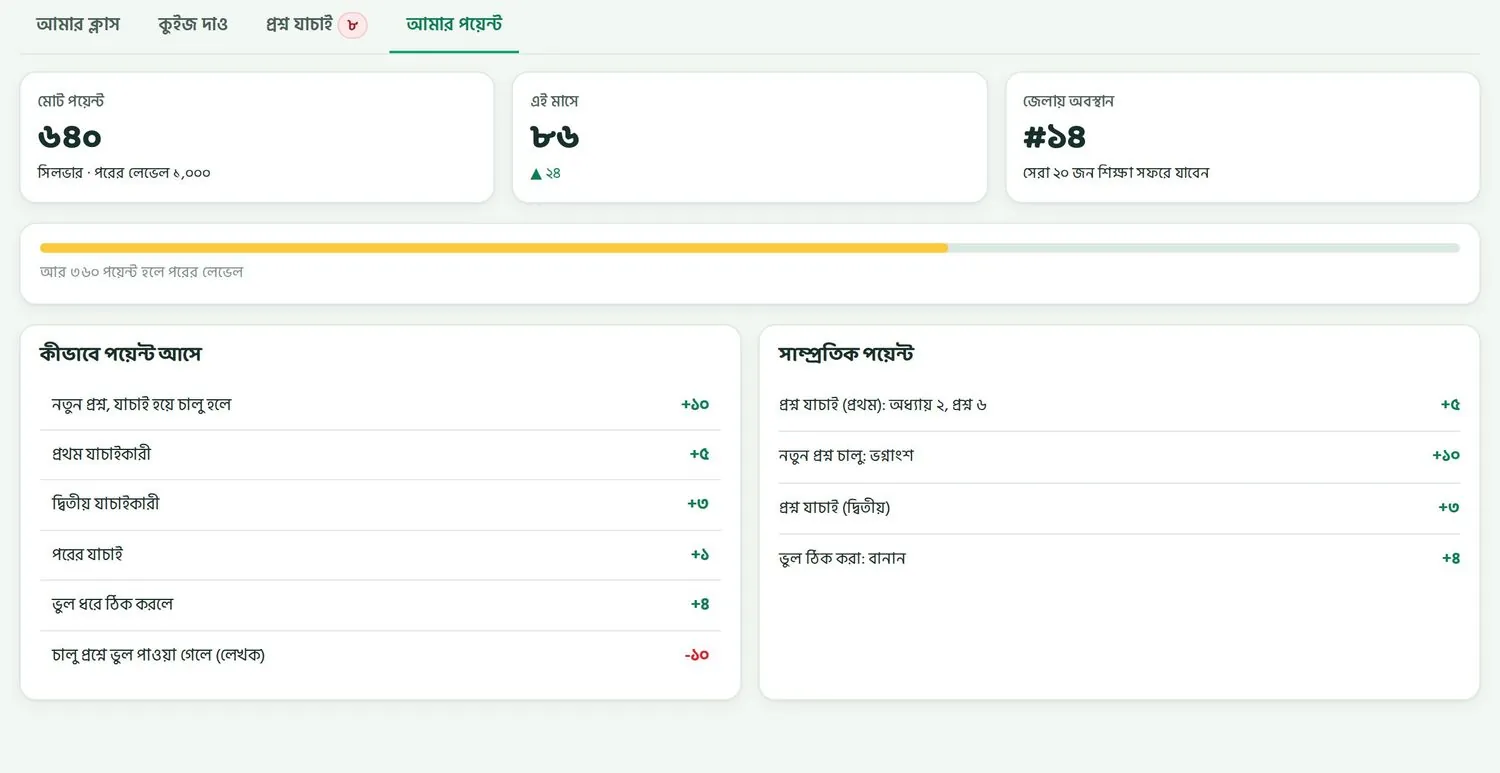
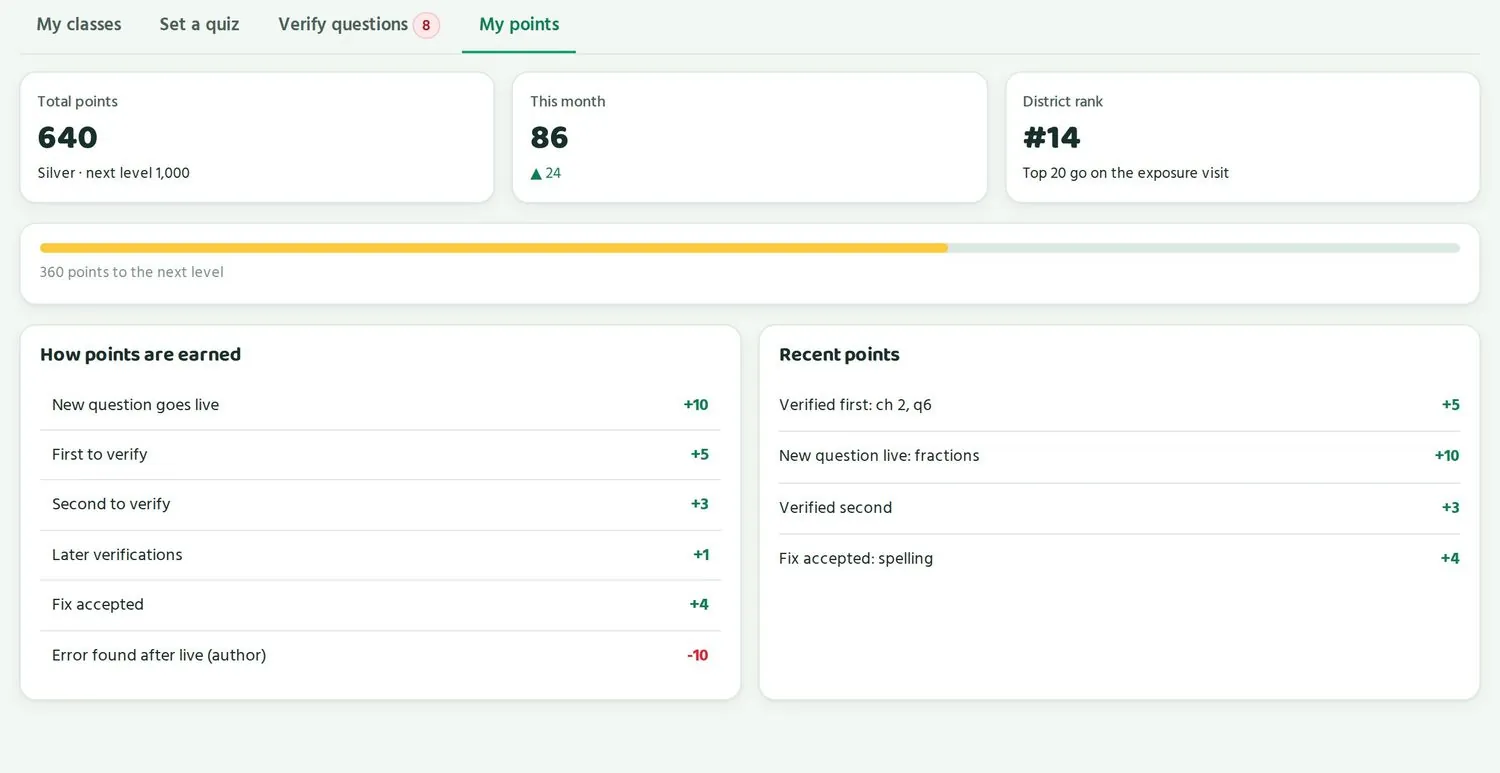
শিক্ষকেরা প্রশ্ন লেখা, যাচাই আর ভুল ঠিক করার জন্য পয়েন্ট পান। প্রতিটি শিক্ষকের পাতায় আমার পয়েন্ট অংশে মোট পয়েন্ট, লেভেল, এই মাসের পয়েন্ট আর জেলায় অবস্থান দেখায়।
Teachers earn points for writing questions, verifying and fixing errors. Each teacher's My points tab shows total points, level, this month's points and district rank.
| কাজAction | পয়েন্টPoints |
|---|---|
| প্রশ্ন চালু হলেQuestion goes live | +১০+10 |
| প্রথম যাচাইকারীFirst to verify | +৫+5 |
| দ্বিতীয় যাচাইকারীSecond to verify | +৩+3 |
| পরের যাচাইLater verification | +১+1 |
| ভুল ঠিক করা গৃহীত হলেFix accepted | +৪+4 |
| প্রতি ১০০ শিক্ষার্থী প্রশ্নের উত্তর দিলে (প্রশ্নপ্রতি সর্বোচ্চ ১০)Per 100 students answering the question (max 10 per question) | +২+2 |
| মুক্তপাঠ সার্টিফিকেটMuktopaath certificate | +১৫+15 |
| চালু প্রশ্নে ভুল: লেখক / প্রতি যাচাইকারীError after live: author / each verifier | -১০ / -৫-10 / -5 |
প্রশ্নভান্ডার কীভাবে বাড়বেHow the question bank grows
এখন প্রতিটি বইয়ের প্রথম ২-৩টি অধ্যায় থেকে প্রশ্ন আছে। শিক্ষকেরা নতুন প্রশ্ন লেখেন, অন্য স্কুলের শিক্ষকেরা যাচাই করেন, আর যত বেশি শিক্ষার্থী একটা প্রশ্নের উত্তর দেয়, লেখক তত পয়েন্ট পান। তাই যত বেশি স্কুল যুক্ত হয়, ভান্ডার তত দ্রুত বাড়ে আর যাচাইও দ্রুত হয়।
Today each book has questions from its first 2-3 chapters. Teachers write new questions, teachers from other schools verify them, and the more students answer a question, the more points its author earns. So the more schools join, the faster the bank grows and the faster verification goes.
দিনে সর্বোচ্চ ৬০ পয়েন্ট। লেভেল: ব্রোঞ্জ ২০০, সিলভার ৫০০, গোল্ড ১,০০০, প্ল্যাটিনাম ২,৫০০।
Daily cap is 60 points. Levels: Bronze 200, Silver 500, Gold 1,000, Platinum 2,500.
পুরস্কারRewards
- প্রতিটি লেভেলে সার্টিফিকেট।A certificate at each level.
- উপজেলা বা জেলার বোর্ডে শিক্ষকের নাম।The teacher's name on the upazila or district board.
- প্রশিক্ষণে অগ্রাধিকার, যেমন মুক্তপাঠের আইসিটি কোর্স।Priority for training seats, such as the Muktopaath ICT course.
- প্রতি টার্মে প্রতিটি জেলার সেরা শিক্ষকদের শিক্ষা সফর।A termly exposure visit for the top teachers in each district.
- স্পনসর করা ছোট পুরস্কার।Small sponsored rewards.
পুরস্কারের আবেদন অনুমোদন করে পারো টিম।
Reward requests are approved by the Paaro team.
কর্তৃপক্ষ কী সিদ্ধান্ত নিতে পারেDecisions the authority may take
শিক্ষকদের অংশগ্রহণ ধরে রাখতে স্বীকৃতি জরুরি। কর্তৃপক্ষ চাইলে এই বিষয়গুলোতে সিদ্ধান্ত দিতে পারে:
Recognition keeps teachers involved. The authority may choose to decide on the following:
- শিক্ষা সফর অনুমোদন: কতজন যাবেন, কবে, আর কোথায়।Approving exposure visits: how many teachers go, when and where.
- স্বীকৃতি: সেরা যাচাইকারী শিক্ষকদের জন্য কর্তৃপক্ষের চিঠি বা সনদ।Recognition: a letter or certificate from the authority for top verifying teachers.
- মুক্তপাঠ সার্টিফিকেট: কোন কোর্স পারোর পয়েন্টে গোনা হবে, আর প্রশিক্ষণে আসন দেওয়ার সময় পারোর পয়েন্ট বিবেচনা করা হবে কি না।Muktopaath certificate: which courses count for Paaro points, and whether Paaro points are considered when allocating training seats.
জাতীয় পাতার যাচাই করা প্রশ্ন ঘর দেখায় কতগুলো প্রশ্ন চালু আর কতজন শিক্ষক যাচাই করছেন। এই সংখ্যা থেমে গেলে স্বীকৃতির কথা ভাবার সময়।
The national Verified questions card shows how many questions are live and how many teachers are verifying. When that number stalls, it is time to think about recognition.
চালু করার পরিকল্পনাRollout
আগে ৪-৫টি প্রতিষ্ঠানে দুই মাসের পাইলট, তারপর জেলা ধরে ধরে।A two-month pilot in 4-5 institutions first, then district by district.
পাইলটThe pilot
পাইলট চলবে দুই মাস, কর্তৃপক্ষের বেছে দেওয়া ৪ থেকে ৫টি প্রতিষ্ঠানে। প্রতিটি ধারা থেকে একটি: সাধারণ, ইংলিশ ভার্সন, মাদ্রাসা আর কারিগরি। এতে দেখা যাবে চার ধরনের প্রতিষ্ঠানে পারো কেমন চলে।
The pilot runs for two months in 4 to 5 institutions chosen by the authority, one per stream: general, English version, madrasah and technical. This shows how Paaro works in each kind of institution.
পাইলট স্কুল বাছাইয়ের সময় যা ভাববেনWhat to consider when choosing pilot schools
- প্রতিটি ধারা থেকে একটি প্রতিষ্ঠান।One institution per stream.
- প্রধান শিক্ষক আগ্রহী, আর অন্তত কয়েকজন শিক্ষক ফোনে স্বচ্ছন্দ।A willing head teacher, and at least a few teachers comfortable with phones.
- ৬ থেকে ১০ শ্রেণির শিক্ষার্থী আছে, কারণ এখনকার প্রশ্ন এই শ্রেণিগুলোর বই থেকে।Students in classes 6 to 10, since today's questions come from those books.
- শিক্ষার্থীদের বা অভিভাবকদের হাতে কিছু ফোন আছে, অথবা স্কুলে স্মার্ট বোর্ড আছে।Some students or guardians have phones, or the school has a smart board.
- উপজেলা অফিস কাছে, যাতে পরিদর্শন সহজ হয়।The upazila office is close enough for visits.
একটা স্কুল কীভাবে যুক্ত হয়How a school joins
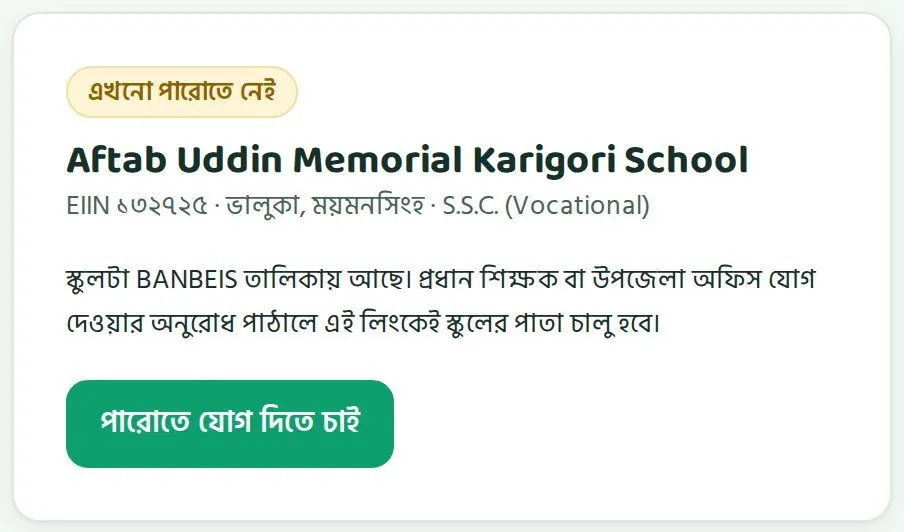
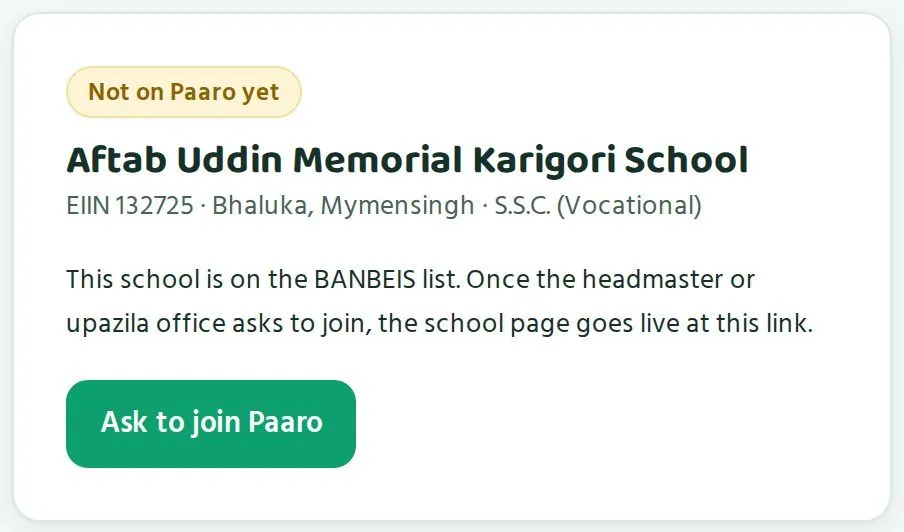
পারো কাজ করে BANBEIS ২০২৪ তালিকা দিয়ে। দেশের প্রতিটি প্রতিষ্ঠানের EIIN আগে থেকেই পারোতে আছে। তাই যুক্ত না হওয়া স্কুলের লিংক খুললেও স্কুলের নাম, উপজেলা আর স্তর দেখায়, সঙ্গে এখনো পারোতে নেই লেখা আর পারোতে যোগ দিতে চাই বোতাম।
Paaro works from the BANBEIS 2024 list. Every institution's EIIN is already in Paaro. So even a school that has not joined shows its name, upazila and level at its link, with a Not on Paaro yet label and an Ask to join Paaro button.
- প্রধান শিক্ষক বা উপজেলা অফিস যোগ দেওয়ার অনুরোধ পাঠায়।The head teacher or upazila office asks to join.
- পারো টিম EIIN দিয়ে স্কুল যোগ করে আর প্রধান শিক্ষকের অ্যাকাউন্ট অনুমোদন দেয়।The Paaro team adds the school by EIIN and approves the head teacher's account.
- একই লিংকে স্কুলের পাতা চালু হয়, যেমন
paaro.net/900101।The school page goes live at the same link, such aspaaro.net/900101. - প্রধান শিক্ষক শিক্ষক যোগ করেন। প্রত্যেক শিক্ষক SMS-এ নিজের লিংক পান।The head teacher adds teachers. Each teacher gets their link by SMS.
- প্রধান শিক্ষক CSV বা এক্সেল ফাইল দিয়ে শিক্ষার্থীর তালিকা তোলেন। পারো নিজে থেকেই প্রত্যেকের কোড বানায়।The head teacher imports students from a CSV or Excel file. Paaro creates each student code automatically.
- স্কুল লগইন স্লিপ প্রিন্ট করে শিক্ষার্থীদের হাতে দেয়। স্লিপে থাকে কোড আর প্রথম পিন।The school prints login slips with each code and first PIN and hands them out.
উপজেলা অফিসের মাধ্যমে আমন্ত্রণInviting schools through upazila offices
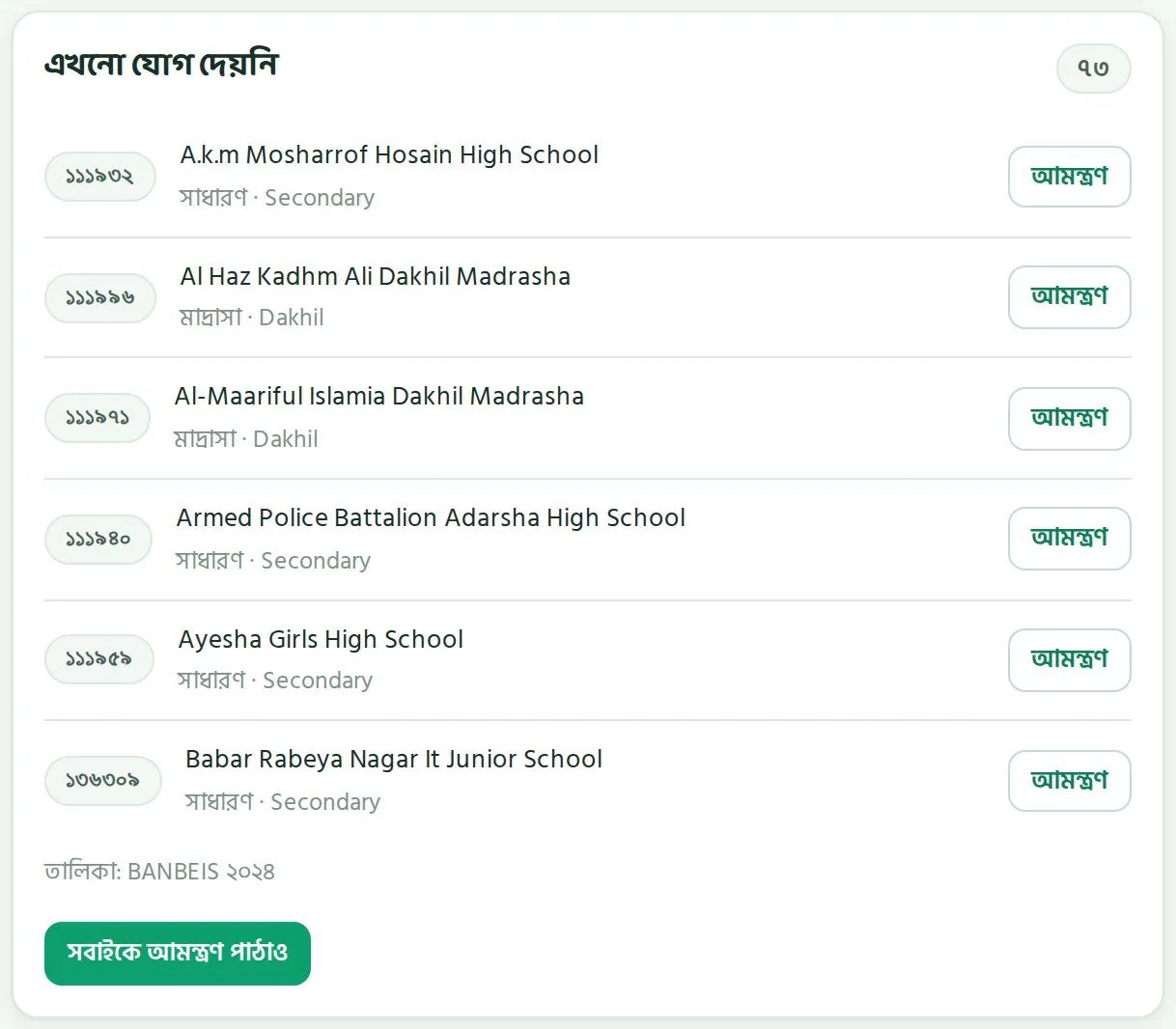
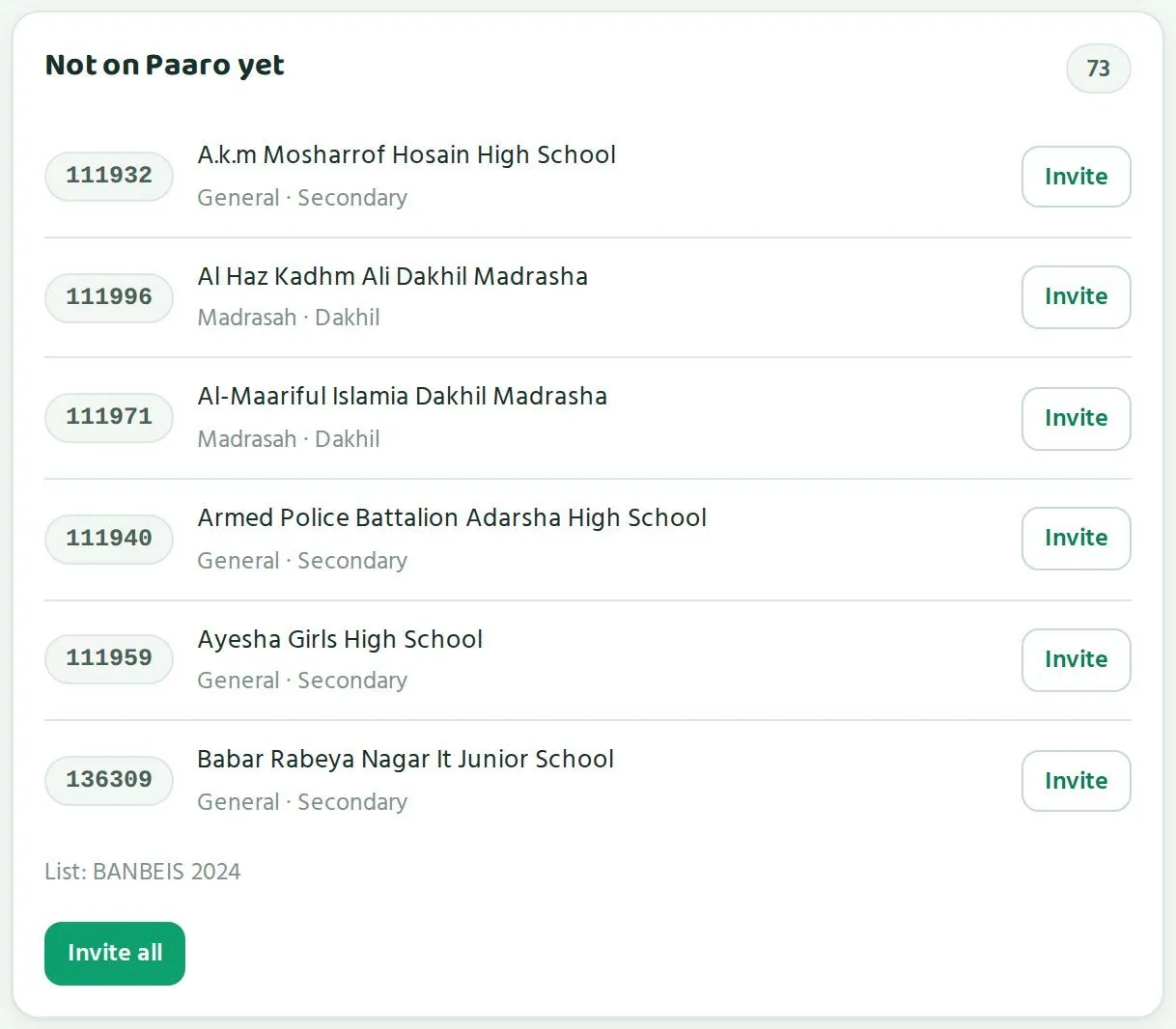
প্রতিটি উপজেলার পাতায় এখনো যোগ দেয়নি তালিকা থাকে, BANBEIS থেকে। প্রতিটি স্কুলের EIIN, ধারা আর স্তর দেখায়। উপজেলা অফিস একটা স্কুলের পাশে আমন্ত্রণ চাপলে স্কুলে SMS যায়। সবাইকে আমন্ত্রণ পাঠাও দিয়ে একসাথে সব স্কুলকে পাঠানো যায়।
Each upazila page has a Not on Paaro yet list from BANBEIS, with each school's EIIN, stream and level. When the upazila office taps Invite next to a school, the school gets an SMS. Invite all sends to every school at once.
জেলা ধরে ধরে বিস্তারDistrict-by-district expansion
পাইলটের পরে পারো চালু হবে জেলা ধরে ধরে। প্রতিটি ধাপে জেলা অফিস উপজেলা অফিসগুলোকে নিয়ে কাজ করে, আর উপজেলা অফিস স্কুলগুলোকে আমন্ত্রণ পাঠায়। জাতীয় পাতার পারোতে আছে ঘরে পুরো দেশের অগ্রগতি দেখবেন।
After the pilot, Paaro expands district by district. At each step the district office works through its upazila offices, and the upazila offices invite schools. The national On Paaro card shows progress for the whole country.
প্রতিটি ধাপের আগে যা দেখবেনWhat to check before each step
| ধাপStep | এগোনোর আগে দেখুনCheck before moving on |
|---|---|
| পাইলট থেকে প্রথম জেলাPilot to first district | পাইলট স্কুলে সাপ্তাহিক অংশগ্রহণ স্থির বা বাড়ছে কি না; প্রতিটি ধারায় কুইজ চলছে কি না; শিক্ষকেরা প্রশ্ন যাচাই করছেন কি না; লগইনে বড় সমস্যা আছে কি নাWhether weekly participation in the pilot schools is steady or rising; whether quizzes run in every stream; whether teachers are verifying questions; whether login has major problems |
| এক জেলা থেকে পরের জেলাOne district to the next | জেলার বেশিরভাগ উপজেলায় স্কুল যুক্ত হয়েছে কি না; ৮ সপ্তাহের রেখা ওপরে কি না; কতগুলো স্কুল ৬২ শতাংশের নিচেWhether most upazilas have schools on Paaro; whether the 8-week line is rising; how many schools are below 62% |
| নতুন শ্রেণি বা অধ্যায় যোগAdding classes or chapters | সেই বইয়ের যথেষ্ট প্রশ্ন যাচাই হয়ে চালু হয়েছে কি নাWhether enough questions from those books are verified and live |
| পুরো দেশWhole country | তথ্য কোথায় রাখা হবে, সেই সিদ্ধান্ত হয়েছে কি নাWhether the data location has been agreed |
একসাথে অনেক জেলা চালু করলে উপজেলা অফিসের ওপর চাপ পড়ে, আর স্কুলগুলো সাহায্য পায় না। অংশগ্রহণ স্থির হওয়ার পরে পরের জেলায় যাওয়াই নিরাপদ।
Opening many districts at once overloads upazila offices, and schools go without help. It is safer to move to the next district once participation has settled.
পাইলটে কার কী দায়িত্বWho does what in the pilot
| কেWho | দায়িত্বResponsibility |
|---|---|
| কর্তৃপক্ষAuthority | পাইলট প্রতিষ্ঠান বাছাই, সংশ্লিষ্ট জেলা ও উপজেলা অফিসকে জানানো, দুই মাস শেষে পর্যালোচনাChoose the pilot institutions, inform the district and upazila offices concerned, review at the end of two months |
| জেলা ও উপজেলা অফিসDistrict and upazila offices | পাইলট স্কুলের পাতা নিয়মিত দেখা, দরকার হলে পরিদর্শনCheck the pilot schools' pages regularly and visit when needed |
| প্রধান শিক্ষকHead teacher | শিক্ষক আর শিক্ষার্থী যোগ করা, লগইন স্লিপ বিতরণAdd teachers and students, hand out login slips |
| শিক্ষকTeachers | সপ্তাহে কুইজ দেওয়া, প্রশ্ন যাচাই করাSet weekly quizzes and verify questions |
| পারো টিমPaaro team | স্কুল যোগ করা, অ্যাকাউন্ট অনুমোদন, প্রশ্নভান্ডার আর SMS দেখাAdd schools, approve accounts, manage the question bank and SMS |
পাইলট শেষে যা জানতে চাইবেনWhat to ask at the end of the pilot
- প্রতিটি ধারায় কত শতাংশ শিক্ষার্থী নিয়মিত কুইজ দিয়েছে?In each stream, what share of students took quizzes regularly?
- দুই মাসে কোন বিষয়ে কত শিক্ষার্থী ধাপে উঠেছে?Over two months, how many students moved up a stage in each subject?
- কতগুলো প্রশ্ন যাচাই হয়ে চালু হয়েছে, আর কোনো চালু প্রশ্নে ভুল পাওয়া গেছে কি না?How many questions went live after verification, and was any error found in a live question?
- শিক্ষক আর প্রধান শিক্ষকেরা কোথায় সমস্যায় পড়েছেন?Where did teachers and head teachers run into trouble?
- কোন ধারার জন্য আলাদা প্রস্তুতি লাগবে?Which stream needs separate preparation?
তথ্য কাজে লাগানোUsing the data
মাসিক পর্যালোচনা, ডাউনলোড, আর সাবধানতা।Monthly review, downloads and cautions.
মাসিক পর্যালোচনার প্রশ্নMonthly review questions
প্রতি মাসে একবার জাতীয় পাতা খুলে এই প্রশ্নগুলোর উত্তর খুঁজুন। পুরো কাজে আধা ঘণ্টার মতো লাগে।
Once a month, open the national page and answer these questions. It takes about half an hour.
- পারোতে আছে: গত মাসের চেয়ে কতগুলো প্রতিষ্ঠান বেশি যুক্ত হয়েছে?On Paaro: how many more institutions joined since last month?
- কুইজে অংশগ্রহণ চার্ট: শেষ ৪ সপ্তাহে রেখা উঠছে, সমান, নাকি নামছে?Quiz participation chart: over the last 4 weeks, is the line rising, flat or falling?
- ৬৪ জেলা টেবিল: ওপরের ৫টি জেলা কোনগুলো? গত মাসেও কি এরাই ছিল?All 64 districts table: which five districts are at the top? Were they the same last month?
- বিষয়ভিত্তিক ধাপ: কোন বিষয়ে লাল আর কমলা অংশ সবচেয়ে বড়? কমছে কি?Stage by subject: which subject has the largest red and orange sections? Are they shrinking?
- যাচাই করা প্রশ্ন: প্রশ্ন আর যাচাইকারী শিক্ষকের সংখ্যা বাড়ছে কি?Verified questions: are live questions and verifying teachers growing?
- কোন জেলার অফিসের সাথে এই মাসে কথা বলা দরকার?Which district offices should you talk to this month?
উদাহরণ: একটা মাসিক পর্যালোচনাExample: one monthly review
ধরুন নমুনা পাতায় দেখলেন, জাতীয় অংশগ্রহণ ৮ সপ্তাহে ধীরে ধীরে বেড়েছে। বিভাগের টেবিলে বরিশালের অংশগ্রহণ সবচেয়ে কম। ৬৪ জেলার টেবিলে ওপরে আছে ঝালকাঠি, আর বরিশাল বিভাগের আরো দুটো জেলা, ভোলা আর বরগুনা, ওপরের দিকে। বিষয়ভিত্তিক ধাপে ইংরেজিতে কমলা অংশ সবচেয়ে বড়।
Suppose the sample page shows national participation rising slowly over 8 weeks. In the divisions table, Barishal has the lowest participation. At the top of the 64-district table is Jhalokati, with two more Barishal division districts, Bhola and Barguna, near the top. In stage by subject, English has the largest orange section.
এখান থেকে তিনটি কাজ বের হয়: বরিশাল বিভাগের জেলা অফিসগুলোর সাথে অংশগ্রহণ নিয়ে কথা বলা, ঝালকাঠির উপজেলাগুলোর ৮ সপ্তাহের রেখা দেখা, আর ইংরেজিতে শিক্ষক সহায়তার কথা ভাবা। পরের মাসে এই তিনটাই আগে দেখবেন।
Three actions follow: talk to the Barishal division district offices about participation, look at the 8-week lines of Jhalokati's upazilas, and consider teacher support in English. Next month, check these three first.
ডাউনলোডDownloads
| পাতাPage | বোতামButton |
|---|---|
| জাতীয় পাতাNational page | এক্সপোর্টExport |
| জেলার পাতাDistrict page | ExcelExcel |
| উপজেলার পাতাUpazila page | রিপোর্টReport |
| স্কুলের পাতাSchool page | মাসিক রিপোর্টMonthly report |
সভার জন্য জাতীয় পাতার এক্সপোর্ট আর দরকারি জেলার Excel ফাইল নিয়ে যেতে পারেন। কোনো জেলার কথা বলার সময় সঙ্গে জেলার লিংকও দিন, যাতে সবাই একই পাতা দেখেন।
For meetings, bring the national export and the Excel file for the districts in question. When you discuss a district, share its link too, so everyone looks at the same page.
ধাপ দিয়ে সহায়তা ঠিক করাUsing stages to target support
- কোনো বিষয়ে সারা দেশে লাল-কমলা অংশ বড় হলে সেই বিষয়ে শিক্ষক প্রশিক্ষণ বা বাড়তি উপকরণের কথা ভাবুন।If a subject has large red and orange sections nationally, consider teacher training or extra materials for that subject.
- নির্দিষ্ট কোনো বিভাগ বা জেলায় একই চিত্র হলে সেখানে আগে সহায়তা পাঠান।If the picture is concentrated in a division or district, send support there first.
- জেলার পাতায় ধারাভিত্তিক ধাপ দেখুন। কোনো একটা ধারা পিছিয়ে থাকলে সেই ধারার প্রতিষ্ঠানে নজর দিন।Check stage by stream on the district page. If one stream lags, focus on institutions in that stream.
- মনে রাখুন, ৩ নম্বর ধাপের নিচের শিক্ষার্থীরা নিজে থেকেই সহজ পথ পায়। আপনার কাজ হলো কোথায় শিক্ষকের বাড়তি সহায়তা লাগবে, সেটা বের করা।Remember that students below stage 3 already get the easier path automatically. Your job is to find where teachers need extra support.
সাবধানতাCautions
- আগে অংশগ্রহণ দেখুন। কম শিক্ষার্থী কুইজ দিলে ধাপের ছবি ভরসাযোগ্য নয়।Look at participation first. When few students take quizzes, the stage picture cannot be relied on.
- ছোট সংখ্যা সাবধানে পড়ুন। অল্প কয়েকটা স্কুলের উপজেলায় একটা স্কুলই শতাংশ অনেক বদলে দিতে পারে।Read small numbers with care. In an upazila with few schools, one school can swing the percentage a lot.
- এক সপ্তাহ দেখে সিদ্ধান্ত নেবেন না। ৮ সপ্তাহের রেখা দেখুন।Do not decide on one week. Look at the 8-week line.
- শিক্ষার্থীর কোনো র্যাংকিং তালিকা বানাবেন না, প্রকাশও করবেন না। পারোর কাজ শেখায় সাহায্য করা। শিক্ষার্থীর র্যাংকিং সেই কাজের উল্টো ফল আনে।Do not make or publish league tables of students. Paaro is there to help learning, and ranking students works against that.
- জেলা বা স্কুলের তুলনা দিয়ে ঠিক করুন কোথায় সহায়তা যাবে। তুলনা শাস্তির কাজে লাগালে অফিস আর স্কুল সমস্যা লুকাতে শুরু করে।Use comparisons of districts or schools to decide where support goes. Used for punishment, they push offices and schools to hide problems.
- পাইলটের সময় জাতীয় পাতার বেশিরভাগ সংখ্যা নমুনা। আসল সিদ্ধান্ত নেবেন পাইলট স্কুলের তথ্য দেখে।During the pilot most numbers on the national page are sample. Base real decisions on the pilot schools' data.
জেলা অফিসের সাথে আলোচনায়In conversations with district offices
- আপনার জেলার কতগুলো উপজেলা ৮ সপ্তাহে এগিয়েছে, কতগুলো পিছিয়েছে?How many of your upazilas moved forward over 8 weeks, and how many fell back?
- কম অংশগ্রহণের স্কুলগুলোতে উপজেলা অফিস পরিদর্শন করেছে কি?Have upazila offices visited the low-participation schools?
- যুক্ত না হওয়া স্কুলগুলোকে আমন্ত্রণ পাঠানো হয়েছে কি?Have the schools not yet on Paaro been invited?
- কোন ধারা বা বিষয়ে আপনার জেলা পিছিয়ে, আর কী সাহায্য লাগবে?In which stream or subject is your district behind, and what help do you need?
প্রায়ই যা জানতে চাওয়া হয়Frequently asked questions
কর্তৃপক্ষের কর্মকর্তারা যে প্রশ্নগুলো সবচেয়ে বেশি করেন।The questions senior officials ask most.
জাতীয় পাতার সংখ্যাগুলো কি আসল?Are the numbers on the national page real?
প্রতিষ্ঠানের সংখ্যা আসল, BANBEIS ২০২৪ থেকে: ৩৩,২১৬ প্রতিষ্ঠান, ৬৪ জেলা, ৫৬২ উপজেলা ও থানা। বাকি সংখ্যা পুরো দেশে চালু হলে কেমন দেখাবে তার নমুনা। পাইলট চলবে ৪ থেকে ৫টি প্রতিষ্ঠানে।
Institution counts are real, from BANBEIS 2024: 33,216 institutions, 64 districts, 562 upazilas and thanas. Other numbers are a sample of what full rollout would look like. The pilot runs in 4 to 5 institutions.
আমরা কি কোনো শিক্ষার্থীর নাম বা নম্বর দেখতে পারি?Can we see a student's name or marks?
না। উপজেলা থেকে ওপরের কোনো স্তরে শিক্ষার্থীর নাম দেখায় না। আপনি সংখ্যা আর ধাপ দেখবেন। নির্দিষ্ট শিক্ষার্থীর বিষয় প্রধান শিক্ষক আর শিক্ষক দেখেন।
No. From upazila level upwards, student names are never shown. You see numbers and stages. Individual students are handled by the head teacher and teachers.
লিংক তো সহজ। কেউ অন্যের পাতা খুলে ফেলবে না তো?Links are simple. Can someone open another person's page?
প্রতিটি পাতা লগইন চায়, আর লগইন পাতায় লেখা থাকে কারা খুলতে পারেন। ঠিক মানুষ লগইন না করলে ভেতরের তথ্য খোলে না। শিক্ষার্থীর লিংকে কোড থাকুক বা না থাকুক, লগইন পাতা একই রকম দেখায়।
Every page asks for login, and the login screen lists who may open it. Nothing opens until the right person logs in. A student link's login screen looks the same whether the code exists or not.
সদর দপ্তরের নতুন সহকর্মীর অ্যাকাউন্ট কীভাবে পাব?How do we get an account for a new colleague at headquarters?
পারো টিমকে hello@paaro.net ঠিকানায় লিখুন: নাম, পদ, অফিসের Google অ্যাকাউন্ট বা মোবাইল নম্বর। পারো টিম অনুমোদন দেয়।
Write to the Paaro team at hello@paaro.net with the name, post, and office Google account or mobile number. The Paaro team approves it.
SMS কোড আসছে না। কী করব?The SMS code does not arrive. What should I do?
কয়েক মিনিট অপেক্ষা করুন। এক নম্বরে ঘণ্টায় সর্বোচ্চ ৩টি কোড যায়, আর প্রতিটি কোড ৫ মিনিট কাজ করে। অফিসের Google অ্যাকাউন্ট দিয়েও ঢুকতে পারেন। নম্বর বদলে থাকলে পারো টিমকে জানান।
Wait a few minutes. A number gets at most 3 codes an hour, and each code works for 5 minutes. You can also use your office Google account. If your number has changed, tell the Paaro team.
প্রশ্ন ভুল হলে কী হয়?What if a question is wrong?
প্রতিটি প্রশ্ন দুই ভিন্ন স্কুলের দুজন শিক্ষক বইয়ের পৃষ্ঠা মিলিয়ে যাচাই করেন। চালুর পরে ভুল ধরা পড়লে লেখক আর যাচাইকারীরা পয়েন্ট হারান, আর যে শিক্ষক ঠিক করেন তিনি পয়েন্ট পান।
Every question is checked against the book page by two teachers from two different schools. If an error is found after it goes live, the author and verifiers lose points and the teacher who fixes it gains points.
এখন কোন শ্রেণি আর বই আছে?Which classes and books are covered now?
৬, ৭, ৮ আর ৯-১০ শ্রেণির বই, আর ১১-১২ শ্রেণির বাংলা। মোট ২৭টি বই, প্রতিটির প্রথম ২-৩টি অধ্যায়, ৭৬৬টি খসড়া প্রশ্ন।
Books for classes 6, 7, 8 and 9-10, plus Bangla for 11-12. That is 27 books, the first 2-3 chapters of each, with 766 draft questions.
যে শিক্ষার্থীর স্মার্টফোন নেই, সে কী করবে?What about students without a smartphone?
পারো কম দামের অ্যান্ড্রয়েড ফোনে চলে, আর ক্লাসের স্মার্ট বোর্ডেও চলে। শিক্ষক ক্লাসেই কুইজ দিতে পারেন। কুইজ ঠিক করার সময় শিক্ষক বেছে নেন বাসা থেকে দেওয়া যাবে কি না।
Paaro runs on a ordinary Android phone and on a classroom smart board. Teachers can run the quiz in class. When setting a quiz, the teacher chooses whether students can do it from home.
অভিভাবকেরা কি অনেক SMS পাবেন?Will guardians get a lot of SMS?
না। অভিভাবক সপ্তাহে কয়েকটার বেশি SMS পান না, আর শুধু যেগুলো তিনি নিজে চালু করেন: শুক্রবার সন্ধ্যায় সাপ্তাহিক ফল, ৩ দিন কুইজ না দিলে, আর শিক্ষক লিখলে।
No. Guardians get at most a few SMS a week, only the ones they switch on: the weekly result on Friday evening, a note after 3 days without a quiz, and when the teacher writes.
তথ্য কোথায় রাখা হয়?Where is the data stored?
পাইলটের সময় তথ্য নিরাপদে রাখা হয়, প্রতিদিন ব্যাকআপ হয়, আর প্রতিটি প্রশাসনিক কাজের নথি থাকে। পুরো দেশে চালুর জন্য তথ্য কোথায় থাকবে, সেটা কর্তৃপক্ষের সাথে আলোচনা করে ঠিক হবে।
During the pilot, data is stored securely with daily backups, and every admin action is logged. Where data will sit for national rollout is to be agreed with the authority.
একটা স্কুল যুক্ত হতে কত সময় লাগে?How long does it take a school to join?
স্কুলের EIIN আগে থেকেই পারোতে আছে। পারো টিম স্কুল যোগ করে প্রধান শিক্ষককে অনুমোদন দিলেই পাতা চালু হয়। এরপর প্রধান শিক্ষক একটা ফাইল দিয়ে সব শিক্ষার্থী তোলেন আর লগইন স্লিপ প্রিন্ট করেন।
The school's EIIN is already in Paaro. The page goes live once the Paaro team adds the school and approves the head teacher. The head teacher then imports all students from one file and prints login slips.
এক পাতায় সবQuick reference
হাতের কাছে রাখার জন্য সংক্ষেপে।The essentials on one page.
| বিষয়Item | বিস্তারিতDetail |
|---|---|
| আপনার লিংকYour link | paaro.net/dshepaaro.net/dshe |
| লগইনLogin | অফিসের Google অ্যাকাউন্ট, অথবা নিবন্ধিত মোবাইল আর ৬ অঙ্কের SMS কোড (৫ মিনিট)Office Google account, or registered mobile and 6-digit SMS code (5 minutes) |
| জেলার পাতাDistrict page | paaro.net/mymensinghpaaro.net/mymensingh |
| উপজেলার পাতাUpazila page | paaro.net/mymensingh/muktagachhapaaro.net/mymensingh/muktagachha |
| স্কুলের পাতাSchool page | paaro.net/900101 (EIIN)paaro.net/900101 (EIIN) |
| অ্যাকাউন্ট ও সাহায্যAccounts and help | পারো টিম, hello@paaro.netPaaro team, hello@paaro.net |
| প্রতিষ্ঠান (BANBEIS ২০২৪)Institutions (BANBEIS 2024) | মোট ৩৬,২০৬; ৬-১২ শ্রেণি ৩৩,২১৬; ৬৪ জেলা; ৫৬২ উপজেলা ও থানা36,206 in total; 33,216 with classes 6-12; 64 districts; 562 upazilas and thanas |
| পাইলটPilot | ৪-৫টি প্রতিষ্ঠান, প্রতি ধারায় একটি, দুই মাস4-5 institutions, one per stream, two months |
| প্রশ্নভান্ডারQuestion bank | ৭৬৬টি খসড়া প্রশ্ন, ২৭টি বই, দুই স্কুলের দুজন শিক্ষক যাচাই করেন766 draft questions, 27 books, checked by two teachers from two schools |
ছয় ধাপSix stages
- ১ শুরু (লাল) · ২ চেষ্টা (কমলা) · ৩ এগোচ্ছে (হলুদ)1 Starting (red) · 2 Trying (orange) · 3 Moving (yellow)
- ৪ পারছে (হালকা সবুজ) · ৫ ভালো পারে (সবুজ) · ৬ দক্ষ (গাঢ় সবুজ)4 Getting it (light green) · 5 Strong (green) · 6 Mastered (dark green)
মাসিক পর্যালোচনাMonthly review
- আগে অংশগ্রহণ, তারপর ধাপ।Participation first, then stages.
- এক সপ্তাহের ওঠানামায় না তাকিয়ে ৮ সপ্তাহের রেখা দেখুন।Judge by the 8-week line, and let single weeks pass.
- ৬৪ জেলার টেবিলের ওপরের জেলাগুলোর সাথে কথা বলুন।Talk to the districts at the top of the 64-district table.
- লাল-কমলা বেশি যে বিষয়ে, সেখানে সহায়তা পাঠান।Send support to the subject with most red and orange.
- ৬২ শতাংশের নিচের স্কুলগুলো উপজেলা অফিসের পরিদর্শন তালিকায় আছে কি না দেখুন।Check that schools below 62% are on upazila visit plans.
কখনো নাNever
- শিক্ষার্থীর র্যাংকিং তালিকা বানানো বা প্রকাশ করা।Make or publish league tables of students.
- লগইনের কোড বা পিন অন্য কাউকে দেওয়া।Share a login code or PIN with anyone.