আপনার স্কুলে পারোPaaro for your school
পারো কী, শিক্ষার্থীরা কী করে, আর প্রধান শিক্ষক হিসেবে আপনি কী পান।What Paaro is, what students do, and what you get as head teacher.
পারো হলো ক্লাস ১২ পর্যন্ত বাংলাদেশের শিক্ষার্থীদের জন্য একটা শেখার সহায়তা ব্যবস্থা। ঠিকানা paaro.net। শিক্ষার্থী যেকোনো ফোনে একটা ছোট কুইজ দেয়। কুইজটা ক্লাসে দেওয়া যায়, বাসায়ও দেওয়া যায়। সাধারণত একটা কুইজে ৮টা প্রশ্ন থাকে।
Paaro is a learning-support engine for Bangladeshi students up to class 12. The address is paaro.net. A student takes a short quiz on any phone, in class or at home. A quiz usually has 8 questions.
কুইজের পর শিক্ষক দেখেন তাঁর ক্লাসের কোন শিক্ষার্থী কোথায় আছে। আপনি দেখেন পুরো স্কুলের ছবি। উপজেলা আর জেলা অফিস দেখে সংখ্যা আর ধাপ। প্রত্যেকে নিজের দায়িত্বের জায়গা থেকে দেখেন। কাউকে আলাদা কোনো খাতা বা রেজিস্টার রাখতে হয় না।
After the quiz, each teacher sees where every student in their classes stands. You see the whole school. The upazila and district offices see numbers and stages. Each person sees what fits their role. Nobody has to keep an extra register.
চারটা বিষয়, NCTB ২০২৬ এর বইFour subjects, NCTB 2026 books
পারোতে এখন চারটা বিষয় আছে: বাংলা, ইংরেজি, গণিত আর আইসিটি। প্রশ্ন আসে NCTB ২০২৬ সালের পাঠ্যবই থেকে। বাংলা আর ইংরেজি বই সব ধারায় একই। গণিত আর আইসিটির ইংলিশ ভার্সন বই বাংলা বইয়েরই অনুবাদ। তাই গণিত আর আইসিটির প্রতিটা প্রশ্ন বাংলা আর ইংরেজি দুই ভাষাতেই আছে।
Paaro covers four subjects today: Bangla, English, maths and ICT. Questions come from the NCTB 2026 textbooks. The Bangla and English books are the same in every stream. The English version maths and ICT books are translations of the Bangla books, so every maths and ICT question has both Bangla and English text.
পারো চারটা ধারার জন্য তৈরি: সাধারণ (বাংলা মাধ্যম), ইংলিশ ভার্সন, মাদ্রাসা (দাখিল ও আলিম) আর কারিগরি। আপনার প্রতিষ্ঠান স্কুল, মাদ্রাসা বা কারিগরি যেটাই হোক, এই বইয়ের নিয়ম একই।
Paaro works for four streams: general (Bangla medium), English version, madrasah (dakhil and alim) and technical. Whether your institution is a school, a madrasah or a technical school, the steps in this manual are the same.
কুইজ কেমন হয়What a quiz looks like
- প্রশ্ন ১২ রকমের। যেমন এক উত্তর বাছাই, সব ঠিক উত্তর বাছাই, সত্য মিথ্যা, ক্রমে সাজানো, জোড়া মেলানো, শব্দ বসিয়ে শূন্যস্থান পূরণ, সংখ্যা লেখা, শব্দ লেখা, দলে ভাগ করা, ভুল শব্দে ট্যাপ, শুনে লেখা আর অনুচ্ছেদ পড়ে উত্তর।There are 12 question types, such as single choice, select all, true or false, put in order, match pairs, fill gaps from a word bank, type a number, type a word, sort into groups, tap the wrong word, listen and type, and read a passage and answer.
- সব কাজ ট্যাপ করে হয়। কিছু টেনে আনতে হয় না। সাধারণ অ্যান্ড্রয়েড ফোনে চলে, ক্লাসের স্মার্ট বোর্ডেও চলে।Everything is done by tapping. Nothing needs dragging. It works on a ordinary Android phone and on a classroom smart board.
- প্রতিটা প্রশ্নের সাথে বইয়ের ছাপা পাতার নম্বর থাকে। কুইজ শেষে শিক্ষার্থী ঠিক উত্তর আর সেই পাতা দেখতে পারে।Every question carries the printed book page where the answer is found. After the quiz, the student can see the right answer and the page.
- উত্তর মেলানো হয় সার্ভারে। জমা দেওয়ার আগে শিক্ষার্থী উত্তর দেখতে পায় না।Answers are checked on the server. Students cannot see answers before they submit.
ছয়টা ধাপSix stages
প্রতিটা বিষয়ের প্রতিটা অধ্যায়ে শিক্ষার্থী ছয়টা ধাপের কোনো একটায় থাকে। প্রতিটা ধাপের একটা রং আছে। লাল মানে একদম শুরু, গাঢ় সবুজ মানে দক্ষ। পুরো বইয়ে আপনি এই রংগুলোই দেখবেন।
Paaro places each student on one of six stages in every chapter of every subject. Each stage has a colour. Red means just starting, dark green means mastered. You will see these colours all through your school page.
কোনো অধ্যায়ে যে শিক্ষার্থী ৩ নম্বর ধাপের নিচে থাকে, সে নিজে থেকেই একটা সহজ পথ পায়। আগে সহজ প্রশ্ন আর পাঠটা, তারপর আবার মূল কুইজ। শিক্ষককে এর জন্য আলাদা কিছু করতে হয় না।
A student below stage 3 in a chapter automatically gets an easier path: easy questions and the lesson first, then the main quiz again. The teacher does not need to do anything for this.
প্রধান শিক্ষক হিসেবে আপনি কী পানWhat you get as head teacher
- পুরো স্কুলের একটা পাতা, আপনার স্কুলের EIIN দিয়ে:
paaro.net/900101।One page for the whole school, at your EIIN:paaro.net/900101. - চারটা বড় সংখ্যা: কতজন শিক্ষার্থী যোগ দিয়েছে, এই সপ্তাহে কতজন কুইজ দিয়েছে, কতজন শিক্ষক সক্রিয়, আর আপনার শিক্ষকরা কতগুলো প্রশ্ন যাচাই করেছেন।Four big numbers: students who joined, students who did a quiz this week, active teachers, and questions verified by your teachers.
- প্রতিটা শ্রেণি আর শাখার অবস্থা, ৮ সপ্তাহের রেখাসহ।The state of each class and section, with an 8-week line.
- "নজর দিন" তালিকা, যেখানে পারো নিজেই দেখিয়ে দেয় কোথায় সমস্যা আর কোথায় ভালো খবর।A "Needs attention" list, where Paaro points out problems and good news for you.
- শিক্ষকদের তালিকা, প্রত্যেকের লিংক, কুইজ আর পয়েন্টসহ।A teachers table with each teacher's link, quizzes and points.
- মাসিক রিপোর্ট ডাউনলোড, যেটা সভায় নিয়ে যাওয়া যায়।A monthly report download to take to meetings.
- শিক্ষক যোগ, শিক্ষার্থী যোগ আর লগইন স্লিপ প্রিন্টের সুবিধা।Tools to add teachers, import students and print login slips.
এখন পারো কোথায় আছেWhere Paaro is today
এখন পারোর প্রশ্নভান্ডারে ৭৬৬টা খসড়া প্রশ্ন আছে। প্রশ্নগুলো এসেছে ২৭টা NCTB বই থেকে: ৬, ৭, ৮ আর ৯-১০ শ্রেণির বই, আর ১১-১২ শ্রেণির বাংলা। প্রতিটা বইয়ের প্রথম ২ থেকে ৩টা অধ্যায় এখন আছে। শিক্ষকরা যাচাই করার পরেই প্রশ্ন চালু হয়।
Today the question bank has 766 draft questions from 27 NCTB books: classes 6, 7, 8 and 9-10, and Bangla for 11-12. The first 2 to 3 chapters of each book are in. A question goes live only after teachers verify it.
প্রথমে দুই মাসের একটা পাইলট চলবে ৪ থেকে ৫টা প্রতিষ্ঠানে, প্রতিটা ধারা থেকে একটা করে। প্রতিষ্ঠানগুলো বাছাই করে শিক্ষা কর্তৃপক্ষ। এরপর জেলা ধরে ধরে সারা দেশে চালু হবে।
A two-month pilot runs first in 4 to 5 institutions, one per stream, chosen by the education authority. After that, Paaro rolls out district by district.
ছোট কুইজ ক্লাসের শুরুতে বা শেষে সহজেই দেওয়া যায়। আলাদা পিরিয়ড লাগে না, খাতা বা কাগজও লাগে না।
A short quiz fits easily at the start or end of a class. It needs no extra period, no copies and no paper.
আপনার স্কুলের লিংক আর লগইনYour school's link and logging in
EIIN দিয়ে লিংক, কীভাবে ঢুকবেন, আর লিংক না খুললে কী করবেন।Your EIIN link, how to log in, and what to do if the link does not open.
পারোতে প্রত্যেকের একটা সহজ লিংক আছে। আপনার স্কুলের লিংক হলো paaro.net এর পরে স্কুলের EIIN। EIIN হলো সরকারের দেওয়া ৬ অঙ্কের নম্বর। যেমন মুক্তাগাছা আদর্শ উচ্চ বিদ্যালয়ের EIIN 900101, তাই লিংক paaro.net/900101।
Everyone on Paaro has one easy link. Your school's link is paaro.net followed by your EIIN, the school's 6-digit government number. For example, Muktagachha Adarsha High School has EIIN 900101, so its link is paaro.net/900101.
সবার লিংক কেমন হয়How everyone's link is built
| কার পাতাWhose page | লিংকLink | উদাহরণExample |
|---|---|---|
| কর্তৃপক্ষAuthority | paaro.net/dshe | paaro.net/dshe |
| জেলা অফিসDistrict office | paaro.net/[district] | paaro.net/mymensingh |
| উপজেলা অফিসUpazila office | paaro.net/[district]/[upazila] | paaro.net/mymensingh/muktagachha |
| স্কুল / প্রধান শিক্ষকSchool / head teacher | paaro.net/[EIIN] | paaro.net/900101 |
| শিক্ষকTeacher | paaro.net/[EIIN]/[name] | paaro.net/900101/nasrin |
| শিক্ষার্থীStudent | paaro.net/[name+4 digits] | paaro.net/rafi2031 |
| অভিভাবকGuardian | paaro.net/[student]/guardian | paaro.net/rafi2031/guardian |
- শিক্ষকের লিংক হলো স্কুলের লিংক আর শিক্ষকের নামের প্রথম অংশ, ইংরেজিতে:
paaro.net/900101/nasrin।A teacher's link is the school link plus the teacher's first name in English:paaro.net/900101/nasrin. - একই স্কুলে একই নামের দুজন শিক্ষক থাকলে দ্বিতীয়জনের নামের শেষে ২ বসে:
nasrin2।If two teachers at a school share a name, the second one gets a 2 at the end:nasrin2. - শিক্ষার্থীর কোড হলো ইংরেজিতে নামের প্রথম অংশ আর ৪টা অঙ্ক:
rafi2031। কোড কখনো বদলায় না।A student code is the English first name plus 4 digits:rafi2031. A code never changes. - অভিভাবকের লিংক হলো শিক্ষার্থীর কোডের পরে guardian:
paaro.net/rafi2031/guardian।A guardian's link is the student code followed by guardian:paaro.net/rafi2031/guardian. - উপজেলা অফিসের লিংক জেলা আর উপজেলার নাম দিয়ে:
paaro.net/mymensingh/muktagachha।The upazila office link uses the district and upazila names:paaro.net/mymensingh/muktagachha.
লিংক মনে রাখা সহজ, কিন্তু প্রতিটা পাতায় লগইন লাগে। ঠিক মানুষ লগইন না করলে ভেতরের তথ্য খোলে না। তাই লিংক কাউকে বললে কোনো তথ্য ফাঁস হয় না।
The link is easy to remember, and every page still asks for login. The data opens only for the right person. Sharing a link does not share any data.
কীভাবে লগইন করবেনHow to log in
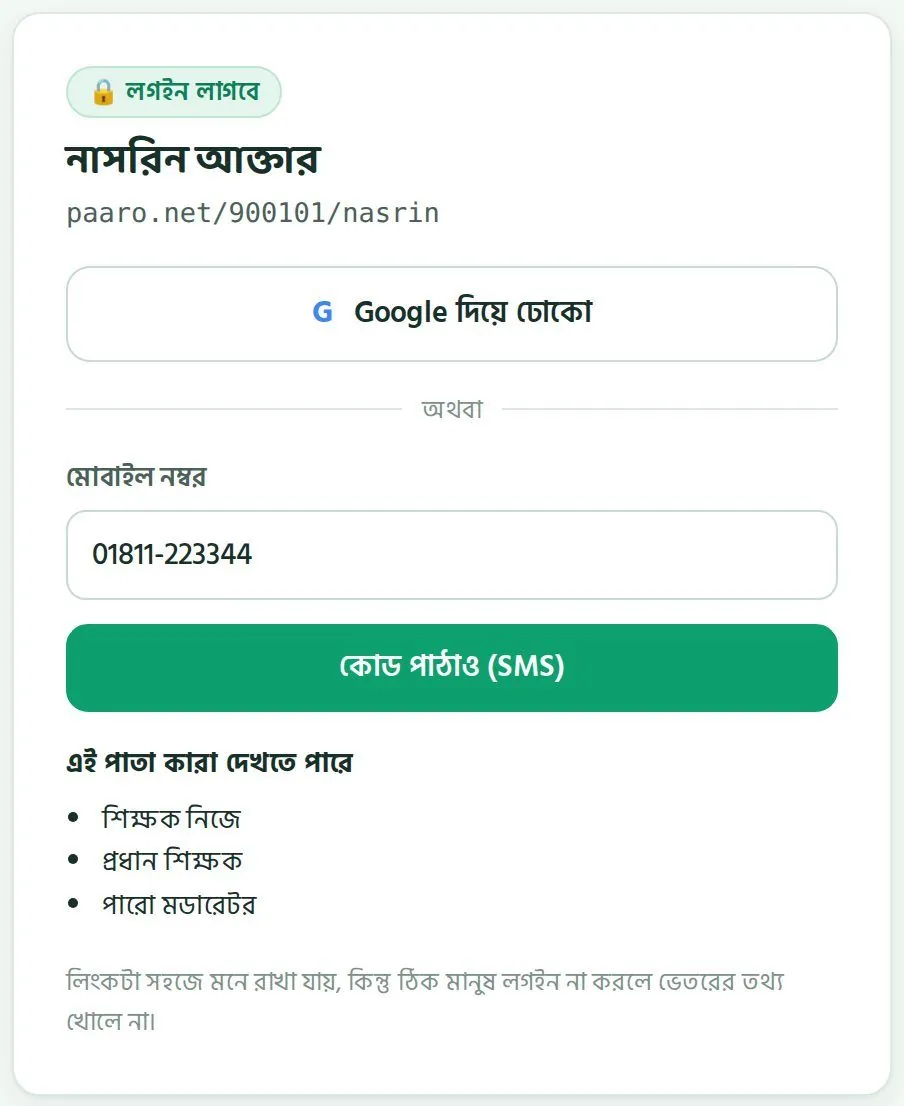
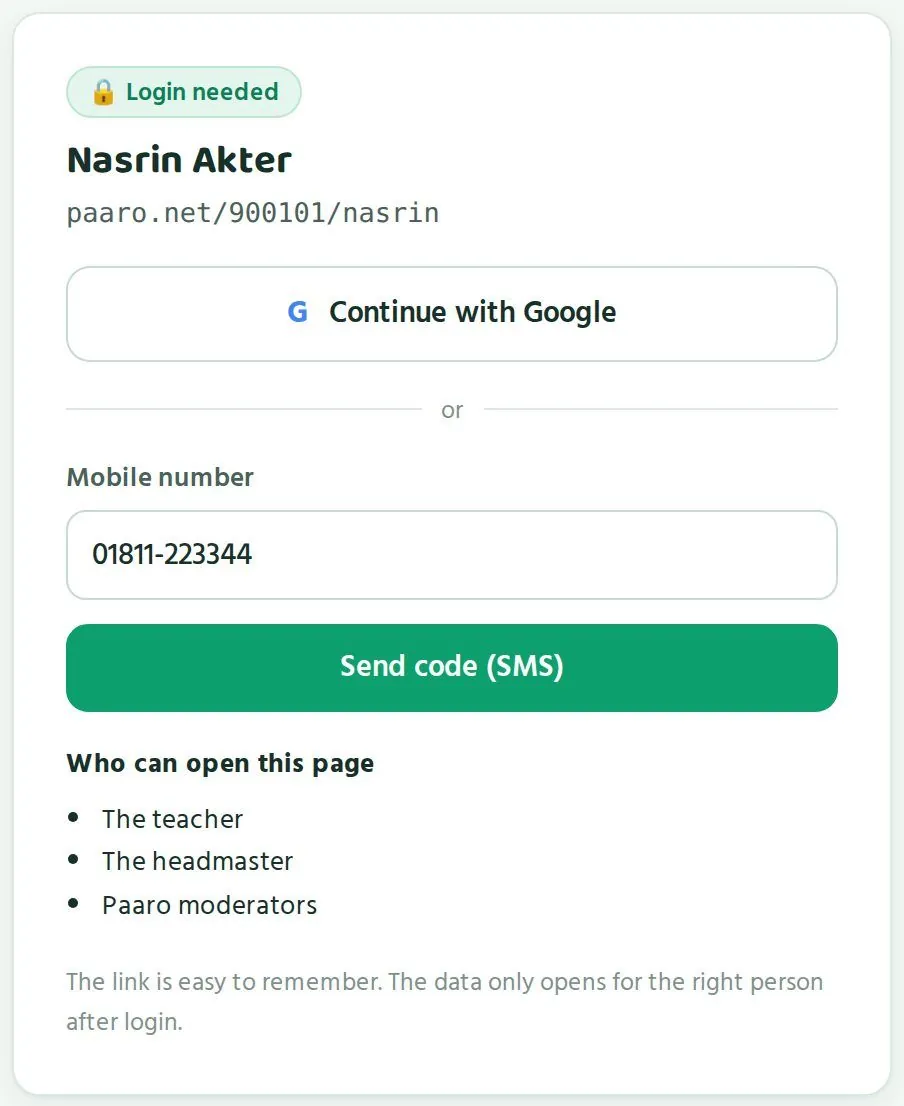
প্রধান শিক্ষক আর শিক্ষকরা দুইভাবে ঢুকতে পারেন: Google অ্যাকাউন্ট দিয়ে, অথবা মোবাইল নম্বরে আসা ৬ অঙ্কের SMS কোড দিয়ে। নিচের ছবিটা একজন শিক্ষকের লিংকের লগইন পাতা। আপনার স্কুলের লিংকেও একই রকম পাতা আসে।
Head teachers and teachers can log in two ways: with a Google account, or with a 6-digit SMS code sent to their mobile. The picture below is the login screen on a teacher's link. Your school link shows the same kind of screen.
- ফোন বা কম্পিউটারের ব্রাউজারে আপনার স্কুলের লিংক লিখুন, যেমন
paaro.net/900101।Type your school's link in the phone or computer browser, for examplepaaro.net/900101. - লগইন পাতা আসবে। ওপরে স্কুলের নাম আর নিচে "এই পাতা কারা দেখতে পারে" দেখে নিন।The login screen opens. Check the school name at the top and "Who can open this page" below.
- Google অ্যাকাউন্ট থাকলে "Google দিয়ে ঢোকো" চাপুন আর আপনার অ্যাকাউন্ট বেছে নিন।If you use Google, tap "Continue with Google" and choose your account.
- মোবাইল দিয়ে ঢুকতে চাইলে "মোবাইল নম্বর" ঘরে আপনার নিবন্ধিত নম্বর লিখে "কোড পাঠাও (SMS)" চাপুন।To use your mobile, type your registered number in "Mobile number" and tap "Send code (SMS)".
- SMS এ আসা ৬ অঙ্কের কোডটা লিখুন। কোড ৫ মিনিট কাজ করে।Type the 6-digit code from the SMS. The code works for 5 minutes.
- আপনার স্কুলের পাতা খুলে যাবে।Your school page opens.
একটা নম্বরে এক ঘণ্টায় সর্বোচ্চ ৩টা কোড যায়। কোড না এলে বারবার চাপবেন না। একটু অপেক্ষা করুন, নেটওয়ার্ক দেখুন, তারপর আবার চেষ্টা করুন।
A number can get at most 3 codes in an hour. If a code does not arrive, do not keep tapping. Wait a little, check the network, then try again.
প্রতিটা পাতায় বাংলা আর ইংরেজির একটা সুইচ আছে। যে ভাষায় আরাম, সেটা বেছে নিন।
Every page has a Bangla and English switch. Choose whichever you prefer.
প্রথমবার: পারো টিমের অনুমোদনThe first time: approval by the Paaro team
প্রধান শিক্ষকের অ্যাকাউন্ট অনুমোদন করে পারো টিম। আপনার স্কুল পারোতে যোগ দিলে পারো টিম আপনার নাম আর মোবাইল নম্বর মিলিয়ে দেখে অ্যাকাউন্ট চালু করে। অ্যাকাউন্ট নিয়ে কোনো প্রশ্ন থাকলে পারো টিমকে লিখুন: hello@paaro.net।
Head teacher accounts are approved by the Paaro team. When your school joins, the Paaro team checks your name and mobile number and switches your account on. For any account question, write to the Paaro team at hello@paaro.net.
আপনার শিক্ষকদের অনুমোদন দেওয়াApproving your teachers
নতুন শিক্ষককে অনুমোদন দেন প্রধান শিক্ষক, মানে আপনি। অনুমোদন দেওয়ার আগে দেখে নিন মানুষটা সত্যিই আপনার স্কুলের শিক্ষক কি না, আর নাম, মোবাইল, বিষয় আর ক্লাস ঠিক আছে কি না। ভুল মানুষকে অনুমোদন দিলে সে আপনার শিক্ষার্থীদের নাম দেখতে পাবে।
New teachers are approved by their head teacher, which means you. Before approving, check that the person really teaches at your school, and that the name, mobile, subject and classes are right. Anyone you approve can see your students' names.
- যে শিক্ষক বদলি হয়ে গেছেন বা আর পড়ান না, তাঁর বিষয়ে পারো টিমকে জানান।Tell the Paaro team about any teacher who has transferred or no longer teaches.
- একজনের অ্যাকাউন্ট অন্যজনকে ব্যবহার করতে দেবেন না। প্রত্যেক শিক্ষকের নিজের লিংক আর নিজের লগইন থাকবে।Do not let one teacher use another's account. Each teacher has their own link and own login.
লিংক না খুললেIf the link does not open
দুই রকম ঘটনা হতে পারে। এক, আপনার স্কুল এখনো পারোতে যোগ দেয়নি। দুই, লিংকে কোনো ভুল আছে। দুটোই পাতা দেখে চেনা যায়।
Two things can happen. Either your school has not joined Paaro yet, or the link has a mistake. The screen tells you which.
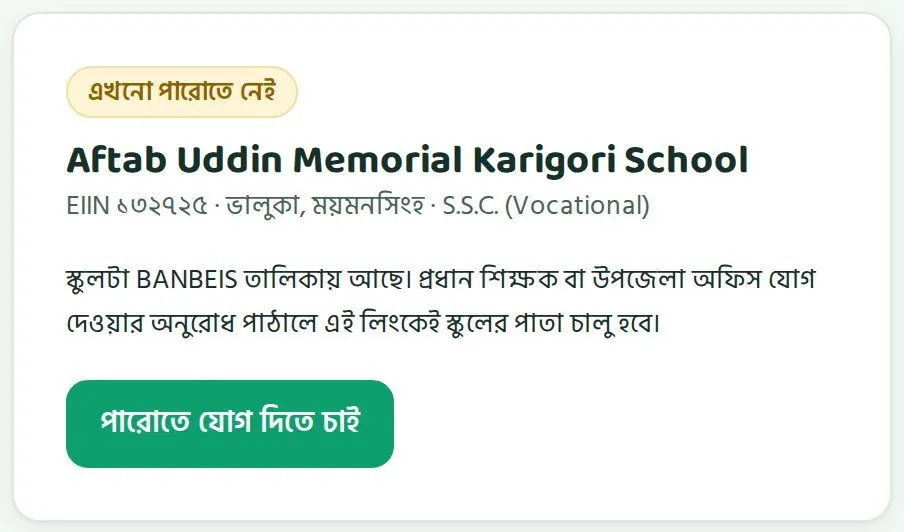
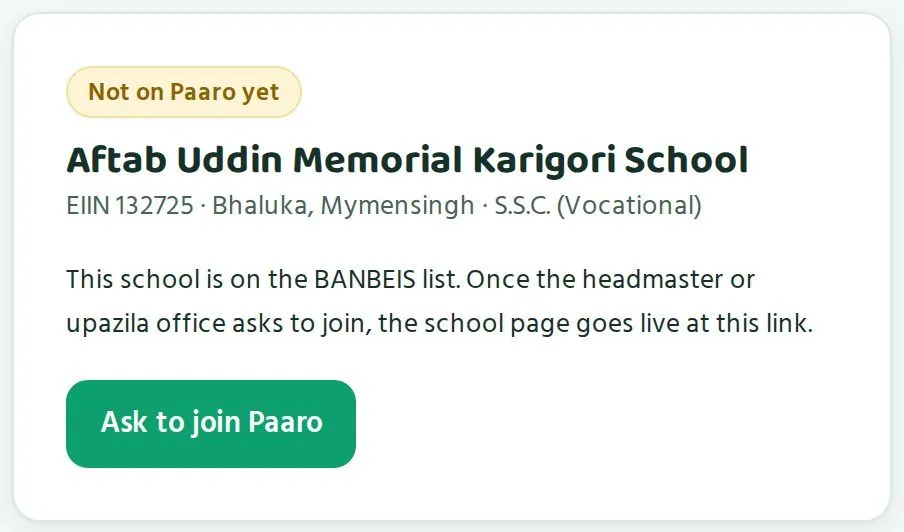
দেশের প্রতিটা স্কুল, মাদ্রাসা আর কারিগরি প্রতিষ্ঠানের নাম সরকারের BANBEIS তালিকায় আছে। তাই আপনার স্কুল পারোতে না থাকলেও paaro.net/EIIN খুললে স্কুলের নাম, উপজেলা আর স্তর দেখায়। সাথে একটা হলুদ চিহ্ন থাকে: "এখনো পারোতে নেই"।
Every school, madrasah and technical institution in the country is on the government BANBEIS list. So even if your school is not on Paaro, opening paaro.net/EIIN shows its name, upazila and level, with a yellow label: "Not on Paaro yet".
- ব্রাউজারে
paaro.netএর পরে আপনার স্কুলের EIIN লিখুন।Typepaaro.netfollowed by your school's EIIN in the browser. - নাম, উপজেলা আর স্তর ঠিক আছে কি না দেখুন।Check that the name, upazila and level are right.
- "পারোতে যোগ দিতে চাই" চাপুন।Tap "Ask to join Paaro".
- পারো টিম অনুরোধ দেখে স্কুল যোগ করবে। তখন এই লিংকেই আপনার স্কুলের পাতা চালু হবে।The Paaro team reviews the request and adds the school. Your school page then goes live at this same link.
উপজেলা অফিসও তাদের পাতা থেকে আপনার স্কুলকে আমন্ত্রণ পাঠাতে পারে। তখন একটা SMS আসে। দুই দিক থেকেই কাজ হয়।
The upazila office can also invite your school from its own page, which sends an SMS. Either route works.
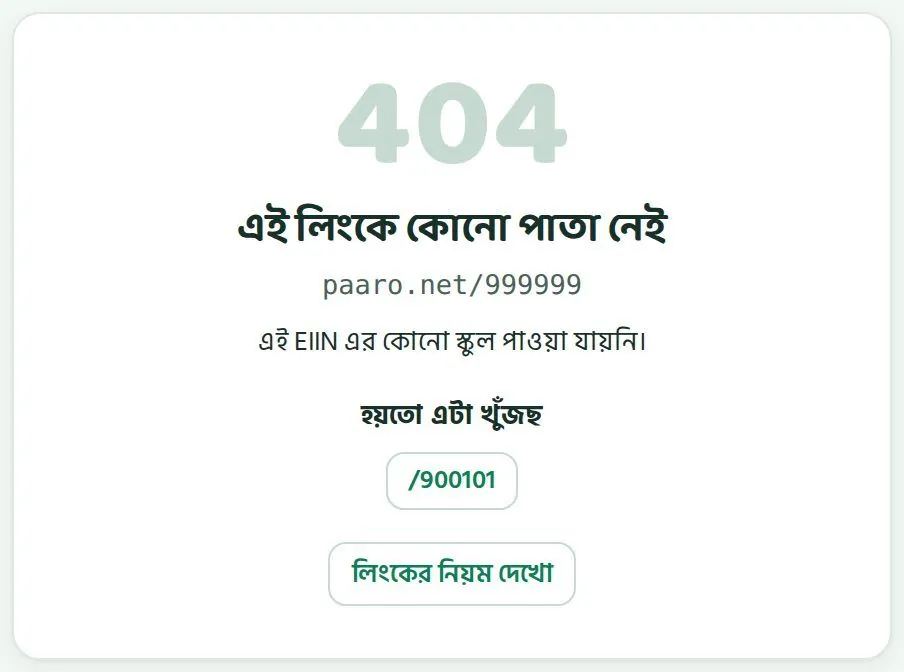
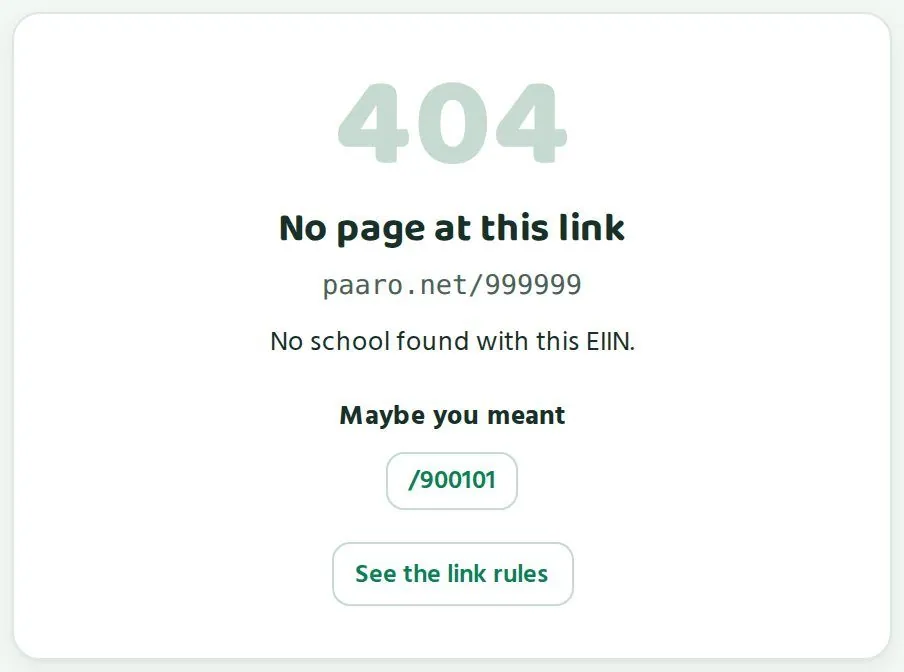
লিংকে ভুল থাকলে পাতায় লেখা আসে "এই লিংকে কোনো পাতা নেই"। নিচে "হয়তো এটা খুঁজছ" অংশে কাছাকাছি একটা সঠিক লিংক থাকতে পারে। "লিংকের নিয়ম দেখো" চাপলে সব লিংকের নিয়ম দেখা যায়।
If the link has a mistake, the screen says "No page at this link". Under "Maybe you meant" there may be a close correct link. "See the link rules" shows how all links are built.
- EIIN এ ৬টা অঙ্ক আছে কি না গুনে দেখুন।Count that the EIIN has 6 digits.
- শিক্ষকের লিংকে নাম ইংরেজিতে, ছোট হাতের অক্ষরে লিখুন।Write teacher names in the link in English, in small letters.
- শিক্ষার্থীর লিংক ভুল হলে লগইন পাতা একই রকম দেখায়, কোড থাকুক বা না থাকুক। তাই শিক্ষার্থী ঢুকতে না পারলে আগে তার স্লিপের কোডটা মিলিয়ে দেখুন।A student link shows the same login screen whether the code exists or not. If a student cannot log in, first check the code on their slip.
ধাপে ধাপে স্কুল চালু করাSetting up your school, step by step
শিক্ষক যোগ, শিক্ষার্থী যোগ, লগইন স্লিপ, অভিভাবকের নম্বর, আর প্রথম সপ্তাহের পরিকল্পনা।Adding teachers, importing students, login slips, guardian phones and a first-week plan.
স্কুলের পাতা চালু হলে তিনটা কাজ আগে করতে হয়: শিক্ষক যোগ করা, শিক্ষার্থী যোগ করা, আর শিক্ষার্থীদের হাতে লগইন স্লিপ দেওয়া। একজন অফিস সহকারী বা আইসিটি শিক্ষক পাশে থাকলে এক বা দুই দিনেই কাজটা শেষ হয়।
Once your school page is live, three jobs come first: add teachers, import students, and hand out login slips. With an office assistant or ICT teacher beside you, this takes one or two days.
শিক্ষক যোগ করাAdding teachers
আগে একটা কাগজে বা এক্সেলে প্রত্যেক শিক্ষকের তথ্য লিখে নিন: ইংরেজিতে নাম, মোবাইল নম্বর, কোন বিষয় পড়ান আর কোন কোন ক্লাসে পড়ান। তারপর একজন একজন করে যোগ করুন।
First write down each teacher's details on paper or in Excel: name in English, mobile number, subject and classes taught. Then add them one by one.
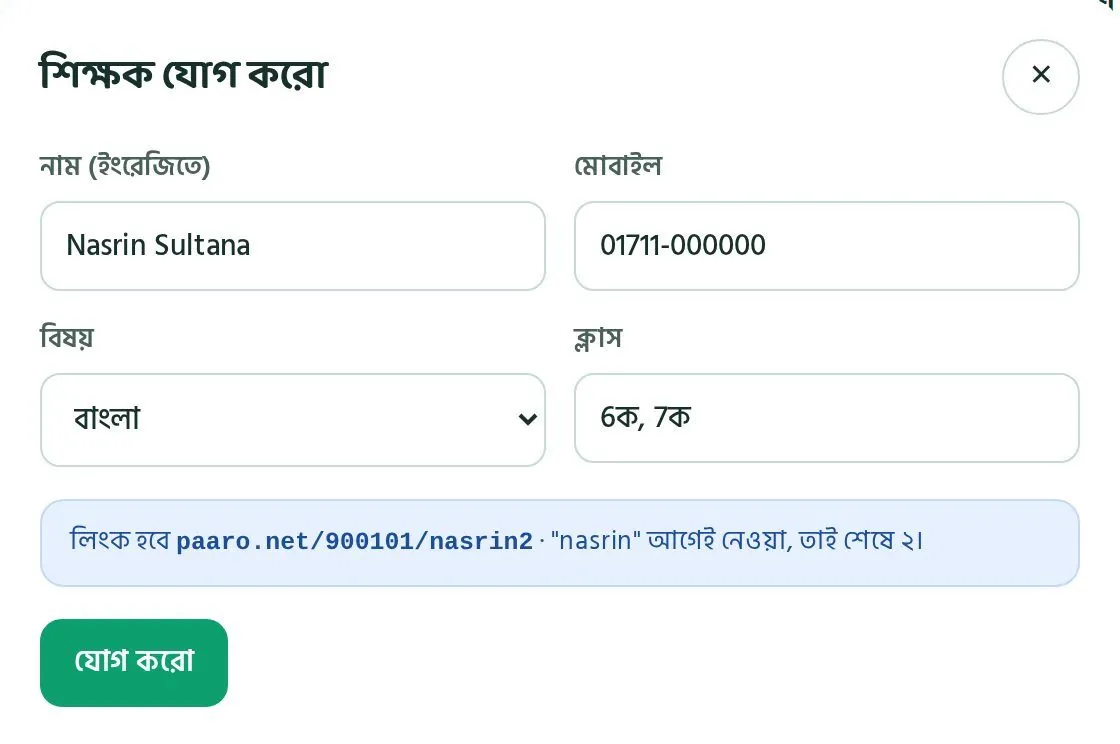
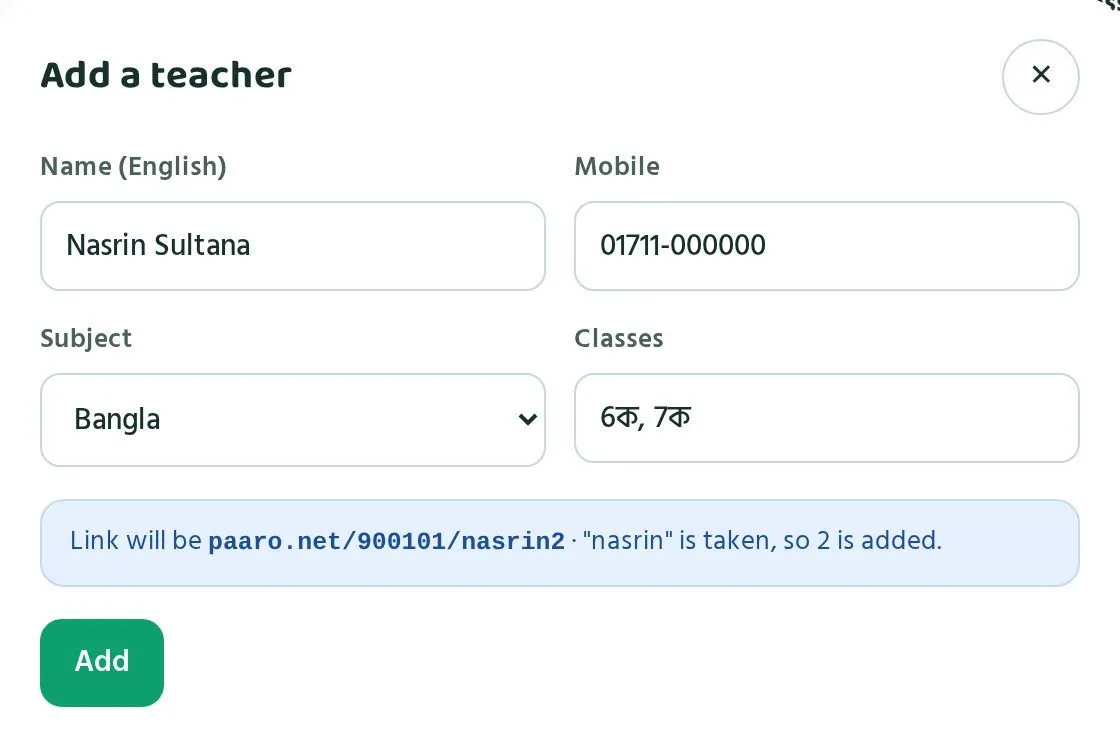
- স্কুলের পাতায় "শিক্ষকরা" অংশে যান। ডানদিকে ওপরে "+ শিক্ষক যোগ" চাপুন।On the school page, go to the "Teachers" section. Tap "+ Add teacher" at the top right.
- "শিক্ষক যোগ করো" জানালা খুলবে। "নাম (ইংরেজিতে)" ঘরে পুরো নাম ইংরেজিতে লিখুন, যেমন Nasrin Sultana।The "Add a teacher" window opens. In "Name (English)", type the full name in English, for example Nasrin Sultana.
- "মোবাইল" ঘরে শিক্ষকের নিজের মোবাইল নম্বর লিখুন। এই নম্বরেই লগইনের কোড যাবে।In "Mobile", type the teacher's own mobile number. Login codes go to this number.
- "বিষয়" থেকে বিষয় বাছুন: বাংলা, ইংরেজি, গণিত বা আইসিটি।Choose the subject under "Subject": Bangla, English, maths or ICT.
- "ক্লাস" ঘরে শ্রেণি আর শাখা লিখুন, কমা দিয়ে আলাদা করে, যেমন ৬ক, ৭ক।In "Classes", type class and section separated by commas, for example 6ক, 7ক.
- নিচের নীল ঘরে লিংকটা দেখে নিন, যেমন
paaro.net/900101/nasrin2।Check the link in the blue box, for examplepaaro.net/900101/nasrin2. - "যোগ করো" চাপুন। শিক্ষক একটা SMS পাবেন, তাতে তাঁর লিংক থাকবে।Tap "Add". The teacher gets an SMS with their link.
নীল ঘরে কেন nasrin2 দেখাচ্ছে? কারণ এই স্কুলে আগে থেকেই একজন নাসরিন আছেন, তাঁর লিংক paaro.net/900101/nasrin। নতুন নাসরিনের লিংকের শেষে তাই ২ বসেছে। পারো নিজেই এটা ঠিক করে। আপনাকে কিছু করতে হয় না, শুধু নতুন শিক্ষককে তাঁর সঠিক লিংকটা জানিয়ে দিন।
Why does the blue box show nasrin2? Because the school already has a Nasrin, whose link is paaro.net/900101/nasrin. So the new Nasrin's link ends in 2. Paaro sorts this out on its own. You only need to tell the new teacher their correct link.
প্রথম দিন সব শিক্ষককে একসাথে বসিয়ে যোগ করুন। প্রত্যেকে সাথে সাথে SMS পেয়ে নিজের লিংকে একবার ঢুকে দেখলে পরে আর সমস্যা হয় না।
Add all teachers on the first day with everyone in the room. If each teacher gets the SMS and logs in once straight away, problems are rare later.
শিক্ষার্থী যোগ করা (CSV ফাইল দিয়ে)Importing students (with a CSV file)
শিক্ষার্থীদের একজন একজন করে যোগ করতে হয় না। একটা CSV বা এক্সেল ফাইলে সবার তথ্য রেখে একবারে তুলে দেওয়া যায়। ফাইলে পাঁচটা কলাম লাগবে। কলামের নাম ইংরেজিতে, ঠিক নিচের মতো লিখুন।
You do not need to add students one by one. Put everyone in one CSV or Excel file and import it at once. The file needs five columns. Write the column names in English, exactly as below.
| কলামColumn | কী লিখবেনWhat to write | উদাহরণExample |
|---|---|---|
| namename | শিক্ষার্থীর নাম, ইংরেজিতেStudent's name, in English | Rafi HasanRafi Hasan |
| classclass | শ্রেণিClass | ৭7 |
| sectionsection | শাখাSection | কক |
| rollroll | রোল নম্বরRoll number | ১২12 |
| guardian_phoneguardian_phone | অভিভাবকের মোবাইল নম্বরGuardian's mobile number | অভিভাবকের ১১ অঙ্কের নম্বরThe guardian's 11-digit number |
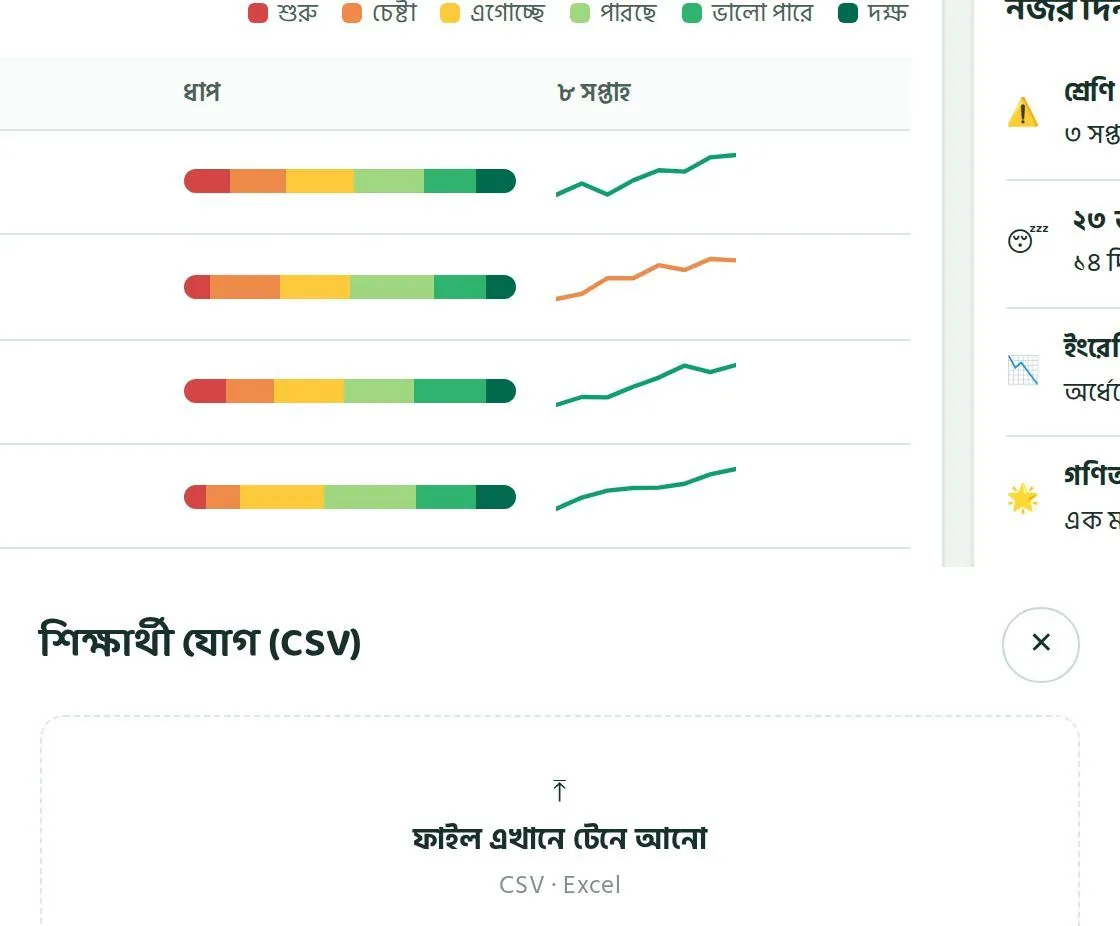
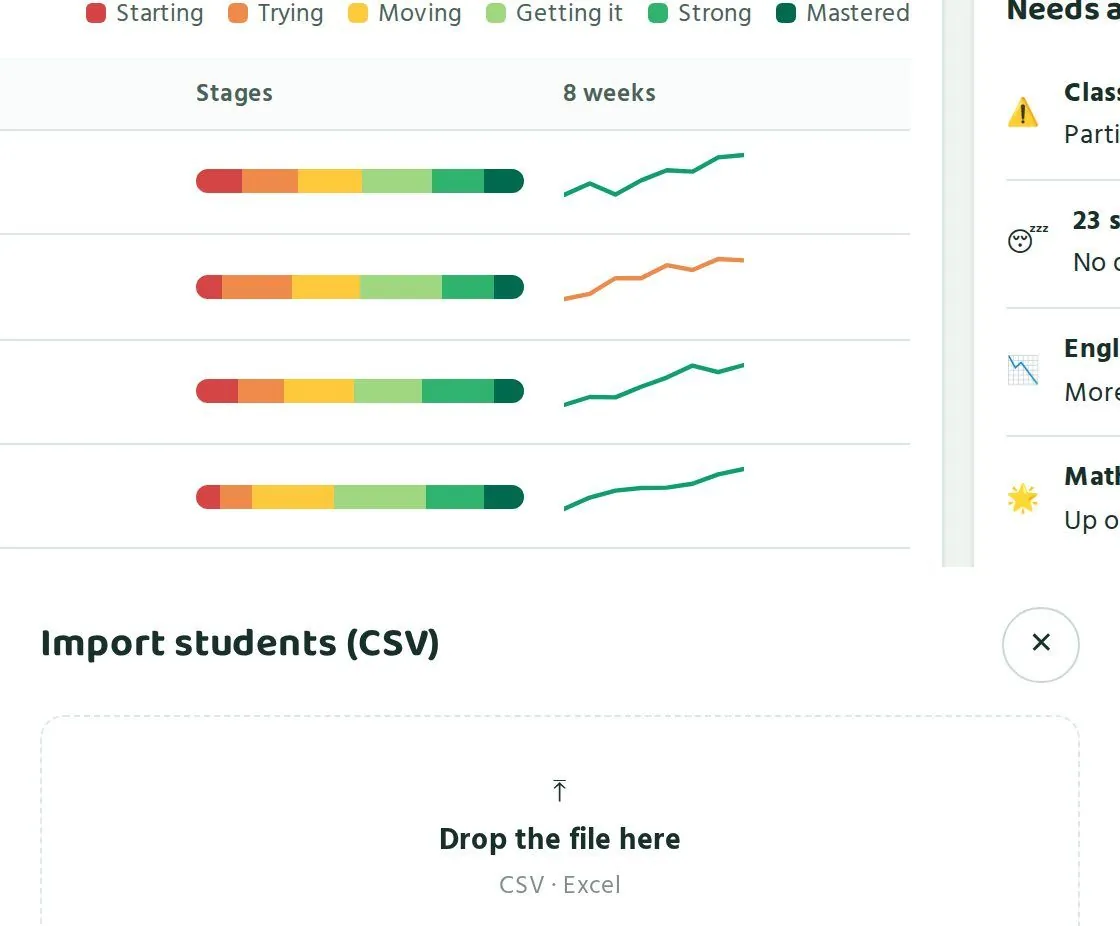
- স্কুলের পাতায় "বিষয়ভিত্তিক ধাপ" অংশের নিচে "শিক্ষার্থী যোগ (CSV)" চাপুন।On the school page, below "Stage by subject", tap "Import students (CSV)".
- জানালা খুললে ফাইলটা "ফাইল এখানে টেনে আনো" জায়গায় ছেড়ে দিন। ফোনে থাকলে ওই জায়গায় ট্যাপ করে ফাইল বেছে নিন।When the window opens, drop the file on "Drop the file here". On a phone, tap that area and pick the file.
- পারো নিজেই প্রত্যেক শিক্ষার্থীর কোড বানাবে।Paaro creates each student's code automatically.
- যে শিক্ষার্থী আগে থেকেই পারোতে আছে, পারো তাকে আলাদা করে দেখাবে। একই শিক্ষার্থী দুবার যোগ হবে না।Paaro flags any student who already exists, so nobody is added twice.
- শেষে পারো প্রিন্ট করার মতো লগইন স্লিপ বানাবে।Finally, Paaro makes printable login slips.
শিক্ষার্থীর কোড কীভাবে হয়How student codes are made
প্রতিটা শিক্ষার্থীর কোড হলো ইংরেজিতে নামের প্রথম অংশ আর ৪টা অঙ্ক, যেমন rafi2031। একই অভিভাবকের নম্বর থাকা ভাইবোনেরা সম্ভব হলে একই ৪টা অঙ্ক পায়, যেমন rafi2031 আর mim2031। এতে অভিভাবকের মনে রাখা সহজ হয়। কোড একবার হলে আর কখনো বদলায় না, ক্লাস বদলালেও না।
Each student code is the English first name plus 4 digits, like rafi2031. Brothers and sisters with the same guardian phone get the same 4 digits where possible, like rafi2031 and mim2031. This makes codes easy for guardians to remember. A code never changes, even when the student moves up a class.
অভিভাবকের নম্বর ঠিক থাকা খুব জরুরি। অভিভাবক লগইন করেন এই নম্বরে আসা SMS কোড দিয়ে, আর কোড শুধু নিবন্ধিত নম্বরেই যায়। নম্বর ভুল হলে অভিভাবক ঢুকতে পারবেন না, ভাইবোনের কোডও মিলবে না।
The guardian's number must be right. Guardians log in with an SMS code, and the code only goes to the registered number. A wrong number means the guardian cannot log in and siblings will not share digits.
লগইন স্লিপ প্রিন্ট করাPrinting login slips
প্রতিটা স্লিপে থাকে শিক্ষার্থীর কোড আর প্রথম PIN। শিক্ষার্থী প্রথমবার লগইন করলে PIN বদলাতে হয়। তাই স্লিপের PIN শুধু প্রথম দিনের জন্য।
Each slip has the student's code and first PIN. Students must change the PIN at first login, so the PIN on the slip is only for the first day.
- স্কুলের পাতায় "লগইন স্লিপ প্রিন্ট" চাপুন।On the school page, tap "Print login slips".
- স্লিপগুলো প্রিন্ট করে শ্রেণি আর শাখা অনুযায়ী আলাদা খামে রাখুন।Print the slips and keep them in separate envelopes by class and section.
- শ্রেণি শিক্ষকের হাতে খাম দিন। তিনি ক্লাসে প্রত্যেকের হাতে নিজের স্লিপ দেবেন।Give each envelope to the class teacher, who hands each student their own slip in class.
- ক্লাসেই সবাইকে একবার লগইন করিয়ে নতুন PIN বানাতে বলুন।Ask everyone to log in once in class and set a new PIN.
- শিক্ষার্থী লগইন করে কোড আর ৪ অঙ্কের PIN দিয়ে।Students log in with their code and a 4-digit PIN.
- পরপর ৫ বার ভুল PIN দিলে অ্যাকাউন্ট ১৫ মিনিট বন্ধ থাকে। তারপর আবার চেষ্টা করা যায়।After 5 wrong PINs, the account locks for 15 minutes. Then the student can try again.
- PIN ভুলে গেলে শিক্ষক বা প্রধান শিক্ষক নতুন PIN দিতে পারেন।If a student forgets the PIN, a teacher or the head teacher can give a new one.
অভিভাবকের নম্বর জোগাড় করাCollecting guardian phones
অনেক স্কুলে ভর্তির খাতায় পুরনো নম্বর থাকে। তাই CSV বানানোর আগে নম্বরগুলো একবার মিলিয়ে নিন। কয়েকটা সহজ উপায়:
Admission registers often hold old numbers, so check the numbers once before making the CSV. A few simple ways:
- প্রত্যেক ক্লাসে একটা ছোট কাগজ পাঠান: শিক্ষার্থীর নাম, রোল আর অভিভাবকের বর্তমান মোবাইল নম্বর। অভিভাবক সই করে ফেরত দেবেন।Send a small slip home with each class: student name, roll and the guardian's current mobile. The guardian signs and returns it.
- অভিভাবক সভায় নম্বরগুলো পড়ে শোনান আর ঠিক করে নিন।Read the numbers out at a guardians' meeting and correct them.
- ভাইবোন একই স্কুলে পড়লে দুজনের জন্য একই নম্বর লিখুন। তাহলে তারা একই ৪টা অঙ্ক পাবে।If siblings attend the same school, use the same number for both so they get the same 4 digits.
- যে শিক্ষার্থীর অভিভাবকের ফোন নেই, তার জন্য কাছের কোনো আত্মীয়ের নম্বর নিন, যিনি নিয়মিত খবর রাখেন।If a guardian has no phone, take the number of a close relative who keeps in touch regularly.
প্রথম সপ্তাহের পরিকল্পনাA first-week plan
| দিনDay | কী করবেনWhat to do |
|---|---|
| ১ম দিনDay 1 | শিক্ষকদের সভা। সবাইকে যোগ করুন, প্রত্যেকে নিজের লিংকে একবার ঢুকুক।Teachers' meeting. Add everyone and have each teacher log in once. |
| ২য় দিনDay 2 | অভিভাবকের নম্বর মিলিয়ে CSV ফাইল বানান।Check guardian numbers and make the CSV file. |
| ৩য় দিনDay 3 | শিক্ষার্থী যোগ করুন আর লগইন স্লিপ প্রিন্ট করুন।Import students and print login slips. |
| ৪র্থ দিনDay 4 | ক্লাসে স্লিপ দিন। সবাই লগইন করে নতুন PIN বানাক।Hand out slips in class. Everyone logs in and sets a new PIN. |
| ৫ম দিনDay 5 | প্রতিটা বিষয়ের শিক্ষক একটা করে ছোট কুইজ দিন।Each subject teacher sets one short quiz. |
| ৬ষ্ঠ দিনDay 6 | স্কুলের পাতা খুলে দেখুন কোন ক্লাস বাকি আছে। সেই ক্লাসের শিক্ষকের সাথে কথা বলুন।Open the school page, see which classes are behind, and talk to those teachers. |
প্রথম সপ্তাহে লক্ষ্য একটাই: প্রত্যেক শিক্ষার্থী অন্তত একটা কুইজ দিক। ধাপ বা নম্বর নিয়ে এখনই ভাববেন না।
In the first week there is one goal: every student does at least one quiz. Do not worry about stages or scores yet.
স্কুলের পাতা পড়াReading the school page
চারটা সংখ্যা, ক্লাসভিত্তিক অবস্থা আর বিষয়ভিত্তিক ধাপ কীভাবে বুঝবেন।How to read the four numbers, Class by class and Stage by subject.
স্কুলের পাতা ওপর থেকে নিচে পড়ুন। ওপরে পুরো স্কুলের ছবি, তারপর শ্রেণি ধরে ধরে, তারপর বিষয় ধরে। সপ্তাহে একবার ১০ মিনিট দিলেই যথেষ্ট।
Read the school page from top to bottom: the whole school first, then class by class, then subject by subject. Ten minutes once a week is enough.


পাতার মাথায় কী থাকেWhat is at the top
- একদম ওপরে একটা পথ দেখায়: কর্তৃপক্ষ › ময়মনসিংহ › মুক্তাগাছা › আপনার স্কুল। এতে বোঝা যায় আপনার স্কুল কোন জেলা আর উপজেলার মধ্যে পড়ে।At the very top is a path: Authority › Mymensingh › Muktagachha › your school. It shows which district and upazila your school belongs to.
- তারপর স্কুলের নাম, EIIN, ধারা (যেমন সাধারণ) আর প্রধান শিক্ষকের নাম।Then the school name, EIIN, stream (for example General) and the head teacher's name.
- ডানদিকে স্কুলের লিংক আর "কপি" বোতাম। চাপলে লিংকটা কপি হয়, যেটা আপনি শিক্ষকদের বা উপজেলা অফিসে পাঠাতে পারেন।On the right, the school link with a "Copy" button. Tap it to copy the link to send to teachers or the upazila office.
- তার পাশে "মাসিক রিপোর্ট" বোতাম। এটা নিয়ে অধ্যায় ৭ এ বলা আছে।Next to it, the "Monthly report" button, covered in chapter 7.
চারটা বড় সংখ্যাThe four big numbers
| সংখ্যাNumber | উদাহরণExample | মানে কীWhat it means | কী দেখবেনWhat to look for |
|---|---|---|---|
| পারোতে শিক্ষার্থীStudents on Paaro | ১,০৩০/১,১২০, ৯২% যোগ দিয়েছে1,030/1,120, 92% joined | স্কুলের মোট শিক্ষার্থীর মধ্যে কতজন পারোতে আছেHow many of all your students are on Paaro | ১০০% এর কাছে না গেলে দেখুন কারা স্লিপ পায়নি বা লগইন করেনিIf it is well below 100%, find out who has no slip or has not logged in |
| এই সপ্তাহে কুইজ দিয়েছেDid a quiz this week | ৭৮%, গত সপ্তাহের চেয়ে ৫% বেশি78%, up 5% vs last week | এই সপ্তাহে অন্তত একটা কুইজ দিয়েছে কত ভাগ শিক্ষার্থীShare of students who did at least one quiz this week | তীরটা ওপরে না নিচে, সেটা দেখুনWatch whether the arrow goes up or down |
| সক্রিয় শিক্ষকActive teachers | ২১/২৮, গত ৭ দিনে21/28, last 7 days | গত ৭ দিনে কতজন শিক্ষক পারো ব্যবহার করেছেনTeachers who used Paaro in the last 7 days | কারা বাকি, সেটা "শিক্ষকরা" তালিকায় দেখুনSee who is missing in the "Teachers" table |
| যাচাই করা প্রশ্নQuestions verified | ১৪৬, এই স্কুলের শিক্ষকরা146, by this school's teachers | আপনার শিক্ষকরা মোট কতগুলো প্রশ্ন যাচাই করেছেনQuestions your teachers have verified in total | সংখ্যা বাড়লে বোঝা যায় শিক্ষকরা প্রশ্নভান্ডারে কাজ করছেনA rising number shows teachers are working on the question bank |
সবচেয়ে জরুরি সংখ্যা হলো "এই সপ্তাহে কুইজ দিয়েছে"। শিক্ষার্থীরা নিয়মিত কুইজ না দিলে ধাপের হিসাবও ঠিকমতো আসে না।
The most important number is "Did a quiz this week". If students do not quiz regularly, the stages cannot show a true picture.
ক্লাসভিত্তিক অবস্থাClass by class
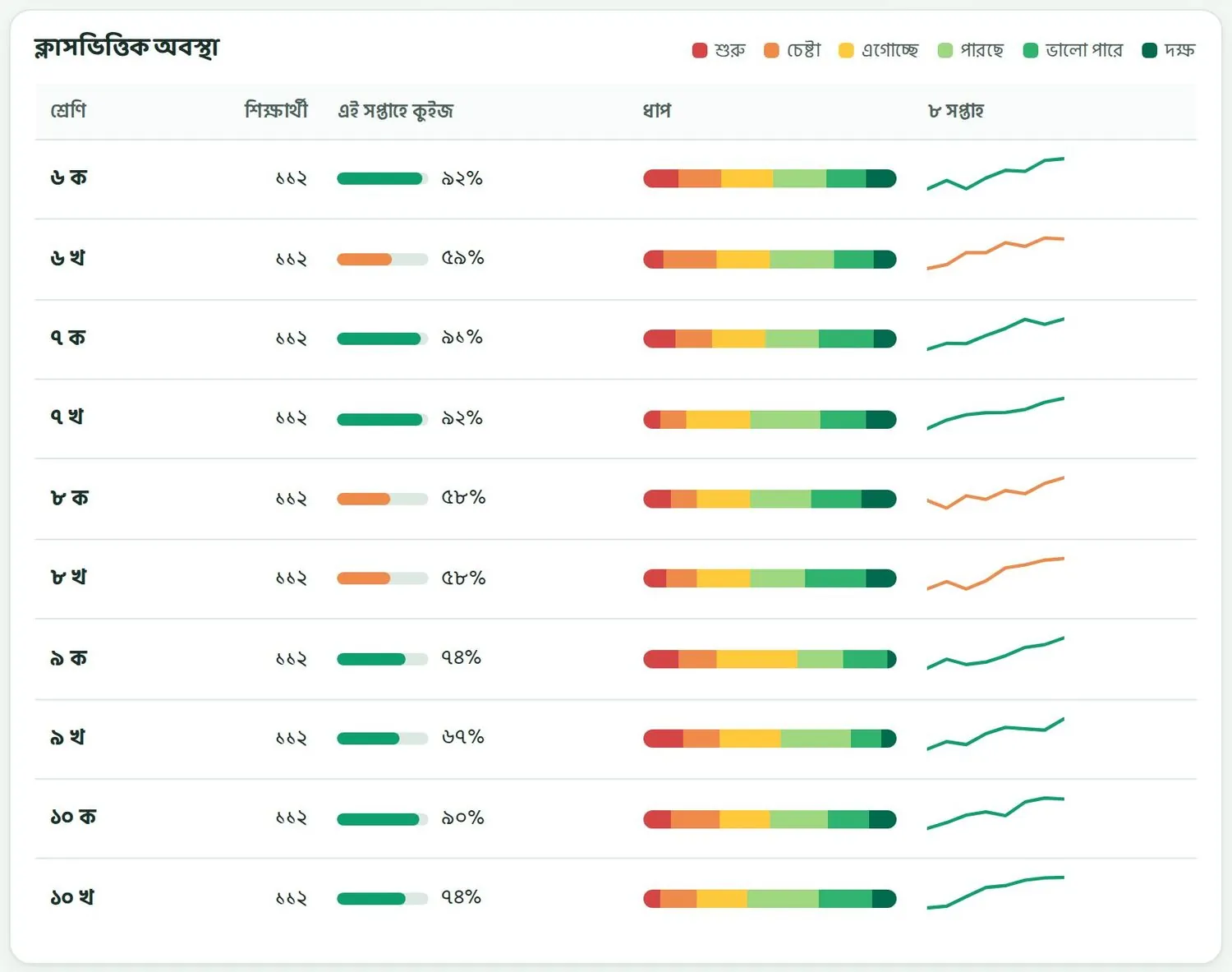
এই তালিকায় প্রতিটা শ্রেণি আর শাখার জন্য একটা সারি। প্রতিটা সারিতে পাঁচটা ঘর:
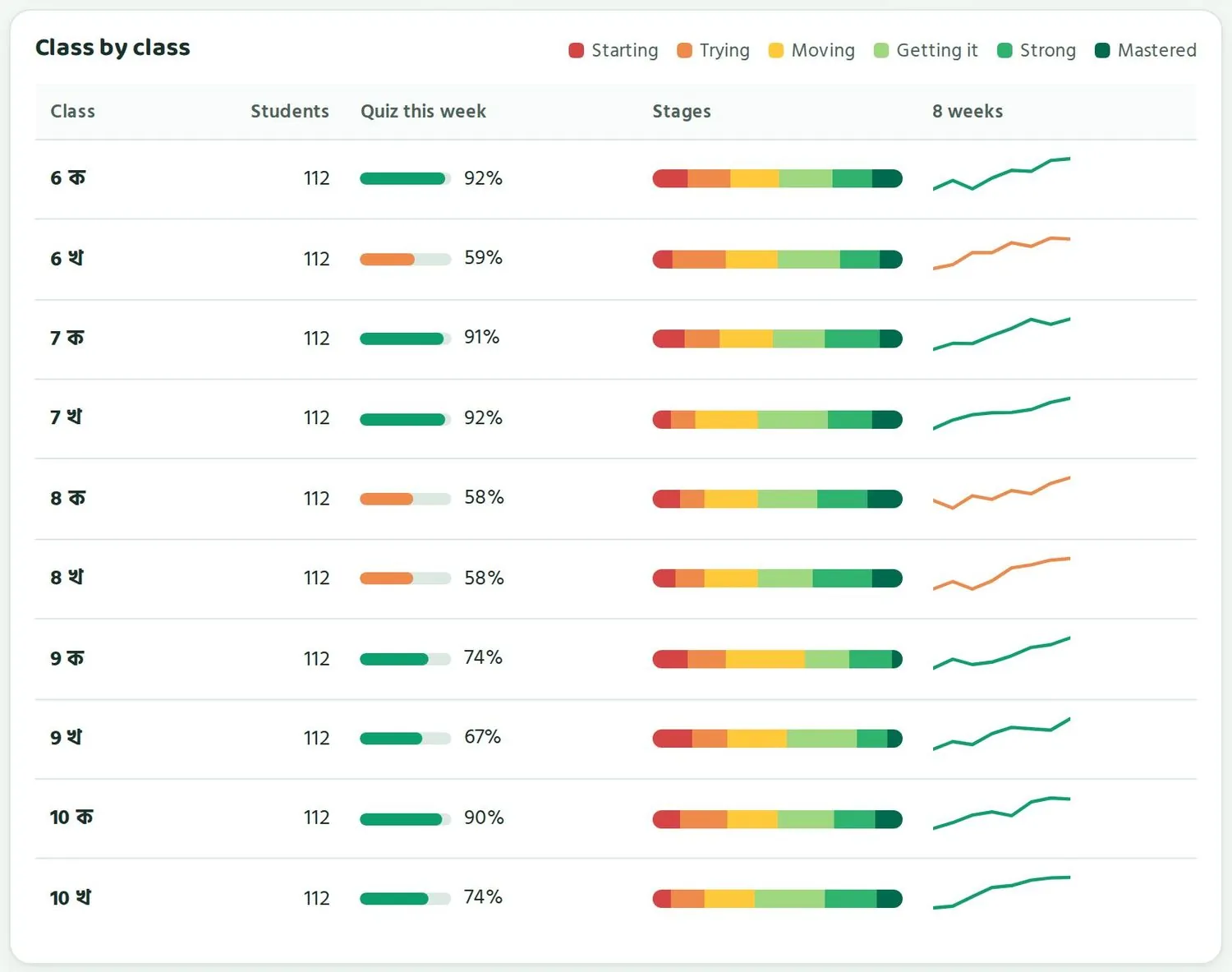
This table has one row for each class and section. Each row has five columns:
- শ্রেণি: শ্রেণি আর শাখা, যেমন ৬ক, ৬খ।Class: class and section, for example 6ক, 6খ.
- শিক্ষার্থী: ওই শাখায় পারোতে কতজন আছে।Students: how many in that section are on Paaro.
- এই সপ্তাহে কুইজ: কত ভাগ শিক্ষার্থী এই সপ্তাহে কুইজ দিয়েছে। বারটা সবুজ হলে ভালো। সংখ্যা কম হলে বারটা কমলা হয়ে যায়।Quiz this week: the share of students who did a quiz this week. A green bar is good. A low figure turns the bar orange.
- ধাপ: শাখার শিক্ষার্থীরা ছয় ধাপে কীভাবে ছড়িয়ে আছে। লাল আর কমলা অংশ বড় হলে অনেকেই শুরুর দিকে আছে। সবুজ অংশ বড় হলে বেশিরভাগ ভালো করছে।Stages: how the section's students spread across the six stages. Big red and orange parts mean many are near the start. Big green parts mean most are doing well.
- ৮ সপ্তাহ: গত ৮ সপ্তাহে অংশগ্রহণ কেমন বদলেছে। রেখা ওপরে উঠলে ভালো খবর।8 weeks: how participation changed over the last 8 weeks. A rising line is good news.
ছবির উদাহরণে ৬খ (৫৯%), ৮ক (৫৮%) আর ৮খ (৫৮%) কমলা। মানে এই তিন শাখায় এই সপ্তাহে অনেক শিক্ষার্থী কুইজ দেয়নি। অথচ ৬ক, ৭খ আর ১০ক শাখায় ৯০% এর বেশি। একই স্কুলে এত পার্থক্য হলে সাধারণত কারণটা ক্লাসের ভেতরের। হয়তো শিক্ষক কুইজ দেননি, হয়তো ক্লাসে ফোনের সমস্যা।
In the example, 6খ (59%), 8ক (58%) and 8খ (58%) are orange: many students in these sections did no quiz this week. Meanwhile 6ক, 7খ and 10ক are above 90%. A gap this big within one school usually has a cause inside the class. Perhaps the teacher set no quiz, or phones are a problem in that class.
কমলা সারি দেখলে আগে সেই শাখার শিক্ষকের সাথে কথা বলুন। দোষ খুঁজবেন না। জিজ্ঞেস করুন কোথায় আটকাচ্ছে।
When you see an orange row, talk to that section's teacher first. Do not look for blame. Ask what is getting in the way.
বিষয়ভিত্তিক ধাপStage by subject
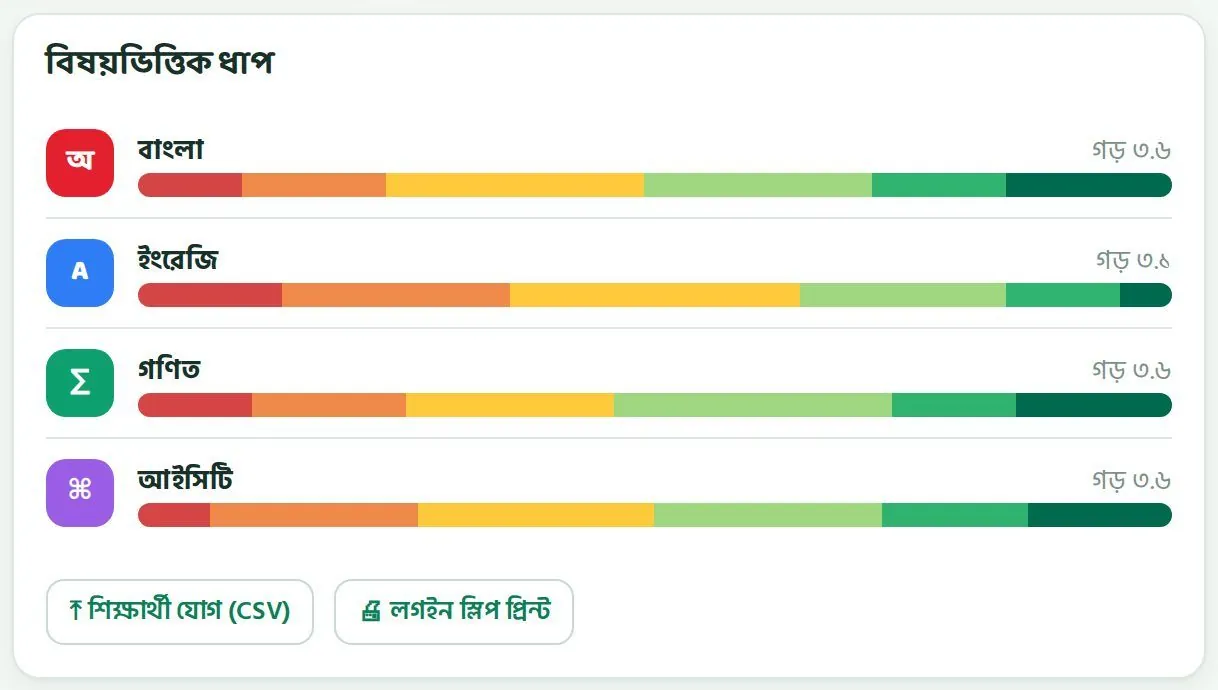
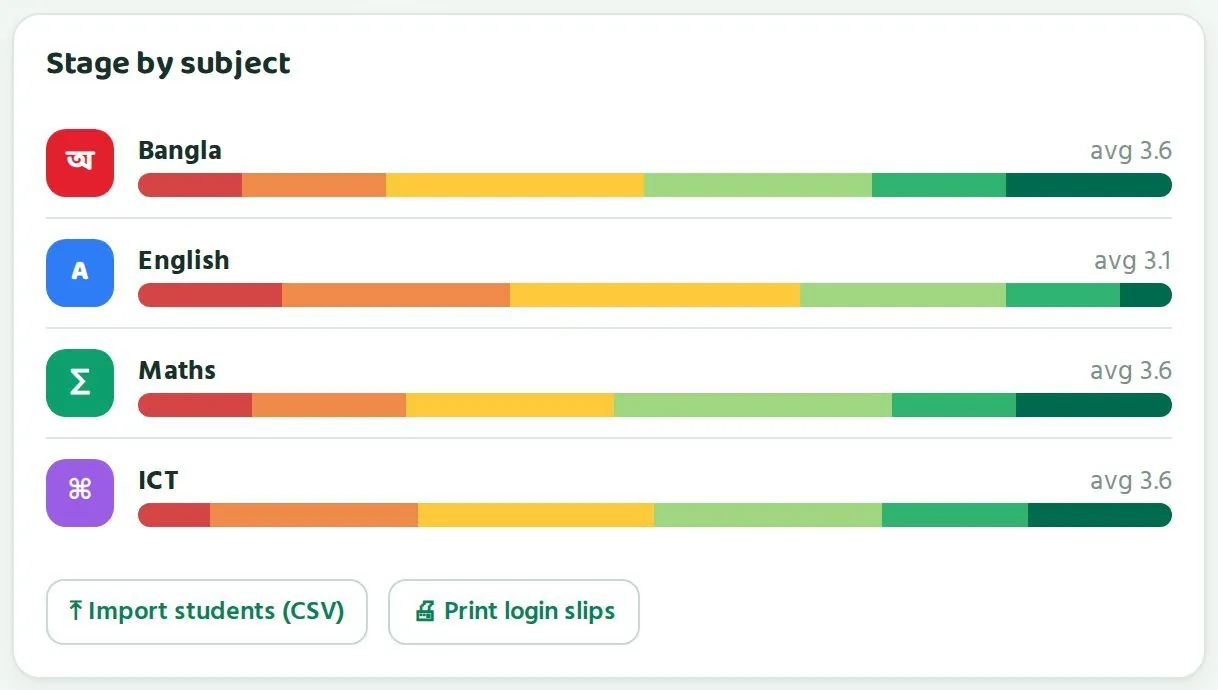
এখানে চারটা বিষয়ের প্রতিটায় পুরো স্কুলের শিক্ষার্থীরা কোন ধাপে আছে, সেটা একটা রঙিন বারে দেখায়। ডানদিকে থাকে গড় ধাপ। ছবির উদাহরণে বাংলা, গণিত আর আইসিটির গড় ৩.৬, ইংরেজির গড় ৩.১। ইংরেজির বারে লাল আর কমলা অংশ বেশি লম্বা।
Here, one coloured bar per subject shows which stages the whole school's students are in, with the average stage on the right. In the example, Bangla, maths and ICT average 3.6 and English averages 3.1. The English bar has longer red and orange parts.
এর মানে ইংরেজিতে আপনার স্কুলের বেশি শিক্ষার্থী শুরুর দিকে আছে। অনেক স্কুলেই ইংরেজি কঠিন লাগে। এটা একটা সংকেত যে ইংরেজি শিক্ষকদের সাথে বসে পরিকল্পনা করা দরকার।
This means more of your students are near the start in English. Many schools find English hard. It is a signal to sit down with your English teachers and plan.
সংখ্যা পড়ার কয়েকটা নিয়মA few rules for reading the numbers
- এক সপ্তাহের ওঠানামা দেখে সিদ্ধান্ত নেবেন না। ৮ সপ্তাহের রেখা দেখুন।Do not decide on one week's rise or fall. Look at the 8-week line.
- ধাপ বদলাতে সময় লাগে। অংশগ্রহণ আগে বাড়ে, ধাপ পরে ওঠে।Stages take time to change. Participation rises first, stages follow.
- নতুন অধ্যায় শুরু হলে কিছুদিন ধাপ একটু নামতে পারে। এটা স্বাভাবিক।Stages can dip for a while when a new chapter starts. That is normal.
- দুটো শাখা তুলনা করার সময় মনে রাখুন শিক্ষার্থী সংখ্যা আলাদা হতে পারে।When comparing two sections, remember their student numbers may differ.
নজর দিন: কোথায় আগে হাত দেবেনNeeds attention: where to act first
"নজর দিন" তালিকার প্রতিটা সতর্কবার্তা কী বোঝায় আর কী করা যায়।What each alert in "Needs attention" means and what you can do.
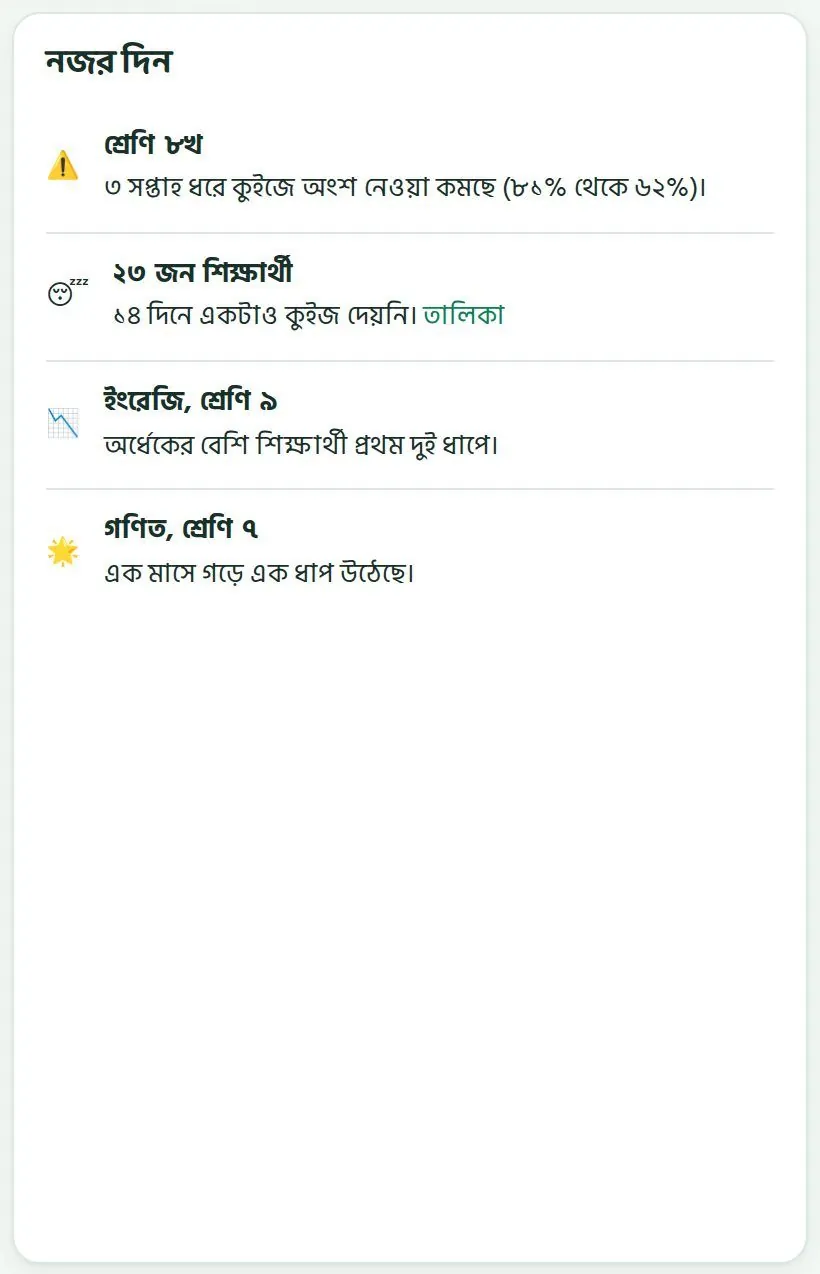
পুরো পাতা খুঁটিয়ে দেখার সময় সবসময় থাকে না। তাই পারো নিজেই "নজর দিন" তালিকায় জানিয়ে দেয় কোথায় সমস্যা হচ্ছে। সাথে একটা ভালো খবরও দেয়। ব্যস্ত সপ্তাহে শুধু এই তালিকাটা দেখলেও চলে।
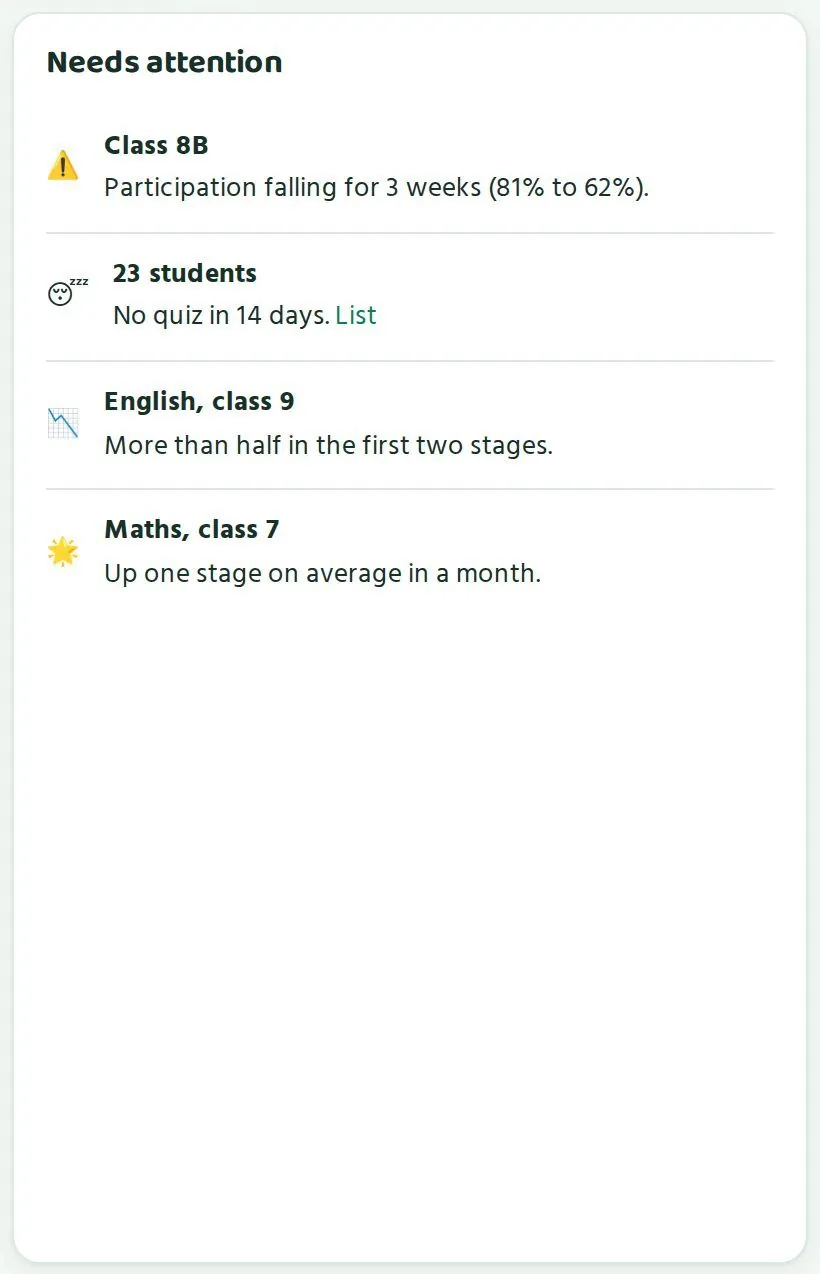
You do not always have time to study the whole page. So Paaro lists the problems for you in "Needs attention", with a piece of good news too. In a busy week, this list alone is enough.
| সতর্কবার্তাAlert | মানে কীWhat it means | আপনি কী করতে পারেনWhat you can do |
|---|---|---|
| শ্রেণি ৮খ: ৩ সপ্তাহ ধরে কুইজে অংশ নেওয়া কমছে (৮১% থেকে ৬২%)Class 8B: participation falling for 3 weeks (81% to 62%) | টানা তিন সপ্তাহ ধরে কমছে, তাই এটা সাময়িক কিছু বলে মনে হয় নাIt has fallen three weeks in a row, so it is unlikely to be a passing dip | শাখার শিক্ষকদের সাথে ৫ মিনিট কথা বলুন। কারণ জানুন, এক সপ্তাহের একটা লক্ষ্য ঠিক করুন।Talk to the section's teachers for 5 minutes. Find the cause and agree a target for one week. |
| ২৩ জন শিক্ষার্থী: ১৪ দিনে একটাও কুইজ দেয়নি23 students: no quiz in 14 days | দুই সপ্তাহ ধরে এরা পারোতে আসেনিThese students have not used Paaro for two weeks | "তালিকা" চেপে নামগুলো ডাউনলোড করুন। শ্রেণি শিক্ষকদের দিন, তাঁরা খোঁজ নেবেন।Tap "List" to download the names. Give them to class teachers to follow up. |
| ইংরেজি, শ্রেণি ৯: অর্ধেকের বেশি শিক্ষার্থী প্রথম দুই ধাপেEnglish, class 9: more than half in the first two stages | এই বিষয়ে এই শ্রেণির বেশিরভাগ শিক্ষার্থী শুরু বা চেষ্টা ধাপেMost students in this class are at Starting or Trying in this subject | বিষয় শিক্ষকের সাথে বসে দেখুন কোন অধ্যায়ে আরেকটু সাহায্য দরকার। সহজ কুইজ বা বাড়তি ক্লাসের কথা ভাবুন।Sit with the subject teacher to see which chapters need more help. Consider easy quizzes or an extra class. |
| গণিত, শ্রেণি ৭: এক মাসে গড়ে এক ধাপ উঠেছেMaths, class 7: up one stage on average in a month | ভালো খবর। এই শ্রেণি এক মাসে অনেক এগিয়েছেGood news: this class moved up a lot in one month | শিক্ষককে সবার সামনে ধন্যবাদ দিন। তিনি কী করেছেন, অন্যদের জানাতে বলুন।Thank the teacher in front of colleagues. Ask them to share what they did. |
১. কোনো শ্রেণির অংশগ্রহণ কমছে1. A class whose participation is falling
পারো তখনই এটা দেখায় যখন কোনো শ্রেণিতে টানা ৩ সপ্তাহ ধরে কুইজে অংশ নেওয়া কমছে। ছবির উদাহরণে ৮খ শাখায় ৮১% থেকে নেমে ৬২% হয়েছে। এক সপ্তাহের কম হওয়া সাধারণ ব্যাপার, পরীক্ষা বা ছুটির কারণে হতে পারে। তিন সপ্তাহ মানে কিছু একটা বদলেছে।
Paaro shows this when a class's participation has fallen for 3 weeks in a row. In the example, 8খ dropped from 81% to 62%. A single low week is common, perhaps because of exams or holidays. Three weeks means something has changed.
- "ক্লাসভিত্তিক অবস্থা" তালিকায় ওই শাখার ৮ সপ্তাহের রেখা দেখুন। কবে থেকে নামছে?In "Class by class", look at that section's 8-week line. When did it start falling?
- ওই শাখার বিষয় শিক্ষকদের সাথে কথা বলুন। কেউ কি কুইজ দেওয়া বন্ধ করেছেন? শিক্ষক কি ছুটিতে?Talk to the section's subject teachers. Has someone stopped setting quizzes? Is a teacher on leave?
- শ্রেণি শিক্ষককে জিজ্ঞেস করুন শিক্ষার্থীদের ফোন বা নেটওয়ার্কের কোনো সমস্যা হচ্ছে কি না।Ask the class teacher whether students have phone or network problems.
- এক সপ্তাহের জন্য একটা ছোট লক্ষ্য ঠিক করুন, যেমন ক্লাসেই একটা কুইজ। পরের সপ্তাহে রেখাটা আবার দেখুন।Set a small target for one week, such as one quiz done in class. Check the line again next week.
২. যারা ১৪ দিনে কুইজ দেয়নি2. Students with no quiz in 14 days
এই সতর্কবার্তায় বলা থাকে কতজন শিক্ষার্থী ১৪ দিনে একটাও কুইজ দেয়নি। পাশে "তালিকা" লেখা থাকে। চাপলে নামের তালিকা ডাউনলোড হয়। তালিকায় নাম থাকে, তাই এটা সাবধানে রাখবেন।
This alert says how many students have done no quiz in 14 days. Next to it is "List". Tap it to download the names. The list has names, so keep it safe.
- তালিকাটা শাখা অনুযায়ী ভাগ করে শ্রেণি শিক্ষকদের দিন।Split the list by section and give it to class teachers.
- শ্রেণি শিক্ষক শিক্ষার্থীর সাথে কথা বলবেন: লগইন হচ্ছে না, PIN ভুলে গেছে, নাকি ফোন নেই?The class teacher asks the student: is login failing, is the PIN forgotten, or is there no phone?
- PIN ভুলে গেলে শিক্ষক বা আপনি নতুন PIN দিন।If the PIN is forgotten, the teacher or you can give a new one.
- ফোন না থাকলে ক্লাসের স্মার্ট বোর্ডে বা স্কুলের কম্পিউটারে কুইজ দেওয়ার ব্যবস্থা করুন।If there is no phone, arrange for the quiz on the classroom smart board or a school computer.
- দরকার হলে শিক্ষক অভিভাবককে SMS পাঠাতে পারেন। শিক্ষকের পাতায় "যাদের সাহায্য দরকার" তালিকায় এই বোতাম আছে।If needed, the teacher can send the guardian an SMS. The button is in the teacher's "Students who need help" list.
এই তালিকা দিয়ে কাউকে ক্লাসে লজ্জা দেবেন না, নোটিস বোর্ডেও টাঙাবেন না। উদ্দেশ্য হলো কারণ খুঁজে সাহায্য করা।
Never use this list to shame students in class or post it on a notice board. The aim is to find the cause and help.
৩. কোনো বিষয়ে অর্ধেকের বেশি প্রথম দুই ধাপে3. A subject where more than half are in the first two stages
প্রথম দুই ধাপ হলো শুরু আর চেষ্টা। কোনো শ্রেণির কোনো বিষয়ে অর্ধেকের বেশি শিক্ষার্থী এই দুই ধাপে থাকলে পারো এটা দেখায়। মানে এই বিষয়ে ক্লাসের বড় অংশ এখনো মূল কথাগুলো ধরতে পারেনি।
The first two stages are Starting and Trying. Paaro shows this alert when more than half of a class is in these two stages in one subject. It means a large part of the class has not yet grasped the basics in that subject.
- বিষয় শিক্ষককে তাঁর পাতার "কে কোথায়" ছক খুলতে বলুন। সেখানে প্রতিটা অধ্যায়ের রং দেখা যায়।Ask the subject teacher to open the "Who stands where" grid on their page, which shows the colour for each chapter.
- কোন অধ্যায়ে সবচেয়ে বেশি লাল আর কমলা, সেটা একসাথে বের করুন।Together, find the chapter with the most red and orange.
- সেই অধ্যায় আবার পড়ানোর একটা ছোট পরিকল্পনা করুন। শিক্ষক চাইলে "সহজ" কঠিনতার কুইজ দিতে পারেন।Plan a short re-teach of that chapter. The teacher can set a quiz with "easy" difficulty.
- মনে রাখুন, ৩ নম্বর ধাপের নিচের শিক্ষার্থীরা নিজে থেকেই সহজ পথ পায়। শিক্ষকের কাজ হলো ক্লাসে পাঠটা আরেকবার বুঝিয়ে দেওয়া।Remember, students below stage 3 get the easier path automatically. The teacher's job is to explain the lesson once more in class.
- এক মাস পর "বিষয়ভিত্তিক ধাপ" আবার দেখুন।Check "Stage by subject" again after a month.
৪. ভালো খবর4. Good news
তালিকায় সবসময় সমস্যা থাকে না। যেমন "গণিত, শ্রেণি ৭: এক মাসে গড়ে এক ধাপ উঠেছে"। এটা বড় অর্জন। ভালো খবর নিয়েও কাজ আছে।
The list is not always problems. For example, "Maths, class 7: up one stage on average in a month". That is a real achievement, and good news deserves action too.
- শিক্ষক সভায় সংশ্লিষ্ট শিক্ষককে ধন্যবাদ দিন।Thank the teacher concerned at the staff meeting.
- তিনি কী করেছেন, দুই মিনিটে অন্যদের বলতে বলুন।Ask them to tell colleagues in two minutes what they did.
- ব্যবস্থাপনা কমিটির সভায় এই খবরটা জানান।Share the news at the managing committee meeting.
- শ্রেণির শিক্ষার্থীদেরও জানান। তারা পরিশ্রমের ফল দেখতে পেলে উৎসাহ পায়।Tell the class too. Students are encouraged when they see their effort pay off.
প্রতি সপ্তাহে একই দিনে "নজর দিন" তালিকা দেখার অভ্যাস করুন, যেমন বৃহস্পতিবার শেষ পিরিয়ডের পর। তাহলে কোনো সমস্যা বড় হওয়ার আগেই ধরা পড়ে।
Make a habit of checking "Needs attention" on the same day each week, for example Thursday after the last period. Problems get caught before they grow.
আপনার শিক্ষকরাYour teachers
শিক্ষকদের তালিকা, কুইজ দেওয়ায় উৎসাহ, প্রশ্ন যাচাই, পয়েন্ট আর পুরস্কার।The teachers table, encouraging quizzes, verifying questions, points and rewards.
পারোর কাজ চলে শিক্ষকদের হাতে। তাঁরা কুইজ দেন, ফল দেখে ক্লাসে পড়ান, আর প্রশ্ন যাচাই করেন। প্রধান শিক্ষক হিসেবে আপনার কাজ তাঁদের পাশে থাকা আর উৎসাহ দেওয়া।
Paaro runs through teachers. They set quizzes, use the results in class and verify questions. Your job as head teacher is to support and encourage them.
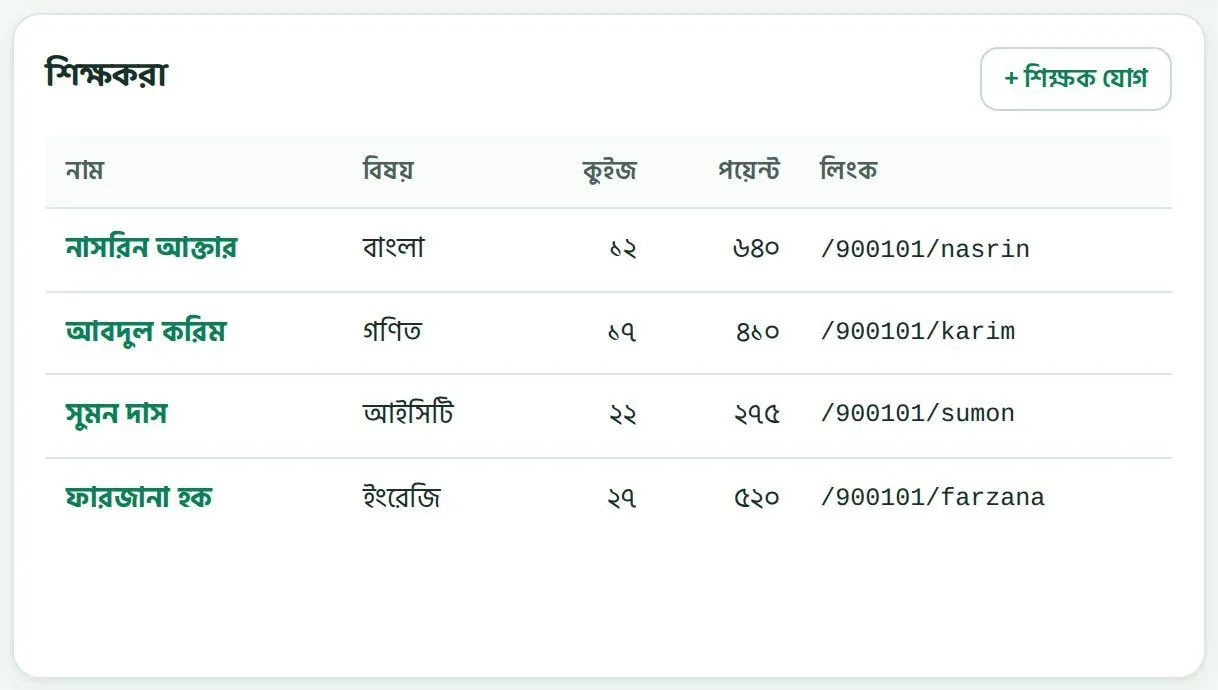
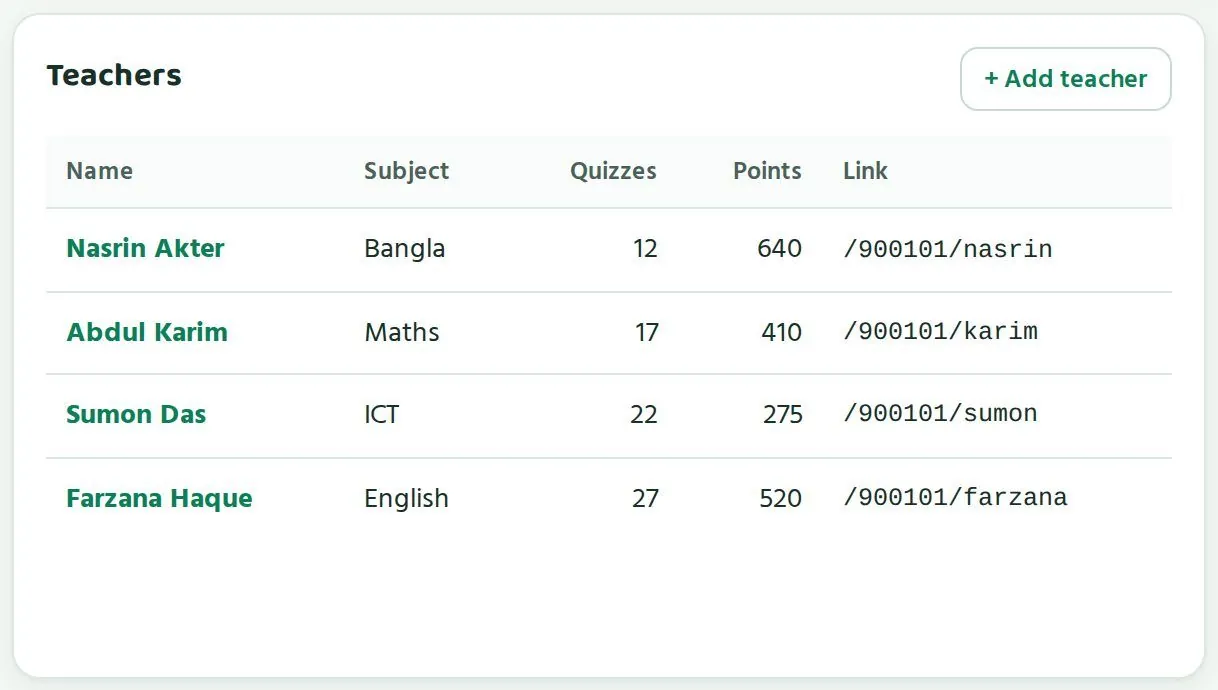
শিক্ষকদের তালিকা পড়াReading the teachers table
- নাম: শিক্ষকের নাম। নামে চাপলে তাঁর পাতা খোলে।Name: the teacher's name. Tap it to open their page.
- বিষয়: তিনি কোন বিষয় পড়ান।Subject: the subject they teach.
- কুইজ: তিনি কতগুলো কুইজ দিয়েছেন।Quizzes: how many quizzes they have set.
- পয়েন্ট: প্রশ্ন লেখা আর যাচাইয়ের জন্য পাওয়া পয়েন্ট।Points: points earned for writing and verifying questions.
- লিংক: শিক্ষকের নিজের লিংক, যেমন
/900101/nasrinবা/900101/karim।Link: the teacher's own link, such as/900101/nasrinor/900101/karim.
ছবির উদাহরণে নাসরিন আক্তার ১২টা কুইজ দিয়েছেন আর ৬৪০ পয়েন্ট পেয়েছেন। আবদুল করিম দিয়েছেন ১৭টা কুইজ। সুমন দাস ২২টা, ফারজানা হক ২৭টা। কুইজ কম দেখলে আগে দেখুন তাঁর ক্লাস কয়টা। সংখ্যাটা শিক্ষকের সাথে কথা শুরু করার একটা উপায়।
In the example, Nasrin Akter has set 12 quizzes and earned 640 points. Abdul Karim has set 17, Sumon Das 22 and Farzana Haque 27. If a count looks low, first check how many classes that teacher has. The number is a way to start a conversation with the teacher.
কুইজ দেওয়ায় উৎসাহ দেওয়াEncouraging teachers to set quizzes
শিক্ষক নিজের পাতার "কুইজ দাও" অংশ থেকে কুইজ দেন। সেখানে তিনি বাছেন শ্রেণি, বিষয়, অধ্যায়, প্রশ্ন সংখ্যা (৮টা মানে ৫ মিনিট, অথবা ১২টা), জমার তারিখ আর সময়, আর কঠিনতা (মিশ্র, মানে সহজ থেকে কঠিন, অথবা সহজ)। তিনটা সুইচও থাকে: বাসা থেকে দেওয়া যাবে কি না, কুইজ শেষে ঠিক উত্তর আর বইয়ের পাতা দেখাবে কি না, আর অভিভাবককে SMS যাবে কি না।
Teachers set quizzes from the "Set a quiz" tab on their page. They choose class, subject, chapter, number of questions (8 means 5 minutes, or 12), due date and time, and difficulty (mixed easy to hard, or easy). There are three switches: students can do it from home, show right answers and book page after the quiz, and send SMS to guardians.
- প্রতি সপ্তাহে প্রতিটা বিষয়ে প্রতিটা শাখায় অন্তত একটা কুইজের লক্ষ্য ঠিক করুন।Set a target of at least one quiz per subject, per section, per week.
- ক্লাসের শুরুতে ৫ মিনিট কুইজের জন্য রাখতে বলুন। এতে বাসায় ফোন না থাকা শিক্ষার্থীরাও সুযোগ পায়।Suggest keeping 5 minutes at the start of class for the quiz, so students without a phone at home get a chance too.
- "কুইজের পর সঠিক উত্তর আর বইয়ের পাতা দেখাও" সুইচ চালু রাখতে উৎসাহ দিন। শিক্ষার্থী ভুল থেকে শেখে।Encourage leaving on the switch that shows right answers and the book page. Students learn from mistakes.
- শিক্ষক সভায় একজন শিক্ষককে দিয়ে দুই মিনিটে দেখান কীভাবে কুইজ দিতে হয়।At a staff meeting, have one teacher show in two minutes how to set a quiz.
প্রশ্ন যাচাইVerifying questions
পারোর সব প্রশ্ন এখন খসড়া। শিক্ষকরা বই খুলে মিলিয়ে দেখলে তবেই প্রশ্ন চালু হয়। আপনার শিক্ষকরা যত বেশি যাচাই করবেন, আপনার শিক্ষার্থীরা তত বেশি প্রশ্ন পাবে।
All Paaro questions are drafts for now. A question goes live only after teachers check it against the book. The more your teachers verify, the more questions your students get.
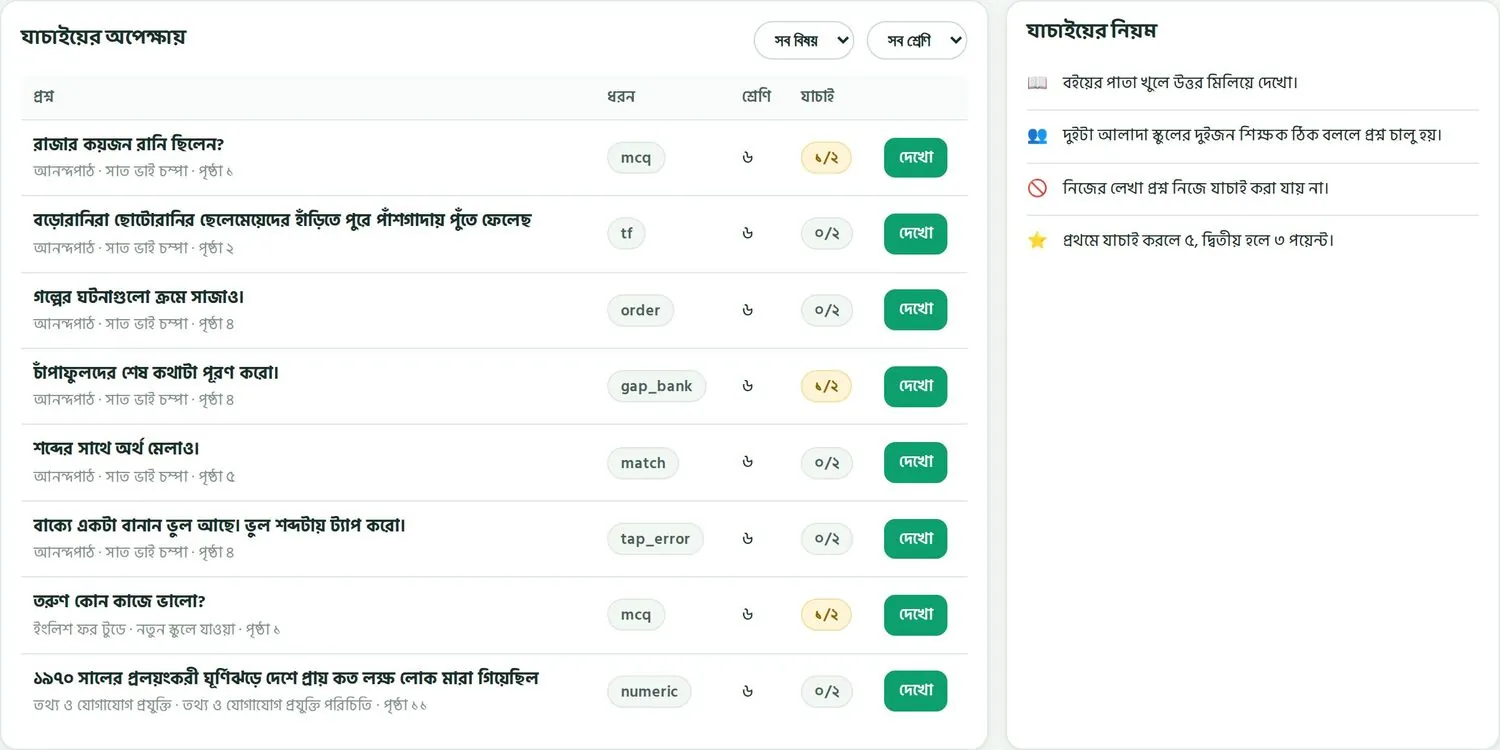
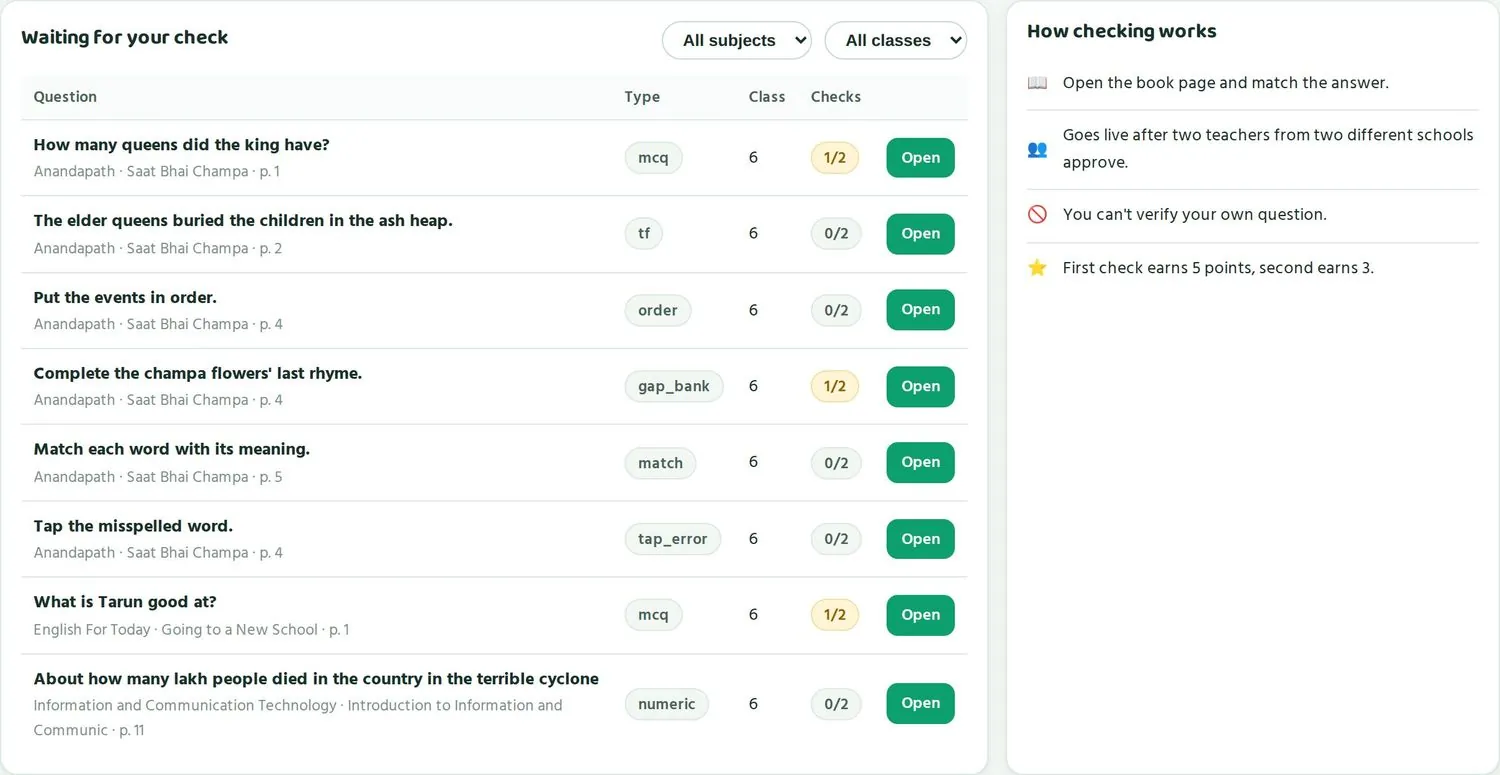
- বইয়ের পাতা খুলে উত্তর মিলিয়ে দেখতে হয়।Teachers open the book page and match the answer.
- দুইটা আলাদা স্কুলের দুইজন শিক্ষক ঠিক বললে প্রশ্ন চালু হয়।A question goes live after two teachers from two different schools approve it.
- নিজের লেখা প্রশ্ন নিজে যাচাই করা যায় না। একই স্কুলের শিক্ষকও একে অপরের প্রশ্ন যাচাই করতে পারেন না।Teachers cannot verify their own question, or a question from their own school.
- প্রশ্ন খুললে তিনটা বোতাম থাকে: "✓ ঠিক আছে", "⚑ ভুল আছে" আর "পরে দেখব"।An opened question has three buttons: "✓ Correct", "⚑ Something is wrong" and "Skip".
শিক্ষকের পয়েন্ট আর পুরস্কারTeacher points and rewards
প্রশ্ন লেখা আর যাচাইয়ের জন্য শিক্ষকরা পয়েন্ট পান। প্রত্যেক শিক্ষক নিজের পাতার "আমার পয়েন্ট" অংশে মোট পয়েন্ট, লেভেল আর জেলায় অবস্থান দেখেন। নিয়মগুলো সংক্ষেপে:
Teachers earn points for writing and verifying questions. Each teacher sees their total, level and district rank in "My points" on their page. The rules in short:
| কাজAction | পয়েন্টPoints |
|---|---|
| নিজের প্রশ্ন চালু হলেYour question goes live | +১০+10 |
| প্রথম যাচাইকারীFirst to verify | +৫+5 |
| দ্বিতীয় যাচাইকারীSecond to verify | +৩+3 |
| পরের যাচাইLater checks | +১+1 |
| সংশোধন গৃহীত হলেFix accepted | +৪+4 |
| প্রশ্নে প্রতি ১০০ শিক্ষার্থী উত্তর দিলেPer 100 students answering your question | +২ (এক প্রশ্নে সর্বোচ্চ ১০)+2 (max 10 per question) |
| মুক্তপাঠ সনদMuktopaath certificate | +১৫+15 |
| চালু হওয়ার পর ভুল ধরা পড়লেError found after going live | লেখক −১০, প্রতিটা যাচাইকারী −৫Author −10, each verifier −5 |
- দিনে সর্বোচ্চ ৬০ পয়েন্ট পাওয়া যায়।The daily cap is 60 points.
- লেভেল: ব্রোঞ্জ ২০০, সিলভার ৫০০, গোল্ড ১,০০০, প্ল্যাটিনাম ২,৫০০।Levels: Bronze 200, Silver 500, Gold 1,000, Platinum 2,500.
- প্রতিটা লেভেলে সনদ, উপজেলা আর জেলার বোর্ডে নাম, প্রশিক্ষণে অগ্রাধিকার (যেমন মুক্তপাঠের আইসিটি কোর্স), আর প্রতি টার্মে জেলার সেরা শিক্ষকদের জন্য এক্সপোজার ভিজিট।A certificate at each level, name on the upazila and district board, priority for training seats (such as the Muktopaath ICT course), and a termly exposure visit for the top teachers in each district.
- কখনো কখনো স্পনসর করা ছোট পুরস্কার থাকে। পুরস্কারের অনুরোধ অনুমোদন করে পারো টিম।Sometimes there are sponsored small rewards. Reward requests are approved by the Paaro team.
ন্যায্যতা রাখাKeeping it fair
- পয়েন্ট দিয়ে শিক্ষকের মূল্যায়ন করবেন না। পয়েন্ট হলো প্রশ্নভান্ডারের কাজের হিসাব।Do not use points to appraise teachers. Points count question-bank work.
- যাচাইয়ের জন্য তাড়া দেবেন না। তাড়াহুড়ো করে ভুল প্রশ্ন ঠিক বললে পরে পয়েন্ট কাটা যায়, আর শিক্ষার্থী ভুল শেখে।Do not rush verification. Approving a wrong question in a hurry costs points later and teaches students something wrong.
- সব বিষয়ের শিক্ষকদের সমান সুযোগ দিন। আইসিটি শিক্ষক একজন হলে তাঁর চাপ বেশি, সেটা মাথায় রাখুন।Give teachers of every subject the same chance. If there is only one ICT teacher, remember their load is heavier.
- ভালো কাজের স্বীকৃতি সবার সামনে দিন। সমস্যার কথা আলাদা করে বলুন।Praise good work in public. Discuss problems in private.
রিপোর্ট আর সভাReports and meetings
মাসিক রিপোর্ট ডাউনলোড, আর শিক্ষক, ব্যবস্থাপনা কমিটি আর উপজেলা অফিসের সাথে এটা কীভাবে ব্যবহার করবেন।Downloading the monthly report and using it with teachers, the managing committee and the upazila office.
প্রতি মাসে আপনাকে কয়েকটা সভায় স্কুলের অবস্থা বলতে হয়: শিক্ষক সভা, ব্যবস্থাপনা কমিটির সভা, উপজেলা অফিসের সভা। পারোর মাসিক রিপোর্ট এই কাজ সহজ করে। হাতে বানানো হিসাব লাগে না।
Each month you report on the school at several meetings: the staff meeting, the managing committee and the upazila office. Paaro's monthly report makes this easy, with no hand-made tallies.
মাসিক রিপোর্ট ডাউনলোডDownloading the monthly report
- আপনার স্কুলের লিংকে লগইন করুন।Log in at your school link.
- পাতার ওপরে ডানদিকে, লিংকের পাশে "মাসিক রিপোর্ট" বোতাম চাপুন।At the top right of the page, next to the link, tap "Monthly report".
- রিপোর্ট আপনার ফোন বা কম্পিউটারে ডাউনলোড হবে।The report downloads to your phone or computer.
- সভার আগে প্রিন্ট করে নিন, অথবা ফোন থেকেই দেখান।Print it before the meeting, or show it from your phone.
মাসিক রিপোর্ট আপনার স্কুলের তথ্য। স্কুলের বাইরে কাউকে পাঠানোর আগে ভেবে নিন কার জন্য কতটুকু দরকার। শিক্ষার্থীর নাম আছে এমন তালিকা কখনো সভায় বিলি করবেন না।
The monthly report is your school's data. Before sending it outside the school, think about who needs how much. Never hand out lists with student names at a meeting.
শিক্ষক সভায়At the staff meeting
শিক্ষক সভায় রিপোর্ট ব্যবহার করুন একসাথে সমস্যা সমাধানের জন্য। কারো সামনে কাউকে ছোট করবেন না। ২০ মিনিটের একটা সহজ কাঠামো:
At the staff meeting, use the report to solve problems together. Never belittle anyone in front of others. A simple 20-minute plan:
- ৫ মিনিট: চারটা বড় সংখ্যা আর গত মাসের সাথে তুলনা।5 minutes: the four big numbers and how they compare with last month.
- ৫ মিনিট: এক বা দুইটা ভালো খবর, আর যে শিক্ষকের জন্য এটা হলো তাঁর দুই কথা।5 minutes: one or two pieces of good news, with a few words from the teacher behind them.
- ৫ মিনিট: "নজর দিন" তালিকা থেকে সবচেয়ে বড় একটা সমস্যা। সবাই মিলে একটা উপায় ঠিক করুন।5 minutes: the biggest single problem from "Needs attention". Agree one fix together.
- ৫ মিনিট: আগামী মাসের লক্ষ্য, যেমন সব শাখায় ৮০% অংশগ্রহণ, আর প্রশ্ন যাচাইয়ের একটা লক্ষ্য।5 minutes: next month's targets, such as 80% participation in every section, and a question-verification target.
ব্যবস্থাপনা কমিটির সভায়At the managing committee meeting
কমিটির সদস্যরা ব্যস্ত মানুষ। তাঁদের কাছে সহজ ভাষায় তিনটা কথা বলুন: কতজন শিক্ষার্থী নিয়মিত কুইজ দিচ্ছে, কোন বিষয়ে স্কুল ভালো আর কোন বিষয়ে পিছিয়ে, আর স্কুল কী করছে। ধাপের রং দেখালে সবাই সহজে বোঝেন।
Committee members are busy people. Tell them three things in plain words: how many students quiz regularly, which subjects are strong and which are behind, and what the school is doing about it. The stage colours make this easy to see.
- "বিষয়ভিত্তিক ধাপ" বারগুলো দেখান। কোন বিষয়ে লাল আর কমলা বেশি, সেটা এক নজরে বোঝা যায়।Show the "Stage by subject" bars. Anyone can see at a glance which subject has more red and orange.
- অংশগ্রহণ কম থাকলে কমিটির সাহায্য চান। যেমন অভিভাবকদের সাথে কথা বলা, বা স্কুলে একটা বাড়তি কম্পিউটার বা ট্যাবলেট।If participation is low, ask the committee for help, such as talking to guardians or an extra computer or tablet for the school.
- ভালো শিক্ষকদের নাম নিন। কমিটির সামনে প্রশংসা শিক্ষকদের জন্য বড় উৎসাহ।Name teachers who did well. Praise in front of the committee means a lot to them.
উপজেলা অফিসের সাথেWith the upazila office
উপজেলা অফিস নিজেদের পাতায় আপনার স্কুলের সংখ্যা আর ধাপ দেখতে পায়, শিক্ষার্থীর নাম ছাড়া। তারা উপজেলার সব স্কুল তুলনা করে দেখে। যে স্কুলে অংশগ্রহণ ৬২% এর নিচে, সেটা "সাহায্য লাগবে এমন স্কুল" হিসেবে ধরা হয়। অফিসার তখন "ভিজিট" চেপে স্কুলটাকে পরিদর্শনের তালিকায় যোগ করতে পারেন।
The upazila office sees your school's numbers and stages on its own page, without student names. It compares all schools in the upazila. A school with participation below 62% counts as needing support, and the officer can add it to the visit plan with the "Visit" button.
- উপজেলা অফিস ফোন করার আগেই নিজের পাতা দেখে নিন। কোনো সংখ্যা কম থাকলে কারণ আর আপনার পরিকল্পনা তৈরি রাখুন।Look at your own page before the upazila office calls. If a number is low, have the reason and your plan ready.
- পরিদর্শনের সময় স্কুলের পাতা খুলে দেখান কোন শাখায় কী হচ্ছে। শিক্ষার্থীর নাম দেখানোর দরকার নেই।During a visit, open your school page and show what is happening section by section. There is no need to show student names.
- সাহায্য দরকার হলে সরাসরি বলুন, যেমন প্রশিক্ষণ বা যন্ত্রপাতি।If you need help, say so plainly, such as training or equipment.
মাসিক রুটিনA monthly routine
| কখনWhen | কী করবেনWhat to do | কতক্ষণHow long |
|---|---|---|
| প্রতি সপ্তাহে একদিনOne day each week | চারটা সংখ্যা আর "নজর দিন" দেখুন। যারা ১৪ দিনে কুইজ দেয়নি, তাদের তালিকা শ্রেণি শিক্ষকদের দিন।Check the four numbers and "Needs attention". Give the no-quiz list to class teachers. | ১০ মিনিট10 minutes |
| মাসের প্রথম সপ্তাহFirst week of the month | মাসিক রিপোর্ট ডাউনলোড করুন। শিক্ষক সভায় আলোচনা করুন।Download the monthly report and discuss it at the staff meeting. | ২০ মিনিট20 minutes |
| মাসের দ্বিতীয় সপ্তাহSecond week | পিছিয়ে থাকা বিষয়ের শিক্ষকদের সাথে আলাদা বসুন।Meet separately with teachers of subjects that are behind. | ১৫ মিনিট15 minutes |
| মাসের তৃতীয় সপ্তাহThird week | "শিক্ষকরা" তালিকায় কুইজ আর পয়েন্ট দেখুন। যাঁরা কুইজ দিচ্ছেন না, তাঁদের সাথে কথা বলুন।Look at quizzes and points in "Teachers". Talk to anyone not setting quizzes. | ১০ মিনিট10 minutes |
| মাসের শেষ সপ্তাহLast week | ব্যবস্থাপনা কমিটি বা উপজেলা অফিসের জন্য তিনটা মূল কথা লিখে রাখুন।Note three key points for the managing committee or the upazila office. | ১০ মিনিট10 minutes |
মাসে এক ঘণ্টার কম সময়েই পুরো স্কুলের খবর আপনার হাতে থাকে। নিয়মটা ধরে রাখাই আসল কাজ।
Less than an hour a month keeps the whole school in view. The real work is keeping the habit.
শিক্ষার্থী আর অভিভাবকStudents and guardians
শিক্ষার্থী আর অভিভাবক নিজেদের পাতায় কী দেখে, PIN নতুন করে দেওয়া আর অভিভাবকের SMS।What students and guardians see, giving a new PIN, and guardian SMS.
শিক্ষার্থী আর অভিভাবক কী দেখে, সেটা জানা থাকলে আপনি অভিভাবক সভায় সহজে বোঝাতে পারবেন। দুটো পাতাই ফোনের জন্য বানানো।
Knowing what students and guardians see helps you explain Paaro at guardians' meetings. Both pages are made for phones.
শিক্ষার্থীর পাতাThe student page
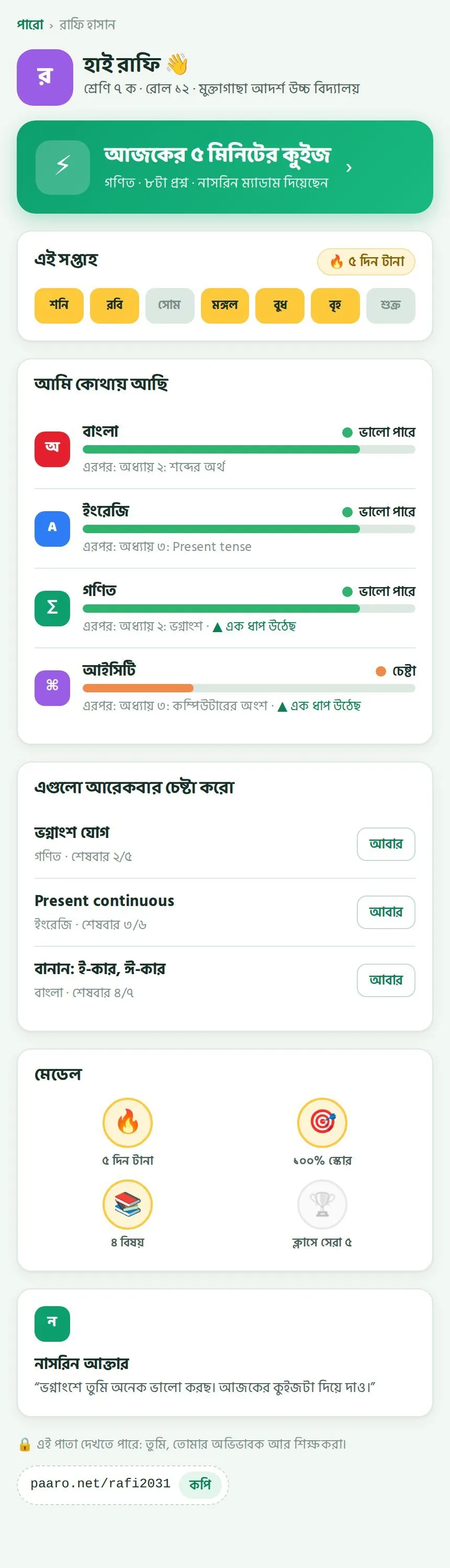
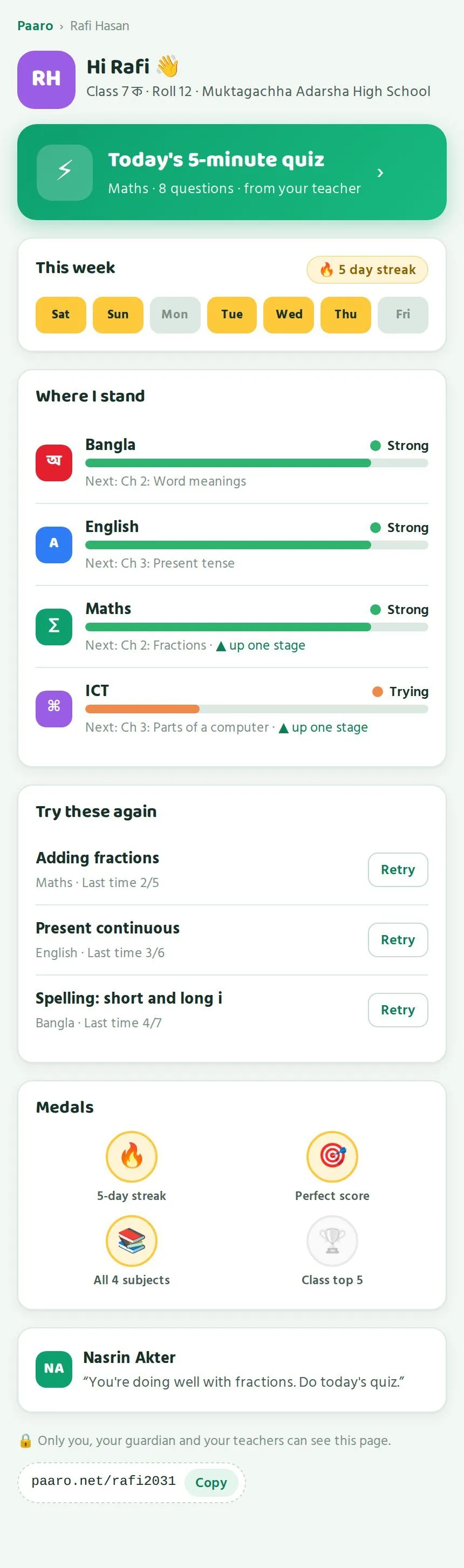
- ওপরে নাম, শ্রেণি, রোল আর স্কুল।At the top: name, class, roll and school.
- বড় সবুজ বোতাম "আজকের কুইজ"। নিচে লেখা থাকে বিষয়, কয়টা প্রশ্ন আর কোন শিক্ষক দিয়েছেন।A big green "Today's quiz" button, showing the subject, number of questions and which teacher set it.
- "এই সপ্তাহ": সপ্তাহের কোন কোন দিন কুইজ দিয়েছে, আর কত দিন টানা।"This week": which days had a quiz, and the streak.
- "আমি কোথায় আছি": প্রতিটা বিষয়ে ধাপ, এরপর কোন অধ্যায়, আর কোথায় এক ধাপ উঠেছে।"Where I stand": the stage in each subject, what comes next, and where the student moved up a stage.
- "এগুলো আরেকবার চেষ্টা করো": যে প্রশ্নগুলো আবার দেওয়া উচিত, পাশে "আবার" বোতাম।"Try these again": topics worth another go, each with a Retry button.
- মেডেল: ৫ দিন টানা, ১০০% স্কোর, ৪ বিষয়, আর ক্লাসে সেরা ৫।Medals: 5-day streak, perfect score, all 4 subjects, and class top 5.
- শিক্ষকের একটা ছোট কথা, আর নিচে শিক্ষার্থীর নিজের লিংক, সাথে "কপি"।A short note from the teacher, and at the bottom the student's own link with Copy.
পাতার নিচে লেখা থাকে এই পাতা কারা দেখতে পারে: শিক্ষার্থী নিজে, তার অভিভাবক আর শিক্ষকরা। উপজেলা বা জেলা অফিস এই পাতা দেখতে পারে না।
The bottom of the page says who can see it: the student, their guardian and their teachers. The upazila and district offices cannot see this page.
অভিভাবকের পাতাThe guardian page
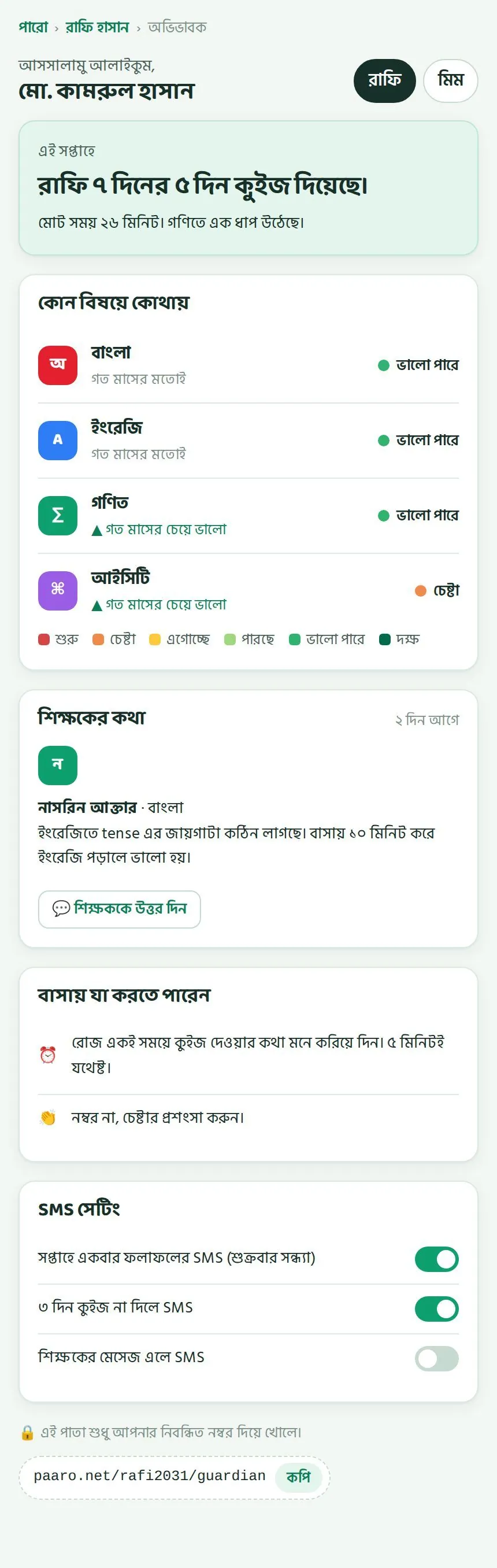
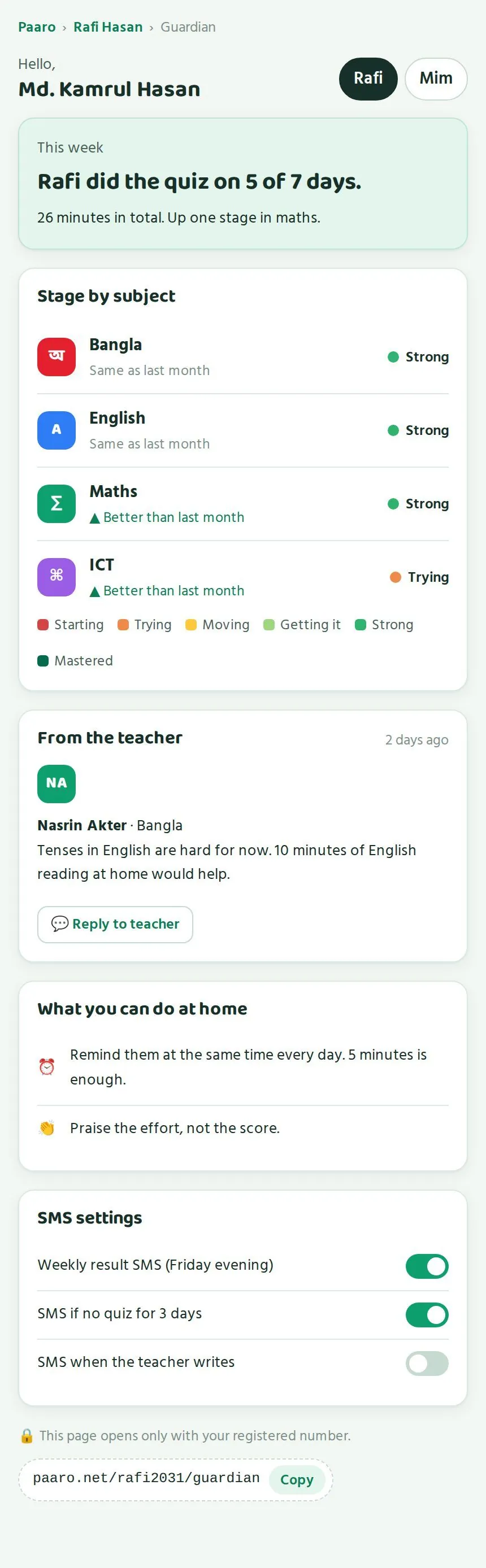
- একই অভিভাবকের একাধিক সন্তান থাকলে ওপরে নামের বোতাম চেপে বদলানো যায়, যেমন রাফি আর মিম।A guardian with more than one child switches between them with the name buttons at the top, such as Rafi and Mim.
- সপ্তাহের সারাংশ সহজ ভাষায়: "রাফি ৭ দিনের ৫ দিন কুইজ দিয়েছে। মোট সময় ২৬ মিনিট। গণিতে এক ধাপ উঠেছে।"A plain weekly summary: "Rafi did the quiz on 5 of 7 days. 26 minutes in total. Up one stage in maths."
- "কোন বিষয়ে কোথায়": প্রতিটা বিষয়ের ধাপ, আর গত মাসের চেয়ে ভালো নাকি একই।Stage by subject, and whether it is better than or the same as last month.
- "শিক্ষকের কথা": শিক্ষকের বার্তা, আর "শিক্ষককে উত্তর দিন" বোতাম।The teacher's message, with a button to reply to the teacher.
- "বাসায় যা করতে পারেন": ছোট ছোট পরামর্শ, যেমন রোজ একই সময়ে কুইজের কথা মনে করিয়ে দেওয়া।Tips for home, such as reminding the student to do the quiz at the same time each day.
অভিভাবকের SMSGuardian SMS
অভিভাবক নিজেই ঠিক করেন কোন SMS পাবেন। "SMS সেটিং" অংশে তিনটা সুইচ আছে:
Guardians choose which SMS they get. The SMS settings have three switches:
- সপ্তাহে একবার ফলাফলের SMS, শুক্রবার সন্ধ্যায়।A weekly result SMS, on Friday evening.
- ৩ দিন কুইজ না দিলে SMS।An SMS if there is no quiz for 3 days.
- শিক্ষকের মেসেজ এলে SMS।An SMS when the teacher writes.
অভিভাবক সপ্তাহে কয়েকটার বেশি SMS পান না, আর শুধু যেগুলো তিনি চালু করেছেন সেগুলোই পান। শিক্ষক কুইজ দেওয়ার সময় "অভিভাবককে SMS যাবে" সুইচ চালু করলে, অথবা "যাদের সাহায্য দরকার" তালিকার SMS বোতাম চাপলেও অভিভাবক খবর পান।
Guardians receive at most a few SMS a week, and only what they switch on. Guardians also hear from the school when a teacher turns on "send SMS to guardians" while setting a quiz, or uses the SMS button in "Students who need help".
অভিভাবক কীভাবে ঢোকেনHow guardians log in
- অভিভাবক ফোনে সন্তানের কোডের পরে guardian লিখে লিংক খোলেন, যেমন
paaro.net/rafi2031/guardian।The guardian opens the student code followed by guardian, for examplepaaro.net/rafi2031/guardian. - নিবন্ধিত মোবাইল নম্বর লেখেন।They type the registered mobile number.
- SMS এ আসা কোড লেখেন। কোড শুধু সেই নম্বরেই যায় যেটা শিক্ষার্থীর সাথে নিবন্ধিত।They type the code from the SMS. The code only goes to the number registered with the student.
PIN নতুন করে দেওয়াGiving a new PIN
শিক্ষার্থী PIN ভুলে যাবে, এটা স্বাভাবিক। পরপর ৫ বার ভুল PIN দিলে অ্যাকাউন্ট ১৫ মিনিট বন্ধ থাকে। PIN একদম মনে না থাকলে শিক্ষক বা প্রধান শিক্ষক নতুন PIN দিতে পারেন। সাধারণত শ্রেণি বা বিষয় শিক্ষকই এটা করবেন। আপনার কাছে এলে আপনিও দিতে পারেন।
Students forget PINs, and that is normal. After 5 wrong PINs, the account locks for 15 minutes. If the PIN is truly forgotten, a teacher or the head teacher can give a new one. Usually the class or subject teacher does this, and you can too if the student comes to you.
- নতুন PIN দেওয়ার আগে নিশ্চিত হোন শিক্ষার্থী নিজেই চাইছে।Before giving a new PIN, make sure the student is the one asking.
- নতুন PIN শিক্ষার্থীকে সরাসরি দিন, অন্য কারো হাতে না।Give the new PIN to the student directly, never through someone else.
- শিক্ষার্থীকে বলুন PIN কারো সাথে ভাগ না করতে, বন্ধুর সাথেও না।Tell students never to share their PIN, even with friends.
অভিভাবক সভায় কী বলবেনWhat to say at a guardians' meeting
- পারো একটা ছোট কুইজ। এটা দেখায় শেখা কেমন এগোচ্ছে।Paaro is a short quiz. It shows how learning is going.
- আপনার ফোনে সন্তানের পাতা দেখতে পারবেন। শুধু আপনার নম্বরেই কোড যাবে।You can see your child's page on your phone. The code only goes to your number.
- নম্বর বদলালে স্কুলকে জানান।Tell the school if your number changes.
- সন্তানের চেষ্টার প্রশংসা করুন। এটাই সবচেয়ে বড় উৎসাহ।Praise your child's effort. It is the best encouragement.
গোপনীয়তা আর দায়িত্বPrivacy and responsibilities
কে কী দেখতে পারে, উপজেলার ওপরে নাম দেখা যায় না, আর PIN ও তালিকা নিরাপদ রাখা।Who sees what, no names above upazila, and keeping PINs and lists safe.
পারোতে শিক্ষার্থীর নাম আর শেখার তথ্য থাকে। তাই কে কী দেখতে পারবে, সেটা শুরু থেকেই ঠিক করা আছে। স্কুলের ভেতরে আপনি সব দেখতে পান, তাই আপনার দায়িত্বও বেশি।
Paaro holds students' names and learning data, so who can see what is fixed from the start. Inside the school you see everything, which also makes your responsibility bigger.
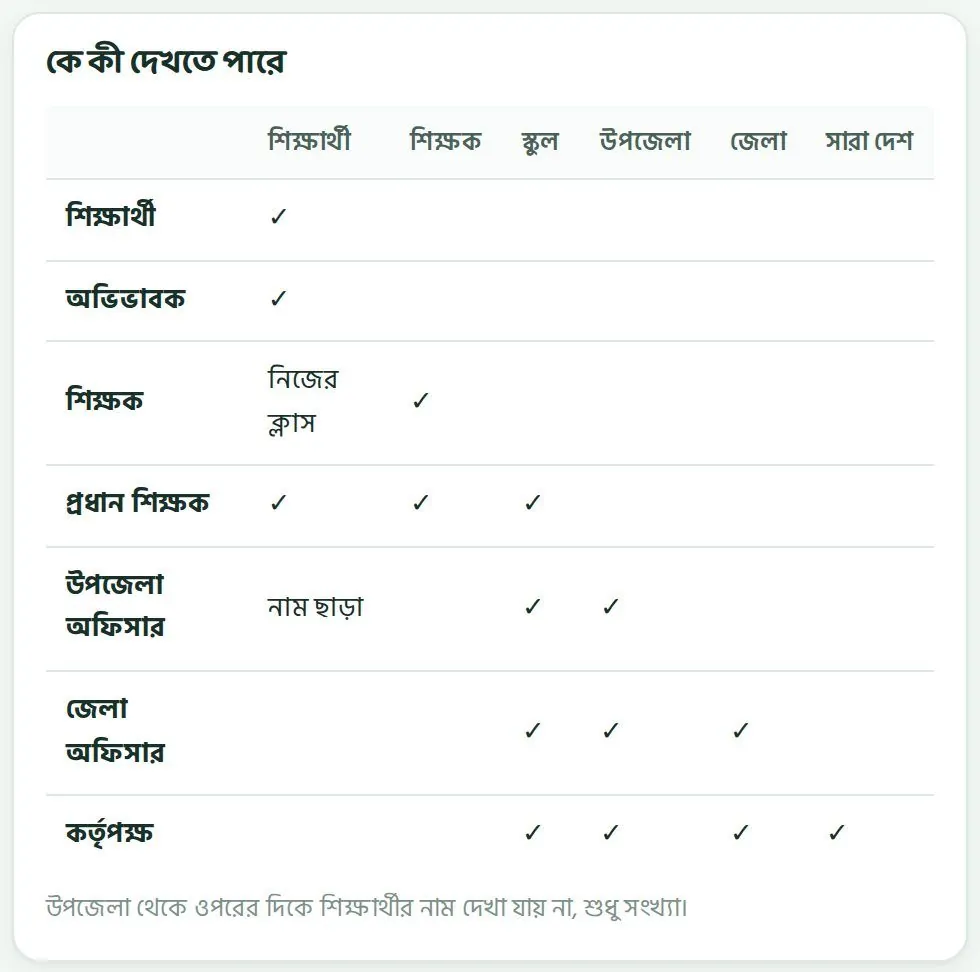
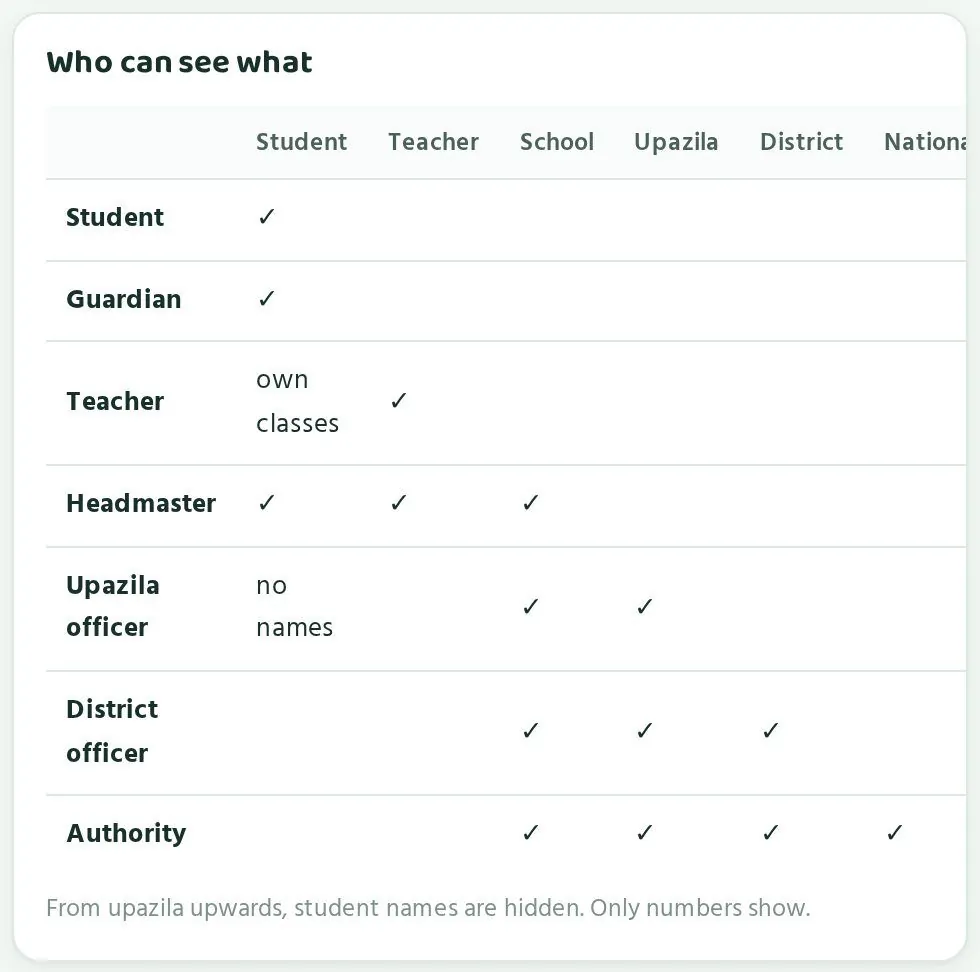
| কেWho | কী খুলতে পারেCan open |
|---|---|
| শিক্ষার্থীStudent | নিজের পাতাOwn page |
| অভিভাবকGuardian | নিজের সন্তানদের পাতাOwn children's pages |
| শিক্ষকTeacher | নিজের পাতা, নিজের ক্লাসের শিক্ষার্থীOwn page, students in own classes |
| প্রধান শিক্ষকHead teacher | স্কুলের পাতা, স্কুলের সব শিক্ষক আর শিক্ষার্থীSchool page, all teachers and students of the school |
| উপজেলা অফিসারUpazila officer | উপজেলার পাতা আর উপজেলার স্কুলের পাতা, সংখ্যা আর ধাপ হিসেবে, শিক্ষার্থীর নাম ছাড়াUpazila page and school pages in the upazila, as numbers and stages, with no student names |
| জেলা অফিসারDistrict officer | জেলা, তার উপজেলা আর স্কুল, সংখ্যা হিসেবে, নাম ছাড়াDistrict, its upazilas and schools, as numbers, no names |
| কর্তৃপক্ষAuthority | সব কিছু, সংখ্যা হিসেবে, নাম ছাড়াEverything, as numbers, no names |
উপজেলা থেকে ওপরে কোনো নাম নেইNo names from upazila upwards
উপজেলা থেকে ওপরের দিকে কোনো পাতায় শিক্ষার্থীর নাম দেখায় না। উপজেলা, জেলা আর কর্তৃপক্ষ দেখে শুধু সংখ্যা, শতাংশ আর ধাপ। কোন শিক্ষার্থী কোথায় আছে, সেটা জানেন শুধু স্কুলের ভেতরের মানুষ: শিক্ষক, আপনি, আর শিক্ষার্থীর নিজের অভিভাবক।
From upazila level upwards, no page shows student names. The upazila, district and Authority see only numbers, percentages and stages. Which student stands where is known only inside the school: teachers, you, and the student's own guardian.
তাই উপজেলা অফিস কোনো শিক্ষার্থীর নাম চাইলে পারোর নিয়মটা মনে করিয়ে দিন। পরিদর্শনে সংখ্যা আর ধাপ দেখানোই যথেষ্ট।
So if the upazila office asks for a student's name, remind them of Paaro's rule. Numbers and stages are enough for a visit.
আপনার দায়িত্বYour responsibilities
- লগইন স্লিপ: স্লিপে প্রথম PIN থাকে। স্লিপ খামে রাখুন, শুধু শিক্ষার্থীর হাতে দিন। বাড়তি স্লিপ তালাবদ্ধ জায়গায় রাখুন।Login slips: slips carry the first PIN. Keep them in envelopes, hand them only to the student, and lock away spare slips.
- ডাউনলোড করা তালিকা: "তালিকা" থেকে নামানো নামের তালিকা কাজ শেষে মুছে ফেলুন। হোয়াটসঅ্যাপ গ্রুপে পাঠাবেন না।Downloaded lists: delete name lists from "List" once you are done. Do not post them in WhatsApp groups.
- CSV ফাইল: এতে নাম আর অভিভাবকের নম্বর থাকে। কাজ শেষে ফাইলটা নিরাপদ জায়গায় রাখুন বা মুছে দিন।CSV file: it has names and guardian numbers. Store it safely or delete it once the import is done.
- শেয়ার করা কম্পিউটার: স্কুলের অফিসের কম্পিউটারে কাজ শেষে লগআউট করুন।Shared computers: log out after using the school office computer.
- শিক্ষক অনুমোদন: শুধু আপনার স্কুলের আসল শিক্ষককে অনুমোদন দিন। কেউ চলে গেলে পারো টিমকে জানান।Teacher approval: approve only real teachers of your school. Tell the Paaro team when someone leaves.
- SMS কোড: আপনার লগইনের SMS কোড কাউকে বলবেন না, অফিস সহকারীকেও না।SMS codes: never tell anyone your login code, not even your office assistant.
পারো কীভাবে তথ্য রাখেHow Paaro keeps data
- তথ্য নিরাপদে রাখা হয়। পাইলটের সময় প্রতিদিন ব্যাকআপ নেওয়া হয়।Data is stored securely, with daily backups during the pilot.
- পারো টিমের প্রতিটা কাজের রেকর্ড রাখা হয়।Every admin action by the Paaro team is logged.
- উত্তর মেলানো হয় সার্ভারে। শিক্ষার্থী জমা দেওয়ার আগে উত্তর দেখতে পায় না।Answers are checked on the server. Students cannot see answers before submitting.
- SMS যায় বাংলাদেশের একটা SMS সেবার মাধ্যমে।SMS go through a Bangladeshi SMS provider.
কোনো শিক্ষার্থীর তথ্য ভুল হাতে গেছে মনে হলে দেরি করবেন না। সাথে সাথে পারো টিমকে hello@paaro.net এ লিখুন।
If you think a student's data has reached the wrong person, do not wait. Write to the Paaro team at hello@paaro.net straight away.
সাধারণ প্রশ্নFrequently asked questions
প্রধান শিক্ষকরা সবচেয়ে বেশি যা জানতে চান।What head teachers ask most often.
আমার স্কুলের লিংক কী?What is my school's link?
paaro.net এর পরে আপনার স্কুলের ৬ অঙ্কের EIIN। যেমন paaro.net/900101।
paaro.net followed by your school's 6-digit EIIN, for example paaro.net/900101.
লিংক জানলে যে কেউ কি আমার স্কুলের তথ্য দেখতে পারবে?Can anyone who knows the link see my school's data?
না। প্রতিটা পাতায় লগইন লাগে। ঠিক মানুষ লগইন না করলে ভেতরের তথ্য খোলে না।
No. Every page asks for login, and the data opens only for the right person.
SMS কোড আসছে না। কী করব?The SMS code is not arriving. What should I do?
নেটওয়ার্ক দেখুন আর একটু অপেক্ষা করুন। এক ঘণ্টায় একটা নম্বরে সর্বোচ্চ ৩টা কোড যায়, আর প্রতিটা কোড ৫ মিনিট কাজ করে। চাইলে Google দিয়েও ঢুকতে পারেন।
Check the network and wait a little. A number gets at most 3 codes an hour, and each code works for 5 minutes. You can also log in with Google.
আমার অ্যাকাউন্ট কে চালু করবে?Who switches on my account?
প্রধান শিক্ষকের অ্যাকাউন্ট অনুমোদন করে পারো টিম। প্রশ্ন থাকলে hello@paaro.net এ লিখুন।
Head teacher accounts are approved by the Paaro team. Write to hello@paaro.net with any question.
দুজন শিক্ষকের নাম একই। লিংক কী হবে?Two teachers have the same name. What happens to the link?
দ্বিতীয়জনের লিংকের শেষে ২ বসে, যেমন paaro.net/900101/nasrin2। "শিক্ষক যোগ করো" জানালার নীল ঘরে এটা আগেই দেখায়।
The second one gets a 2 at the end, such as paaro.net/900101/nasrin2. The blue box in the "Add a teacher" window shows it before you add.
CSV ফাইলে একই শিক্ষার্থী দুবার থাকলে কী হবে?What if a student appears twice in the CSV?
পারো আগে থেকে থাকা শিক্ষার্থীকে আলাদা করে দেখায়। একই শিক্ষার্থী দুবার যোগ হয় না।
Paaro flags students who already exist, so nobody is added twice.
শিক্ষার্থী পরের ক্লাসে উঠলে কোড কি বদলাবে?Does a student's code change when they move up a class?
না। শিক্ষার্থীর কোড কখনো বদলায় না।
No. A student code never changes.
শিক্ষার্থী PIN ভুলে গেছে।A student has forgotten their PIN.
শিক্ষক বা আপনি নতুন PIN দিতে পারেন। ৫ বার ভুল দিলে অ্যাকাউন্ট ১৫ মিনিট বন্ধ থাকে, তারপর আবার চেষ্টা করা যায়।
A teacher or you can give a new PIN. After 5 wrong tries the account locks for 15 minutes, then the student can try again.
যে শিক্ষার্থীর ফোন নেই, সে কীভাবে কুইজ দেবে?How does a student without a phone take the quiz?
পারো যেকোনো ফোনে চলে, ক্লাসের স্মার্ট বোর্ডেও চলে। ক্লাসে ৫ মিনিট রাখলে বা স্কুলের কম্পিউটারে ব্যবস্থা করলে সবাই সুযোগ পায়।
Paaro works on any phone and on a classroom smart board. Keeping 5 minutes in class or using a school computer gives everyone a chance.
উপজেলা অফিস কি আমার শিক্ষার্থীদের নাম দেখতে পায়?Can the upazila office see my students' names?
না। উপজেলা থেকে ওপরে শুধু সংখ্যা আর ধাপ দেখা যায়, কোনো নাম না।
No. From upazila upwards only numbers and stages show, never names.
প্রশ্নে ভুল পেলে কী করব?What if we find a mistake in a question?
শিক্ষক যাচাইয়ের সময় "⚑ ভুল আছে" চেপে মন্তব্যে কারণ লিখবেন। সংশোধন গৃহীত হলে তিনি ৪ পয়েন্ট পান।
When checking, the teacher taps "⚑ Something is wrong" and writes the reason in the comment box. An accepted fix earns 4 points.
আমার স্কুল পারোতে নেই। কী করব?My school is not on Paaro. What do I do?
paaro.net এর পরে EIIN লিখে খুলুন আর "পারোতে যোগ দিতে চাই" চাপুন। পারো টিম অনুরোধ দেখে স্কুল যোগ করবে।
Open paaro.net followed by your EIIN and tap "Ask to join Paaro". The Paaro team will review the request and add the school.
আমাদের মাদ্রাসা। পারো কি আমাদের জন্যও?We are a madrasah. Is Paaro for us too?
হ্যাঁ। পারো সাধারণ, ইংলিশ ভার্সন, মাদ্রাসা (দাখিল ও আলিম) আর কারিগরি, চার ধারার জন্যই।
Yes. Paaro works for all four streams: general, English version, madrasah (dakhil and alim) and technical.
এক পাতায় সবQuick reference
প্রধান শিক্ষকের জন্য সব জরুরি কথা এক পাতায়।Everything a head teacher needs on one page.
| কাজTask | কোথায়Where |
|---|---|
| স্কুলের পাতা খোলাOpen the school page | paaro.net/900101 (আপনার EIIN)paaro.net/900101 (your EIIN) |
| লগইনLog in | "Google দিয়ে ঢোকো" অথবা মোবাইল আর "কোড পাঠাও (SMS)""Continue with Google" or mobile and "Send code (SMS)" |
| শিক্ষক যোগAdd a teacher | "শিক্ষকরা" অংশে "+ শিক্ষক যোগ""+ Add teacher" in "Teachers" |
| শিক্ষার্থী যোগImport students | "শিক্ষার্থী যোগ (CSV)""Import students (CSV)" |
| লগইন স্লিপLogin slips | "লগইন স্লিপ প্রিন্ট""Print login slips" |
| মাসিক রিপোর্টMonthly report | ওপরে ডানদিকে "মাসিক রিপোর্ট""Monthly report" at the top right |
| ১৪ দিনে কুইজ দেয়নি এমন তালিকাNo-quiz-in-14-days list | "নজর দিন" অংশে "তালিকা""List" in "Needs attention" |
| স্কুল যোগ করার অনুরোধAsk to join | EIIN লিংকে "পারোতে যোগ দিতে চাই""Ask to join Paaro" on the EIIN link |
| পারো টিমPaaro team | hello@paaro.nethello@paaro.net |
মনে রাখার সংখ্যাNumbers to remember
- কুইজ ছোট, সাধারণত ৮টা প্রশ্ন।Quiz: short, usually 8 questions.
- SMS কোড ৬ অঙ্ক, ৫ মিনিট চলে, ঘণ্টায় সর্বোচ্চ ৩টা।SMS code: 6 digits, valid 5 minutes, at most 3 an hour.
- শিক্ষার্থীর PIN ৪ অঙ্ক। ৫ বার ভুল হলে ১৫ মিনিট বন্ধ।Student PIN: 4 digits. 5 wrong tries lock it for 15 minutes.
- ৩ নম্বর ধাপের নিচে থাকলে শিক্ষার্থী নিজে থেকেই সহজ পথ পায়।Below stage 3, a student gets the easier path automatically.
- উপজেলা অফিসের হিসাবে ৬২% এর নিচে অংশগ্রহণ মানে সাহায্য দরকার।Below 62% participation, the upazila office marks a school as needing support.
ছয় ধাপSix stages
- ১ শুরু (লাল), ২ চেষ্টা (কমলা), ৩ এগোচ্ছে (হলুদ)।1 Starting (red), 2 Trying (orange), 3 Moving (yellow).
- ৪ পারছে (হালকা সবুজ), ৫ ভালো পারে (সবুজ), ৬ দক্ষ (গাঢ় সবুজ)।4 Getting it (light green), 5 Strong (green), 6 Mastered (dark green).
প্রতি সপ্তাহে ১০ মিনিটTen minutes each week
- চারটা বড় সংখ্যা দেখুন।Check the four big numbers.
- কমলা সারির শাখার শিক্ষকের সাথে কথা বলুন।Talk to teachers of orange sections.
- "নজর দিন" তালিকা ধরে কাজ ভাগ করুন।Share out actions from "Needs attention".
- একটা ভালো খবরের জন্য কাউকে ধন্যবাদ দিন।Thank someone for a piece of good news.
কখনো করবেন নাNever
- SMS কোড বা PIN কাউকে বলবেন না।Share an SMS code or PIN.
- নামের তালিকা গ্রুপে পাঠাবেন না বা নোটিস বোর্ডে টাঙাবেন না।Post name lists in groups or on notice boards.
- অচেনা কাউকে শিক্ষক হিসেবে অনুমোদন দেবেন না।Approve someone you do not know as a teacher.