পারো একজন অফিসারকে কী দেখায়What Paaro shows an officer
পারো কীভাবে কাজ করে, আর আপনার পাতায় কোন তথ্য আসে, এক নজরে।How Paaro works, and what reaches your page, at a glance.
পারো হলো ক্লাস ১২ পর্যন্ত বাংলাদেশের শিক্ষার্থীদের শেখায় সাহায্য করার একটা প্ল্যাটফর্ম। ঠিকানা paaro.net। শিক্ষার্থী যেকোনো ফোনে, ক্লাসে বা বাসায়, ছোট একটা কুইজ দেয়। সাধারণত কুইজে ৮টা প্রশ্ন থাকে। এরপর শিক্ষক, প্রধান শিক্ষক আর শিক্ষা অফিসার, সবাই নিজের নিজের পর্যায় থেকে দেখতে পান শিক্ষার্থীরা কোথায় দাঁড়িয়ে আছে।
Paaro is a learning-support platform for Bangladeshi students up to class 12, at paaro.net. A student takes a short quiz on any phone, in class or at home. A quiz usually has 8 questions. Teachers, head teachers and education officers can then each see, at their own level, where students stand.
আপনি উপজেলা মাধ্যমিক শিক্ষা অফিসার বা জেলা শিক্ষা অফিসার হলে পারো আপনাকে আপনার এলাকার ছবিটা দেখায়। কতগুলো প্রতিষ্ঠান আছে, কতগুলো পারোতে যোগ দিয়েছে, এই সপ্তাহে কত শিক্ষার্থী কুইজ দিয়েছে, আর কোন বিষয়ে শিক্ষার্থীরা কোন ধাপে আছে। কোন স্কুলের পাশে এখন দাঁড়ানো দরকার, সেটাও পাতায় আলাদা করে চোখে পড়ে।
If you are an upazila secondary education officer or a district education officer, Paaro shows you the picture of your area: how many institutions there are, how many have joined Paaro, how many students did a quiz this week, and which stage students are at in each subject. The schools that need your support right now also stand out on the page.
চারটি বিষয়Four subjects
পারোতে এখন চারটি বিষয় আছে: বাংলা, ইংরেজি, গণিত আর আইসিটি। প্রশ্ন আসে NCTB ২০২৬ সালের পাঠ্যবই থেকে। বাংলা আর ইংরেজি বই সব ধারায় একই। গণিত আর আইসিটির ইংলিশ ভার্সন বই বাংলা বইয়ের অনুবাদ, তাই এই দুই বিষয়ের প্রতিটি প্রশ্ন বাংলা আর ইংরেজি দুই ভাষাতেই আছে।
Paaro covers four subjects today: Bangla, English, maths and ICT. Questions come from the NCTB 2026 textbooks. The Bangla and English books are the same in every stream. The English-version maths and ICT books are translations of the Bangla books, so every maths and ICT question exists in both Bangla and English.
পারো চারটি ধারার প্রতিষ্ঠানে চলে: সাধারণ (বাংলা মাধ্যম), ইংলিশ ভার্সন, মাদ্রাসা (দাখিল ও আলিম) আর কারিগরি। আপনার পাতায় প্রতিষ্ঠানের পাশে তার ধারা লেখা থাকে, যাতে আপনি একই রকম প্রতিষ্ঠানকে পাশাপাশি রেখে দেখতে পারেন।
Paaro runs in four streams of institution: general (Bangla medium), English version, madrasah (dakhil and alim) and technical. Your page shows each institution's stream next to its name, so you can compare like with like.
প্রতিটি প্রশ্নের সাথে বইয়ের ছাপা পাতার নম্বর থাকে। কুইজ শেষে শিক্ষার্থী সঠিক উত্তর আর বইয়ের সেই পাতাটা দেখতে পারে। উত্তর যাচাই হয় সার্ভারে, তাই জমা দেওয়ার আগে শিক্ষার্থী উত্তর দেখতে পায় না। প্রশ্ন লাইভ হওয়ার আগে শিক্ষকেরা বই মিলিয়ে সেগুলো যাচাই করেন।
Every question carries the printed book page where its answer is found. After a quiz, the student can see the right answer and that page. Answers are checked on the server, so students cannot see them before submitting. Teachers check questions against the book before they go live.
ছয়টি ধাপSix stages
পারো শিক্ষার্থীর অবস্থা দেখায় ধাপ দিয়ে। প্রতিটি অধ্যায়ে প্রতিটি শিক্ষার্থী ছয়টি ধাপের একটায় থাকে। ধাপগুলো নিচ থেকে ওপরে সাজানো, প্রতিটার আলাদা রং। আপনার পাতার সব রঙিন বার এই ছয় রং দিয়েই তৈরি।
Paaro places students on stages. In each chapter, each student is at one of six stages, ordered from lowest to highest, each with its own colour. Every coloured bar on your page is built from these six colours.
কোনো অধ্যায়ে শিক্ষার্থী ৩ নম্বর ধাপের নিচে থাকলে পারো নিজে থেকেই তাকে একটা সহজ পথ দেয়: আগে সহজ প্রশ্ন আর পড়া, তারপর আবার মূল কুইজ। তাই লাল আর কমলা অংশ বড় দেখলে বুঝবেন, সেই শিক্ষার্থীরা ইতিমধ্যে বাড়তি সাহায্য পাচ্ছে। আপনার কাজ হলো দেখা, স্কুলের শিক্ষকেরা এই সাহায্যটা ঠিকমতো কাজে লাগাচ্ছেন কিনা।
When a student is below stage 3 in a chapter, Paaro automatically gives an easier path: easy questions and the lesson first, then the main quiz again. So a large red and orange share means those students are already getting extra help. Your role is to see whether the school's teachers are making good use of it.
আপনি কী দেখেন, কী দেখেন নাWhat you see and what you do not
- আপনি দেখেন সংখ্যা আর ধাপ: প্রতিষ্ঠানের সংখ্যা, অংশগ্রহণের হার, ধাপের ভাগ, ৮ সপ্তাহের ধারা।You see numbers and stages: institution counts, participation rates, the share at each stage, and the 8-week trend.
- আপনি কোনো শিক্ষার্থীর নাম দেখেন না। উপজেলা থেকে ওপরের দিকে শিক্ষার্থীর নাম কখনো দেখানো হয় না।You never see student names. From upazila level upwards, student names are never shown.
- কোনো শিক্ষার্থীর নিজের পাতা বা অভিভাবকের পাতা আপনার জন্য খোলে না।Individual student pages and guardian pages do not open for you.
- উপজেলা অফিসার দেখেন নিজের উপজেলা আর তার স্কুলগুলো। জেলা অফিসার দেখেন পুরো জেলা, তার উপজেলা আর স্কুলগুলো।An upazila officer sees their own upazila and its schools. A district officer sees the whole district, its upazilas and its schools.
এই বইয়ে উদাহরণ হিসেবে ময়মনসিংহ জেলা আর মুক্তাগাছা উপজেলা ব্যবহার করা হয়েছে। ছবিতে প্রতিষ্ঠানের মোট সংখ্যা BANBEIS ২০২৪ থেকে নেওয়া, তাই সেগুলো আসল। স্কুলের নাম, অংশগ্রহণের হার, ধাপ আর অন্য সব সংখ্যা নমুনা। আপনার পাতায় আপনার এলাকার আসল তথ্য আসবে।
This guide uses Mymensingh district and Muktagachha upazila as examples. In the screenshots, institution counts come from BANBEIS 2024 and are real. School names, participation rates, stages and all other numbers are sample data. Your own page will show the real data for your area.
পাইলট থেকে সারা দেশেFrom pilot to the whole country
শুরুতে দুই মাসের একটা পাইলট চলছে ৪ থেকে ৫টি প্রতিষ্ঠানে, প্রতি ধারা থেকে একটি করে। প্রতিষ্ঠানগুলো বেছে নিয়েছে শিক্ষা কর্তৃপক্ষ। এরপর জেলা ধরে ধরে পারো চালু হবে। তাই শুরুর দিকে আপনার উপজেলায় পারোতে থাকা স্কুলের সংখ্যা কম দেখাতে পারে। এটা স্বাভাবিক।
A two-month pilot is running first in 4 to 5 institutions, one per stream, chosen by the education authority. After that, Paaro rolls out district by district. So in the early weeks, the number of schools on Paaro in your upazila may look small. That is expected.
প্রশ্নভান্ডারে এখন ২৭টি NCTB বই থেকে ৭৬৬টি খসড়া প্রশ্ন আছে। ক্লাস ৬, ৭, ৮, ৯-১০ আর ১১-১২ এর বাংলা, প্রতিটি বইয়ের প্রথম ২-৩টি অধ্যায়। শিক্ষকেরা যাচাই করার পর প্রশ্নগুলো লাইভ হয়। তাই শুরুর দিকের তথ্য মূলত বইয়ের প্রথম অধ্যায়গুলো নিয়ে।
The question bank today holds 766 draft questions from 27 NCTB books: classes 6, 7, 8, 9-10, and Bangla for 11-12, covering the first 2-3 chapters of each book. Questions go live after teachers verify them. So early data mostly covers the first chapters of each book.
আপনার লিংক আর লগইনYour link and logging in
নিজের পাতা কীভাবে খুলবেন, আর কীভাবে লগইন করবেন।How to open your page and log in.
পারোতে প্রত্যেকের একটা সহজ লিংক আছে। লিংক দেখেই বোঝা যায় পাতাটা কার। জেলা অফিসের লিংক জেলার নাম দিয়ে, উপজেলা অফিসের লিংক জেলা আর উপজেলার নাম দিয়ে।
Everyone on Paaro has one easy link. You can tell whose page it is from the link itself. A district office link uses the district name. An upazila office link uses the district and upazila names.
| কার পাতাWhose page | লিংকLink | উদাহরণExample |
|---|---|---|
| কর্তৃপক্ষAuthority | paaro.net/dshe | paaro.net/dshe |
| জেলা অফিসDistrict office | paaro.net/[district] | paaro.net/mymensingh |
| উপজেলা অফিসUpazila office | paaro.net/[district]/[upazila] | paaro.net/mymensingh/muktagachha |
| স্কুল / প্রধান শিক্ষকSchool / head teacher | paaro.net/[EIIN] | paaro.net/900101 |
| শিক্ষকTeacher | paaro.net/[EIIN]/[name] | paaro.net/900101/nasrin |
| শিক্ষার্থীStudent | paaro.net/[name+4 digits] | paaro.net/rafi2031 |
| অভিভাবকGuardian | paaro.net/[student]/guardian | paaro.net/rafi2031/guardian |
জেলা আর উপজেলার নাম কীভাবে লিখবেনHow to write district and upazila names
- নাম ইংরেজিতে, ছোট হাতের অক্ষরে লিখুন:
paaro.net/mymensingh।Write the name in English, in lower case:paaro.net/mymensingh. - উপজেলার জন্য জেলার পরে একটা স্ল্যাশ দিয়ে উপজেলার নাম:
paaro.net/mymensingh/muktagachha।For an upazila, add a slash and the upazila name after the district:paaro.net/mymensingh/muktagachha. - নামে ফাঁকা জায়গা থাকলে সেখানে হাইফেন দিন:
paaro.net/mymensingh/mymensingh-sadar।If the name has a space, use a hyphen:paaro.net/mymensingh/mymensingh-sadar. - পুরোনো বানান লিখলেও চলবে।
paaro.net/chittagongলিখলে নিজে থেকেইpaaro.net/chattogramখুলবে। comilla, barisal, jessore আর bogra এর বেলায়ও একই কাজ হয়।Old spellings work too.paaro.net/chittagongopenspaaro.net/chattogramby itself. The same happens for comilla, barisal, jessore and bogra.
স্কুলের লিংক হলো তার ৬ অঙ্কের EIIN নম্বর, যেমন paaro.net/900101। আপনার এলাকার কোনো স্কুলের EIIN জানা থাকলে সরাসরি সেই লিংকে গিয়ে স্কুলের পাতা খুলতে পারেন।
A school's link is its 6-digit EIIN, for example paaro.net/900101. If you know the EIIN of a school in your area, you can go straight to that link to open the school's page.
লগইন করার ধাপSteps to log in
লিংকটা মনে রাখা সহজ, কিন্তু প্রতিটি পাতা খোলার আগে লগইন লাগে। সঠিক মানুষ লগইন না করলে ভেতরের তথ্য খোলে না। অফিসারেরা দুইভাবে লগইন করতে পারেন: অফিসের Google অ্যাকাউন্ট দিয়ে, অথবা নিবন্ধিত মোবাইল নম্বর আর SMS কোড দিয়ে।
The link is easy to remember, but every page asks for login. The data opens only for the right person. Officers can log in in two ways: with the office Google account, or with the registered mobile number and an SMS code.
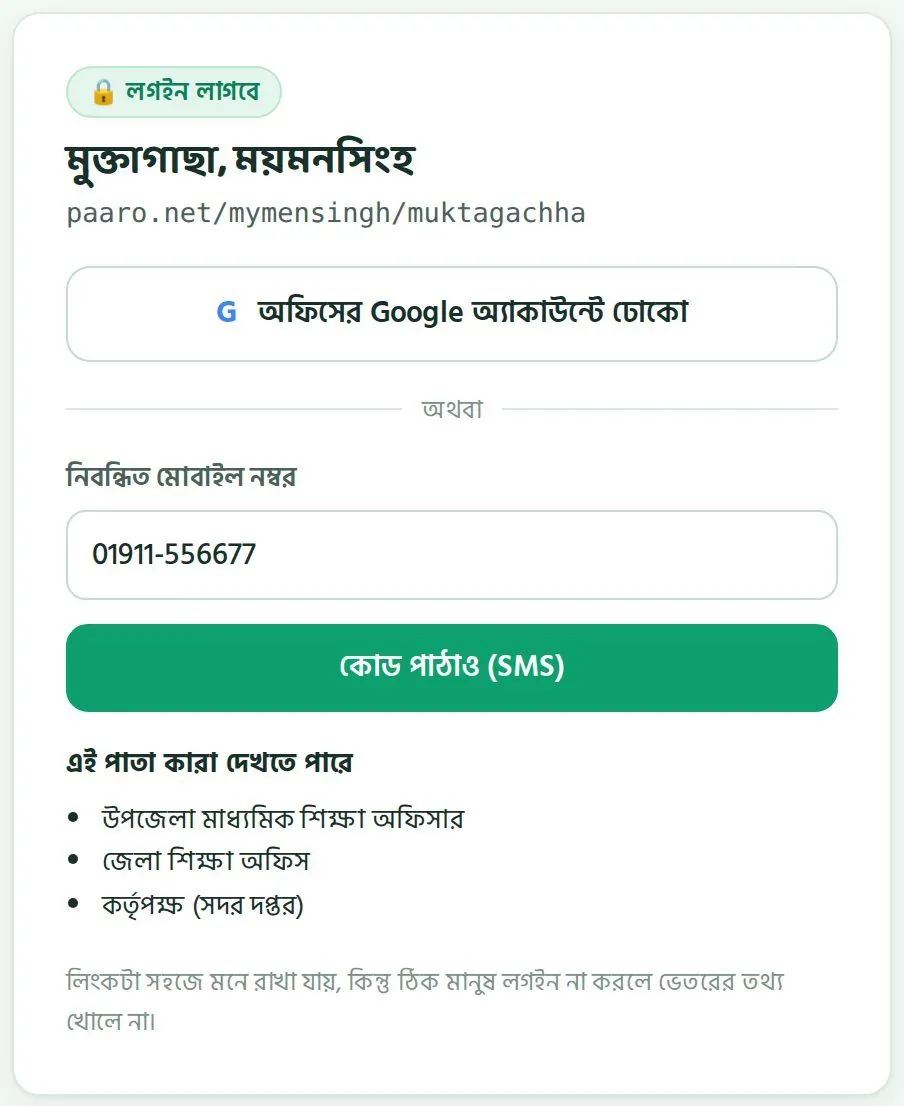
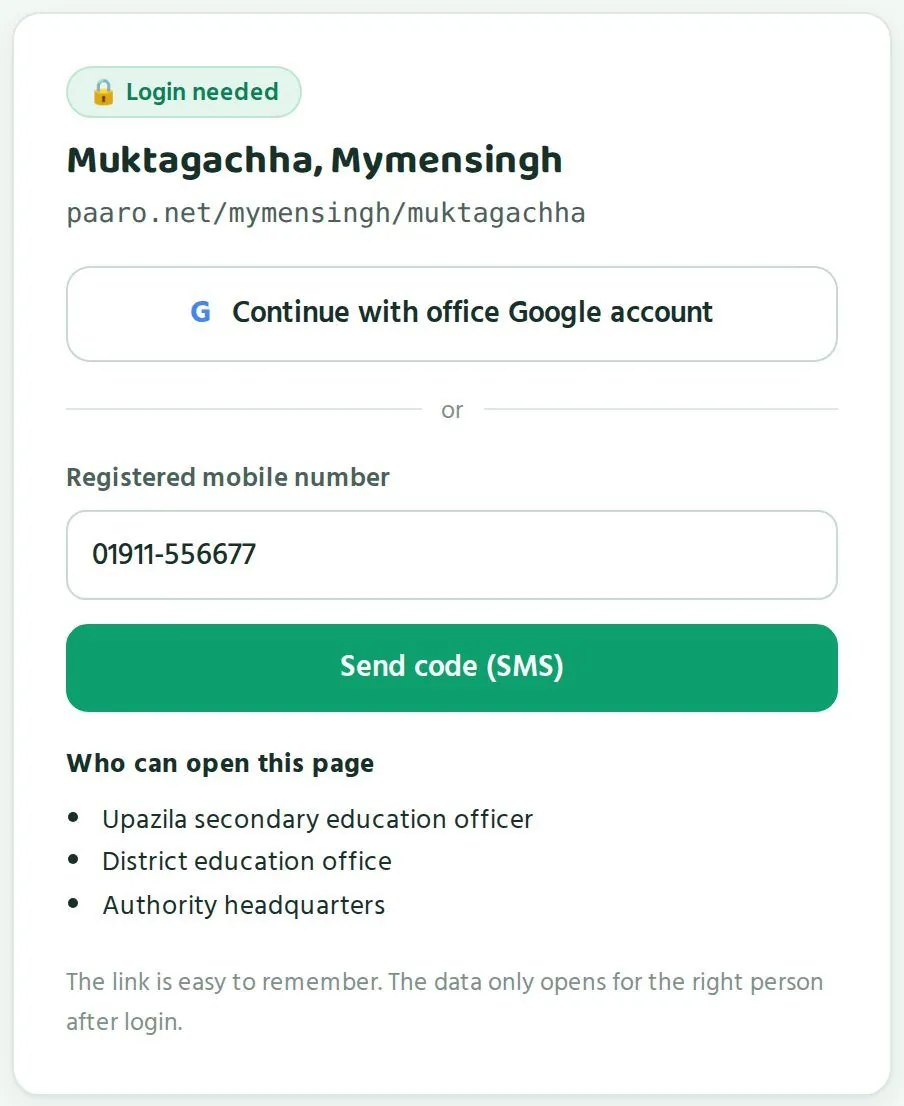
- ব্রাউজারে আপনার লিংক লিখুন, যেমন
paaro.net/mymensingh/muktagachha।Type your link in the browser, for examplepaaro.net/mymensingh/muktagachha. - লগইন পাতায় ওপরে আপনার উপজেলা আর জেলার নাম দেখে নিন। নিচে এই পাতা কারা দেখতে পারে অংশে লেখা থাকে: উপজেলা মাধ্যমিক শিক্ষা অফিসার, জেলা শিক্ষা অফিস আর কর্তৃপক্ষ (সদর দপ্তর)।On the login screen, check that your upazila and district name appear at the top. The Who can open this page section lists: upazila secondary education officer, district education office, and authority headquarters.
- অফিসের Google অ্যাকাউন্ট থাকলে অফিসের Google অ্যাকাউন্টে ঢোকো চাপুন আর সেই অ্যাকাউন্ট বেছে নিন।If you have an office Google account, tap Continue with office Google account and choose that account.
- মোবাইল দিয়ে ঢুকতে চাইলে নিবন্ধিত মোবাইল নম্বর ঘরে আপনার নম্বর লিখে কোড পাঠাও (SMS) চাপুন।To use your mobile, type your number in Registered mobile number and tap Send code (SMS).
- ফোনে আসা ৬ অঙ্কের কোডটা লিখুন। কোড ৫ মিনিট কাজ করে।Type the 6-digit code that arrives on your phone. The code works for 5 minutes.
- লগইন হলে আপনার উপজেলা বা জেলার পাতা খুলে যাবে।Once you are logged in, your upazila or district page opens.
কোড না এলে একটু অপেক্ষা করে আবার চাইতে পারেন। তবে একটা নম্বরে এক ঘণ্টায় সর্বোচ্চ ৩টা কোড যায়। বারবার চাপার আগে নম্বরটা ঠিক লিখেছেন কিনা দেখে নিন।
If the code does not arrive, wait a little and ask again. A number can receive at most 3 codes in one hour, so check that you typed the number correctly before asking again.
অ্যাকাউন্ট কোথা থেকে আসেWhere your account comes from
অফিসারদের অ্যাকাউন্ট তৈরি আর অনুমোদন করে পারো টিম। আপনার অফিসের Google অ্যাকাউন্ট বা মোবাইল নম্বর যদি এখনো নিবন্ধিত না থাকে, তাহলে hello@paaro.net ঠিকানায় ইমেইল করুন। ইমেইলে আপনার নাম, পদ, অফিস (জেলা ও উপজেলা), অফিসের ইমেইল আর মোবাইল নম্বর লিখুন। দায়িত্ব বদল হলে বা নতুন কর্মকর্তা যোগ দিলেও একই ঠিকানায় জানান।
The Paaro team creates and approves officer accounts. If your office Google account or mobile number is not registered yet, email hello@paaro.net. Include your name, post, office (district and upazila), office email and mobile number. Use the same address when duties change or a new officer joins.
নিজের লগইন কারো সাথে শেয়ার করবেন না। অফিসের অন্য কেউ পাতা দেখতে চাইলে তাঁর নামে আলাদা অ্যাকাউন্ট চেয়ে পারো টিমকে লিখুন।
Do not share your login with anyone. If a colleague in your office needs to see the page, ask the Paaro team for an account in their own name.
ভুল লিংক লিখলেIf you type a wrong link
লিংকে ভুল থাকলে পারো একটা পাতা দেখায়: এই লিংকে কোনো পাতা নেই। সেখানে কাছাকাছি সঠিক লিংকের পরামর্শ থাকে, আর লিংকের নিয়ম দেখো বোতাম থাকে। বোতাম চাপলে ওপরের নিয়মের তালিকাটা খোলে।
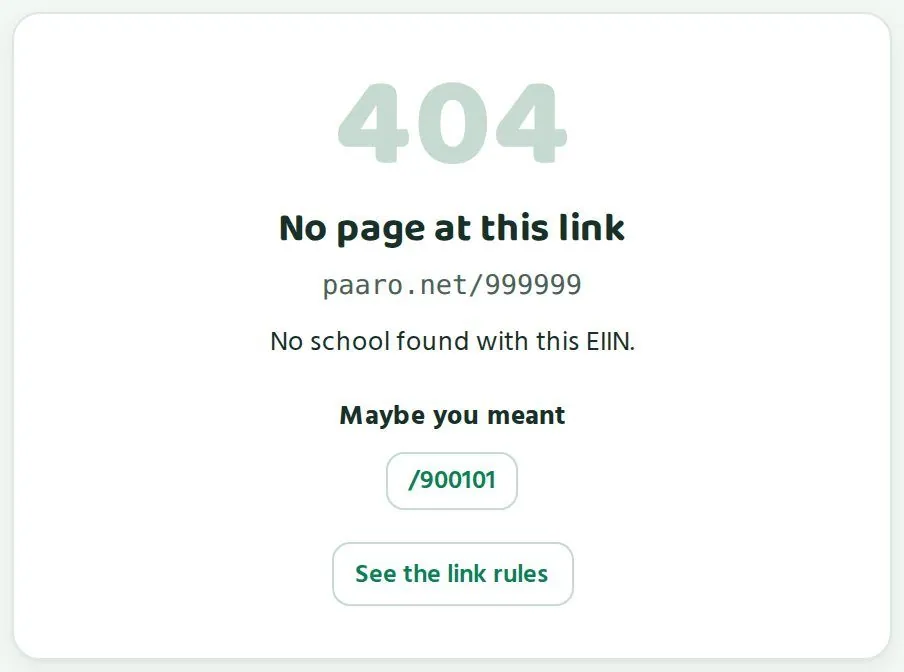
If a link is wrong, Paaro shows a page saying No page at this link. It suggests a close match under Maybe you meant, and has a See the link rules button that opens the link rules table.
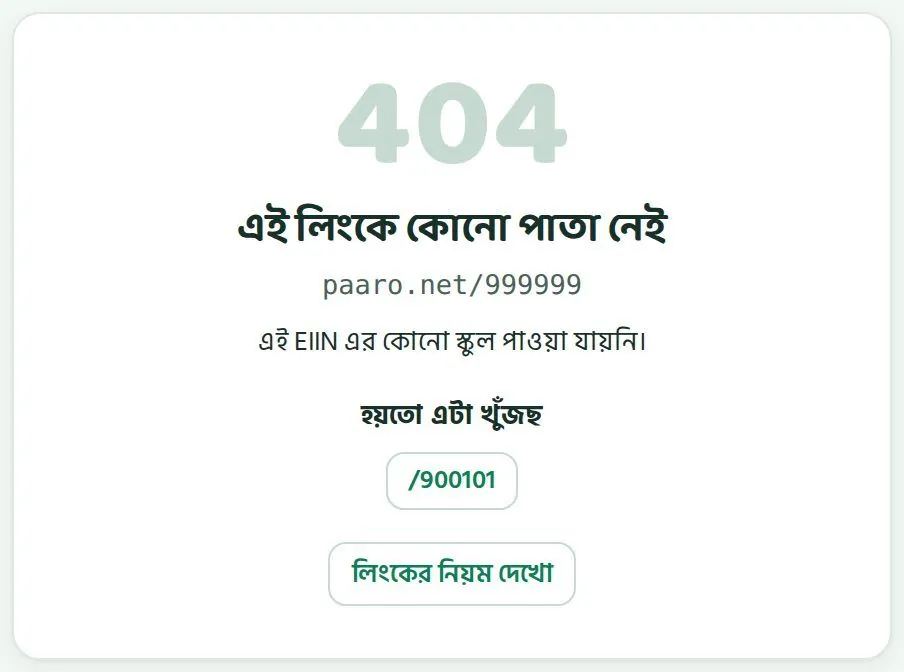
প্রতিটি পাতায় বাংলা আর ইংরেজির একটা সুইচ আছে। যে ভাষায় সুবিধা, সেটা বেছে নিন। তথ্য একই থাকে।
Every page has a Bangla/English switch. Choose the language you prefer. The data stays the same.
উপজেলার পাতাThe upazila page
চারটি সংখ্যা, স্কুলের তালিকা আর বিষয়ভিত্তিক ধাপ কীভাবে পড়বেন।How to read the four numbers, the schools table and stage by subject.
উপজেলার পাতা (paaro.net/mymensingh/muktagachha) আপনার উপজেলার পুরো ছবি এক জায়গায় দেখায়। ওপরে আছে পথনির্দেশ: কর্তৃপক্ষ › ময়মনসিংহ › মুক্তাগাছা। জেলার নামে চাপলে জেলার পাতায় যাওয়া যায়, যদি আপনার সেটা দেখার অনুমতি থাকে। ডানদিকে আছে আপনার লিংক, কপি বোতাম আর রিপোর্ট ডাউনলোডের বোতাম।
The upazila page (paaro.net/mymensingh/muktagachha) shows the whole picture of your upazila in one place. At the top is the breadcrumb: Authority › Mymensingh › Muktagachha. Tapping the district name takes you to the district page, if you have permission to see it. On the right are your link, a Copy button and a Report download button.


চারটি সংখ্যাThe four numbers
| ঘরCard | মানে কীWhat it means | ছবিতেIn the picture |
|---|---|---|
| প্রতিষ্ঠান (BANBEIS)Institutions (BANBEIS) | উপজেলায় ক্লাস ৬-১২ চালায় এমন সব প্রতিষ্ঠান, সরকারি BANBEIS ২০২৪ তালিকা থেকে।All institutions in the upazila running class 6-12, from the government BANBEIS 2024 list. | ৮২82 |
| পারোতে আছেOn Paaro | এর মধ্যে কতগুলো পারোতে যোগ দিয়েছে, আর সেটা মোটের কত শতাংশ।How many of those have joined Paaro, and what share of the total that is. | ৯, মানে ১১%9, which is 11% |
| এই সপ্তাহে কুইজ দিয়েছেDid a quiz this week | পারোতে থাকা শিক্ষার্থীদের কত শতাংশ এই সপ্তাহে কুইজ দিয়েছে, নিচে গত সপ্তাহের তুলনায় বাড়া বা কমা।The share of students on Paaro who did a quiz this week, with the change from last week underneath. | ৭৬%, ৩% বেড়েছে76%, up 3% |
| সাহায্য লাগবে এমন স্কুলSchools needing support | যেসব স্কুলে কুইজে অংশগ্রহণ ৬২% এর নিচে।Schools where quiz participation is below 62%. | ১1 |
প্রথম দুটি সংখ্যা মিলিয়ে দেখলে বোঝা যায় আপনার উপজেলায় পারো কতটা ছড়িয়েছে। ছবির উদাহরণে ৮২টির মধ্যে ৯টি প্রতিষ্ঠান পারোতে আছে। বাকি ৭৩টি এখনো যোগ দেয়নি। এদের কীভাবে আনবেন, সেটা অধ্যায় ৪ এ আছে।
Read the first two numbers together to see how far Paaro has spread in your upazila. In the example, 9 of 82 institutions are on Paaro. The other 73 have not joined yet. Chapter 4 explains how to bring them on board.
তৃতীয় সংখ্যাটা বলে যে স্কুলগুলো যোগ দিয়েছে, সেখানে শিক্ষার্থীরা নিয়মিত কুইজ দিচ্ছে কিনা। চতুর্থ সংখ্যাটা আপনার কাজের তালিকার শুরু। এটা বলে এই মুহূর্তে কয়টা স্কুলের পাশে দাঁড়ানো দরকার।
The third number tells you whether students in the schools that have joined are doing quizzes regularly. The fourth number is where your to-do list starts: it tells you how many schools need support right now.
স্কুলগুলো (কম থেকে বেশি)Schools (lowest first)
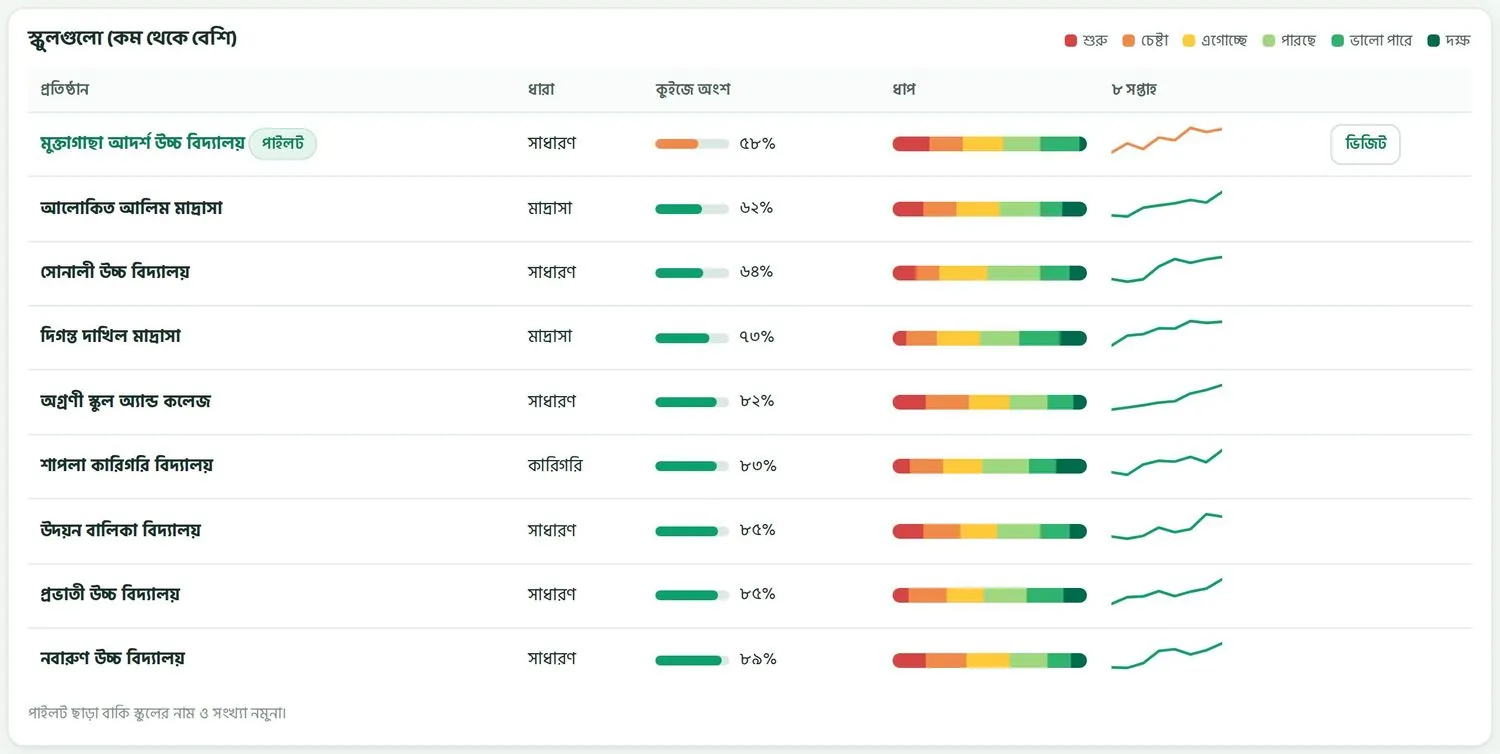
এই তালিকায় আপনার উপজেলার যে স্কুলগুলো পারোতে আছে, সেগুলো দেখা যায়। সবচেয়ে কম অংশগ্রহণের স্কুল সবার ওপরে থাকে। তাই যে স্কুলে আগে নজর দেওয়া দরকার, সেটা প্রথমেই চোখে পড়ে।
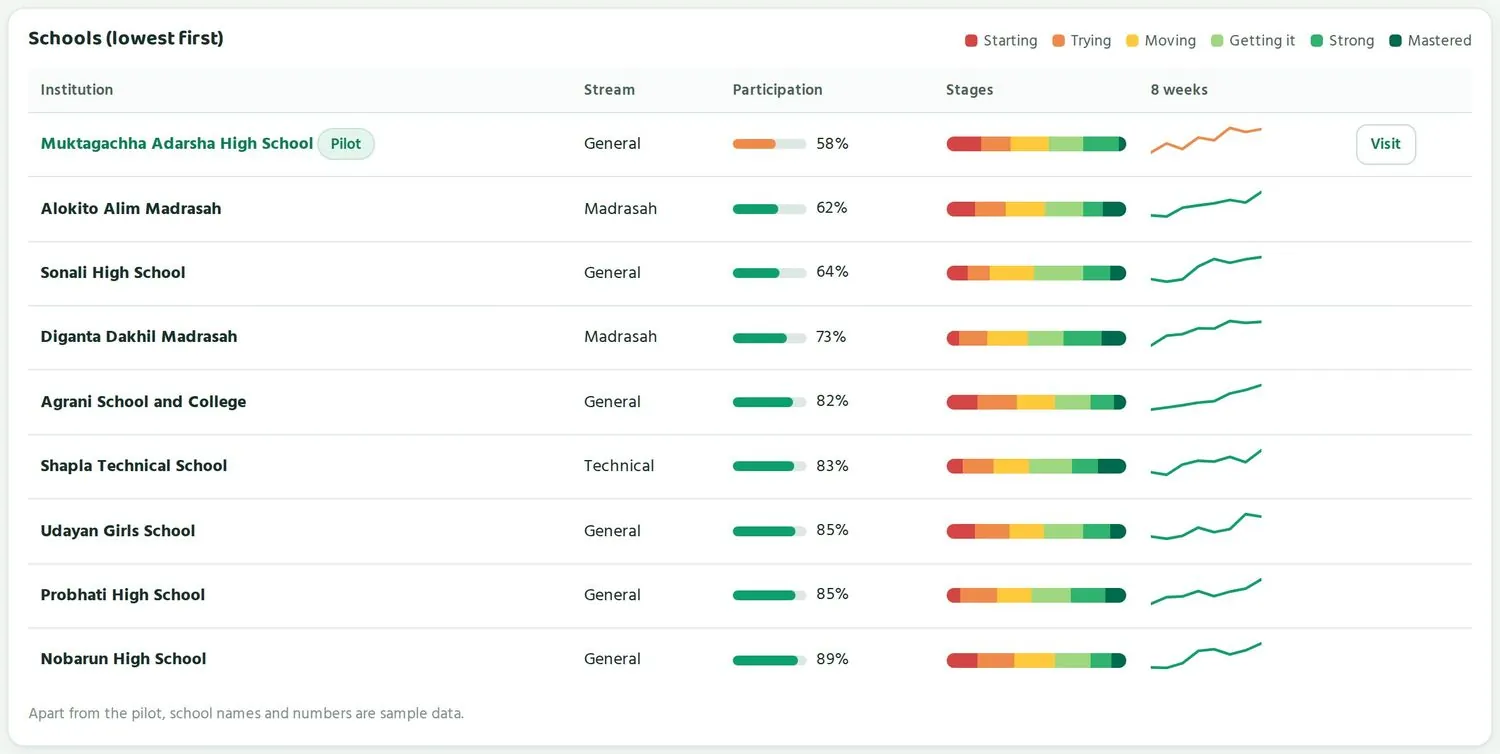
This table lists the schools in your upazila that are on Paaro. The school with the lowest participation sits at the top, so the school that needs attention first is the first one you see.
| কলামColumn | কী দেখায়What it shows |
|---|---|
| প্রতিষ্ঠানInstitution | স্কুলের নাম। পাইলট স্কুলের পাশে পাইলট লেখা থাকে।The school's name. A pilot school has a Pilot tag. |
| ধারাStream | সাধারণ, মাদ্রাসা, কারিগরি বা ইংলিশ ভার্সন।General, madrasah, technical or English version. |
| কুইজে অংশParticipation | এই সপ্তাহে স্কুলের কত শতাংশ শিক্ষার্থী কুইজ দিয়েছে। ৬২% এর নিচে হলে বার কমলা, ওপরে হলে সবুজ।The share of the school's students who did a quiz this week. The bar is orange below 62% and green above it. |
| ধাপStages | স্কুলের শিক্ষার্থীরা ছয় ধাপে কীভাবে ভাগ হয়ে আছে। বাঁয়ে লাল, ডানে গাঢ় সবুজ।How the school's students are spread across the six stages, red on the left to dark green on the right. |
| ৮ সপ্তাহ8 weeks | গত ৮ সপ্তাহে অংশগ্রহণ কীভাবে বেড়েছে বা কমেছে। কম হলে রেখাটাও কমলা।How participation has moved over the last 8 weeks. The line is orange when participation is low. |
| ভিজিটVisit | সাহায্য লাগবে এমন স্কুলের পাশে বোতাম। চাপলে স্কুলটা আপনার পরিদর্শনের পরিকল্পনায় যোগ হয়।A button next to schools needing support. Tapping it adds the school to your visit plan. |
অংশগ্রহণ আর ধাপ, দুটো আলাদা কথাParticipation and stages tell two different things
কুইজে অংশ বলে শিক্ষার্থীরা কুইজ দিচ্ছে কিনা। ধাপ বলে যারা দিচ্ছে, তারা কতটা পারছে। দুটো একসাথে পড়ুন। কয়েকটা সাধারণ অবস্থা নিচে দেওয়া হলো।
Participation tells you whether students are doing quizzes. Stages tell you how well those who do them are doing. Read the two together. Some common patterns are below.
| যা দেখছেনWhat you see | সম্ভাব্য মানেWhat it may mean | যা জিজ্ঞেস করতে পারেনWhat you can ask |
|---|---|---|
| অংশ কম, ধাপ ভালোLow participation, good stages | অল্প কিছু শিক্ষার্থী কুইজ দিচ্ছে, সম্ভবত যারা এমনিতেই ভালো করে। পুরো স্কুলের ছবি এখনো আসেনি।Only a few students are doing quizzes, probably those who already do well. The full picture of the school is not in yet. | সব ক্লাসে কুইজ দেওয়া হচ্ছে কি? ফোন বা সময়ের সমস্যা আছে কি?Are quizzes being set in every class? Is there a problem with phones or time? |
| অংশ বেশি, লাল-কমলা বেশিHigh participation, a lot of red and orange | শিক্ষার্থীরা নিয়মিত কুইজ দিচ্ছে, কিন্তু অনেকে এখনো প্রথম দুই ধাপে।Students do quizzes regularly, but many are still in the first two stages. | কোন বিষয়ে বেশি পিছিয়ে? শিক্ষকেরা সহজ কুইজ দিচ্ছেন কি?Which subject is furthest behind? Are teachers setting easier quizzes? |
| অংশ বেশি, সবুজ বেশিHigh participation, a lot of green | স্কুলটা ভালো চলছে।The school is doing well. | কী কাজ করছে? অন্য স্কুলের সাথে কি শেয়ার করা যায়?What is working? Can it be shared with other schools? |
| অংশ কম, লাল-কমলা বেশিLow participation, a lot of red and orange | স্কুলের সবচেয়ে বেশি সাহায্য দরকার।The school needs the most support. | প্রধান শিক্ষকের সাথে বসে একটা ছোট পরিকল্পনা করুন।Sit down with the head teacher and make a short plan. |
৬২% এর দাগThe 62% line
উপজেলার পাতা ৬২% কে একটা দাগ হিসেবে ধরে। কোনো স্কুলে এই সপ্তাহে ৬২% এর কম শিক্ষার্থী কুইজ দিলে সেই স্কুল সাহায্য লাগবে এমন স্কুল হিসেবে গোনা হয়। তালিকায় তার অংশগ্রহণের বার কমলা হয়ে যায়, আর পাশে ভিজিট বোতাম আসে। ছবির উদাহরণে একটি স্কুল ৫৮% এ আছে, তাই সেটা সবার ওপরে, কমলা রঙে, ভিজিট বোতামসহ।
The upazila page uses 62% as a line. If fewer than 62% of a school's students did a quiz this week, that school counts as a school needing support. Its participation bar turns orange and a Visit button appears next to it. In the example, one school is at 58%, so it sits at the top, in orange, with a Visit button.
এক সপ্তাহ ৬২% এর নিচে থাকা মানেই বড় সমস্যা নয়। পরীক্ষা, ছুটি বা বন্যার মতো কারণে এক সপ্তাহ কম হতে পারে। তাই ৮ সপ্তাহের রেখাটাও দেখুন। রেখা যদি কয়েক সপ্তাহ ধরে নিচের দিকে যায়, তখন খোঁজ নেওয়া জরুরি।
One week below 62% is not always a serious problem. Exams, holidays or floods can make a week low. So look at the 8-week line too. If the line has been falling for several weeks, it is time to find out why.
পরিদর্শনের পরিকল্পনাPlanning school visits
- স্কুলগুলো (কম থেকে বেশি) তালিকার ওপরের দিকটা দেখুন।Look at the top of the Schools (lowest first) table.
- কমলা বারের স্কুলগুলোর ৮ সপ্তাহের রেখা দেখুন। কোনটা পড়ছে, কোনটা উঠছে, আলাদা করুন।Check the 8-week line of each school with an orange bar. Separate those that are falling from those that are rising.
- যে স্কুলে যেতে চান, তার পাশে ভিজিট চাপুন। স্কুলটা আপনার পরিদর্শনের পরিকল্পনায় যোগ হবে।Tap Visit next to a school you want to go to. The school is added to your visit plan.
- স্কুলের নামে চাপলে তার পাতা খোলে। যাওয়ার আগে সেখানে ক্লাসভিত্তিক অবস্থা দেখে নিন (অধ্যায় ৬)।Tap the school's name to open its page. Before the visit, check its class by class table there (Chapter 6).
- প্রধান শিক্ষককে আগে থেকে জানিয়ে রাখুন কোন বিষয় নিয়ে কথা বলতে চান।Let the head teacher know in advance which points you want to discuss.
এক দিনে কাছাকাছি দুই-তিনটি স্কুল মিলিয়ে পরিদর্শন করলে সময় বাঁচে। একটা কমলা স্কুলের সাথে কাছের একটা ভালো করা স্কুলেও যেতে পারেন, যাতে ভালো অভ্যাসগুলো এক স্কুল থেকে আরেক স্কুলে পৌঁছায়।
Visiting two or three nearby schools on one day saves time. You can pair an orange school with a nearby school that is doing well, so good practice travels from one to the other.
বিষয়ভিত্তিক ধাপ, পুরো উপজেলাStage by subject, whole upazila
এই অংশে চারটি বিষয়ের জন্য চারটি বার আছে: বাংলা, ইংরেজি, গণিত আর আইসিটি। প্রতিটি বার দেখায় পুরো উপজেলার শিক্ষার্থীরা সেই বিষয়ে ছয় ধাপে কীভাবে ভাগ হয়ে আছে।
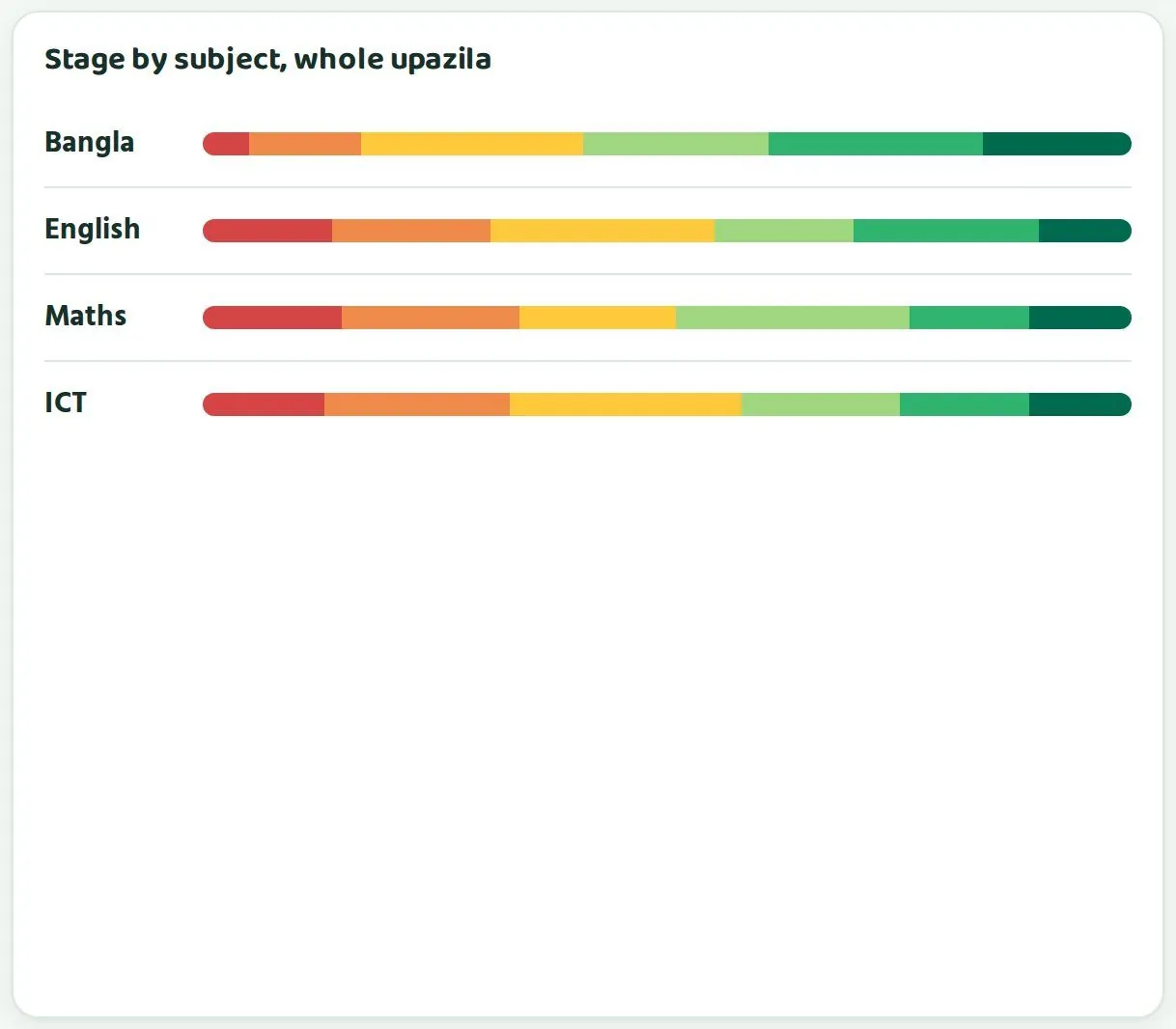
This section has four bars, one for each subject: Bangla, English, maths and ICT. Each bar shows how students across the whole upazila are spread over the six stages in that subject.
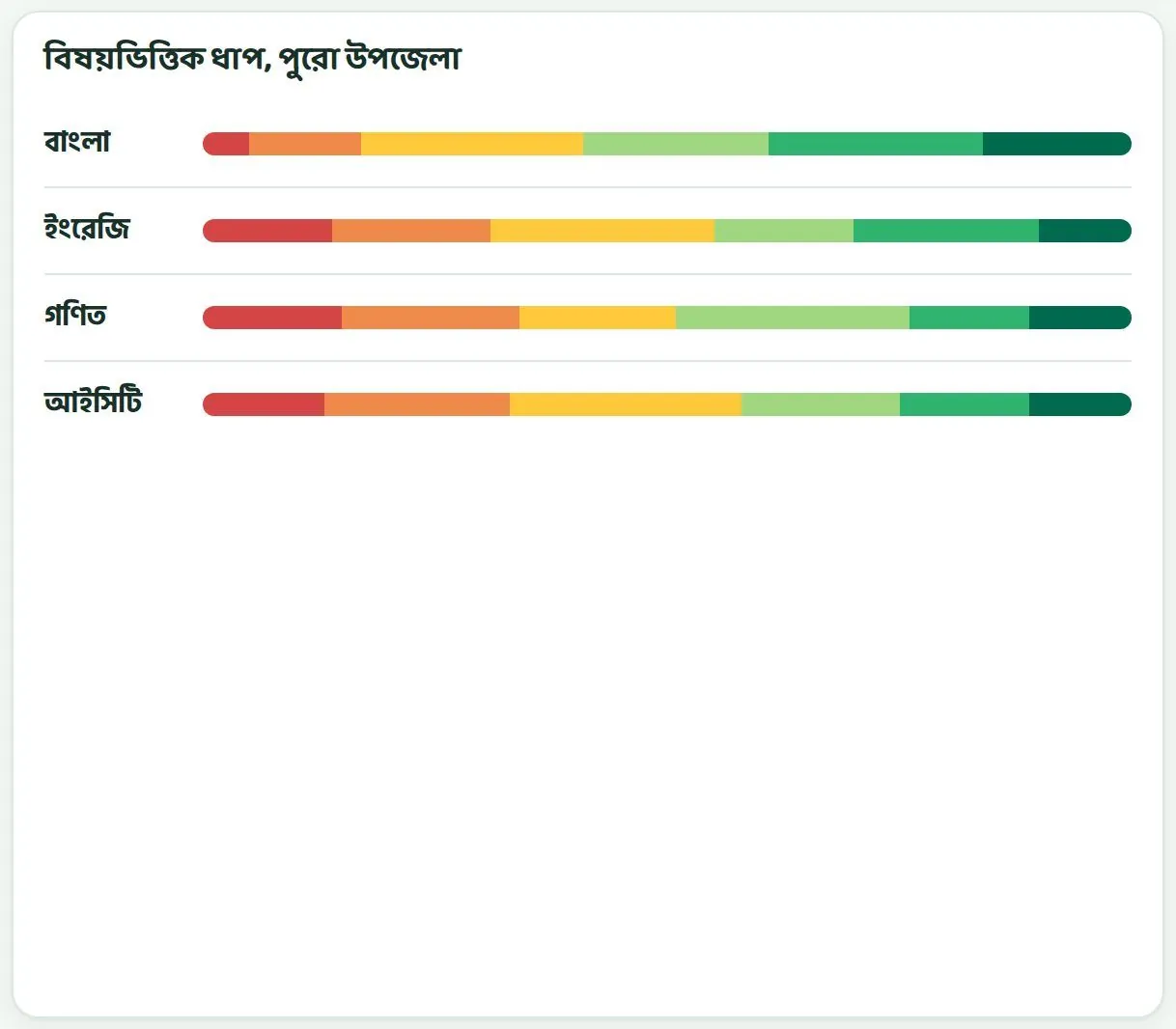
ছবির উদাহরণে বাংলায় লাল অংশ সবচেয়ে ছোট, আর গণিতে লাল ও কমলা মিলে সবচেয়ে বড়। মানে এই উপজেলায় গণিতে সবচেয়ে বেশি শিক্ষার্থী প্রথম দুই ধাপে আছে। এমন হলে উপজেলার গণিত শিক্ষকদের নিয়ে একটা ছোট আলোচনা বা প্রশিক্ষণের কথা ভাবতে পারেন।
In the example, Bangla has the smallest red share, and maths has the largest red and orange share together. That means maths has the most students in the first two stages in this upazila. When you see this, you can plan a short discussion or training with the upazila's maths teachers.
বিষয়ের বার পুরো উপজেলার গড়। কোনো একটা স্কুলের কথা এখানে আলাদা বোঝা যায় না। কোন স্কুলে গণিত বেশি পিছিয়ে, জানতে সেই স্কুলের পাতা খুলুন।
The subject bars are an average for the whole upazila. They do not show any single school. To find which school is furthest behind in maths, open that school's page.
স্কুলগুলোকে পারোতে আনাBringing schools on board
যে স্কুলগুলো এখনো যোগ দেয়নি, তাদের কীভাবে আমন্ত্রণ জানাবেন।How to invite the schools that have not joined yet.
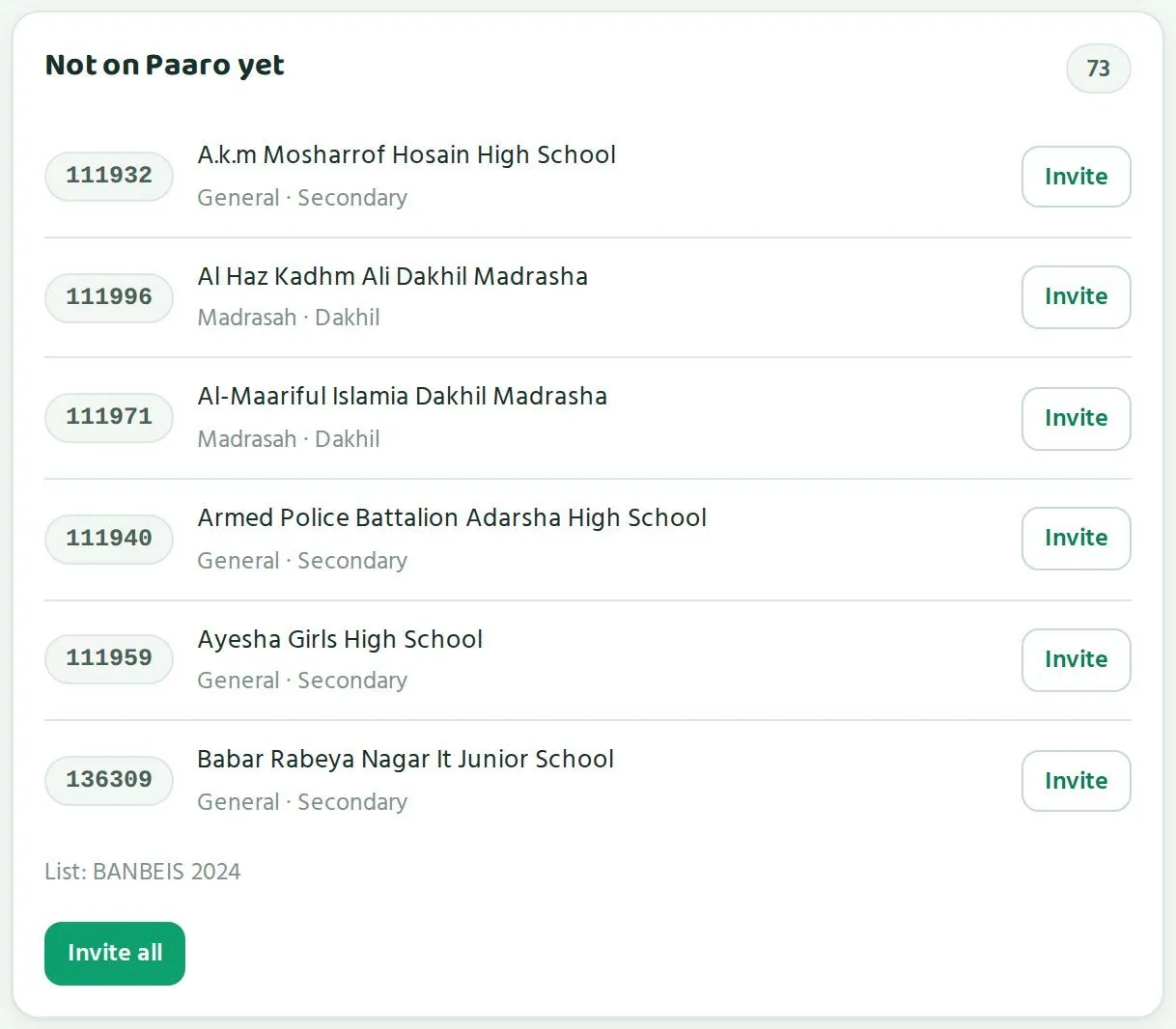
আপনার উপজেলার সব প্রতিষ্ঠানের নাম পারো আগে থেকেই জানে, কারণ তালিকাটা সরকারি BANBEIS ২০২৪ থেকে নেওয়া। যে প্রতিষ্ঠানগুলো এখনো পারোতে আসেনি, সেগুলো উপজেলার পাতার এখনো যোগ দেয়নি অংশে দেখা যায়। ওপরের কোণে মোট সংখ্যা থাকে।
Paaro already knows every institution in your upazila, because the list comes from the government BANBEIS 2024 data. Institutions that are not on Paaro yet appear in the Not on Paaro yet section of the upazila page, with the total in the top corner.
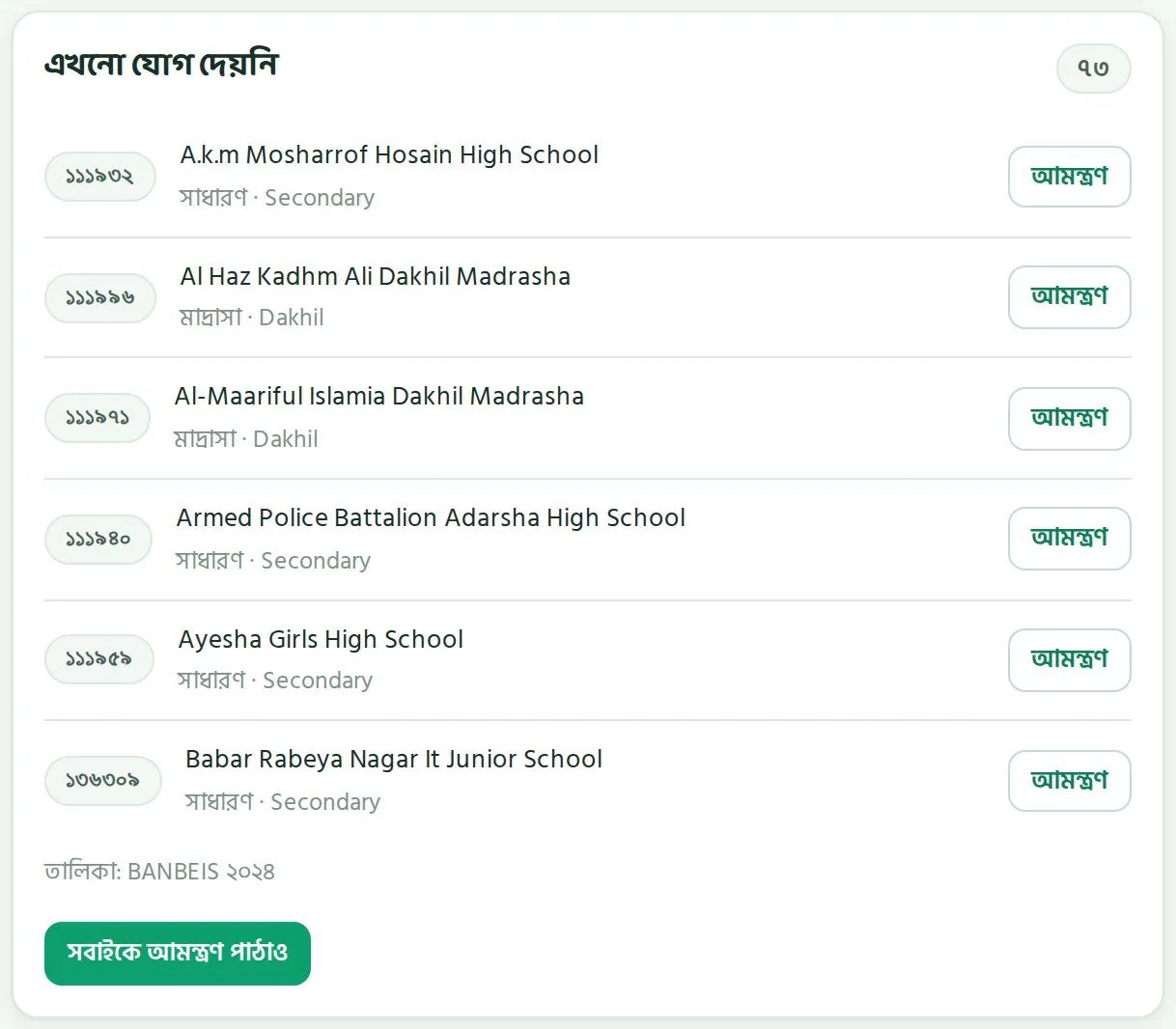
প্রতিটি সারিতে থাকে প্রতিষ্ঠানের EIIN, নাম, ধারা (যেমন সাধারণ বা মাদ্রাসা) আর স্তর (যেমন Secondary বা Dakhil)। ডানদিকে থাকে আমন্ত্রণ বোতাম। তালিকার নিচে লেখা থাকে উৎস, তালিকা: BANBEIS ২০২৪, আর থাকে সবাইকে আমন্ত্রণ পাঠাও বোতাম।
Each row shows the institution's EIIN, name, stream (for example general or madrasah) and level (for example Secondary or Dakhil). On the right is an Invite button. Below the list is the source line, List: BANBEIS 2024, and an Invite all button.
একটি স্কুলকে আমন্ত্রণInviting one school
- উপজেলার পাতায় এখনো যোগ দেয়নি অংশে যান।Go to the Not on Paaro yet section of the upazila page.
- EIIN আর নাম মিলিয়ে সঠিক প্রতিষ্ঠানটা খুঁজে নিন।Find the right institution by matching the EIIN and name.
- তার পাশে আমন্ত্রণ চাপুন। প্রতিষ্ঠানের কাছে একটা SMS চলে যাবে।Tap Invite next to it. An SMS goes to the institution.
- প্রধান শিক্ষককে ফোনেও একবার জানিয়ে দিন যে আমন্ত্রণ পাঠানো হয়েছে। তাতে SMS টা গুরুত্ব পায়।Also call the head teacher to say the invitation has been sent. That makes sure the SMS gets attention.
সবাইকে একসাথে আমন্ত্রণInviting all at once
সবাইকে আমন্ত্রণ পাঠাও চাপলে তালিকার সব প্রতিষ্ঠানে একসাথে আমন্ত্রণ যায়। উপজেলায় পারো চালু হওয়ার শুরুতে, যেমন একটা উপজেলা সভার পরে, এটা কাজে লাগে। সভায় প্রধান শিক্ষকদের আগে থেকে বলে রাখুন যে SMS আসবে।
Tapping Invite all sends the invitation to every institution in the list at once. This is useful when Paaro starts in your upazila, for example after an upazila meeting. Tell head teachers at the meeting that the SMS is coming.
সবাইকে আমন্ত্রণ পাঠানোর আগে ভেবে নিন। যেসব স্কুলের প্রধান শিক্ষক আগে থেকে কিছু জানেন না, তাঁদের কাছে হঠাৎ SMS গেলে সেটা উপেক্ষিত হতে পারে। আগে জানিয়ে তারপর পাঠানো ভালো।
Think before using Invite all. If head teachers have heard nothing beforehand, a sudden SMS may be ignored. It works better to tell them first and then send it.
আমন্ত্রণের পরে কী হয়What happens after an invitation
- প্রধান শিক্ষক পারো থেকে SMS পান।The head teacher receives an SMS from Paaro.
- প্রধান শিক্ষক স্কুলের লিংকে (যেমন
paaro.net/132725) গিয়ে পারোতে যোগ দিতে চাই চাপেন।The head teacher opens the school's link (for examplepaaro.net/132725) and taps Ask to join Paaro. - পারো টিম অনুরোধটা যাচাই করে অনুমোদন দেয়। প্রধান শিক্ষকের অ্যাকাউন্টও পারো টিম অনুমোদন করে।The Paaro team checks and approves the request. The Paaro team also approves the head teacher's account.
- অনুমোদনের পর সেই লিংকেই স্কুলের পাতা চালু হয়।Once approved, the school's page goes live at that same link.
- প্রধান শিক্ষক শিক্ষকদের যোগ করেন আর শিক্ষার্থীদের তালিকা তোলেন। তারপর শিক্ষার্থীরা কুইজ দিতে শুরু করে।The head teacher adds teachers and imports the student list. Then students start doing quizzes.
- স্কুলটা আপনার এখনো যোগ দেয়নি তালিকা থেকে সরে স্কুলগুলো (কম থেকে বেশি) তালিকায় চলে আসে।The school moves from your Not on Paaro yet list to the Schools (lowest first) table.
যোগ না দেওয়া স্কুলের পাতা দেখতে কেমনWhat a school's page looks like before joining
যে স্কুল এখনো পারোতে নেই, তার EIIN লিংক খুললেও একটা পাতা আসে। সেখানে সরকারি তালিকা থেকে স্কুলের নাম, EIIN, উপজেলা, জেলা আর স্তর দেখা যায়। ওপরে লেখা থাকে এখনো পারোতে নেই, আর নিচে থাকে পারোতে যোগ দিতে চাই বোতাম।
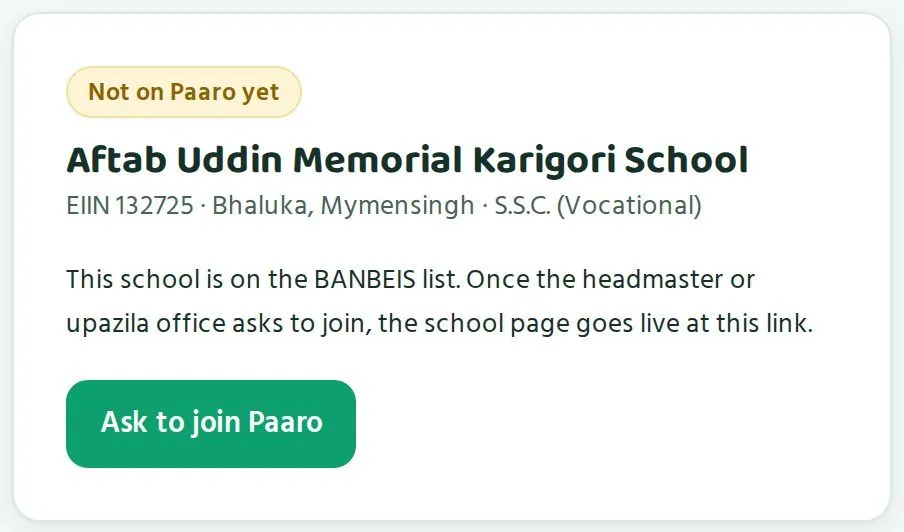
If a school is not on Paaro yet, its EIIN link still opens a page. It shows the school's name, EIIN, upazila, district and level from the government list. At the top it says Not on Paaro yet, and below is an Ask to join Paaro button.
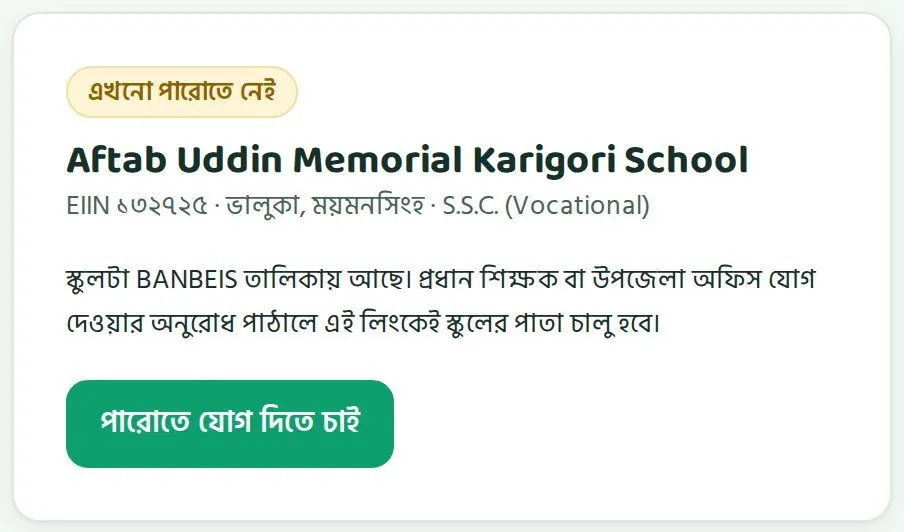
পাতার লেখা অনুযায়ী, প্রধান শিক্ষক বা উপজেলা অফিস যোগ দেওয়ার অনুরোধ পাঠালে এই লিংকেই স্কুলের পাতা চালু হবে। তাই কোনো প্রধান শিক্ষকের ফোন বা ইন্টারনেট নিয়ে সমস্যা থাকলে, আপনি স্কুলের পক্ষে অনুরোধটা পাঠাতে পারেন। পরে প্রধান শিক্ষককে অবশ্যই জানিয়ে দেবেন।
As the page says, once the head teacher or the upazila office asks to join, the school's page goes live at this link. So if a head teacher has trouble with a phone or the internet, you can send the request on the school's behalf. Make sure you tell the head teacher afterwards.
যোগ দেওয়ার হার বাড়াতে একসাথে সব স্কুলের পেছনে না ছুটে ধাপে ধাপে এগোন। প্রথমে প্রতিটি ধারা থেকে কয়েকটা আগ্রহী স্কুল নিন। তারা ভালো চললে তাদের প্রধান শিক্ষকদের দিয়েই পরের সভায় অভিজ্ঞতা বলান।
To raise the joining rate, go step by step instead of chasing every school at once. Start with a few willing schools from each stream. Once they are running well, ask their head teachers to share their experience at the next meeting.
জেলার পাতাThe district page
জেলার সংখ্যা, ৮ সপ্তাহের চার্ট, ধারা আর উপজেলার তালিকা কীভাবে পড়বেন।How to read the district numbers, the 8-week chart, streams and the upazilas table.
জেলার পাতা (paaro.net/mymensingh) জেলা শিক্ষা অফিসের জন্য। এখানে পুরো জেলা এক পাতায় দেখা যায়, আর প্রতিটি উপজেলায় এক চাপে যাওয়া যায়। ওপরে পথনির্দেশ: কর্তৃপক্ষ › ময়মনসিংহ। ডানদিকে আপনার লিংক, কপি আর Excel ডাউনলোডের বোতাম।
The district page (paaro.net/mymensingh) is for the district education office. It shows the whole district on one page, and each upazila is one tap away. At the top is the breadcrumb: Authority › Mymensingh. On the right are your link, Copy and an Excel download button.


চারটি সংখ্যাThe four numbers
| ঘরCard | মানে কীWhat it means | ছবিতেIn the picture |
|---|---|---|
| প্রতিষ্ঠান (BANBEIS)Institutions (BANBEIS) | জেলায় ক্লাস ৬-১২ চালায় এমন প্রতিষ্ঠান, আর উপজেলা/থানার সংখ্যা।Institutions in the district running class 6-12, and the number of upazilas/thanas. | ১,১৭৮, ১৩টি উপজেলা/থানা1,178, 13 upazilas/thanas |
| পারোতে আছেOn Paaro | কতগুলো প্রতিষ্ঠান পারোতে যোগ দিয়েছে, আর মোটের কত শতাংশ।How many institutions have joined Paaro, and what share of the total. | ৭৪৮, মানে ৬৩%748, which is 63% |
| এই সপ্তাহে কুইজ দিয়েছেDid a quiz this week | জেলার পারোতে থাকা শিক্ষার্থীদের কত শতাংশ এই সপ্তাহে কুইজ দিয়েছে, গত সপ্তাহের তুলনাসহ।The share of students on Paaro in the district who did a quiz this week, with the change from last week. | ৭২%, ২% বেড়েছে72%, up 2% |
| গড় ধাপAverage stage | জেলার শিক্ষার্থীদের গড় ধাপ, নিচে গত মাসের গড় ধাপ।The average stage of students in the district, with last month's average underneath. | পারছে, গত মাসে এগোচ্ছেGetting it, last month Moving |
গড় ধাপ ঘরটা মাসে মাসে জেলার অগ্রগতির সবচেয়ে সহজ চিহ্ন। উদাহরণে গত মাসে গড় ছিল এগোচ্ছে (৩ নম্বর ধাপ), এই মাসে পারছে (৪ নম্বর ধাপ)। মানে জেলার শিক্ষার্থীরা গড়ে এক ধাপ ওপরে উঠেছে।
The average stage card is the simplest sign of the district's progress from month to month. In the example, last month's average was Moving (stage 3) and this month it is Getting it (stage 4). That means students in the district have moved up one stage on average.
কুইজে অংশগ্রহণ, ৮ সপ্তাহQuiz participation, 8 weeks
এই চার্টে জেলার গত ৮ সপ্তাহের অংশগ্রহণ দেখা যায়। নিচে সপ্তাহগুলো (স১ থেকে স৮), পাশে শতাংশ। একটা সপ্তাহ দেখে সিদ্ধান্ত না নিয়ে রেখাটা কোন দিকে যাচ্ছে, সেটা দেখুন।
This chart shows the district's participation over the last 8 weeks. Weeks run along the bottom (W1 to W8) and percentages up the side. Look at which way the line is heading before drawing a conclusion from any single week.
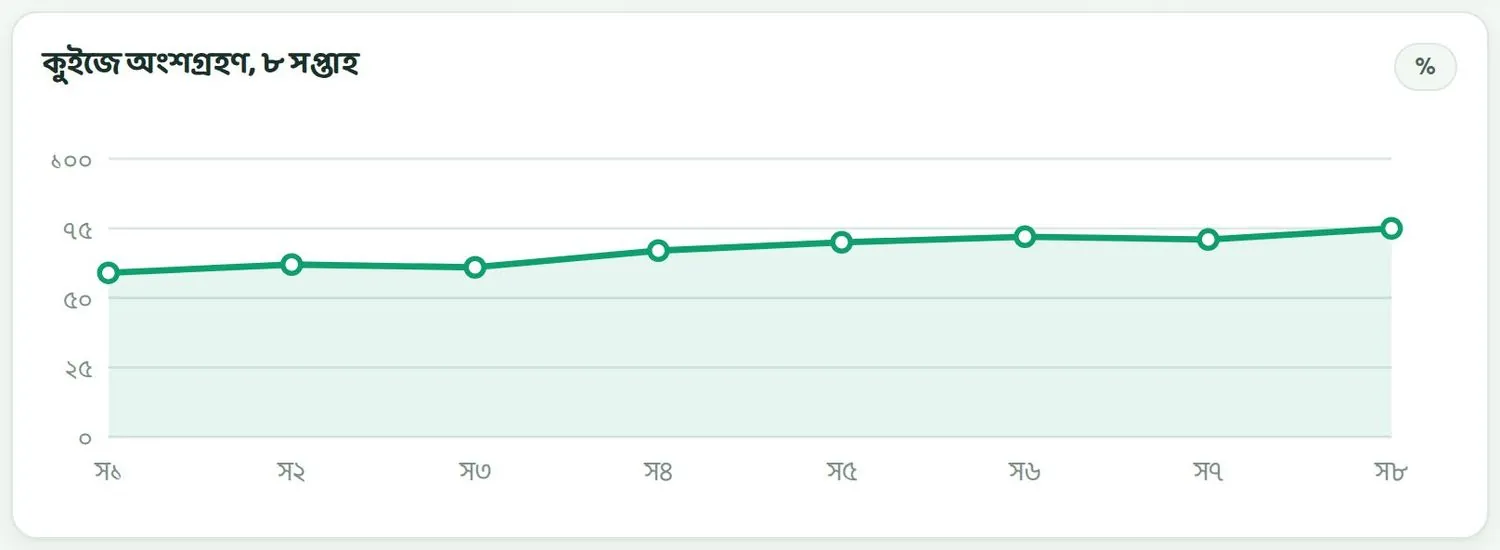
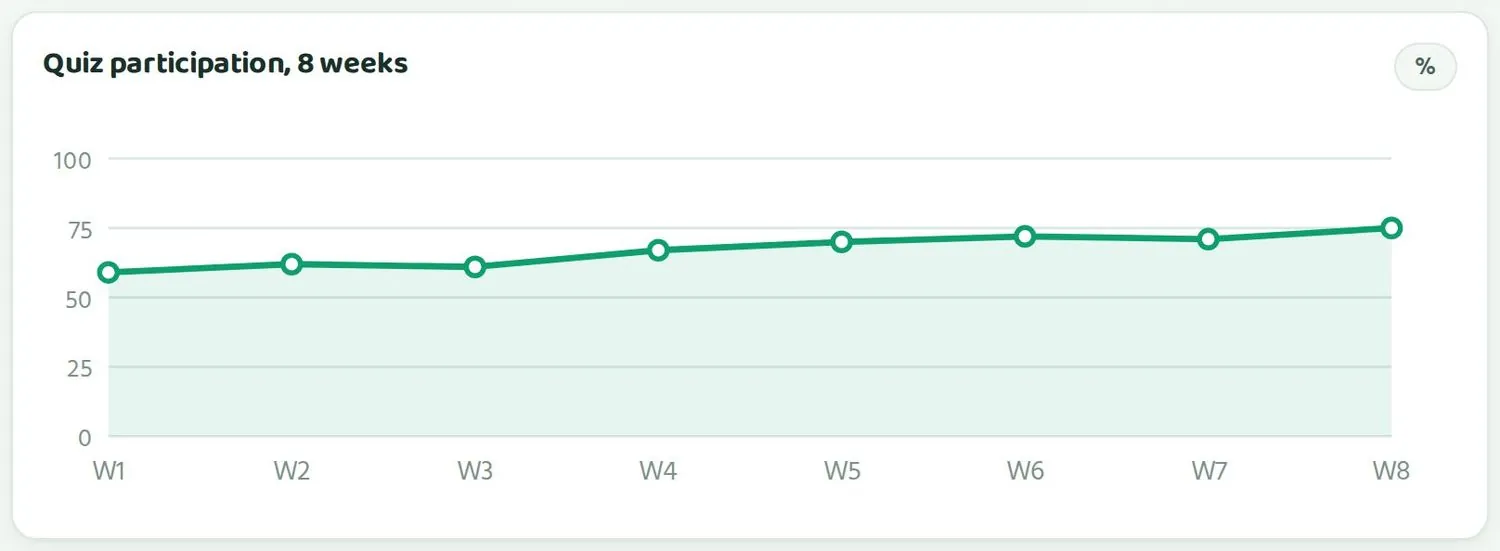
ছবির উদাহরণে রেখাটা ধীরে ধীরে উঠছে, ৬০% এর কাছ থেকে ৭৫% এর কাছে। তৃতীয় আর সপ্তম সপ্তাহে সামান্য কমেছে। এমন ছোট ওঠানামা স্বাভাবিক। হঠাৎ বড় পতন দেখলে খোঁজ নিন, সেই সপ্তাহে ছুটি, পরীক্ষা বা অন্য কিছু ছিল কিনা।
In the example, the line rises slowly, from about 60% to about 75%, with small dips in weeks 3 and 7. Small ups and downs like these are normal. If you see a sudden large drop, find out whether there was a holiday, an exam or something else that week.
ধারা অনুযায়ীBy stream
এই অংশে চারটি ধারার জন্য চারটি বার: সাধারণ, মাদ্রাসা, কারিগরি আর ইংলিশ ভার্সন। প্রতিটি বার দেখায় সেই ধারার শিক্ষার্থীরা ছয় ধাপে কীভাবে ভাগ হয়ে আছে।
This section has four bars, one for each stream: general, madrasah, technical and English version. Each bar shows how students in that stream are spread across the six stages.
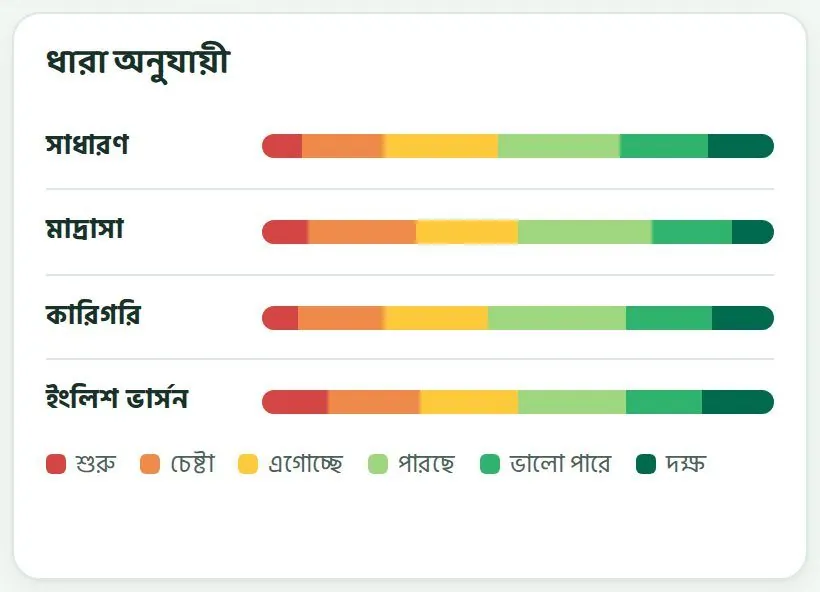
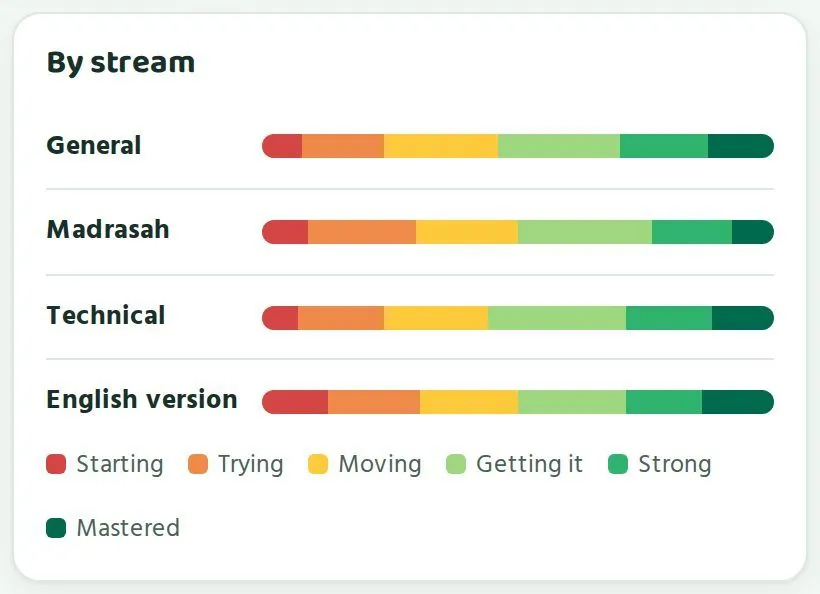
কোনো ধারা বাকিদের চেয়ে পিছিয়ে থাকলে সেই ধারার প্রতিষ্ঠানগুলোর জন্য আলাদা সহায়তার কথা ভাবতে পারেন। যেমন মাদ্রাসার শিক্ষকদের নিয়ে আলাদা সভা, বা কারিগরি প্রতিষ্ঠানে কুইজের সময় ঠিক করা। মনে রাখবেন, প্রতিটি ধারায় প্রতিষ্ঠানের সংখ্যা আলাদা। ছোট ধারায় কয়েকটা প্রতিষ্ঠানের ফলেই বার অনেকটা বদলে যায়।
If one stream is behind the others, you can plan separate support for its institutions, such as a meeting for madrasah teachers or agreeing quiz times with technical institutions. Remember that each stream has a different number of institutions. In a small stream, a few institutions can change the bar a lot.
উপজেলাগুলোUpazilas
এই তালিকায় জেলার সব উপজেলা এক সারিতে একটা করে থাকে। সবচেয়ে বেশি অংশগ্রহণের উপজেলা ওপরে। প্রতিটি উপজেলার নামে চাপলে তার পাতা খোলে। ওপরের কোণে লেখা থাকে: প্রতিষ্ঠানের সংখ্যা BANBEIS ২০২৪; বাকি সংখ্যা নমুনা।
This table has one row for each upazila in the district, with the highest participation at the top. Tap an upazila's name to open its page. The top corner says: institution counts BANBEIS 2024; other numbers sample.
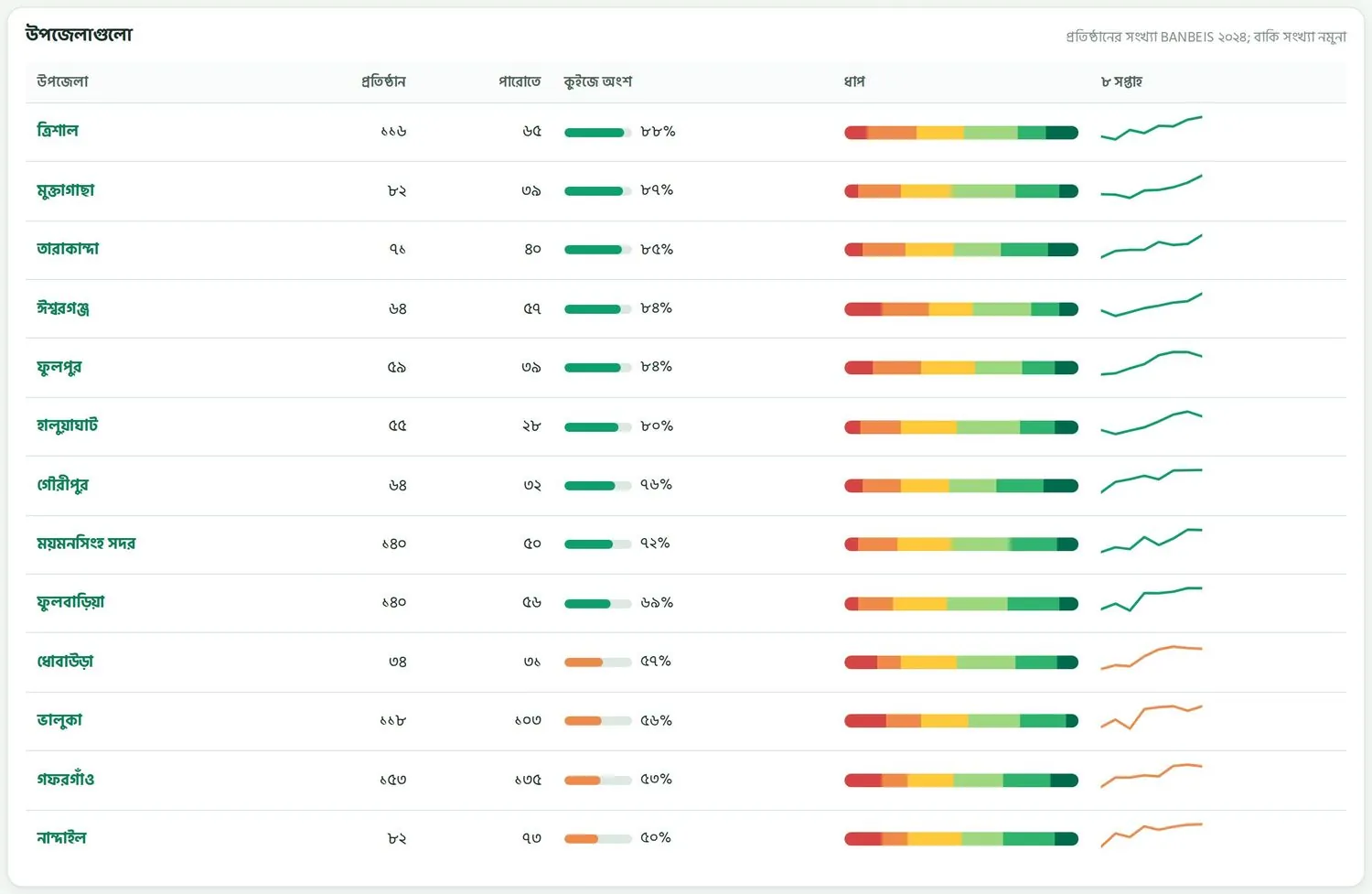
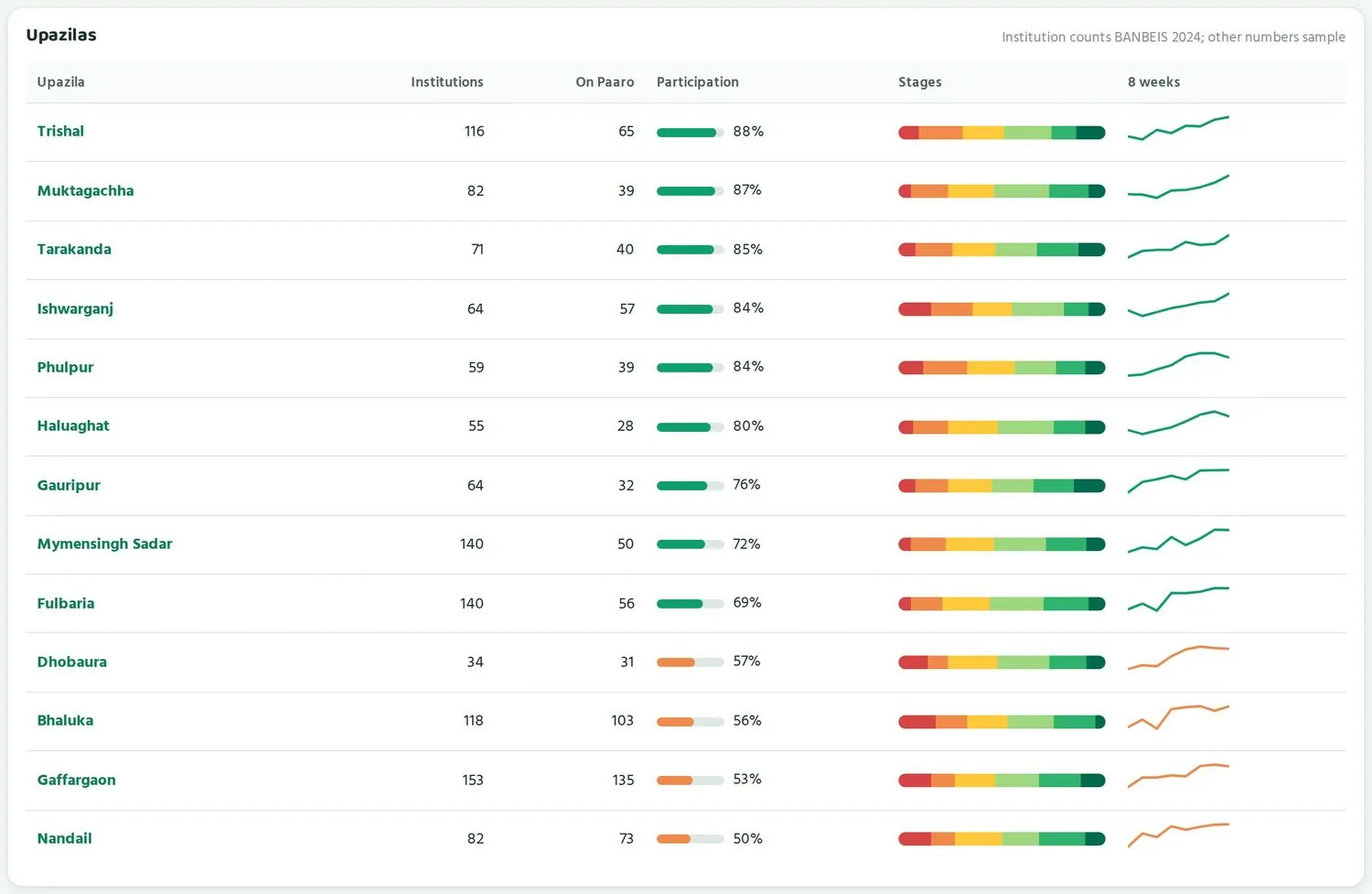
| কলামColumn | কী দেখায়What it shows |
|---|---|
| উপজেলাUpazila | উপজেলার নাম। চাপলে উপজেলার পাতা খোলে।The upazila's name. Tap it to open the upazila page. |
| প্রতিষ্ঠানInstitutions | উপজেলায় ক্লাস ৬-১২ চালায় এমন প্রতিষ্ঠান, BANBEIS ২০২৪ থেকে।Institutions running class 6-12, from BANBEIS 2024. |
| পারোতেOn Paaro | এর মধ্যে কতগুলো পারোতে আছে।How many of those are on Paaro. |
| কুইজে অংশParticipation | এই সপ্তাহে কত শতাংশ শিক্ষার্থী কুইজ দিয়েছে। ৬২% এর নিচে হলে কমলা।The share of students who did a quiz this week. Orange below 62%. |
| ধাপStages | উপজেলার শিক্ষার্থীরা ছয় ধাপে কীভাবে ভাগ হয়ে আছে।How the upazila's students are spread across the six stages. |
| ৮ সপ্তাহ8 weeks | গত ৮ সপ্তাহে অংশগ্রহণের ধারা।The participation trend over the last 8 weeks. |
উপজেলাগুলোকে ন্যায্যভাবে তুলনা করাComparing upazilas fairly
তালিকাটা দেখে প্রথমেই মনে হতে পারে, নিচের উপজেলাগুলো খারাপ করছে। কিন্তু সিদ্ধান্ত নেওয়ার আগে কয়েকটা জিনিস মিলিয়ে দেখুন।
Looking at the table, it may first seem that the upazilas at the bottom are doing badly. Before deciding anything, check a few things.
- কতগুলো প্রতিষ্ঠান যোগ দিয়েছে। উদাহরণে গফরগাঁওয়ে ১৫৩টির মধ্যে ১৩৫টি পারোতে, অংশ ৫৩%। ত্রিশালে ১১৬টির মধ্যে ৬৫টি, অংশ ৮৮%। যে উপজেলা বেশি স্কুল এনেছে, সেখানে নতুন স্কুলগুলো সবে শুরু করছে, তাই অংশ কিছুদিন কম থাকতেই পারে।How many institutions have joined. In the example, Gaffargaon has 135 of 153 on Paaro with 53% participation. Trishal has 65 of 116 with 88%. An upazila that has brought in more schools has many that are just starting, so its participation can stay lower for a while.
- ৮ সপ্তাহের রেখা। কম অংশের কোনো উপজেলার রেখা যদি উঠতে থাকে, সেটা ভালো খবর। বেশি অংশের কোনো উপজেলার রেখা যদি নামতে থাকে, সেখানে আগে নজর দিন।The 8-week line. If a low-participation upazila's line is rising, that is good news. If a high-participation upazila's line is falling, look there first.
- ধারার মিশ্রণ। কোনো উপজেলায় মাদ্রাসা বা কারিগরি প্রতিষ্ঠান বেশি থাকলে তার ছবি আলাদা হতে পারে।The mix of streams. An upazila with more madrasah or technical institutions may look different.
- এলাকার অবস্থা। চর, হাওর বা পাহাড়ি এলাকায় ফোন আর ইন্টারনেট কম থাকলে অংশ কম হতে পারে। এটা উপজেলা অফিসের দোষ নয়।Local conditions. In char, haor or hill areas with fewer phones and weaker internet, participation can be lower. That is not the upazila office's fault.
উপজেলার তালিকাকে প্রতিযোগিতার মঞ্চ বানাবেন না। সভায় নিচের উপজেলার নাম ধরে সমালোচনা করলে পরের মাসে সংখ্যা সাজানোর চাপ তৈরি হয়। তাতে আসল ছবি হারিয়ে যায়। নিচের উপজেলার অফিসারকে আলাদা করে ডেকে জিজ্ঞেস করুন, কী সাহায্য লাগবে।
Do not turn the upazilas table into a competition. Criticising the bottom upazilas by name in a meeting creates pressure to dress up the numbers next month, and the real picture is lost. Call the officer of a lower upazila separately and ask what help they need.
জেলার সভায় তালিকার ওপরের দুই-একটা উপজেলার অফিসারকে বলুন, তাঁরা কী করেছেন সেটা পাঁচ মিনিটে শেয়ার করতে। ভালো অভ্যাস এভাবে সহজে ছড়ায়।
At the district meeting, ask the officers of one or two upazilas near the top to share in five minutes what they did. Good practice spreads easily this way.
একটি স্কুলের ভেতরে দেখাLooking inside a school
স্কুলের পাতায় একজন অফিসার কী দেখেন।What an officer sees on a school page.
উপজেলা বা জেলার পাতায় কোনো স্কুলের নামে চাপলে, অথবা সরাসরি paaro.net/900101 এর মতো EIIN লিংকে গেলে, স্কুলের পাতা খোলে। অফিসার হিসেবে আপনি স্কুলের পাতা দেখেন সংখ্যা আর ধাপ হিসেবে। কোনো শিক্ষার্থীর নাম আপনার সামনে আসে না।
Tap a school's name on the upazila or district page, or go straight to an EIIN link such as paaro.net/900101, to open the school's page. As an officer you see the school page as numbers and stages. No student names appear for you.


ওপরে পথনির্দেশ থাকে: কর্তৃপক্ষ › ময়মনসিংহ › মুক্তাগাছা › স্কুলের নাম। তার নিচে স্কুলের নাম, EIIN, ধারা আর প্রধান শিক্ষকের নাম। ডানদিকে স্কুলের লিংক আর মাসিক রিপোর্ট বোতাম।
At the top is the breadcrumb: Authority › Mymensingh › Muktagachha › school name. Below it are the school's name, EIIN, stream and the head teacher's name. On the right are the school's link and a Monthly report button.
| ঘরCard | মানে কীWhat it means |
|---|---|
| পারোতে শিক্ষার্থীStudents on Paaro | স্কুলের মোট শিক্ষার্থীর মধ্যে কতজন পারোতে যুক্ত, আর কত শতাংশ যোগ দিয়েছে। উদাহরণে ১,১২০ জনের মধ্যে ১,০৩০ জন, ৯২%।How many of the school's students are on Paaro, and the share that has joined. In the example, 1,030 of 1,120, which is 92%. |
| এই সপ্তাহে কুইজ দিয়েছেDid a quiz this week | এই সপ্তাহে কত শতাংশ শিক্ষার্থী কুইজ দিয়েছে, গত সপ্তাহের তুলনাসহ।The share of students who did a quiz this week, compared with last week. |
| সক্রিয় শিক্ষকActive teachers | গত ৭ দিনে কতজন শিক্ষক পারো ব্যবহার করেছেন, মোট শিক্ষকের মধ্যে। উদাহরণে ২৮ জনের মধ্যে ২১ জন।How many teachers used Paaro in the last 7 days, out of all teachers. In the example, 21 of 28. |
| যাচাই করা প্রশ্নQuestions verified | এই স্কুলের শিক্ষকেরা কতগুলো প্রশ্ন বই মিলিয়ে যাচাই করেছেন।How many questions this school's teachers have checked against the book. |
সক্রিয় শিক্ষক ঘরটা খুব কাজের। শিক্ষার্থীরা সাধারণত সেই কুইজই দেয় যেটা শিক্ষক সেট করেন। তাই কোনো স্কুলে অংশ কম আর সক্রিয় শিক্ষকও কম হলে, সমস্যাটা সম্ভবত শিক্ষকদের দিকে। তখন প্রধান শিক্ষকের সাথে শিক্ষকদের প্রশিক্ষণ বা সময় নিয়ে কথা বলুন।
The Active teachers card is very useful. Students usually take the quizzes their teachers set. So if a school has low participation and few active teachers, the issue is probably on the teachers' side. Then talk with the head teacher about teacher training or time.
ক্লাসভিত্তিক অবস্থাClass by class
স্কুলের পাতার এই তালিকায় প্রতিটি ক্লাস আর শাখা আলাদা সারিতে থাকে: শিক্ষার্থীর সংখ্যা, এই সপ্তাহে কুইজের হার, ধাপ আর ৮ সপ্তাহের রেখা। কম অংশের ক্লাসের বার আর রেখা কমলা রঙে দেখায়।
This table on the school page has one row for each class and section: number of students, this week's quiz rate, stages and the 8-week line. Classes with low participation show an orange bar and line.
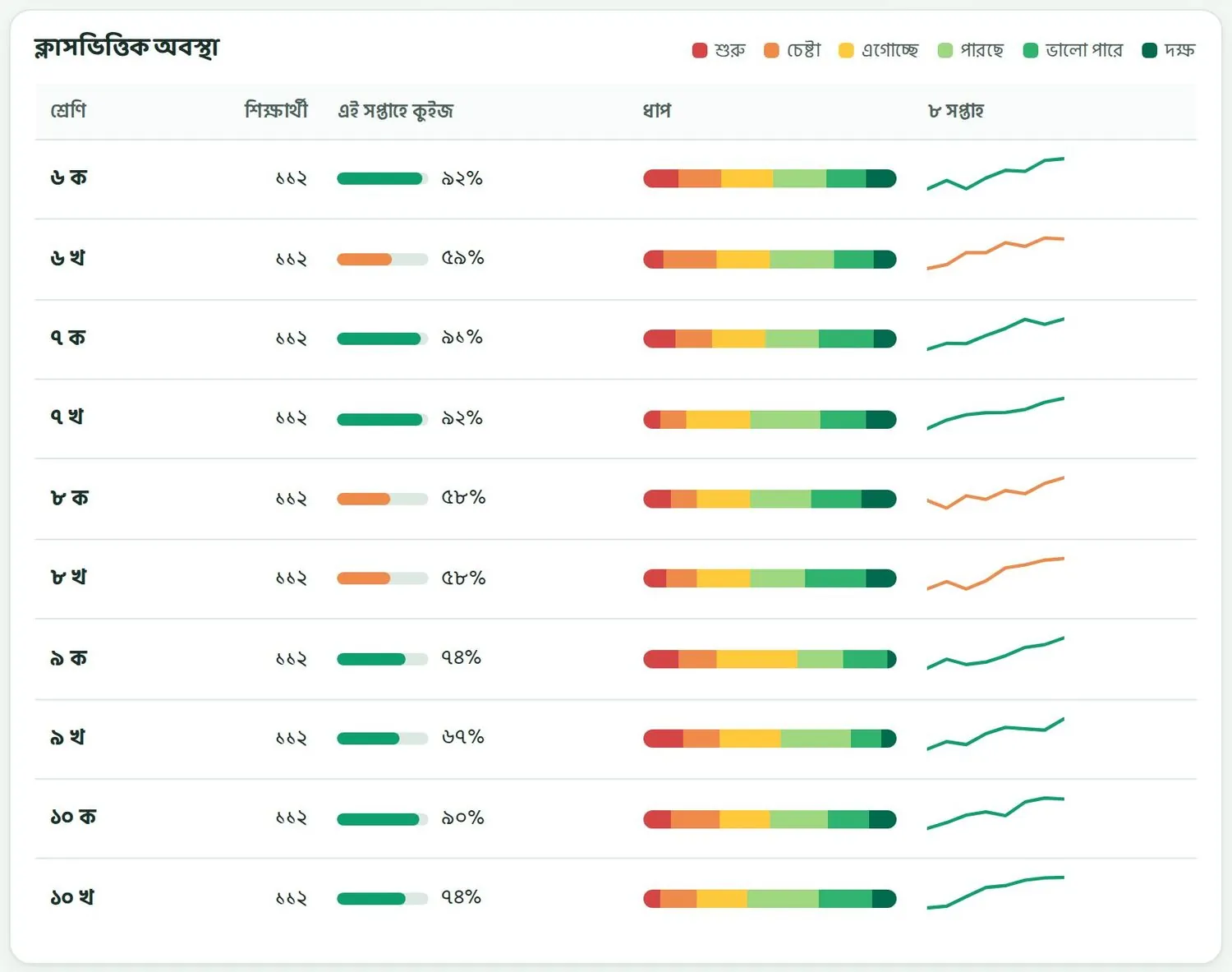
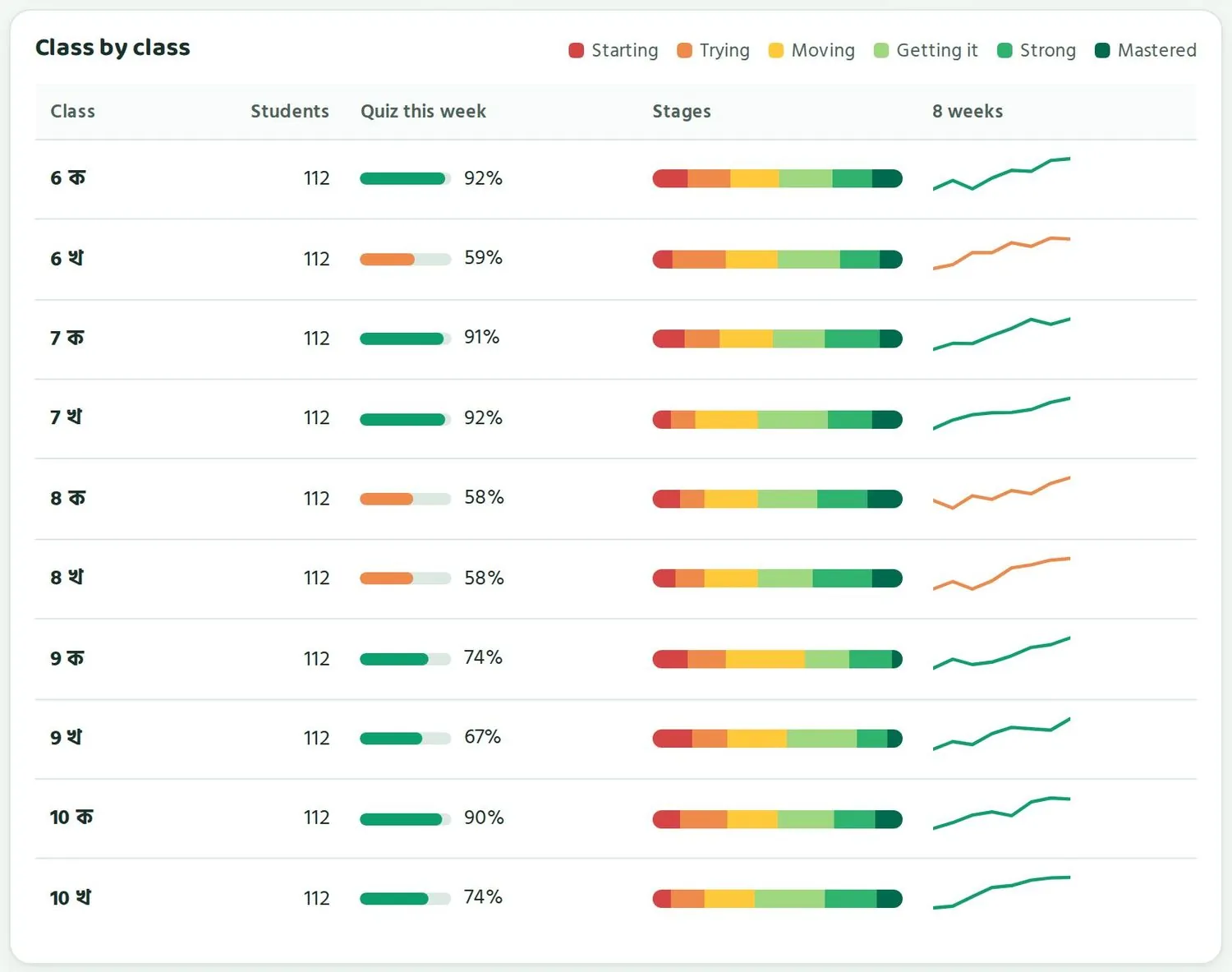
ছবির উদাহরণে ৬ খ, ৮ ক আর ৮ খ কমলা, বাকি ক্লাসগুলো সবুজ। মানে সমস্যাটা কয়েকটা ক্লাসে সীমিত। পরিদর্শনে এই তিনটি ক্লাসের শিক্ষকদের সাথে কথা বললেই সবচেয়ে বেশি কাজ হবে। আবার ৯ ক আর ৯ খ তে অংশ ভালো, কিন্তু লাল ও হলুদ অংশ বড়। সেখানে শিক্ষার্থীরা কুইজ দিচ্ছে, তবে অনেকে এখনো নিচের ধাপে।
In the example, 6 খ, 8 ক and 8 খ are orange and the other classes are green. So the problem is limited to a few classes. On a visit, talking with the teachers of those three classes will help most. Classes 9 ক and 9 খ have good participation but large red and yellow shares: students there are doing quizzes, but many are still at lower stages.
আপনি যা দেখেন নাWhat you do not see
- কোনো শিক্ষার্থীর নাম, রোল বা নিজের পাতা।Any student's name, roll number or personal page.
- শিক্ষার্থীভিত্তিক গ্রিড বা সাহায্য লাগবে এমন শিক্ষার্থীর নামের তালিকা। এগুলো শিক্ষক আর প্রধান শিক্ষকের কাজ।Student-level grids or named lists of students who need help. These are for teachers and head teachers.
- অভিভাবকের তথ্য বা ফোন নম্বর।Guardian details or phone numbers.
কোনো ক্লাসের নির্দিষ্ট শিক্ষার্থীদের নিয়ে কথা বলতে হলে প্রধান শিক্ষক বা ক্লাস শিক্ষকের সাথে বসুন। তাঁরা নিজেদের পাতায় নামসহ দেখতে পান। আপনার ভূমিকা হলো তাঁদের পাশে থাকা আর দরকারি সহায়তা জোগানো।
To discuss particular students in a class, sit down with the head teacher or the class teacher. They see names on their own pages. Your role is to back them up and arrange the support they need.
কাজের একটা নিয়মA working routine
সপ্তাহে ১৫ মিনিট, মাসে একটা সভা, টার্মে একটা পর্যালোচনা।15 minutes a week, one meeting a month, one review a term.
পারো থেকে সবচেয়ে বেশি কাজ পেতে প্রতিদিন পাতা খোলার দরকার নেই। একটা নিয়মিত ছন্দ ঠিক করে নিন। নিচের নিয়মটা বেশিরভাগ উপজেলা আর জেলা অফিসের জন্য যথেষ্ট।
You do not need to open the page every day to get the most from Paaro. Set a steady rhythm instead. The routine below is enough for most upazila and district offices.
প্রতি সপ্তাহে ১৫ মিনিটEvery week, 15 minutes
- সপ্তাহের একটা নির্দিষ্ট দিনে আপনার পাতা খুলুন।Open your page on the same day each week.
- চারটি সংখ্যা দেখুন। এই সপ্তাহে কুইজ দিয়েছে ঘরে বাড়া না কমা, সেটা খেয়াল করুন।Look at the four numbers. Note whether Did a quiz this week has gone up or down.
- উপজেলা অফিসার: স্কুলগুলো (কম থেকে বেশি) তালিকার ওপরের কমলা স্কুলগুলো দেখুন। জেলা অফিসার: উপজেলাগুলো তালিকার নিচের কমলা উপজেলাগুলো দেখুন।Upazila officers: check the orange schools at the top of Schools (lowest first). District officers: check the orange upazilas at the bottom of the Upazilas table.
- যেসব স্কুল বা উপজেলা টানা দুই-তিন সপ্তাহ কমলা, তাদের প্রধান শিক্ষক বা অফিসারকে একটা ফোন করুন।Phone the head teacher or officer of any school or upazila that has been orange for two or three weeks in a row.
- দরকার হলে ভিজিট চাপুন আর পরিদর্শনের পরিকল্পনায় যোগ করুন।If needed, tap Visit to add the school to your visit plan.
- উপজেলা অফিসার: এখনো যোগ দেয়নি তালিকায় এক-দুটি স্কুলকে আমন্ত্রণ পাঠান।Upazila officers: send an invitation to one or two schools in the Not on Paaro yet list.
প্রতি মাসে একটা সভাEvery month, one meeting
মাসিক সমন্বয় সভায় পারোর জন্য ১০-১৫ মিনিট রাখুন। সভার আগে রিপোর্ট বা Excel ডাউনলোড করে নিন (অধ্যায় ৮)।
Keep 10-15 minutes for Paaro at the monthly coordination meeting. Download the Report or Excel file before the meeting (Chapter 8).
- মাসের শুরু আর শেষের অংশগ্রহণ মিলিয়ে দেখান।Show participation at the start and end of the month.
- বিষয়ভিত্তিক ধাপ দেখান। কোন বিষয়ে লাল আর কমলা সবচেয়ে বেশি, সেটা নিয়ে কথা বলুন।Show stage by subject and discuss which subject has the most red and orange.
- নতুন কয়টা স্কুল যোগ দিয়েছে, জানান।Report how many new schools have joined.
- একটা ভালো খবর দিয়ে শুরু বা শেষ করুন: যে স্কুল বা উপজেলা এক মাসে অনেক এগিয়েছে।Open or close with good news: a school or upazila that moved forward a lot this month.
- পরের মাসের জন্য এক-দুটি নির্দিষ্ট কাজ ঠিক করুন।Agree one or two specific actions for next month.
প্রতি টার্মে একটা পর্যালোচনাEvery term, one review
টার্মের শেষে একটু বড় করে দেখুন। জেলার পাতায় গড় ধাপ ঘরে মাস থেকে মাসে কী বদলেছে, সেটা লিখে রাখুন। ধারা অনুযায়ী বারগুলো মিলিয়ে দেখুন কোন ধারা এগিয়েছে, কোনটা পিছিয়ে আছে। উপজেলার পাতায় বিষয়ভিত্তিক ধাপ টার্মের শুরুর সাথে মেলান। এই পর্যালোচনা থেকে পরের টার্মের প্রশিক্ষণ, পরিদর্শন আর সভার পরিকল্পনা করুন।
At the end of each term, take a wider look. On the district page, note how the Average stage card has changed month by month. Compare the stream bars to see which streams moved forward and which are behind. On the upazila page, compare stage by subject with the start of the term. Use this review to plan training, visits and meetings for the next term.
একটা উদাহরণ: মুক্তাগাছায় এক সপ্তাহAn example: one week in Muktagachha
ধরা যাক, রবিবার সকালে মুক্তাগাছার উপজেলা মাধ্যমিক শিক্ষা অফিসার paaro.net/mymensingh/muktagachha খুললেন। চারটি সংখ্যায় দেখলেন, এই সপ্তাহে ৭৬% শিক্ষার্থী কুইজ দিয়েছে, গত সপ্তাহের চেয়ে ৩% বেশি। সাহায্য লাগবে এমন স্কুল একটি। (এই উদাহরণের সব সংখ্যা নমুনা।)
Say the upazila secondary education officer for Muktagachha opens paaro.net/mymensingh/muktagachha on Sunday morning. The four numbers show that 76% of students did a quiz this week, 3% more than last week, and one school needs support. (All numbers in this example are sample data.)
স্কুলের তালিকায় সবার ওপরে একটি স্কুল, অংশ ৫৮%, বার কমলা। তার ৮ সপ্তাহের রেখা অবশ্য উঠছে। অফিসার স্কুলের নামে চেপে ক্লাসভিত্তিক অবস্থা দেখলেন। তিনটি ক্লাস কমলা, বাকিগুলো সবুজ। তিনি প্রধান শিক্ষককে ফোন করলেন। জানা গেল, ওই তিন ক্লাসের দুজন শিক্ষক সবে পারো শুরু করেছেন, কুইজ সেট করতে এখনো অভ্যস্ত নন।
At the top of the schools table is one school at 58%, with an orange bar, though its 8-week line is rising. The officer taps the school's name and checks the class by class table: three classes are orange and the rest green. The officer phones the head teacher and learns that two teachers of those classes have only just started on Paaro and are not yet used to setting quizzes.
অফিসার ভিজিট চেপে স্কুলটা পরিদর্শনের পরিকল্পনায় রাখলেন। সাথে ঠিক করলেন, কাছের একটা ভালো করা স্কুলের একজন শিক্ষক সেদিন সঙ্গে যাবেন, আর ওই দুজন শিক্ষককে কুইজ সেট করা হাতে-কলমে দেখাবেন। শেষে এখনো যোগ দেয়নি তালিকা থেকে দুটি মাদ্রাসাকে আমন্ত্রণ পাঠালেন, আর তাদের সুপারকে ফোনে জানিয়ে দিলেন। পুরো কাজে সময় লাগল পনেরো মিনিটের মতো।
The officer taps Visit to put the school in the visit plan, and arranges for a teacher from a nearby school that is doing well to come along and show the two teachers how to set a quiz. Finally, the officer sends invitations to two madrasahs from the Not on Paaro yet list and phones their superintendents to let them know. The whole task takes about fifteen minutes.
প্রধান শিক্ষককে যা জিজ্ঞেস করতে পারেনQuestions to ask head teachers
প্রশ্নের উদ্দেশ্য হলো সমস্যাটা বোঝা আর সমাধান খোঁজা। দোষ ধরা নয়। খোলা প্রশ্ন করুন, যাতে প্রধান শিক্ষক নিজের কথা বলতে পারেন।
The purpose of your questions is to understand the problem and find a solution. Blame has no place here. Ask open questions so the head teacher can explain in their own words.
- কোন ক্লাসে কুইজ কম হচ্ছে বলে আপনার মনে হয়? কেন?Which classes do you think are doing fewer quizzes? Why?
- শিক্ষার্থীরা কুইজ কোথায় দেয়, ক্লাসে না বাসায়? ফোন পেতে সমস্যা হয় কি?Where do students do quizzes, in class or at home? Is getting a phone a problem?
- শিক্ষকেরা কি নিয়মিত কুইজ সেট করছেন? কারো কি সাহায্য লাগবে?Are teachers setting quizzes regularly? Does anyone need help?
- যেসব শিক্ষার্থী প্রথম দুই ধাপে আছে, তাদের জন্য সহজ কুইজ দেওয়া হচ্ছে কি?Are easier quizzes being set for students in the first two stages?
- স্কুলের কোন কাজটা ভালো চলছে, যেটা অন্য স্কুলও শিখতে পারে?What is working well at your school that other schools could learn from?
- উপজেলা অফিস থেকে আপনার কী সাহায্য দরকার?What help do you need from the upazila office?
তথ্য দিয়ে পাশে দাঁড়ানো, চাপ না দেওয়াUsing data to support, without pressure
পারোর সংখ্যা স্কুলকে সাহায্য করার জন্য। কোনো স্কুলের সংখ্যা কম হলে সেটা এমন একটা জায়গা দেখায় যেখানে আপনার সহায়তা সবচেয়ে বেশি কাজে লাগবে। শিক্ষকেরা যদি ভয় পান যে কম সংখ্যা দেখলে শাস্তি হবে, তাহলে তাঁরা শুধু ভালো শিক্ষার্থীদের দিয়ে কুইজ দেওয়াতে পারেন, বা সহজ কুইজ বারবার দিতে পারেন। তখন সংখ্যা ভালো দেখায়, কিন্তু শেখা বাড়ে না।
Paaro's numbers exist to help schools. A low number shows the place where your support will count most. If teachers fear that low numbers bring punishment, they may let only strong students take quizzes, or set easy quizzes again and again. The numbers then look good while learning stays the same.
- স্কুলের মধ্যে র্যাংকিং বা তালিকা টাঙানো থেকে বিরত থাকুন।Avoid ranking schools or putting up league tables.
- সভায় কম সংখ্যার স্কুলের নাম ধরে সমালোচনা করবেন না। আলাদা করে কথা বলুন।Do not criticise low-scoring schools by name in meetings. Talk to them privately.
- উঁচু সংখ্যার পাশাপাশি উন্নতিরও প্রশংসা করুন। ৪০% থেকে ৬০% এ ওঠা স্কুল অনেক বড় কাজ করেছে।Praise improvement as well as high numbers. A school that rose from 40% to 60% has achieved a great deal.
- লাল আর কমলা অংশকে লজ্জার বিষয় বানাবেন না। নতুন অধ্যায়ের শুরুতে সবাই নিচের ধাপ থেকেই শুরু করে।Do not treat red and orange as a disgrace. At the start of a new chapter, everyone begins at the lower stages.
- পারোর সংখ্যা শিক্ষকের বার্ষিক মূল্যায়নের একমাত্র ভিত্তি হিসেবে ব্যবহার করবেন না।Do not use Paaro's numbers as the only basis for a teacher's annual assessment.
পরিদর্শনে গিয়ে প্রথমে জিজ্ঞেস করুন কী ভালো চলছে, তারপর কোথায় সমস্যা। এতে আলোচনা সহজ হয়, আর প্রধান শিক্ষক নিজেই সমস্যার কথা খুলে বলেন।
On a visit, first ask what is going well, then where the problems are. The conversation becomes easier, and the head teacher raises the problems openly.
রিপোর্ট আর ডাউনলোডReports and downloads
উপজেলার রিপোর্ট, জেলার Excel ফাইল, আর অফিসে শেয়ার করার নিয়ম।The upazila Report, the district Excel file, and how to share within the office.
পারোর পাতা থেকে তথ্য ডাউনলোড করে সভা, চিঠি বা অফিসের নথিতে ব্যবহার করতে পারেন। উপজেলা আর জেলার পাতায় ডাউনলোডের বোতাম আলাদা।
You can download data from Paaro for meetings, letters or office records. The upazila and district pages have different download buttons.
| পাতাPage | বোতামButton | কী পাবেনWhat you get |
|---|---|---|
| উপজেলার পাতাUpazila page | রিপোর্টReport | আপনার উপজেলার একটা রিপোর্ট, সংখ্যা আর ধাপসহ।A report of your upazila, with numbers and stages. |
| জেলার পাতাDistrict page | ExcelExcel | জেলার তথ্য একটা এক্সেল ফাইলে, যাতে আপনি সাজাতে বা নিজের হিসাবে যোগ করতে পারেন।The district's data in an Excel file, so you can sort it or add it to your own sheets. |
উপজেলার রিপোর্ট ডাউনলোডDownloading the upazila Report
- আপনার উপজেলার পাতা খুলুন।Open your upazila page.
- ওপরে ডানদিকে রিপোর্ট বোতাম চাপুন।Tap the Report button at the top right.
- ফাইলটা আপনার কম্পিউটার বা ফোনে ডাউনলোড হবে। তারিখসহ একটা নাম দিয়ে অফিসের ফোল্ডারে রাখুন।The file downloads to your computer or phone. Save it in the office folder with a name that includes the date.
জেলার Excel ডাউনলোডDownloading the district Excel file
- জেলার পাতা খুলুন।Open the district page.
- ওপরে ডানদিকে Excel বোতাম চাপুন।Tap the Excel button at the top right.
- ফাইলটা এক্সেলে খুলুন। উপজেলাভিত্তিক তথ্য নিজের মতো সাজিয়ে নিতে পারেন, যেমন অংশগ্রহণ অনুযায়ী।Open the file in Excel. You can sort the upazila data your own way, for example by participation.
- প্রতি মাসের ফাইল আলাদা রাখুন। টার্মের পর্যালোচনায় মাসগুলো পাশাপাশি রেখে তুলনা করা সহজ হবে।Keep each month's file separately. At the term review it is easy to compare the months side by side.
রিপোর্ট বা এক্সেলে শিক্ষার্থীর নাম থাকে না, কারণ উপজেলা থেকে ওপরের দিকে পারো কখনো শিক্ষার্থীর নাম দেখায় না। তবুও এগুলো অফিসের নথি। যত্ন করে রাখুন।
The Report and Excel file contain no student names, because Paaro never shows student names from upazila level upwards. They are still office records, so handle them with care.
অফিসের ভেতরে শেয়ার করাSharing within the office
- সভায় দেখানোর জন্য রিপোর্ট প্রজেক্টরে বা ছাপিয়ে দেখাতে পারেন।You can show the report on a projector or on paper at a meeting.
- অফিসের সহকর্মী নিয়মিত পাতা দেখতে চাইলে তাঁর জন্য আলাদা অ্যাকাউন্ট চেয়ে hello@paaro.net এ লিখুন। নিজের লগইন দেবেন না।If a colleague needs regular access, email hello@paaro.net to ask for their own account. Do not hand over your login.
- আপনার পাতার লিংক কপি করে সহকর্মীকে পাঠাতে পারেন। লিংকটা খুলবে শুধু যাঁর অনুমতি আছে তাঁর জন্য, লগইনের পরে।You can Copy your page link and send it to a colleague. The link opens only for someone with permission, after login.
- কোনো একটা স্কুলের তথ্য অন্য স্কুলের সাথে শেয়ার করার আগে সেই স্কুলের প্রধান শিক্ষকের সাথে কথা বলুন।Before sharing one school's data with another school, talk to that school's head teacher.
রিপোর্ট বা স্ক্রিনশট ফেসবুক, মেসেঞ্জার বা হোয়াটসঅ্যাপের খোলা গ্রুপে দেবেন না। এতে স্কুলগুলোর তুলনা জনসমক্ষে চলে যায়, যা শিক্ষকদের ওপর অকারণ চাপ তৈরি করে।
Do not post reports or screenshots in open Facebook, Messenger or WhatsApp groups. That puts school comparisons in public view and puts needless pressure on teachers.
গোপনীয়তা আর তথ্যের সুরক্ষাPrivacy and data protection
কে কী দেখতে পারে, আর তথ্য কীভাবে নিরাপদ রাখা হয়।Who can see what, and how data is kept safe.
পারোতে শিক্ষার্থীদের তথ্য থাকে, তাই কে কী দেখতে পারবে সেটা আগে থেকে ঠিক করা আছে। প্রত্যেকে শুধু নিজের দায়িত্বের অংশটুকু দেখেন।
Paaro holds student data, so who can see what is fixed in advance. Each person sees only the part that matches their duties.
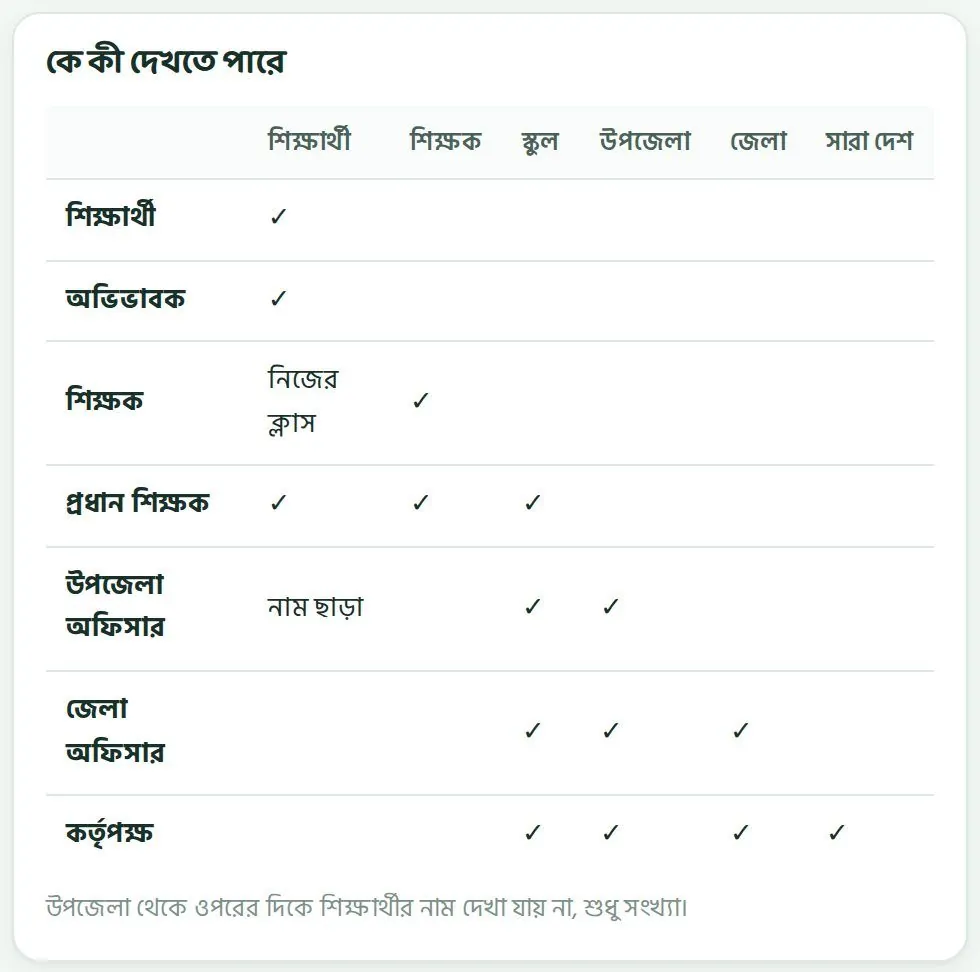
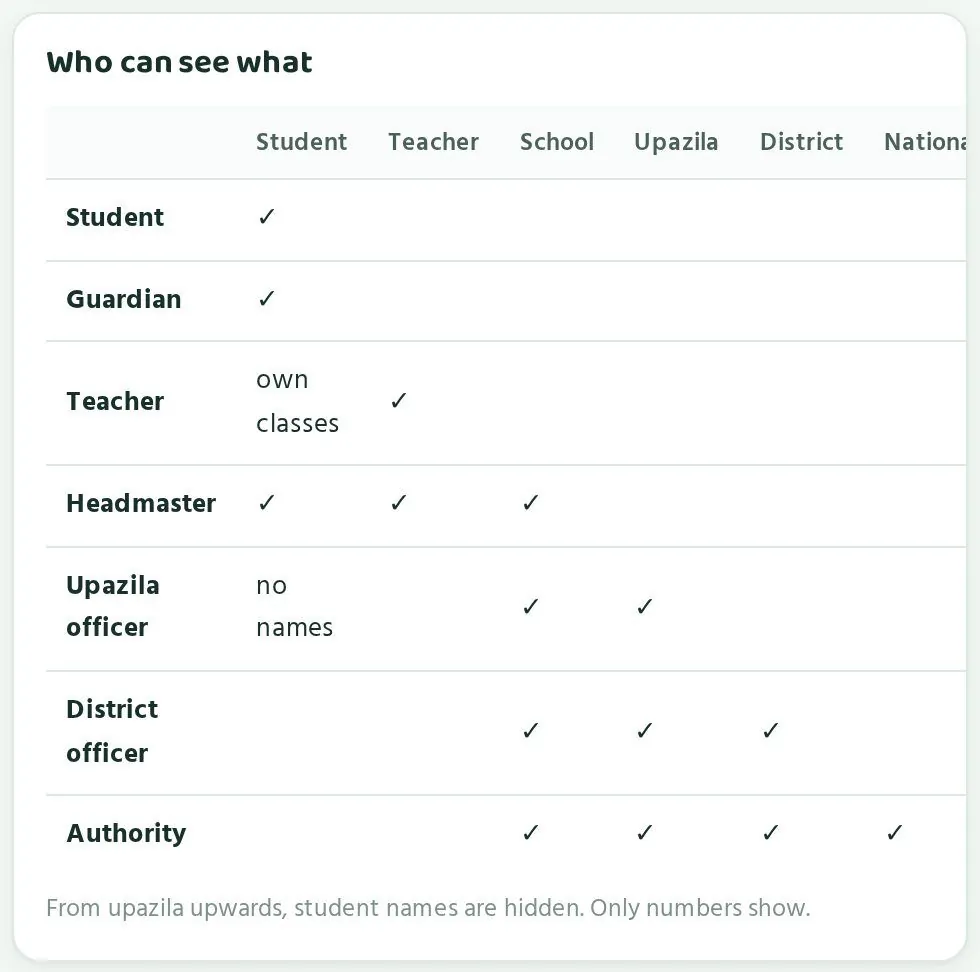
| কেWho | কী খুলতে পারেনWhat they can open |
|---|---|
| শিক্ষার্থীStudent | নিজের পাতাOwn page |
| অভিভাবকGuardian | নিজের সন্তানদের পাতাOwn children's pages |
| শিক্ষকTeacher | নিজের পাতা, নিজের ক্লাসের শিক্ষার্থীরাOwn page; students in own classes |
| প্রধান শিক্ষকHead teacher | স্কুলের পাতা, স্কুলের সব শিক্ষক আর শিক্ষার্থীThe school page, all teachers and students of the school |
| উপজেলা অফিসারUpazila officer | উপজেলার পাতা আর উপজেলার স্কুলের পাতা, সংখ্যা আর ধাপ হিসেবে। শিক্ষার্থীর নাম নেই।The upazila page and school pages in the upazila, as numbers and stages. No student names. |
| জেলা অফিসারDistrict officer | জেলা, তার উপজেলা আর স্কুল, সংখ্যা হিসেবে। শিক্ষার্থীর নাম নেই।The district, its upazilas and schools, as numbers. No student names. |
| কর্তৃপক্ষAuthority | সবকিছু, সংখ্যা হিসেবে। শিক্ষার্থীর নাম নেই।Everything, as numbers. No student names. |
কেন নাম দেখানো হয় নাWhy names are not shown
একজন শিক্ষার্থীকে চেনেন তার শিক্ষক আর প্রধান শিক্ষক। তাঁরাই তাকে সরাসরি সাহায্য করতে পারেন। উপজেলা বা জেলা থেকে দরকার পুরো ছবি: কোন স্কুল, কোন ক্লাস, কোন বিষয় পিছিয়ে। এর জন্য নাম লাগে না। নাম না দেখানোয় শিক্ষার্থী আর অভিভাবকের আস্থাও থাকে, আর কোনো শিক্ষার্থীর ফল অকারণে বেশি মানুষের কাছে যায় না।
A student is known to their teacher and head teacher, and they are the ones who can help directly. The upazila and district need the whole picture: which school, which class, which subject is behind. That needs no names. Keeping names hidden also keeps the trust of students and guardians, and no student's results travel further than needed.
তথ্য কীভাবে সুরক্ষিতHow data is protected
- প্রতিটি পাতা খুলতে লগইন লাগে। লিংক জানা থাকলেও ঠিক মানুষ ছাড়া কেউ ভেতরের তথ্য দেখতে পায় না।Every page needs login. Knowing a link is not enough; only the right person sees the data inside.
- শিক্ষার্থীর লিংকের বেলায়, কোড আসলে আছে কিনা, লগইন পাতা দেখে বোঝা যায় না।For a student link, the login screen looks the same whether the code exists or not.
- তথ্য নিরাপদে রাখা হয়। পাইলটের সময় প্রতিদিন ব্যাকআপ নেওয়া হয়।Data is stored securely, with daily backups during the pilot.
- প্রশাসনিক প্রতিটি কাজের রেকর্ড রাখা হয়।Every admin action is logged.
- অভিভাবকেরা সপ্তাহে অল্প কয়েকটা SMS পান, আর শুধু সেগুলোই যা তাঁরা নিজে চালু করেছেন।Guardians receive at most a few SMS a week, and only the ones they have switched on.
আপনার দায়িত্বYour part
- নিজের লগইন কারো সাথে শেয়ার করবেন না। অফিসের কম্পিউটারে কাজ শেষে ব্রাউজার বন্ধ করুন।Do not share your login. Close the browser when you finish on an office computer.
- ডাউনলোড করা ফাইল অফিসের নিরাপদ ফোল্ডারে রাখুন।Keep downloaded files in a safe office folder.
- একটা স্কুলের সংখ্যা জনসমক্ষে বা অন্য স্কুলের সাথে তুলনা করে প্রকাশ করবেন না।Do not publish a school's numbers publicly or in comparison with other schools.
- কোনো শিক্ষার্থীর বিষয়ে জানতে চাইলে প্রধান শিক্ষকের মাধ্যমে জানুন।If you need to know about a particular student, ask through the head teacher.
- কোনো তথ্য ভুল বা সন্দেহজনক মনে হলে hello@paaro.net এ জানান।If any data looks wrong or suspicious, report it to hello@paaro.net.
পারোর স্ক্রিনশটে কোনো স্কুলের নাম আর সংখ্যা থাকলে সেটাও স্কুলের তথ্য। অফিসের বাইরে পাঠানোর আগে ভেবে নিন কেন আর কাকে পাঠাচ্ছেন।
A Paaro screenshot showing a school's name and numbers is also that school's data. Before sending it outside the office, think about why you are sending it and to whom.
সাধারণ প্রশ্নFrequently asked questions
অফিসারেরা যে প্রশ্নগুলো সবচেয়ে বেশি করেন।The questions officers ask most often.
আমার অ্যাকাউন্ট নেই। কী করব?I do not have an account. What should I do?
hello@paaro.net এ ইমেইল করুন। আপনার নাম, পদ, অফিস, অফিসের ইমেইল আর মোবাইল নম্বর লিখুন। পারো টিম অ্যাকাউন্ট তৈরি করে অনুমোদন দেবে।
Email hello@paaro.net with your name, post, office, office email and mobile number. The Paaro team will create and approve your account.
SMS কোড আসছে না।The SMS code is not arriving.
নম্বরটা ঠিক লিখেছেন কিনা আর সেটা নিবন্ধিত নম্বর কিনা দেখুন। কোড ৫ মিনিট কাজ করে, আর এক নম্বরে এক ঘণ্টায় সর্বোচ্চ ৩টা কোড যায়। অফিসের Google অ্যাকাউন্ট থাকলে সেটা দিয়েও ঢুকতে পারেন। সমস্যা থাকলে পারো টিমকে জানান।
Check that you typed the number correctly and that it is the registered number. A code works for 5 minutes, and a number gets at most 3 codes an hour. You can also use your office Google account. If the problem continues, contact the Paaro team.
আমার দায়িত্ব বদলেছে, অন্য উপজেলায় বদলি হয়েছি।My posting has changed to another upazila.
পারো টিমকে hello@paaro.net এ জানান। অফিসারদের অ্যাকাউন্ট পারো টিম দেখে, তাই তাঁরাই আপনার অনুমতি নতুন উপজেলার জন্য ঠিক করে দেবেন।
Tell the Paaro team at hello@paaro.net. The Paaro team manages officer accounts, so they will update your access for the new upazila.
কোনো শিক্ষার্থীর নাম দেখতে পাচ্ছি না কেন?Why can I not see any student names?
উপজেলা থেকে ওপরের দিকে পারো কখনো শিক্ষার্থীর নাম দেখায় না। আপনি সংখ্যা আর ধাপ দেখেন। নির্দিষ্ট শিক্ষার্থীর বিষয়ে প্রধান শিক্ষক বা ক্লাস শিক্ষকের সাথে কথা বলুন।
From upazila level upwards, Paaro never shows student names. You see numbers and stages. For a particular student, talk to the head teacher or class teacher.
৬২% এর দাগটা কী?What is the 62% line?
কোনো স্কুলে এই সপ্তাহে ৬২% এর কম শিক্ষার্থী কুইজ দিলে সেটা সাহায্য লাগবে এমন স্কুল হিসেবে গোনা হয়। তার বার কমলা হয় আর পাশে ভিজিট বোতাম আসে।
If fewer than 62% of a school's students did a quiz this week, it counts as a school needing support. Its bar turns orange and a Visit button appears.
ছবির সংখ্যাগুলো কি আসল?Are the numbers in the screenshots real?
প্রতিষ্ঠানের মোট সংখ্যা BANBEIS ২০২৪ থেকে নেওয়া, তাই আসল। স্কুলের নাম, অংশগ্রহণ, ধাপ আর অন্য সংখ্যা নমুনা। তাই এক ছবির সাথে আরেক ছবির সংখ্যা না মিলতে পারে। যেমন জেলার তালিকায় মুক্তাগাছার সংখ্যা উপজেলার পাতার চেয়ে আলাদা। আপনার পাতায় আসল তথ্য আসবে, আর সেগুলো মিলবে।
Institution counts come from BANBEIS 2024 and are real. School names, participation, stages and other numbers are sample data, so numbers may differ from one screenshot to another. For example, Muktagachha's figures in the district table differ from the upazila page. Your own page shows real data, and it will be consistent.
আমার উপজেলার একটা স্কুল তালিকায় নেই।A school in my upazila is missing from the list.
তালিকাটা BANBEIS ২০২৪ থেকে নেওয়া, আর এতে ক্লাস ৬-১২ চালায় এমন প্রতিষ্ঠান আছে। স্কুলের EIIN দিয়ে paaro.net/ এর পরে লিখে দেখুন পাতা আসে কিনা। না এলে EIIN আর স্কুলের নাম লিখে পারো টিমকে জানান। পারো টিম EIIN দিয়ে স্কুল যোগ করতে পারে।
The list comes from BANBEIS 2024 and includes institutions running class 6-12. Type the school's EIIN after paaro.net/ to see if a page opens. If not, send the EIIN and school name to the Paaro team. The Paaro team can add schools by EIIN.
আমন্ত্রণ পাঠানোর পরও স্কুল যোগ দিচ্ছে না।A school has not joined after an invitation.
প্রধান শিক্ষককে ফোন করুন। SMS হয়তো চোখ এড়িয়ে গেছে, বা কীভাবে শুরু করবেন বুঝতে পারছেন না। স্কুলের লিংকে (paaro.net/EIIN) গিয়ে পারোতে যোগ দিতে চাই চাপতে বলুন। দরকার হলে উপজেলা অফিস থেকেও অনুরোধ পাঠানো যায়।
Phone the head teacher. The SMS may have been missed, or they may not know how to start. Ask them to open the school's link (paaro.net/EIIN) and tap Ask to join Paaro. If needed, the upazila office can also send the request.
আমি কি প্রশ্ন বা কুইজ সেট করতে পারি?Can I set questions or quizzes?
না। কুইজ সেট করেন শিক্ষকেরা, আর প্রশ্ন যাচাই করেন শিক্ষকেরা বই মিলিয়ে। আপনার পাতা এলাকার অবস্থা দেখার আর স্কুলকে সহায়তা করার জন্য।
No. Teachers set quizzes, and teachers verify questions against the book. Your page is for seeing the state of your area and supporting schools.
জেলা অফিসার কি উপজেলার পাতা দেখতে পারেন?Can a district officer see upazila pages?
হ্যাঁ। জেলার পাতার উপজেলাগুলো তালিকায় যেকোনো উপজেলার নামে চাপলে তার পাতা খোলে। জেলার স্কুলগুলোর পাতাও সংখ্যা হিসেবে দেখা যায়।
Yes. Tap any upazila's name in the Upazilas table on the district page to open its page. School pages in the district can also be seen, as numbers.
শিক্ষার্থীর ফোন না থাকলে কী হবে?What if a student has no phone?
কুইজ ক্লাসেও দেওয়া যায়। পারো কম দামি অ্যান্ড্রয়েড ফোনে আর ক্লাসের স্মার্ট বোর্ডে চলে। সবকিছু ট্যাপ করে করা যায়, টেনে আনার দরকার নেই। স্কুলের কয়েকটা ফোন বা স্মার্ট বোর্ড দিয়ে পালা করে কুইজ নেওয়ার কথা প্রধান শিক্ষকের সাথে আলোচনা করতে পারেন।
Quizzes can be done in class too. Paaro works on a ordinary Android phone and on a classroom smart board. Everything is tap-based, with no dragging. You can discuss with the head teacher taking quizzes in turns using a few school phones or the smart board.
প্রশ্নের উত্তর ভুল মনে হলে কী করব?What if a question's answer seems wrong?
প্রতিটি প্রশ্নের সাথে বইয়ের পাতা নম্বর থাকে, আর দুই স্কুলের দুজন শিক্ষক যাচাই করার পর প্রশ্ন লাইভ হয়। তবুও ভুল মনে হলে প্রশ্ন আর বইয়ের পাতার তথ্যসহ hello@paaro.net এ জানান।
Each question carries its book page, and goes live only after two teachers from two different schools approve it. If one still seems wrong, send the details and book page to hello@paaro.net.
এক পাতায় মনে রাখার কথাQuick reference
দরকারি লিংক, বোতাম আর নিয়ম, এক জায়গায়।Key links, buttons and rules in one place.
| কাজTask | কোথায়Where |
|---|---|
| উপজেলার পাতাUpazila page | paaro.net/mymensingh/muktagachhapaaro.net/mymensingh/muktagachha |
| জেলার পাতাDistrict page | paaro.net/mymensinghpaaro.net/mymensingh |
| স্কুলের পাতাSchool page | paaro.net/900101 (স্কুলের EIIN)paaro.net/900101 (the school's EIIN) |
| লগইনLogin | অফিসের Google অ্যাকাউন্ট, বা নিবন্ধিত মোবাইল আর SMS কোডOffice Google account, or registered mobile and SMS code |
| অ্যাকাউন্ট ও সাহায্যAccounts and help | hello@paaro.nethello@paaro.net |
| পরিদর্শনে যোগAdd to visits | উপজেলার পাতা › ভিজিটUpazila page › Visit |
| স্কুলকে আমন্ত্রণInvite a school | উপজেলার পাতা › আমন্ত্রণ বা সবাইকে আমন্ত্রণ পাঠাওUpazila page › Invite or Invite all |
| ডাউনলোডDownload | উপজেলা: রিপোর্ট। জেলা: Excel।Upazila: Report. District: Excel. |
- ধাপ, নিচ থেকে ওপরে: ১ শুরু, ২ চেষ্টা, ৩ এগোচ্ছে, ৪ পারছে, ৫ ভালো পারে, ৬ দক্ষ।Stages, lowest to highest: 1 Starting, 2 Trying, 3 Moving, 4 Getting it, 5 Strong, 6 Mastered.
- ৬২% এর নিচে অংশগ্রহণ মানে সাহায্য লাগবে এমন স্কুল। বার কমলা।Participation below 62% means a school needing support. The bar is orange.
- প্রতিষ্ঠানের সংখ্যা BANBEIS ২০২৪ থেকে। ছবির বাকি সংখ্যা নমুনা।Institution counts come from BANBEIS 2024. Other numbers in the screenshots are sample data.
- উপজেলা থেকে ওপরের দিকে শিক্ষার্থীর নাম কখনো দেখা যায় না।From upazila level upwards, student names are never shown.
- প্রতি সপ্তাহ: ১৫ মিনিট, চারটি সংখ্যা আর কমলা স্কুল।Every week: 15 minutes, the four numbers and the orange schools.
- প্রতি মাস: সভায় ১০-১৫ মিনিট, রিপোর্ট বা Excel সঙ্গে।Every month: 10-15 minutes at the meeting, with the Report or Excel file.
- প্রতি টার্ম: গড় ধাপ, ধারা আর বিষয়ের পর্যালোচনা।Every term: review average stage, streams and subjects.
- সবসময়: তথ্য দিয়ে সাহায্য করুন, র্যাংকিং বা দোষারোপ এড়িয়ে চলুন।Always: use the data to help, and avoid ranking or blame.