এক পাতায় পারোPaaro on one page
পারো কী, কীভাবে কাজ করে, আর আপনার কাজে কী বদলায়।What Paaro is, how it works, and what changes in your work.
পারো একটা লার্নিং সাপোর্ট সিস্টেম। ক্লাস ১২ পর্যন্ত শিক্ষার্থীদের জন্য বানানো। ঠিকানা paaro.net। শিক্ষার্থী যেকোনো ফোনে ছোট একটা কুইজ দেয়। সাধারণত ৮টা প্রশ্ন থাকে। কুইজ শেষ হলে আপনি দেখতে পান, আপনার ক্লাসের প্রত্যেক শিক্ষার্থী কোন অধ্যায়ে কোথায় দাঁড়িয়ে আছে।
Paaro is a learning-support system for students up to class 12. Its address is paaro.net. A student takes a short quiz on any phone. It usually has 8 questions. When the quiz is done, you can see where every student in your class stands in each chapter.
কেন দরকার? এক ক্লাসে ৪০ জনের মতো শিক্ষার্থী থাকে। কে কোন অধ্যায় বুঝেছে আর কে পিছিয়ে পড়ছে, খাতা দেখে সেটা বের করতে অনেক সময় লাগে। পারো এই কাজটা প্রতি সপ্তাহে নিজে থেকে করে দেয়। আপনি সময়টা পড়ানোয় দিতে পারেন।
Why does this matter? A class has around 40 students. Working out from exercise books who has understood a chapter and who is falling behind takes a lot of time. Paaro does this every week on its own. You can spend that time teaching.
চারটা বিষয়, NCTB-র বইFour subjects, NCTB books
পারোতে এখন চারটা বিষয় আছে: বাংলা, ইংরেজি, গণিত আর আইসিটি। প্রশ্ন আসে NCTB-র ২০২৬ সালের পাঠ্যবই থেকে। বাংলা আর ইংরেজি বই সব ধারায় এক। গণিত আর আইসিটির ইংলিশ ভার্সন বই বাংলা বইয়ের অনুবাদ, তাই এই দুই বিষয়ের প্রতিটা প্রশ্ন বাংলা আর ইংরেজি দুই ভাষাতেই আছে।
Paaro now has four subjects: Bangla, English, maths and ICT. Questions come from the 2026 NCTB textbooks. The Bangla and English books are the same in every stream. The English-version maths and ICT books are translations of the Bangla books, so every maths and ICT question has both Bangla and English text.
ধারা চারটা: সাধারণ (বাংলা মাধ্যম), ইংলিশ ভার্সন, মাদ্রাসা (দাখিল ও আলিম) আর কারিগরি। আপনার স্কুল যে ধারার, পারো সেই অনুযায়ী প্রশ্ন দেখায়।
There are four streams: general (Bangla medium), English version, madrasah (dakhil and alim) and technical. Paaro shows questions to match your school's stream.
প্রতিটা প্রশ্নের সাথে বইয়ের ছাপা পাতার নম্বর দেওয়া থাকে। কুইজের পর শিক্ষার্থী সঠিক উত্তর আর বইয়ের পাতা দেখতে পারে, যদি আপনি সেটা চালু রাখেন। উত্তর যাচাই হয় সার্ভারে, তাই জমা দেওয়ার আগে শিক্ষার্থী উত্তর দেখতে পায় না।
Every question carries the printed book page where the answer is found. After the quiz, the student can see the right answer and the book page, if you leave that switched on. Answers are checked on the server, so students cannot see the answers before they submit.
ছয়টা ধাপSix stages
পারো নম্বর দিয়ে শিক্ষার্থীকে ভাগ করে না। প্রতিটা অধ্যায়ে প্রত্যেক শিক্ষার্থী ছয়টা ধাপের একটায় থাকে। নিচের ধাপ থেকে ওপরের দিকে ধাপগুলো এরকম। প্রতিটা ধাপের একটা রং আছে। পুরো পারোতে এই রংগুলোই দেখবেন।
Paaro does not sort students by marks. In each chapter, every student sits at one of six stages. Here they are, from lowest to highest. Each stage has a colour. You will see these same colours all over Paaro.
ধাপ ১ মানে শিক্ষার্থী সবে শুরু করেছে। ধাপ ৬ মানে অধ্যায়টা সে ভালোভাবে আয়ত্ত করেছে। মাঝের ধাপগুলো দেখায় সে কতটা এগোচ্ছে। একজন শিক্ষার্থী বাংলায় ধাপ ৫-এ আর আইসিটিতে ধাপ ২-এ থাকতে পারে। এটা স্বাভাবিক।
Stage 1 means the student has just started. Stage 6 means the student has mastered the chapter. The stages in between show how far the student has come. A student can be at stage 5 in Bangla and stage 2 in ICT. That is normal.
কোনো অধ্যায়ে শিক্ষার্থী ধাপ ৩-এর নিচে থাকলে পারো নিজে থেকেই তাকে একটা সহজ পথ দেয়। আগে সহজ কিছু প্রশ্ন আর পড়াটা, তারপর আবার মূল কুইজ। আপনাকে আলাদা করে কিছু করতে হয় না।
When a student is below stage 3 in a chapter, Paaro automatically gives them an easier path: some easy questions and the lesson first, then the main quiz again. You do not need to do anything extra.
১২ ধরনের প্রশ্ন, সবই ট্যাপ করে12 question types, all by tapping
প্রশ্ন আছে ১২ ধরনের। যেমন একটা উত্তর বাছাই, সত্য না মিথ্যা, ক্রমে সাজানো, জোড়া মেলানো, ভুল শব্দে ট্যাপ করা। সবই ট্যাপ করে উত্তর দেওয়া যায়। কিছু টেনে আনতে হয় না। তাই সাধারণ অ্যান্ড্রয়েড ফোনে আর ক্লাসের স্মার্ট বোর্ডে, দুই জায়গাতেই চলে। পুরো তালিকা অধ্যায় ৫-এ আছে।
There are 12 question types, such as single choice, true or false, put in order, match pairs and tap the wrong word. Every answer is given by tapping. Nothing needs dragging. So it works on a ordinary Android phone and on a classroom smart board. The full list is in chapter 5.
প্রশ্নব্যাংক আর পাইলটThe question bank and the pilot
এখন পারোতে ৭৬৬টা খসড়া প্রশ্ন আছে। এগুলো NCTB-র ২৭টা বই থেকে নেওয়া: ক্লাস ৬, ৭, ৮, ৯-১০ আর ১১-১২ এর বাংলা। প্রতিটা বইয়ের প্রথম ২-৩টা অধ্যায়। প্রশ্নগুলো চালু হওয়ার আগে শিক্ষকরা যাচাই করেন। এই কাজে আপনিও অংশ নিতে পারেন, আর এর জন্য পয়েন্ট পান।
Paaro now has 766 draft questions from 27 NCTB books: classes 6, 7, 8, 9-10, and Bangla for 11-12. They cover the first 2-3 chapters of each book. Teachers verify the questions before they go live. You can take part in this, and you earn points for it.
শুরুতে দুই মাসের একটা পাইলট চলবে ৪ থেকে ৫টা প্রতিষ্ঠানে, প্রতিটা ধারা থেকে একটা করে। প্রতিষ্ঠানগুলো বাছাই করে শিক্ষা কর্তৃপক্ষ। তারপর জেলা ধরে ধরে পারো ছড়াবে।
It starts with a two-month pilot in 4 to 5 institutions, one from each stream. The education authority chooses them. After that, Paaro rolls out district by district.
আপনার কাজে কী বদলায়What changes in your work
- খাতা দেখে নম্বর গোনার কাজ কমে। কুইজ পারো নিজে দেখে দেয়।Less time marking. Paaro checks the quiz for you.
- প্রতি সপ্তাহে এক নজরে দেখেন, কোন শিক্ষার্থীর কোন অধ্যায়ে আরেকটু সাহায্য দরকার।Every week you see at a glance which student needs a little more help, and in which chapter.
- কাকে আলাদা সাহায্য করতে হবে, তার একটা তালিকা তৈরি থাকে।A list of students who need extra help is ready for you.
- অভিভাবককে এক ট্যাপে SMS পাঠাতে পারেন।You can send a guardian an SMS with one tap.
- প্রশ্ন যাচাই করে পয়েন্ট পান। বেশি পয়েন্ট পেলে সার্টিফিকেট, ট্রেনিংয়ে অগ্রাধিকার আর শিক্ষা সফরের সুযোগ আছে।You earn points by verifying questions. Points lead to certificates, priority for training and a chance to join the exposure visit.
আপনার কাজ সপ্তাহে মোটামুটি তিনটা: কুইজ দেওয়া, ফলাফল দেখে ক্লাসে কাজে লাগানো, আর সময় পেলে কয়েকটা প্রশ্ন যাচাই করা। এই বইয়ে প্রতিটা কাজ ধাপে ধাপে দেখানো আছে।
Your work each week comes down to three things: set a quiz, use the results in class, and verify a few questions when you have time. This book shows each of these step by step.
আপনার লিংক আর লগইনYour link and logging in
প্রত্যেকের একটা সহজ লিংক, আর লগইন করে ঢোকা।Everyone has one easy link, and logs in to open it.
পারোতে প্রত্যেকের একটা করে লিংক আছে। লিংকটা এমনভাবে বানানো যে মনে রাখা সহজ। স্কুলের লিংক তার EIIN, শিক্ষকের লিংক EIIN আর তাঁর নামের প্রথম অংশ। নিচের টেবিলে সব লিংকের নিয়ম আছে।
Everyone on Paaro has one link. Links are built to be easy to remember. A school's link is its EIIN, and a teacher's link is the EIIN plus the teacher's first name. The table below shows the rules for every link.
| কার পাতাWhose page | লিংকLink | উদাহরণExample |
|---|---|---|
| কর্তৃপক্ষAuthority | paaro.net/dshe | paaro.net/dshe |
| জেলা অফিসDistrict office | paaro.net/[district] | paaro.net/mymensingh |
| উপজেলা অফিসUpazila office | paaro.net/[district]/[upazila] | paaro.net/mymensingh/muktagachha |
| স্কুল / প্রধান শিক্ষকSchool / head teacher | paaro.net/[EIIN] | paaro.net/900101 |
| শিক্ষকTeacher | paaro.net/[EIIN]/[name] | paaro.net/900101/nasrin |
| শিক্ষার্থীStudent | paaro.net/[name+4 digits] | paaro.net/rafi2031 |
| অভিভাবকGuardian | paaro.net/[student]/guardian | paaro.net/rafi2031/guardian |
paaro.net এর হোম পাতাতেও এই নিয়মের টেবিল আছে। কোনো লিংক ভুলে গেলে সেখানে দেখে নিন। জেলা আর উপজেলার নাম ইংরেজিতে, ছোট হাতের অক্ষরে লেখা হয়, আর মাঝে ফাঁকা থাকলে সেখানে হাইফেন বসে, যেমন mymensingh-sadar। পুরোনো বানানও কাজ করে: paaro.net/chittagong দিলে /chattogram খোলে।
The paaro.net home page shows the same table of rules. If you forget a link, look there. District and upazila names are written in English lowercase, and spaces become hyphens, such as mymensingh-sadar. Old spellings still work: paaro.net/chittagong opens /chattogram.
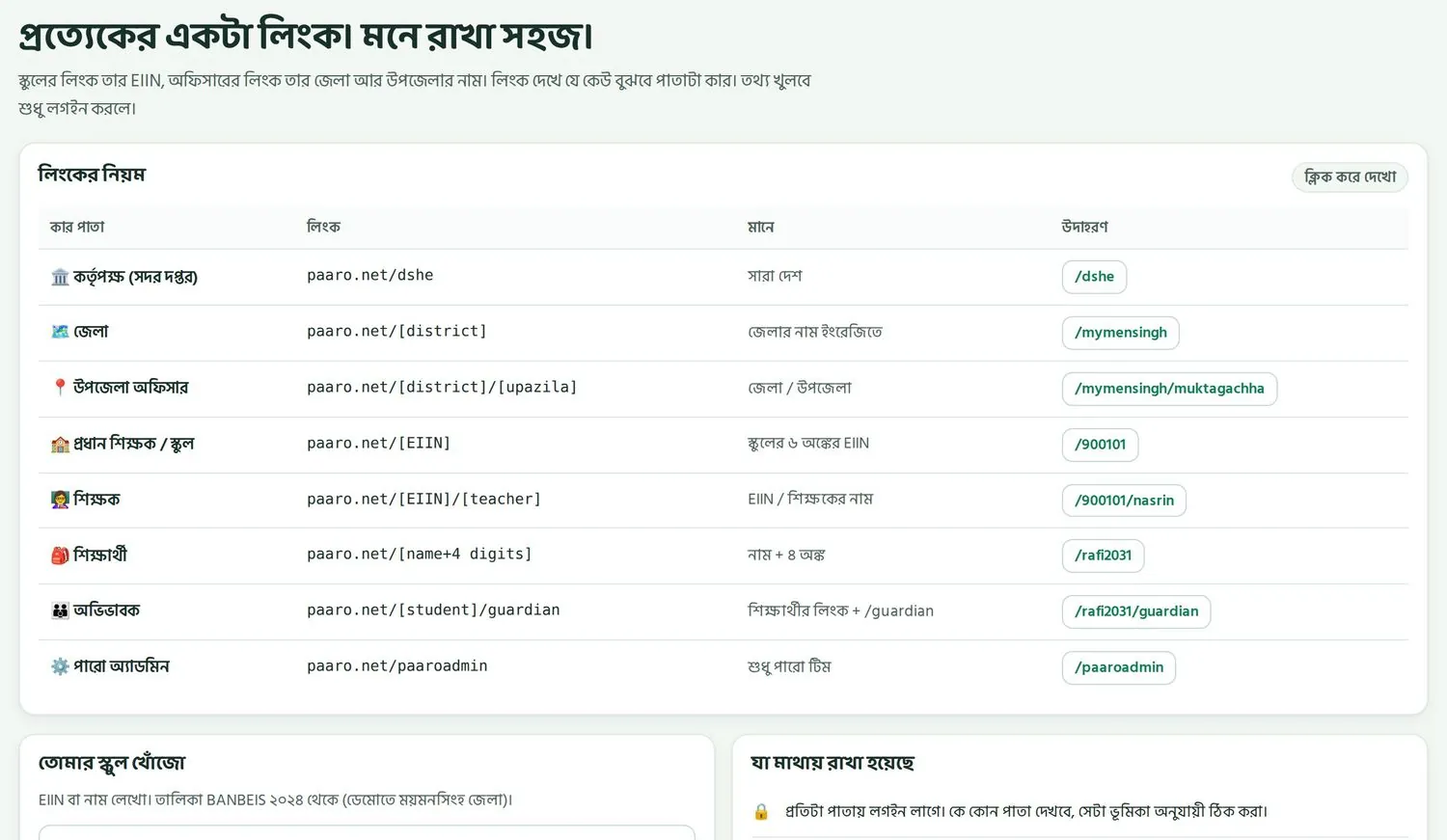
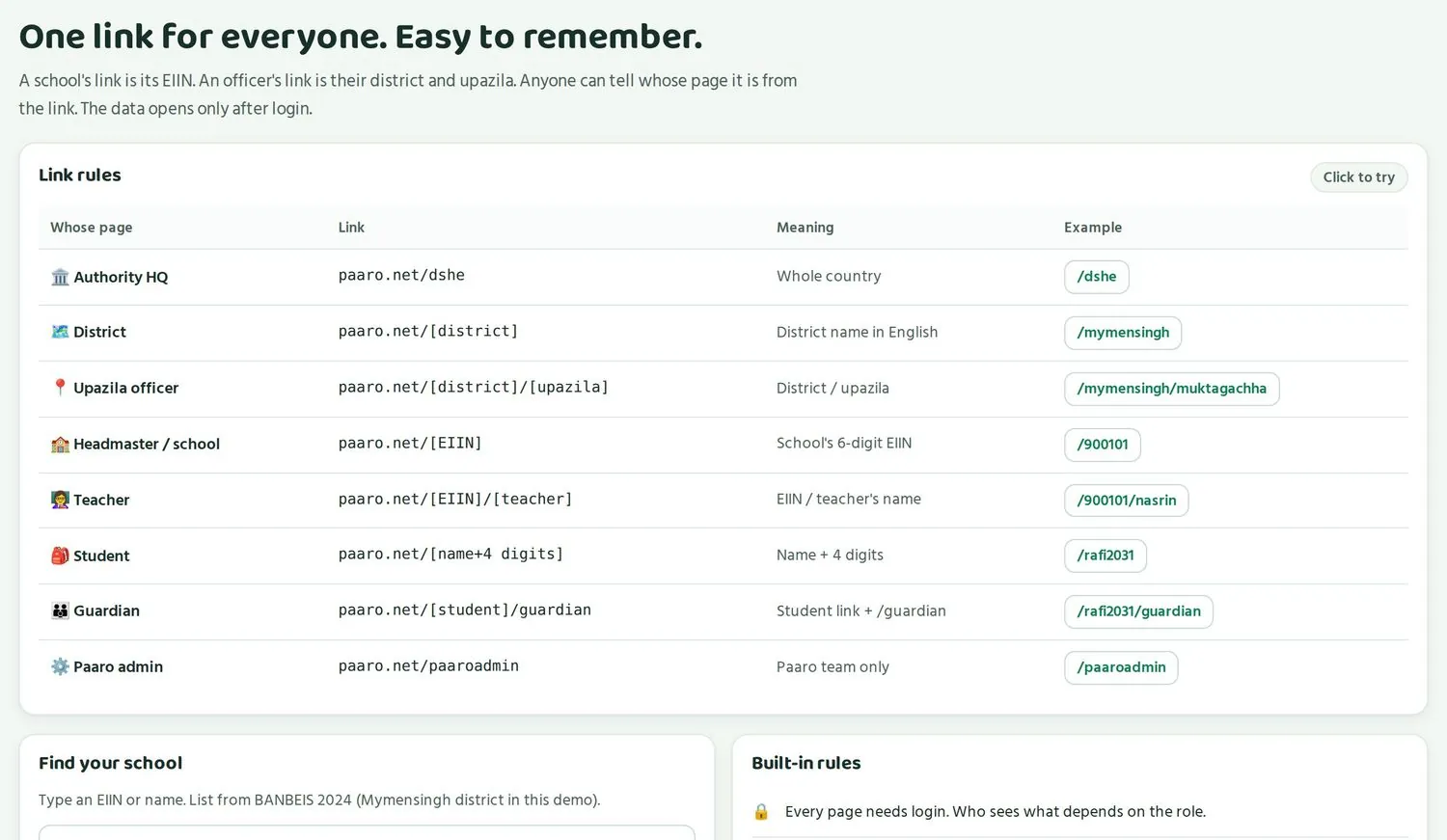
আপনার কাজে সবচেয়ে বেশি লাগবে চারটা লিংক: আপনার নিজের, আপনার স্কুলের, আর শিক্ষার্থী ও অভিভাবকের। স্কুলের পাতা খোলে প্রধান শিক্ষকের জন্য, আপনার জন্য নয়। শিক্ষার্থী আর অভিভাবকের পাতার কথা অধ্যায় ৭-এ আছে।
Four links matter most in your work: your own, your school's, and those of students and guardians. The school page opens for the head teacher, not for you. Student and guardian pages are covered in chapter 7.
আপনার লিংকYour link
ধরুন আপনি নাসরিন আক্তার, মুক্তাগাছা আদর্শ উচ্চ বিদ্যালয়ের বাংলা শিক্ষক। স্কুলের EIIN হলো ৬ অঙ্কের সরকারি নম্বর, এখানে 900101। তাহলে আপনার লিংক paaro.net/900101/nasrin। নামের অংশটা ইংরেজিতে, ছোট হাতের অক্ষরে।
Say you are Nasrin Akter, the Bangla teacher at Muktagachha Adarsha High School. The school's EIIN is its 6-digit government number, here 900101. So your link is paaro.net/900101/nasrin. The name part is in English, in lowercase.
একই স্কুলে একই নামে দুইজন শিক্ষক থাকলে দ্বিতীয়জনের লিংক হয় paaro.net/900101/nasrin2। প্রধান শিক্ষক যখন আপনাকে পারোতে যোগ করেন, আপনার মোবাইলে একটা SMS যায়। তখনই আপনার লিংক তৈরি হয়।
If two teachers at the same school share a name, the second one's link becomes paaro.net/900101/nasrin2. When your head teacher adds you to Paaro, you get an SMS on your mobile. That is when your link is created.
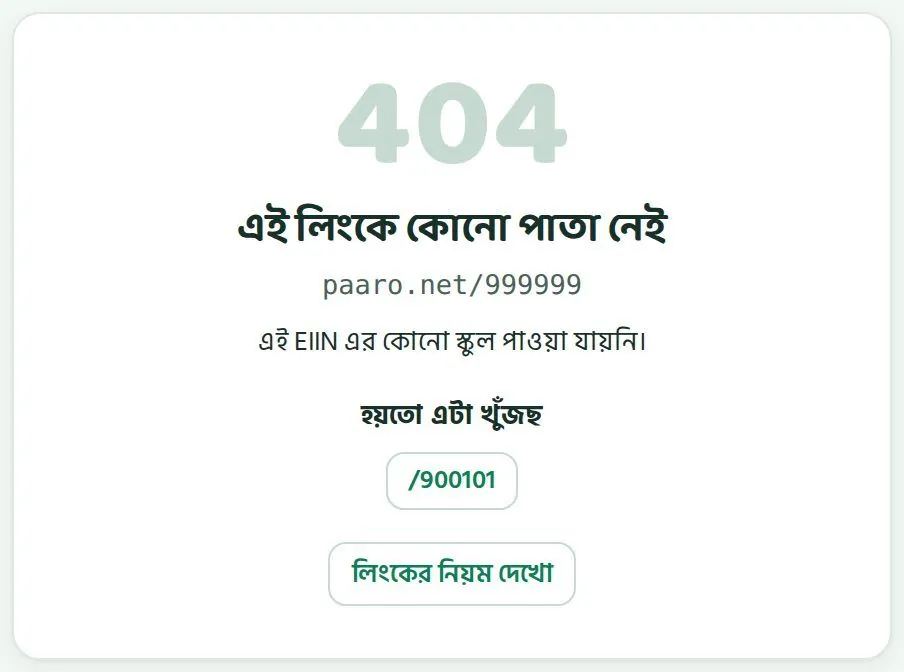
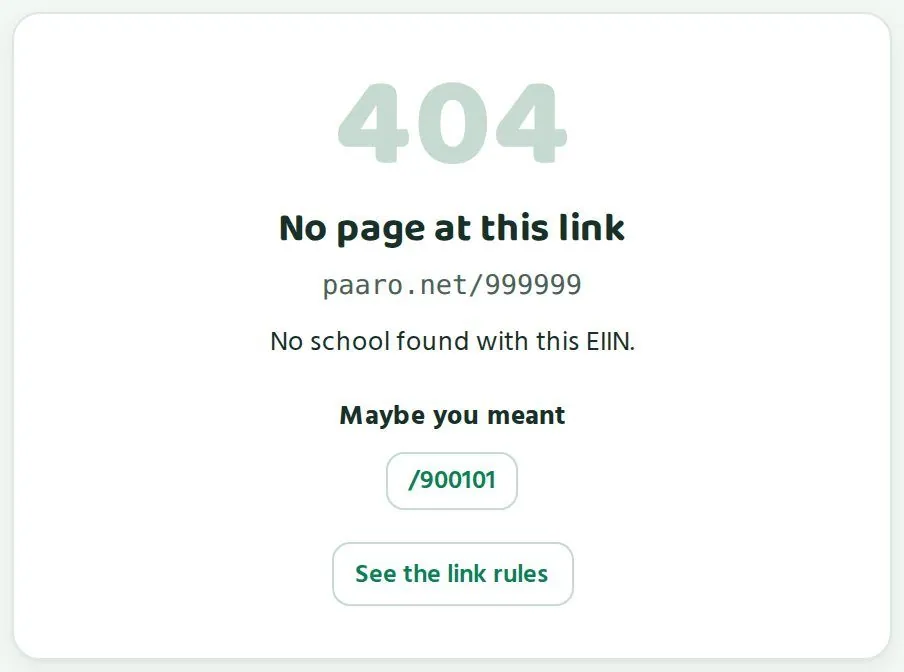
লিংক ভুল টাইপ করলে একটা পাতা আসে যেখানে লেখা থাকে এই লিংকে কোনো পাতা নেই। হয়তো এটা খুঁজছ এর নিচে কাছাকাছি সঠিক লিংকের পরামর্শ থাকে, আর থাকে লিংকের নিয়ম দেখো বোতাম।
If you type a link wrongly, a page appears saying No page at this link. Under Maybe you meant it suggests a close match, and it has a See the link rules button.
লিংক সহজ, কিন্তু পাতা খোলে লগইন করলেThe link is easy, but the page opens only after login
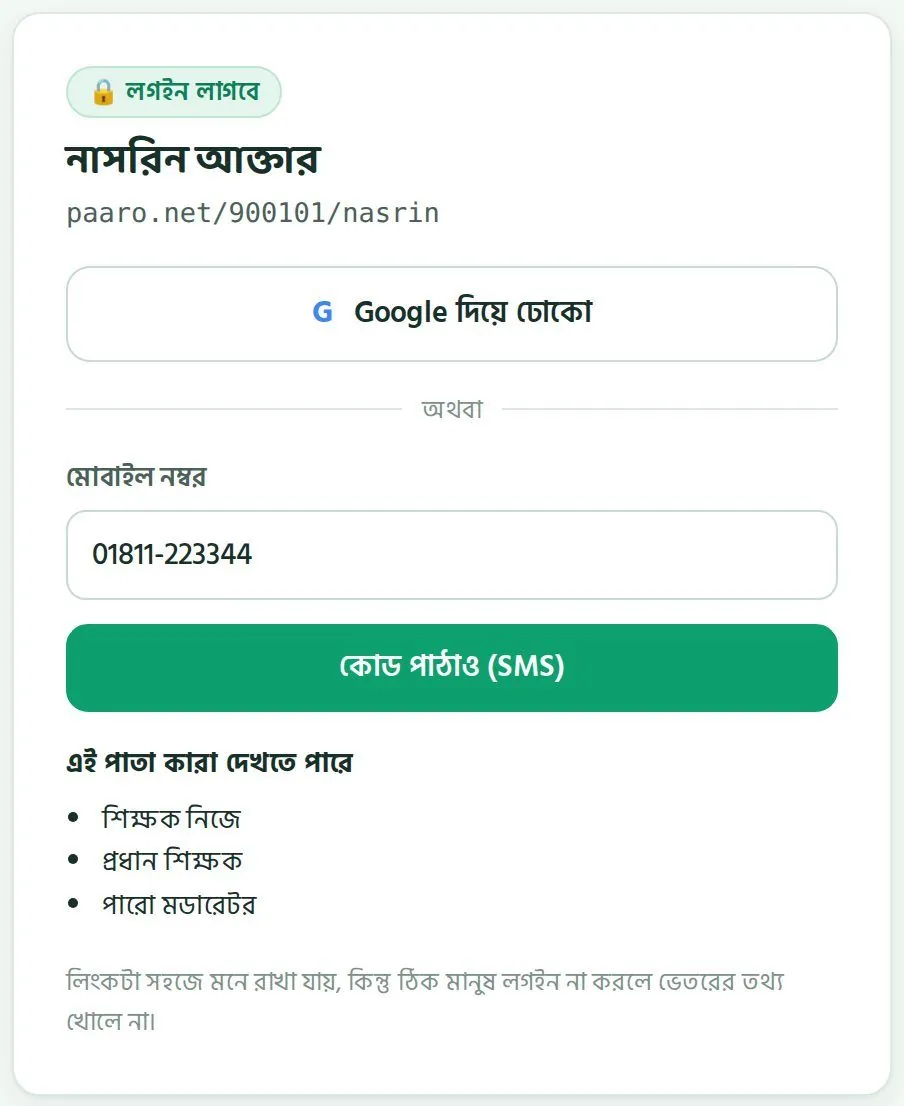
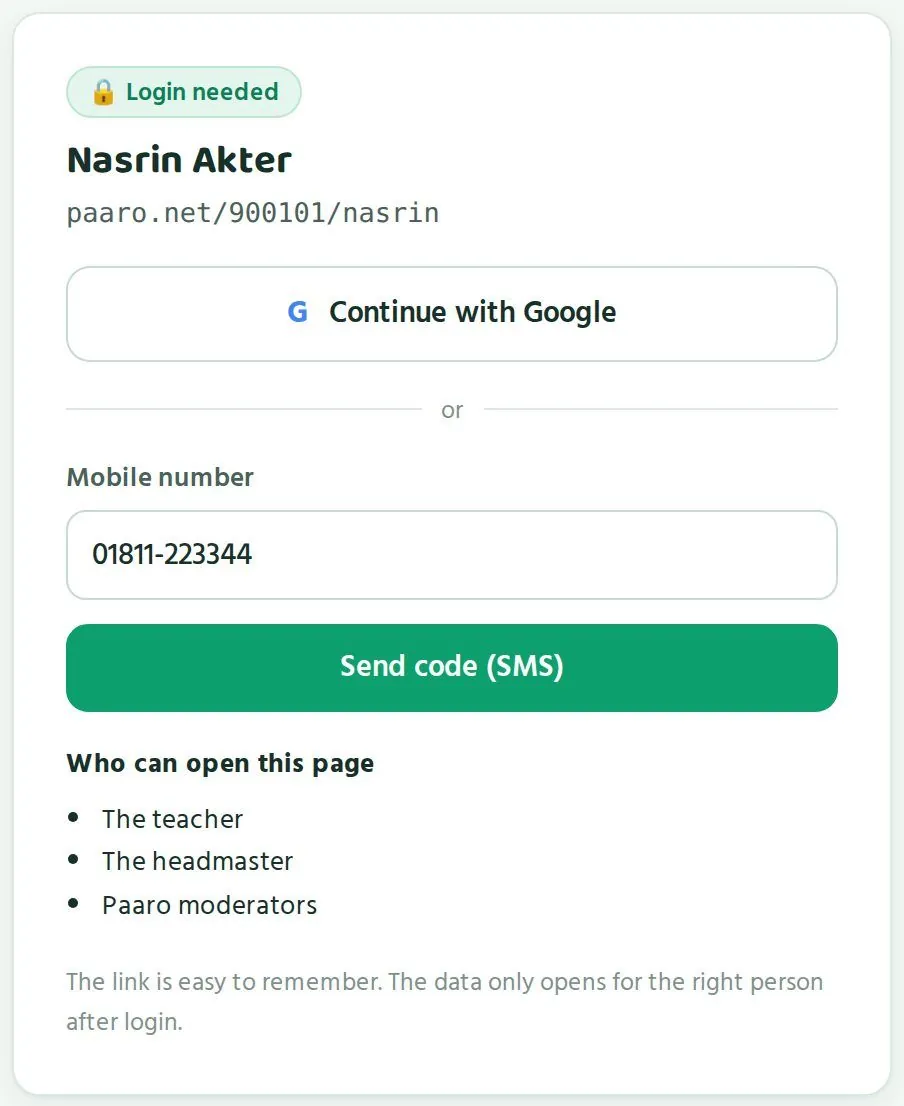
লিংক সবাই জানতে পারে। তাতে ভয়ের কিছু নেই। প্রতিটা পাতায় লগইন লাগে। ঠিক মানুষ লগইন না করলে ভেতরের তথ্য খোলে না। লগইন পাতার নিচে লেখা থাকে এই পাতা কারা দেখতে পারে। আপনার পাতা দেখতে পারেন আপনি নিজে, আপনার প্রধান শিক্ষক আর পারো মডারেটর।
Anyone can know a link. That is fine. Every page needs a login. The data inside opens only when the right person logs in. The login screen lists who can open the page. Your page can be opened by you, your head teacher and Paaro moderators.
দুইভাবে লগইন করা যায়Two ways to log in
আপনার যদি Google অ্যাকাউন্ট থাকে (যেমন Gmail), সেটাই সবচেয়ে সহজ। না থাকলে মোবাইল নম্বর দিয়ে ঢুকুন। দুইভাবেই একই পাতা খোলে।
If you have a Google account (such as Gmail), that is the easiest. If not, use your mobile number. Both open the same page.
- ফোনের ব্রাউজারে আপনার লিংক লিখুন, যেমন
paaro.net/900101/nasrin।Type your link in your phone's browser, for examplepaaro.net/900101/nasrin. - Google থাকলে Google দিয়ে ঢোকো বোতাম চাপুন, তারপর আপনার অ্যাকাউন্ট বেছে নিন।If you use Google, tap Continue with Google and choose your account.
- মোবাইল দিয়ে ঢুকতে চাইলে মোবাইল নম্বর ঘরে সেই নম্বর লিখুন যেটা প্রধান শিক্ষক পারোতে দিয়েছেন।To use your mobile, type the number your head teacher gave Paaro in the Mobile number box.
- কোড পাঠাও (SMS) চাপুন। আপনার ফোনে ৬ অঙ্কের একটা কোড আসবে।Tap Send code (SMS). A 6-digit code arrives on your phone.
- কোডটা লিখে ঢুকে পড়ুন। কোড ৫ মিনিট কাজ করে।Enter the code to log in. The code works for 5 minutes.
এক নম্বরে এক ঘণ্টায় সর্বোচ্চ ৩টা কোড পাঠানো যায়। বারবার কোড পাঠাও চাপবেন না। কোড না এলে একটু অপেক্ষা করুন, নম্বরটা ঠিক আছে কিনা দেখুন।
A number can get at most 3 codes an hour. Do not keep tapping Send code. If the code does not come, wait a little and check that the number is correct.
প্রথমবার: প্রধান শিক্ষকের অনুমোদনThe first time: your head teacher's approval
নতুন শিক্ষককে অনুমোদন দেন তাঁর স্কুলের প্রধান শিক্ষক। প্রধান শিক্ষক আপনার ইংরেজি নাম, মোবাইল, বিষয় আর ক্লাস দিয়ে আপনাকে যোগ করেন। তারপর আপনি SMS পান আর লগইন করতে পারেন। আপনার ক্লাস বা বিষয় ভুল দেখালে প্রধান শিক্ষককে বলুন।
New teachers are approved by their head teacher. The head teacher adds you with your English name, mobile, subject and classes. Then you get an SMS and can log in. If your classes or subject look wrong, tell your head teacher.
বাংলা না ইংরেজিBangla or English
প্রতিটা পাতায় বাংলা আর ইংরেজির একটা সুইচ আছে। যে ভাষায় আরাম, সেটা বেছে নিন। তথ্য একই থাকে, শুধু লেখার ভাষা বদলায়।
Every page has a Bangla and English switch. Choose whichever you are comfortable with. The data stays the same; only the language of the text changes.
ফোনের লগইন নিরাপদ রাখুনKeep your phone login safe
- SMS কোড কাউকে বলবেন না। পারোর কেউ কখনো আপনার কোড চাইবে না।Never tell anyone your SMS code. Nobody from Paaro will ever ask for it.
- ফোনে স্ক্রিন লক রাখুন। আপনার ফোনে শিক্ষার্থীদের নাম আর ফলাফল আছে।Keep a screen lock on your phone. It holds your students' names and results.
- স্কুলের কম্পিউটার বা অন্যের ফোনে ঢুকলে কাজ শেষে লগআউট করুন।If you log in on a school computer or someone else's phone, log out when you finish.
- মোবাইল নম্বর বদলালে প্রধান শিক্ষককে জানান, যাতে নতুন নম্বরে কোড আসে।If you change your mobile number, tell your head teacher so codes go to the new number.
লিংকটা ফোনের ব্রাউজারে বুকমার্ক করে রাখুন, বা হোম স্ক্রিনে যোগ করুন। তাহলে এক ট্যাপে পারো খুলবে।
Bookmark your link in your phone's browser or add it to your home screen. Then Paaro opens with one tap.
আমার ক্লাস পাতাThe My classes page
চারটা সংখ্যা আর “কে কোথায়” ছক পড়া, আর তা দেখে কী করবেন।Reading the four numbers and the “Who stands where” grid, and what to do next.
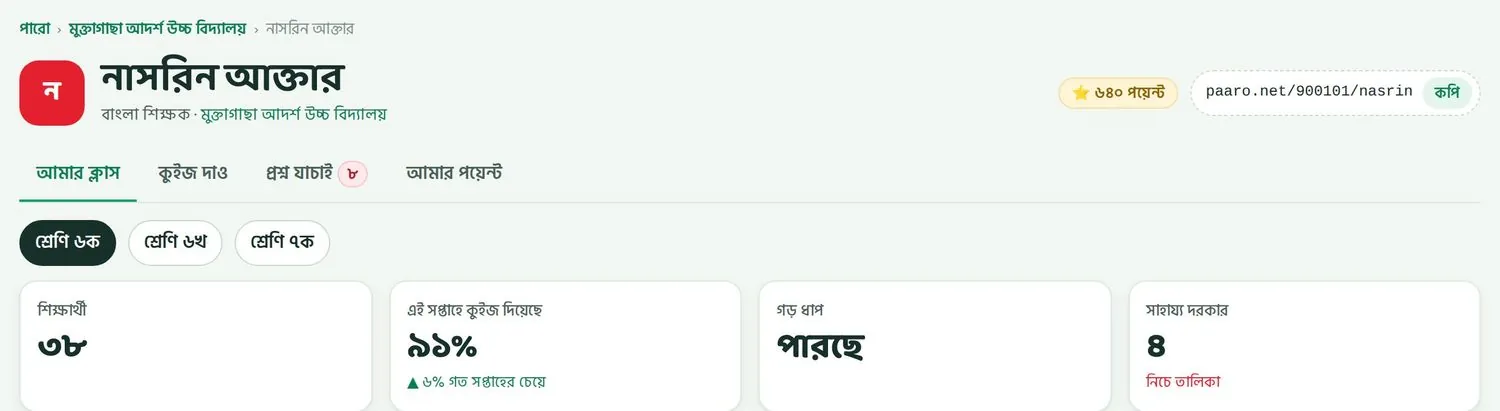
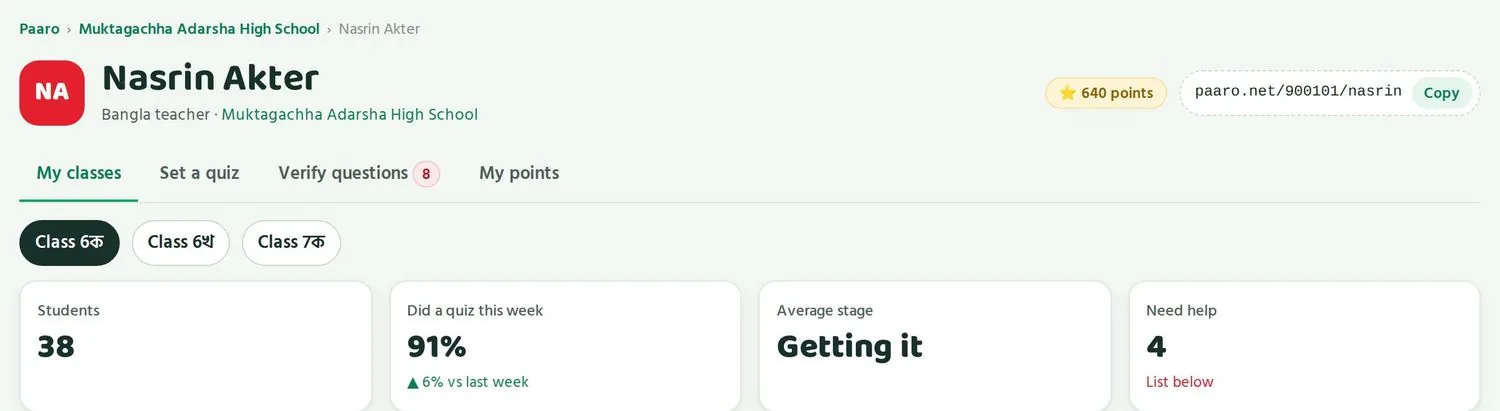
লগইন করলে প্রথমে আসে আমার ক্লাস ট্যাব। এটাই আপনার মূল পাতা। ওপরে আপনার নাম, বিষয়, স্কুল, মোট পয়েন্ট আর আপনার লিংক থাকে। লিংকের পাশে কপি বোতাম চাপলে লিংক কপি হয়।
When you log in, the My classes tab opens first. This is your main page. At the top are your name, subject, school, total points and your link. Tap Copy next to the link to copy it.
চারটা ট্যাবFour tabs
| ট্যাবTab | কী করা যায়What you do there |
|---|---|
| আমার ক্লাসMy classes | ক্লাসের অবস্থা দেখা, কার সাহায্য দরকার, সাম্প্রতিক কুইজSee how the class is doing, who needs help, recent quizzes |
| কুইজ দাওSet a quiz | নতুন কুইজ বানিয়ে পাঠানোBuild and send a new quiz |
| প্রশ্ন যাচাইVerify questions | প্রশ্ন বইয়ের সাথে মিলিয়ে দেখা। পাশের সংখ্যা বলে কয়টা প্রশ্ন অপেক্ষায় আছে।Check questions against the book. The number beside it shows how many are waiting. |
| আমার পয়েন্টMy points | পয়েন্ট, লেভেল আর জেলায় অবস্থানYour points, level and district rank |
ক্লাস বেছে নিনChoose a class
ট্যাবের নিচে আপনার ক্লাসগুলোর বোতাম থাকে, যেমন শ্রেণি ৬ক, শ্রেণি ৬খ, শ্রেণি ৭ক। যে ক্লাস দেখতে চান, সেটা চাপুন। বোতামটা গাঢ় হয়ে যায়, আর নিচের সব তথ্য সেই ক্লাসের দেখায়।
Below the tabs are buttons for your classes, such as Class 6ক, Class 6খ, Class 7ক. Tap the class you want to see. The button turns dark and everything below shows that class.
চারটা সংখ্যাThe four numbers
| সংখ্যাNumber | উদাহরণ (শ্রেণি ৬ক)Example (Class 6ক) | মানে কীWhat it means |
|---|---|---|
| শিক্ষার্থীStudents | ৩৮38 | এই ক্লাসে পারোতে কতজন শিক্ষার্থী আছেHow many students in this class are on Paaro |
| এই সপ্তাহে কুইজ দিয়েছেDid a quiz this week | ৯১%, গত সপ্তাহের চেয়ে ৬% বেশি91%, up 6% on last week | এই সপ্তাহে কত ভাগ শিক্ষার্থী অন্তত একটা কুইজ দিয়েছে। তীর দেখায় গত সপ্তাহের চেয়ে বাড়ল না কমল।The share of students who did at least one quiz this week. The arrow shows the change from last week. |
| গড় ধাপAverage stage | পারছেGetting it | পুরো ক্লাস গড়ে কোন ধাপে আছেThe stage the class is at on average |
| সাহায্য দরকারNeed help | ৪4 | কতজন শিক্ষার্থী পিছিয়ে আছে। নাম নিচের তালিকায়।How many students are behind. Their names are in the list below. |
প্রথম দুইটা সংখ্যা বলে ক্লাস কুইজে কতটা অংশ নিচ্ছে। শেষ দুইটা বলে তারা কতটা পারছে। অংশ নেওয়া কম হলে আগে সেটা ঠিক করুন। কেউ কুইজ না দিলে পারো জানতেই পারে না সে কোথায় আছে।
The first two numbers tell you how much the class is taking part. The last two tell you how much they are learning. If participation is low, fix that first. If a student does no quiz, Paaro cannot know where they stand.
“কে কোথায়” ছক পড়বেন যেভাবেHow to read the “Who stands where” grid
চারটা সংখ্যার নিচে আছে কে কোথায় ছক। এটা পারোর সবচেয়ে কাজের অংশ। ওপরে বিষয়ের নাম লেখা থাকে, যেমন “কে কোথায় · বাংলা”।
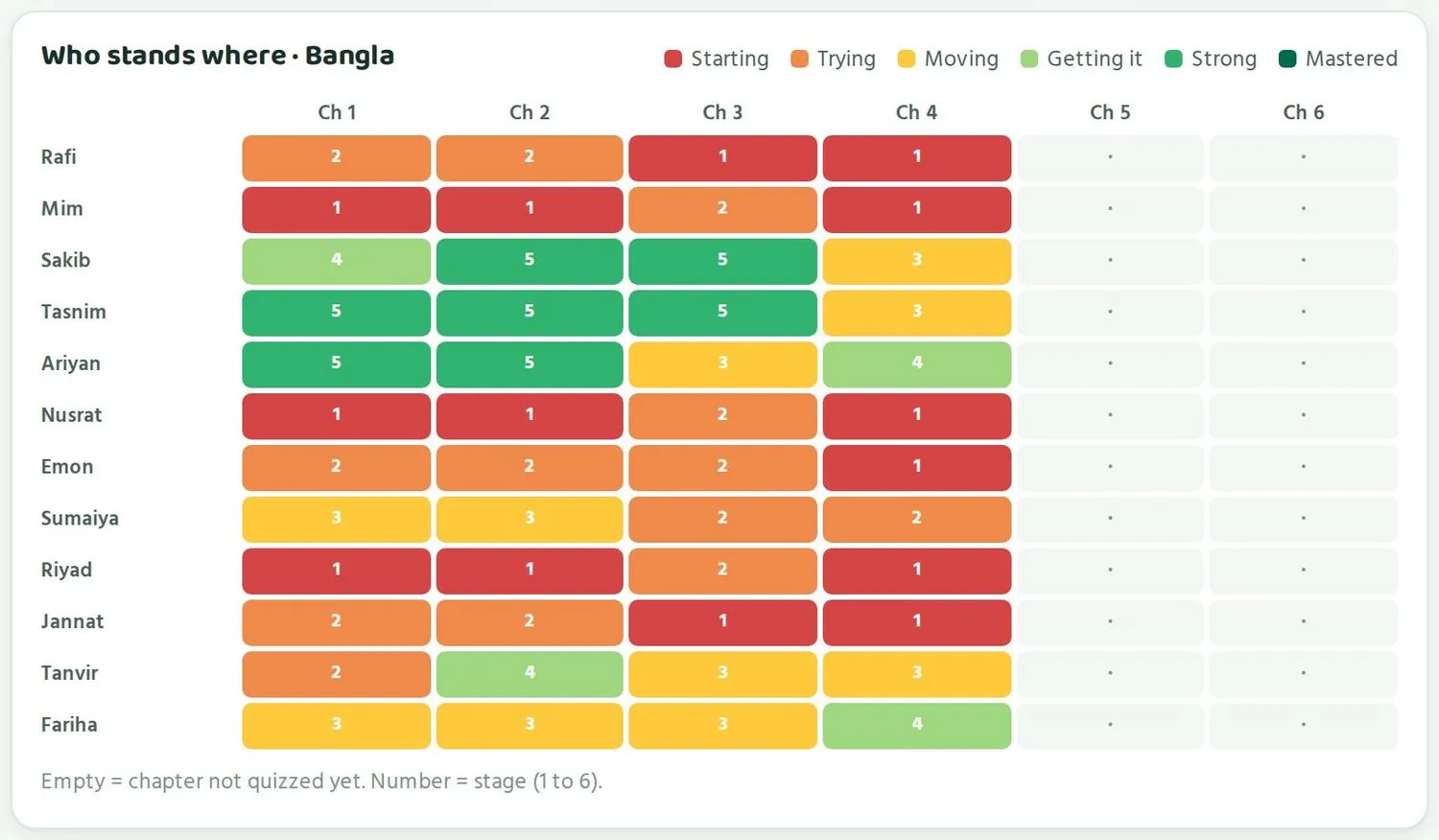
Below the four numbers is the Who stands where grid. It is the most useful part of Paaro. The subject is named at the top, for example “Who stands where · Bangla”.
- প্রতিটা সারি একজন শিক্ষার্থী। বাঁ দিকে তার নাম।Each row is one student. The name is on the left.
- প্রতিটা কলাম একটা অধ্যায়: অধ্যায় ১, অধ্যায় ২, এভাবে।Each column is a chapter: Ch 1, Ch 2 and so on.
- প্রতিটা ঘরের রং দেখায় ধাপ। লাল মানে শুরু, কমলা চেষ্টা, হলুদ এগোচ্ছে, হালকা সবুজ পারছে, সবুজ ভালো পারে, গাঢ় সবুজ দক্ষ।Each cell's colour shows the stage. Red is Starting, orange Trying, yellow Moving, light green Getting it, green Strong, dark green Mastered.
- ঘরের ভেতরের সংখ্যা হলো ধাপ, ১ থেকে ৬।The number in a cell is the stage, 1 to 6.
- খালি ঘর (শুধু একটা বিন্দু) মানে এই অধ্যায়ে এখনো কুইজ হয়নি। এটা খারাপ ফল নয়। শুধু এখনো তথ্য নেই।An empty cell (just a dot) means that chapter has not been quizzed yet. It is not a bad result. There is simply no data yet.
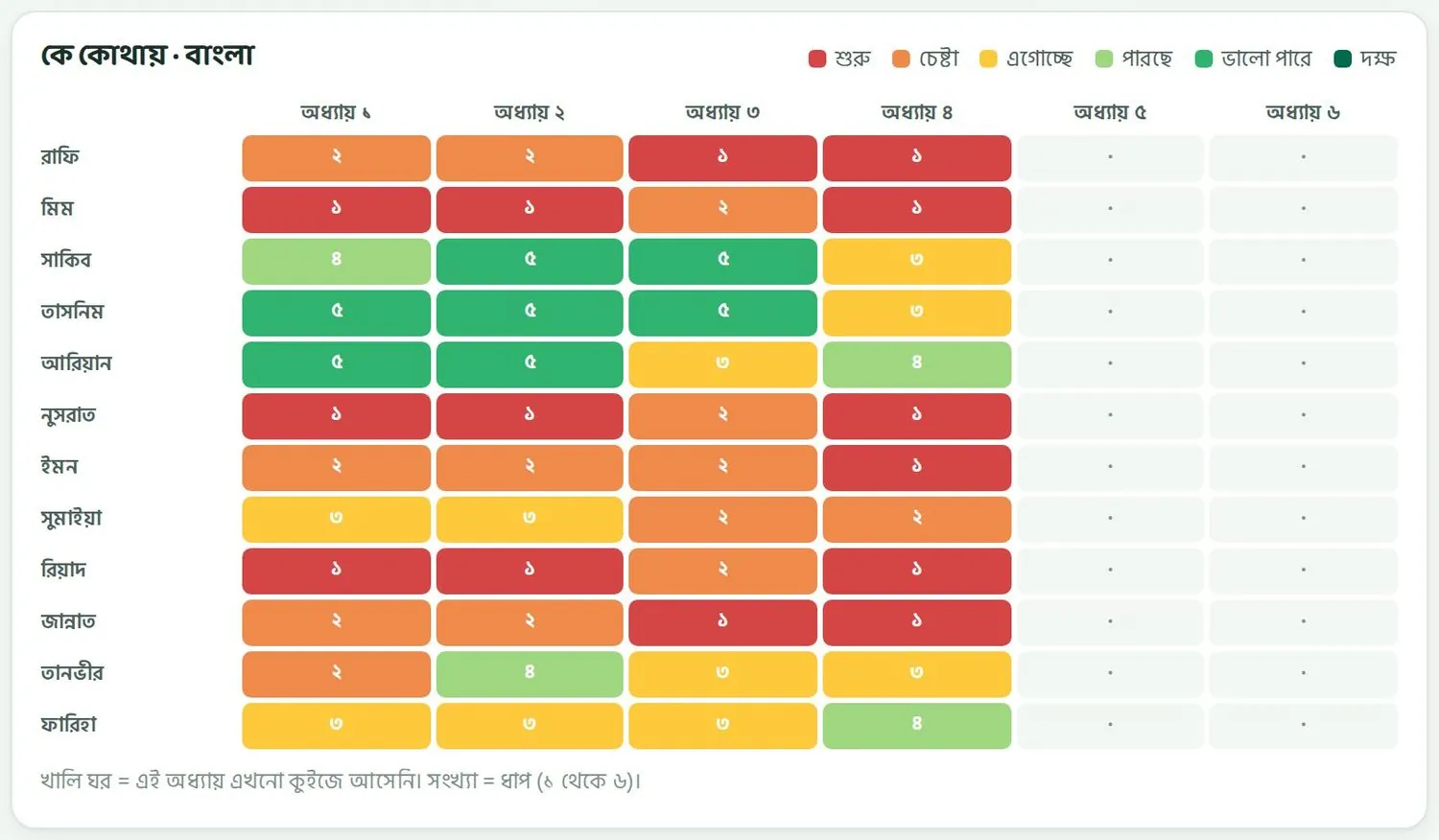
ছকটা দুইভাবে পড়ুন। আড়াআড়ি একটা সারি দেখলে বোঝা যায় একজন শিক্ষার্থী কেমন করছে। ওপর থেকে নিচে একটা কলাম দেখলে বোঝা যায় পুরো ক্লাস একটা অধ্যায়ে কেমন করছে। দুইটার সমাধান আলাদা।
Read the grid two ways. Looking across a row tells you how one student is doing. Looking down a column tells you how the whole class is doing in one chapter. The two call for different action.
উদাহরণ ১: একটা লাল সারিExample 1: a red row
রাফির সারি দেখুন: ২, ২, ১, ১। প্রথম দুই অধ্যায়ে সে চেষ্টা ধাপে, পরের দুইটায় শুরু ধাপে। মানে রাফি প্রায় সব অধ্যায়েই পিছিয়ে আছে। মিম, নুসরাত আর রিয়াদের সারিও একই রকম।
Look at Rafi's row: 2, 2, 1, 1. He is at Trying in the first two chapters and at Starting in the next two. So Rafi is behind in almost every chapter. Mim, Nusrat and Riyad have similar rows.
এটা একজন শিক্ষার্থীর সমস্যা, পুরো ক্লাসের নয়। তাই সমাধানও তার জন্য আলাদা:
This is one student's problem, not the whole class's. So the fix is for that student:
- রাফির সাথে আলাদা করে দুই মিনিট কথা বলুন। জিজ্ঞেস করুন কোথায় আটকাচ্ছে। হয়তো পড়া বুঝছে না, হয়তো ফোন পাচ্ছে না।Talk to Rafi alone for two minutes. Ask which part he finds hard. Maybe he does not follow the lesson, maybe he cannot get a phone.
- নিচের যাদের সাহায্য দরকার তালিকায় রাফির পাশের SMS বোতাম চেপে অভিভাবককে জানান।In the Students who need help list below, tap SMS next to Rafi to tell his guardian.
- রাফি আর তার মতো অন্যদের জন্য এদের জন্য সহজ কুইজ দাও চাপুন।Tap Set an easier quiz for them for Rafi and the others like him.
- মনে রাখবেন, ধাপ ৩-এর নিচে থাকায় পারো রাফিকে নিজে থেকেই সহজ পথ দিচ্ছে। এক সপ্তাহ পর তার সারি আবার দেখুন।Remember, because Rafi is below stage 3, Paaro is already giving him the easier path. Check his row again in a week.
উদাহরণ ২: একটা লাল কলামExample 2: a red column
এবার অধ্যায় ৪-এর কলাম দেখুন। ১২ জনের মধ্যে ৬ জন ধাপ ১-এ। যারা অন্য অধ্যায়ে ভালো, যেমন সাকিব আর তাসনিম, তারাও এখানে মাত্র ধাপ ৩-এ। অধ্যায় ১ থেকে ৩-এ তারা ধাপ ৫-এ ছিল।
Now look down the Ch 4 column. 6 of the 12 students are at stage 1. Even students who do well elsewhere, like Sakib and Tasnim, are only at stage 3 here. They were at stage 5 in chapters 1 to 3.
যখন ভালো শিক্ষার্থীরাও একটা অধ্যায়ে নেমে যায়, তখন সমস্যাটা সম্ভবত অধ্যায়ে বা পড়ানোয়, শিক্ষার্থীতে নয়। হয়তো অধ্যায়টা কঠিন, হয়তো তাড়াহুড়ায় পড়ানো হয়েছে। তাই সমাধান পুরো ক্লাসের জন্য:
When even strong students drop in one chapter, the problem is probably in the chapter or how it was taught, not in the students. Maybe the chapter is hard, maybe it was covered in a hurry. So the fix is for the whole class:
- পরের ক্লাসে অধ্যায় ৪-এর কঠিন অংশটা আবার পড়ান। অন্য উদাহরণ দিয়ে বোঝান।In the next class, teach the hard part of chapter 4 again. Use different examples.
- কুইজ দাও ট্যাবে গিয়ে অধ্যায় ৪-এর নতুন একটা কুইজ দিন।Go to Set a quiz and set a new quiz on chapter 4.
- সাম্প্রতিক কুইজ তালিকায় দেখুন গড় নম্বর বাড়ল কিনা।Check in Recent quizzes whether the average score went up.
এই ক্লাসে ঠিক এটাই হয়েছে। অধ্যায় ৪-এর প্রথম কুইজে গড় ছিল ৬৪%। আবার পড়ানোর পর দ্বিতীয় কুইজে হলো ৭১%। অধ্যায় ৬-এ দেখবেন কীভাবে এটা পড়বেন।
That is exactly what happened in this class. The first chapter 4 quiz averaged 64%. After reteaching, the second quiz averaged 71%. Chapter 6 shows how to read this.
উদাহরণ ৩: সবুজ সারি আর খালি কলামExample 3: green rows and empty columns
তাসনিমের সারি ৫, ৫, ৫, ৩। সে ভালো করছে। তাকে একটু কঠিন কাজ দিন, বা পাশের কাউকে বুঝিয়ে দিতে বলুন। অধ্যায় ৫ আর ৬ খালি, কারণ এগুলোর কুইজ এখনো হয়নি। এই অধ্যায় পড়ানো শেষ হলে কুইজ দিন, তখন ঘরগুলো রঙিন হবে।
Tasnim's row is 5, 5, 5, 3. She is doing well. Give her something harder, or ask her to explain to a classmate. Chapters 5 and 6 are empty because they have not been quizzed yet. Set a quiz once you finish teaching them, and the cells will fill with colour.
একটা কুইজ দেখেই কাউকে দুর্বল ধরে নেবেন না। একদিন খারাপ যেতে পারে। দুই-তিনটা কুইজ ধরে একই রং থাকলে তখন ব্যবস্থা নিন।
Do not judge a student from one quiz. Anyone can have a bad day. Act when the same colour stays over two or three quizzes.
যাদের সাহায্য দরকারStudents who need help
পিছিয়ে থাকা শিক্ষার্থীদের তালিকা, অভিভাবককে SMS আর সহজ কুইজ।The list of students who are behind, SMS to guardians and easier quizzes.
ছকের পাশে বা নিচে থাকে যাদের সাহায্য দরকার তালিকা। পারো নিজে থেকে সেই শিক্ষার্থীদের এখানে তোলে যাদের কয়েকটা অধ্যায়ে আরেকটু সাহায্য দরকার। আপনাকে ছক খুঁজে খুঁজে বের করতে হয় না।
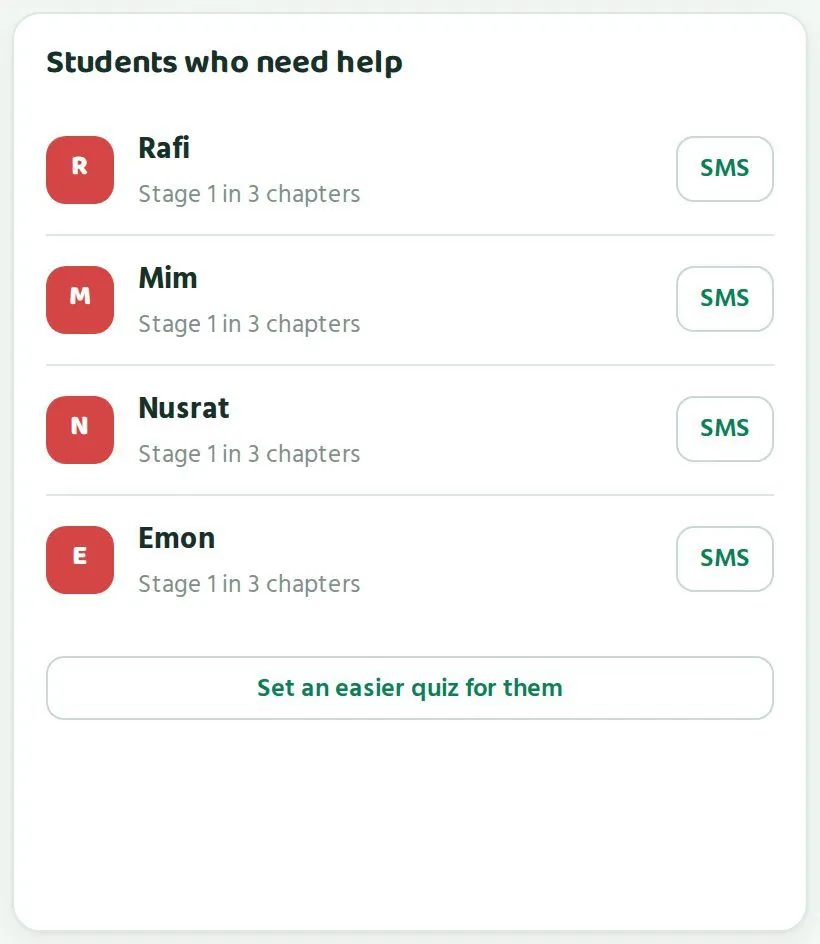
Beside or below the grid is the Students who need help list. Paaro puts students here on its own when they need a little more help in several chapters. You do not have to search the grid for them.
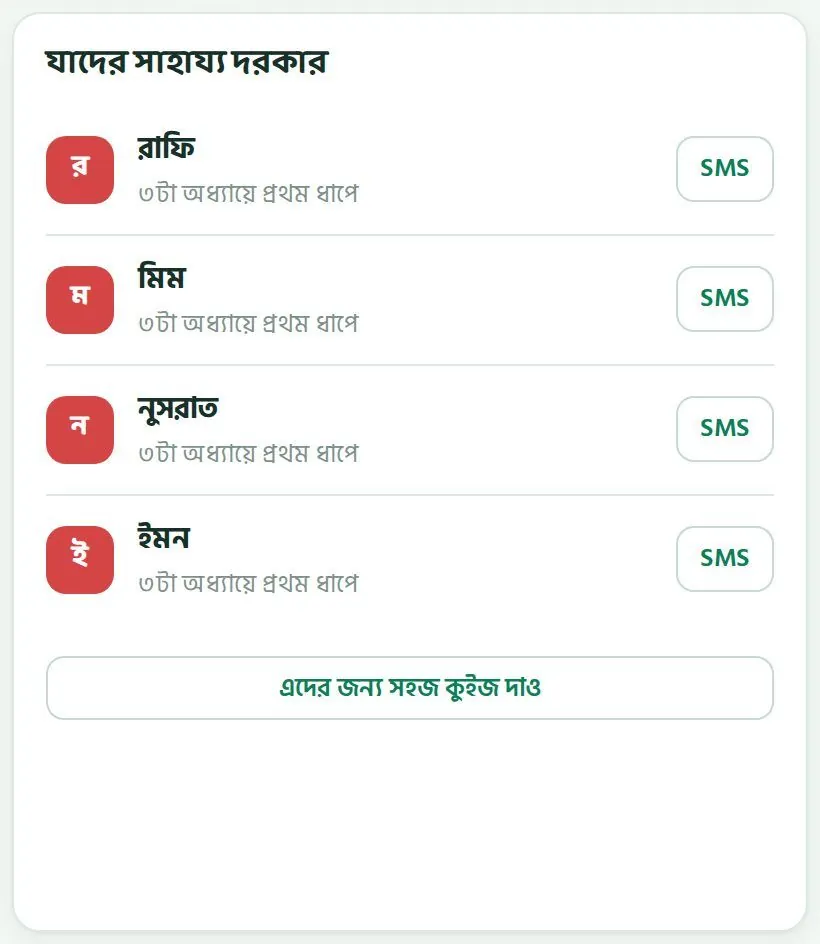
উদাহরণে চারজন আছে: রাফি, মিম, নুসরাত আর ইমন। প্রত্যেকের নামের নিচে লেখা “৩টা অধ্যায়ে প্রথম ধাপে”। ওপরের সাহায্য দরকার সংখ্যাটাও ৪। দুইটা সবসময় মিলবে।
The example shows four students: Rafi, Mim, Nusrat and Emon. Under each name it says “Stage 1 in 3 chapters”. The Need help number at the top is also 4. The two always match.
প্রথম কাজ: শিক্ষার্থীর সাথে কথাFirst step: talk to the student
তালিকাটা একটা সংকেত, রায় নয়। কেউ প্রথম ধাপে আছে মানে সে এখনো শুরুর দিকে আছে। কারণ অনেক রকম হতে পারে: পড়া বোঝেনি, ক্লাসে অনুপস্থিত ছিল, বাসায় ফোন নেই, বা প্রশ্ন পড়তে সমস্যা হচ্ছে। কারণ না জেনে সমাধান হয় না।
The list is a signal. It is not a verdict. A student at stage 1 is still near the start. There can be many reasons: did not follow the lesson, was absent, has no phone at home, or finds the questions hard to read. You cannot fix it without knowing why.
- ক্লাসের পর দুই মিনিট আলাদা করে ডাকুন। সবার সামনে নয়।Call the student aside for two minutes after class. Never in front of everyone.
- জিজ্ঞেস করুন: “কোন প্রশ্নগুলো কঠিন লাগছে?” শুনুন।Ask: “Which questions feel hard?” Listen.
- ফোন পায় কিনা, বাসায় কখন সময় পায়, জেনে নিন।Find out whether they can get a phone and when they have time at home.
- ছোট একটা লক্ষ্য দিন: “এই সপ্তাহে দুইটা কুইজ দাও।”Give a small goal: “Do two quizzes this week.”
অভিভাবককে SMSSMS to the guardian
প্রতিটা নামের পাশে একটা SMS বোতাম আছে। এটা চাপলে সেই শিক্ষার্থীর অভিভাবককে SMS যায়, সেই নম্বরে যেটা স্কুল শিক্ষার্থীর সাথে দিয়েছে। অভিভাবক তাঁর পাতায় আপনার কথা দেখেন আর শিক্ষককে উত্তর দিন বোতাম চেপে উত্তর দিতে পারেন।
Next to each name is an SMS button. Tapping it sends an SMS to that student's guardian, on the number the school registered with the student. The guardian sees your message on their page and can tap Reply to teacher to answer you.
- যাদের সাহায্য দরকার তালিকায় শিক্ষার্থীর নাম খুঁজুন।Find the student in the Students who need help list.
- নামের পাশের SMS বোতাম চাপুন।Tap SMS next to the name.
- ছোট আর নরম ভাষায় লিখুন। সমস্যা না, কী করা যায় সেটা বলুন।Write short and kind. Say what can be done, rather than listing problems.
- পাঠান। অভিভাবক উত্তর দিলে সেটা দেখে নিন।Send it. Look out for the guardian's reply.
একটা ভালো SMS এরকম হতে পারে: “রাফি ভগ্নাংশে একটু পিছিয়ে আছে। রোজ রাতে পারোর ছোট কুইজটা দিতে বললে অনেক উপকার হবে। নাসরিন আক্তার।” এতে অভিভাবক বোঝেন কী করতে হবে, আর ভয় পান না।
A good SMS might read: “Rafi is a little behind in fractions. It would help a lot if he did the short Paaro quiz each night. Nasrin Akter.” The guardian knows what to do and is not alarmed.
অভিভাবকরা সপ্তাহে কয়েকটার বেশি SMS পান না, আর শুধু সেগুলোই পান যা তাঁরা চালু রেখেছেন। তাই দরকার হলেই SMS দিন। এক সপ্তাহে একই পরিবারকে বারবার লিখবেন না।
Guardians get only a few SMS a week, and only the kinds they have switched on. So send an SMS when it matters. Do not write to the same family again and again in one week.
ছোট দলের জন্য সহজ কুইজAn easier quiz for a small group
তালিকার নিচে আছে এদের জন্য সহজ কুইজ দাও বোতাম। এটা দিয়ে তালিকার শিক্ষার্থীদের জন্য আলাদা একটা সহজ কুইজ দেওয়া যায়। পুরো ক্লাসকে সহজ কুইজ দিতে হয় না, যারা ভালো করছে তারা তাদের মতো এগোয়।
Below the list is a Set an easier quiz for them button. It lets you set a separate, easier quiz just for the students on the list. The whole class does not have to take an easy quiz; students who are doing well keep moving at their own pace.
- এদের জন্য সহজ কুইজ দাও চাপুন।Tap Set an easier quiz for them.
- যে অধ্যায়ে তাদের আরেকটু সাহায্য দরকার সেটা বেছে নিন, যেমন অধ্যায় ৪।Choose the chapter where they need more help, for example Ch 4.
- কঠিনতা সহজ রাখুন।Keep the difficulty on Easy.
- কুইজের পর সঠিক উত্তর আর বইয়ের পাতা দেখাও চালু রাখুন, যাতে ভুল করলে পাতা খুলে শিখতে পারে।Leave Show right answers and book page after the quiz on, so they can open the page and learn from mistakes.
- পাঠিয়ে দিন। কয়েক দিন পর ছকে তাদের সারি দেখুন।Send it. Look at their rows in the grid a few days later.
নিজে থেকে সহজ পথThe automatic easier path
আপনি কিছু না করলেও পারো পিছিয়ে থাকা শিক্ষার্থীকে ফেলে রাখে না। কোনো অধ্যায়ে কেউ ধাপ ৩-এর নিচে থাকলে পারো তাকে নিজে থেকেই একটা সহজ পথ দেয়:
Even if you do nothing, Paaro does not leave a struggling student behind. When a student is below stage 3 in a chapter, Paaro automatically gives them an easier path:
- প্রথমে কয়েকটা সহজ প্রশ্ন, যাতে আত্মবিশ্বাস ফেরে।First some easy questions, to build confidence.
- তারপর অধ্যায়ের পড়াটা।Then the lesson for the chapter.
- শেষে আবার মূল কুইজ।Finally the main quiz again.
আপনার সহজ কুইজ আর পারোর সহজ পথ একসাথে কাজ করে। আপনি ঠিক করেন কখন আর কোন অধ্যায়, পারো প্রতিটা শিক্ষার্থীকে তার জায়গা থেকে ধাপে ধাপে ওপরে তোলে।
Your easier quiz and Paaro's easier path work together. You decide when and which chapter; Paaro lifts each student step by step from where they are.
কেউ এক ধাপ উঠলে সেটা খেয়াল করুন আর বলুন। “রাফি, তুমি অধ্যায় ২-এ এক ধাপ উঠেছ!” এই এক লাইনের প্রশংসা পরের সপ্তাহে তাকে আবার কুইজ দিতে টানে। শিক্ষার্থীর পাতাতেও “এক ধাপ উঠেছে” চিহ্ন দেখা যায়।
When a student moves up a stage, notice it and say so. “Rafi, you went up one stage in Ch 2!” That one line of praise brings them back to the quiz next week. The student's own page also shows an “up one stage” mark.
কখন প্রধান শিক্ষককে জানাবেনWhen to tell your head teacher
কোনো শিক্ষার্থী দুই সপ্তাহের বেশি কোনো কুইজ না দিলে, বা SMS দেওয়ার পরও অভিভাবকের সাড়া না পেলে, প্রধান শিক্ষককে জানান। প্রধান শিক্ষকের পাতায় পুরো স্কুলের যেসব শিক্ষার্থী ১৪ দিন কুইজ দেয়নি তাদের তালিকা থাকে। একসাথে কাজ করলে সহজ হয়।
If a student does no quiz for more than two weeks, or the guardian does not respond after an SMS, tell your head teacher. The head teacher's page lists students across the school with no quiz in 14 days. It is easier when you work on it together.
কুইজ দেওয়াSetting a quiz
“কুইজ দাও” ফর্মের প্রতিটা ঘর আর সুইচ, আর কিছু ভালো অভ্যাস।Every field and switch on the “Set a quiz” form, and some good habits.
কুইজ দেওয়াই পারোর মূল কাজ। আপনি কুইজ না দিলে ছক খালি থাকে। একটা কুইজ বানাতে এক মিনিটও লাগে না, কারণ প্রশ্নগুলো পারোর যাচাই করা প্রশ্নব্যাংক থেকে আসে। আপনাকে প্রশ্ন লিখতে হয় না।
Setting quizzes is the heart of Paaro. If you set no quizzes, the grid stays empty. Setting one takes less than a minute, because the questions come from Paaro's verified question bank. You do not have to write questions.
দুই জায়গা থেকে শুরু করা যায়: ওপরের কুইজ দাও ট্যাব, অথবা আমার ক্লাস পাতায় সাম্প্রতিক কুইজ এর পাশের + নতুন কুইজ বোতাম। দুইটাই একই ফর্ম খোলে, নাম নতুন কুইজ।
You can start from two places: the Set a quiz tab at the top, or the + New quiz button beside Recent quizzes on the My classes page. Both open the same form, called New quiz.
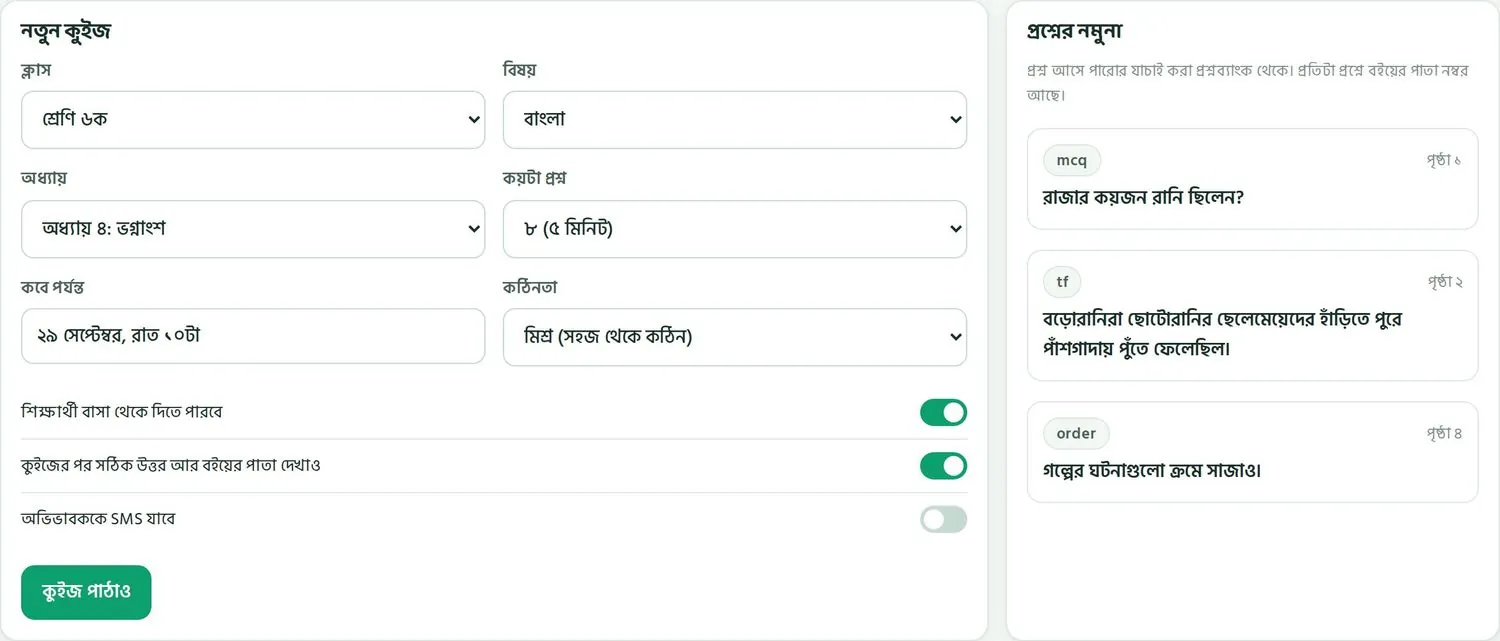
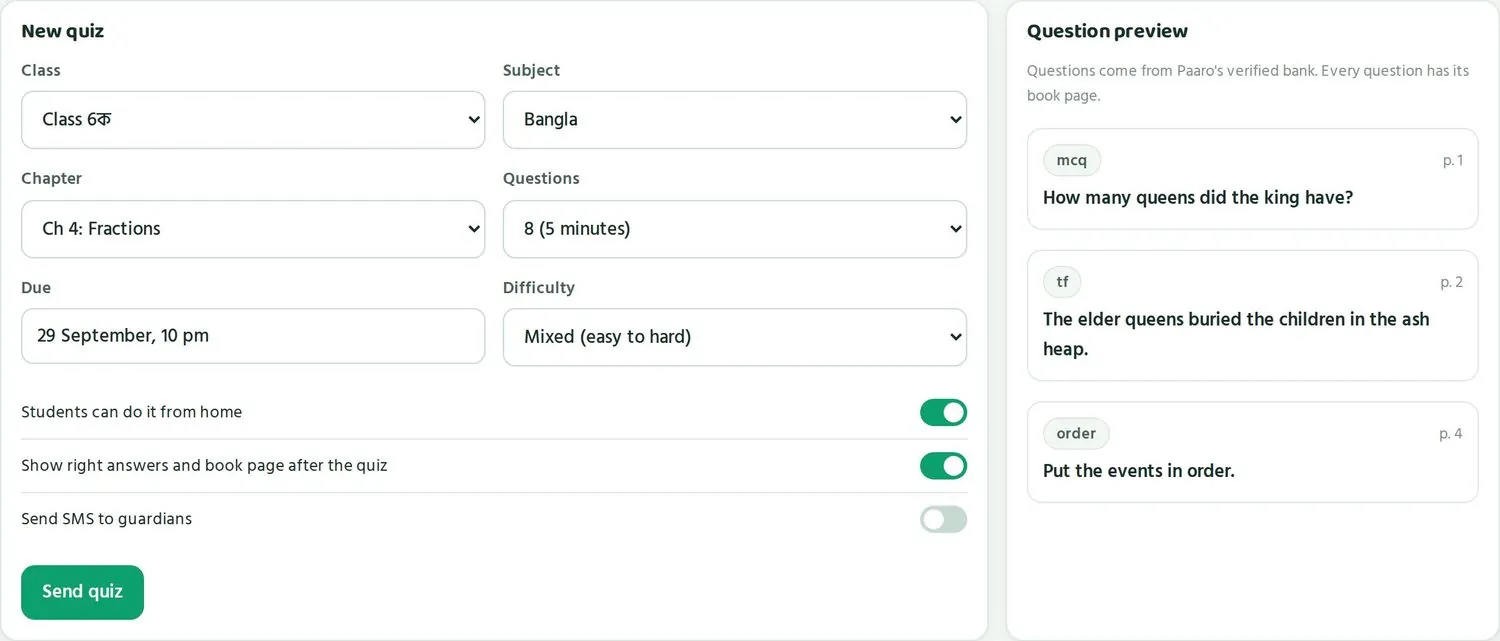
ফর্মের ঘরগুলোThe fields on the form
| ঘরField | কী বেছে নেবেনWhat to choose | উদাহরণExample |
|---|---|---|
| ক্লাসClass | কোন ক্লাস কুইজ পাবেWhich class gets the quiz | শ্রেণি ৬কClass 6ক |
| বিষয়Subject | বাংলা, ইংরেজি, গণিত বা আইসিটিBangla, English, maths or ICT | বাংলাBangla |
| অধ্যায়Chapter | যে অধ্যায় পড়ানো শেষ হয়েছেA chapter you have finished teaching | অধ্যায় ৪Ch 4 |
| কয়টা প্রশ্নQuestions | ৮টা (৫ মিনিট) অথবা ১২টা8 (5 minutes) or 12 | ৮ (৫ মিনিট)8 (5 minutes) |
| কবে পর্যন্তDue | শেষ তারিখ আর সময়The last date and time | ২৯ সেপ্টেম্বর, রাত ১০টা29 September, 10 pm |
| কঠিনতাDifficulty | মিশ্র (সহজ থেকে কঠিন) অথবা সহজMixed (easy to hard) or easy | মিশ্র (সহজ থেকে কঠিন)Mixed (easy to hard) |
তিনটা সুইচThree switches
ঘরগুলোর নিচে তিনটা সুইচ আছে। সবুজ মানে চালু, ধূসর মানে বন্ধ।
Below the fields are three switches. Green means on, grey means off.
| সুইচSwitch | চালু থাকলে কী হয়What happens when it is on | কখন চালু রাখবেনWhen to use it |
|---|---|---|
| শিক্ষার্থী বাসা থেকে দিতে পারবেStudents can do it from home | শিক্ষার্থী স্কুলের বাইরে নিজের বা পরিবারের ফোন থেকে কুইজ দিতে পারেStudents can take the quiz outside school on their own or a family phone | প্রায় সবসময়। ক্লাসের সময় বাঁচে।Almost always. It saves class time. |
| কুইজের পর সঠিক উত্তর আর বইয়ের পাতা দেখাওShow right answers and book page after the quiz | কুইজ শেষে শিক্ষার্থী সঠিক উত্তর আর বইয়ের কোন পাতায় উত্তর আছে তা দেখেAfter the quiz the student sees the right answer and the book page where it is found | প্রায় সবসময়। ভুল থেকে শেখা যায়।Almost always. Students learn from mistakes. |
| অভিভাবককে SMS যাবেSend SMS to guardians | কুইজ দেওয়ার খবর অভিভাবকের কাছে SMS-এ যায়Guardians get an SMS about the quiz | মাঝে মাঝে, যেমন গুরুত্বপূর্ণ কুইজে। প্রতিবার নয়।Now and then, such as for an important quiz. Not every time. |
কুইজ পাঠানো, ধাপে ধাপেSending a quiz, step by step
- কুইজ দাও ট্যাব খুলুন।Open the Set a quiz tab.
- ক্লাস থেকে আপনার ক্লাস বেছে নিন, যেমন শ্রেণি ৬ক।Choose your class under Class, for example Class 6ক.
- বিষয় আর অধ্যায় বেছে নিন।Choose the Subject and Chapter.
- কয়টা প্রশ্ন এ ৮ (৫ মিনিট) রাখুন।Leave Questions on 8 (5 minutes).
- কবে পর্যন্ত এ শেষ সময় দিন। বাসায় দেওয়ার জন্য অন্তত এক-দুই রাত সময় দিন।Set the Due time. Give at least one or two nights if students will do it at home.
- কঠিনতা মিশ্র রাখুন, যদি না ছোট একটা দলের জন্য সহজ কুইজ দিচ্ছেন।Keep Difficulty on Mixed, unless you are setting an easier quiz for a small group.
- তিনটা সুইচ দেখে নিন।Check the three switches.
- ডান দিকের প্রশ্নের নমুনা একবার দেখে নিন।Glance at the Question preview on the right.
- কুইজ পাঠাও চাপুন।Tap Send quiz.
পাঠানোর পর ক্লাসের প্রত্যেক শিক্ষার্থীর পাতায় বড় সবুজ বোতামে আজকের কুইজ দেখায়। সেখানে বিষয়, প্রশ্নের সংখ্যা আর কোন শিক্ষক দিয়েছেন তা লেখা থাকে।
Once sent, every student in the class sees Today's quiz as a big green button on their page. It shows the subject, the number of questions and which teacher set it.
প্রশ্নের নমুনাThe question preview
ফর্মের ডান দিকে প্রশ্নের নমুনা থাকে। এখানে কয়েকটা নমুনা প্রশ্ন দেখায়, প্রতিটার ধরন (যেমন mcq, tf, order) আর বইয়ের পাতা সহ। যেমন “রাজার কয়জন রানি ছিলেন?”, ধরন mcq, পৃষ্ঠা ১। এতে বুঝবেন শিক্ষার্থীরা কী ধরনের প্রশ্ন পাবে।
On the right of the form is the Question preview. It shows a few sample questions with their type (such as mcq, tf, order) and book page. For example “How many queens did the king have?”, type mcq, p. 1. This shows you what kind of questions students will get.
ভালো অভ্যাসGood habits
- ৮টা প্রশ্নই যথেষ্ট। অল্প সময়ে শেষ হয়, শিক্ষার্থী ক্লান্ত হয় না, রোজ দিতে ইচ্ছা করে। ১২টা রাখুন অধ্যায় শেষের রিভিশনে।8 questions is enough. It is over quickly, students do not tire, and they are happy to come back. Keep 12 for end-of-chapter revision.
- মিশ্র কঠিনতা রাখুন। সহজ প্রশ্নে শুরু হলে সবাই কিছু পারে, কঠিন প্রশ্নে বোঝা যায় কে কতটা এগিয়েছে।Keep difficulty mixed. Easy questions first let everyone get some right; harder ones show who has gone further.
- বাসা থেকে দিতে দিন। ক্লাসের সময় পড়ানোয় লাগুক। শুধু যাদের ফোন নেই, তাদের জন্য স্কুলে ব্যবস্থা করুন।Let them do it at home. Keep class time for teaching. Make a plan at school only for those who have no phone.
- অধ্যায় পড়ানো শেষ হলে কুইজ দিন। না পড়ানো অধ্যায়ে কুইজ দিলে সবাই লাল দেখাবে, তাতে কিছু শেখা যায় না।Quiz a chapter after you have taught it. A quiz on an untaught chapter turns everyone red and tells you nothing.
- সপ্তাহে এক-দুইটা কুইজ। নিয়মিত ছোট কুইজ মাসে একটা বড় পরীক্ষার চেয়ে বেশি কাজের।One or two quizzes a week. Small regular quizzes tell you more than one big test a month.
- শেষ সময় রাতে রাখুন। যেমন রাত ১০টা। অনেক পরিবারে সন্ধ্যার পর ফোন খালি হয়।Set the due time in the evening, such as 10 pm. In many families the phone is free only after dark.
১২ ধরনের প্রশ্নThe 12 question types
প্রশ্নব্যাংকে ১২ ধরনের প্রশ্ন আছে। সবই ট্যাপ করে বা ছোট উত্তর লিখে দেওয়া যায়, কিছু টেনে আনতে হয় না। প্রশ্ন যাচাই করার সময় বা নমুনায় ধরনের ইংরেজি নাম দেখবেন, তাই নামগুলো এখানে দেওয়া হলো।
The question bank has 12 question types. Every one is answered by tapping or typing a short answer; nothing needs dragging. You will see the English type names in the preview and when you verify questions, so they are listed here.
| ধরনType | নামName | শিক্ষার্থী কী করেWhat the student does | কোন বিষয়ে বেশিTypical subject |
|---|---|---|---|
| mcqmcq | একটা উত্তর বাছাইSingle choice | চারটা উত্তরের মধ্যে সঠিকটায় ট্যাপ করেTaps the one right answer out of four | সব বিষয়All subjects |
| multimulti | সব সঠিক বাছাইSelect all | যতগুলো সঠিক, সবগুলোতে ট্যাপ করেTaps every answer that is right | আইসিটিICT |
| tftf | সত্য না মিথ্যাTrue or false | বাক্যটা সত্য না মিথ্যা বেছে নেয়Chooses whether a statement is true or false | বাংলাBangla |
| orderorder | ক্রমে সাজানোPut in order | ঘটনা বা ধাপগুলো পরপর ট্যাপ করে সাজায়Taps events or steps one after another to order them | বাংলাBangla |
| matchmatch | জোড়া মেলানোMatch pairs | বাঁ দিকের সাথে ডান দিকের জোড়া ট্যাপ করে মেলায়Taps a left item and its partner on the right | বাংলা, ইংরেজিBangla, English |
| gap_bankgap_bank | শব্দ দিয়ে ফাঁকা পূরণFill gaps from a word bank | দেওয়া শব্দ থেকে ট্যাপ করে ফাঁকা ঘর ভরেFills blanks by tapping words from a given list | বাংলা, ইংরেজিBangla, English |
| numericnumeric | সংখ্যা লেখাType a number | উত্তর হিসেবে একটা সংখ্যা লেখেTypes a number as the answer | গণিত, আইসিটিMaths, ICT |
| short_textshort_text | শব্দ লেখাType a word | উত্তর হিসেবে একটা শব্দ লেখেTypes a word as the answer | ইংরেজিEnglish |
| categorizecategorize | দলে ভাগ করাSort into groups | প্রতিটা জিনিস ঠিক দলে ট্যাপ করে রাখেTaps each item into the right group | গণিত, আইসিটিMaths, ICT |
| tap_errortap_error | ভুল শব্দে ট্যাপTap the wrong word | বাক্যের ভুল বানান বা ভুল শব্দে ট্যাপ করেTaps the misspelled or wrong word in a sentence | বাংলাBangla |
| listen_typelisten_type | শুনে লেখাListen and type | অডিও শুনে যা শুনল তা লেখেListens to audio and types what they hear | ইংরেজিEnglish |
| passage_multipassage_multi | অনুচ্ছেদ পড়ে উত্তরRead a passage and answer | একটা অনুচ্ছেদ পড়ে কয়েকটা প্রশ্নের উত্তর দেয়Reads a passage and answers several questions | বাংলা, ইংরেজিBangla, English |
শুনে লেখা (listen_type) প্রশ্ন শুধু ইংরেজির জন্য। শিক্ষার্থীর ফোনে শব্দ শোনার ব্যবস্থা লাগে। ক্লাসে দিলে হেডফোন বা কম শব্দে দিতে বলুন।
Listen and type (listen_type) questions are for English only. The student's phone needs sound. In class, ask them to use earphones or keep the volume low.
কুইজের পরেAfter the quiz
সাম্প্রতিক কুইজ পড়া, আর ফলাফল ক্লাসে কাজে লাগানো।Reading Recent quizzes, and using the results in class.
কুইজ দেওয়ার পর আসল কাজ শুরু। ফলাফল দেখে কিছু না করলে কুইজ শুধু একটা সংখ্যা হয়ে থাকে। এই অধ্যায়ে দেখুন কোথায় ফলাফল পাবেন আর কীভাবে ক্লাসে কাজে লাগাবেন।
The real work starts after the quiz. If nothing is done with the results, a quiz is just a number. This chapter shows where to find the results and how to use them in class.
সাম্প্রতিক কুইজRecent quizzes
আমার ক্লাস পাতার নিচের দিকে সাম্প্রতিক কুইজ টেবিল আছে। আপনার দেওয়া শেষ কয়েকটা কুইজ এখানে দেখায়, নতুনটা ওপরে।
Near the bottom of the My classes page is the Recent quizzes table. Your last few quizzes appear here, newest at the top.
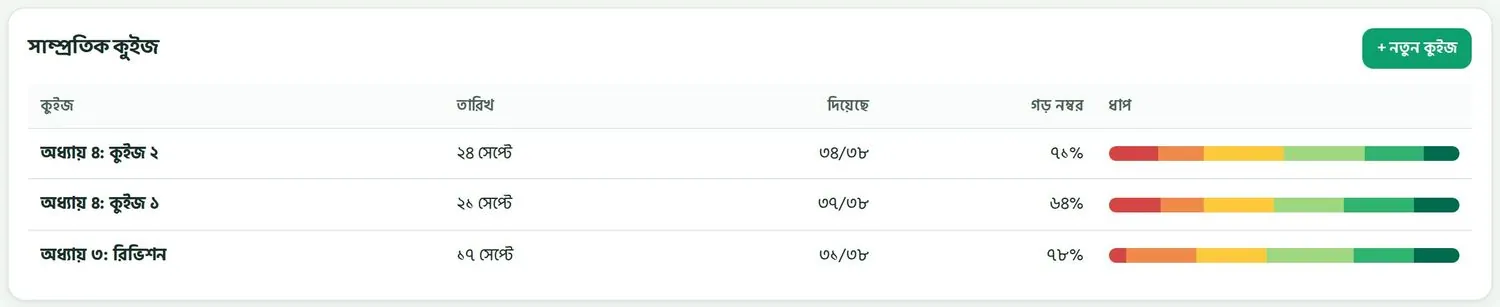
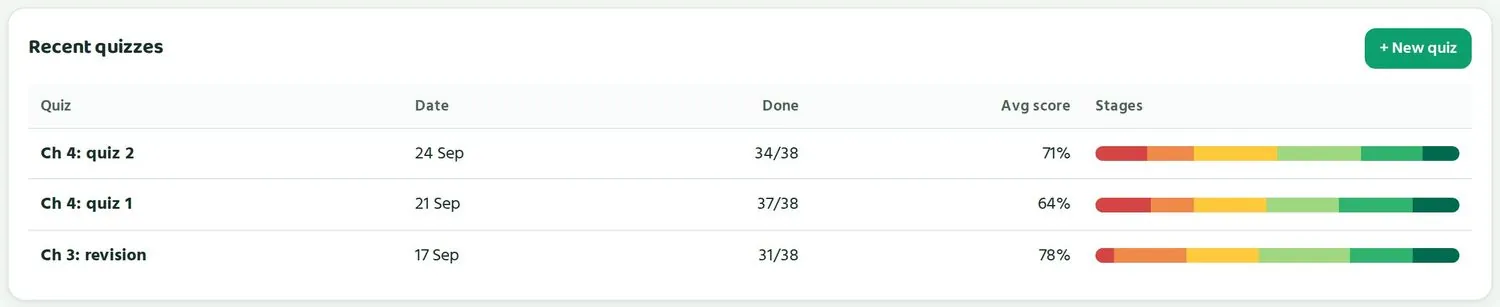
| কলামColumn | মানেMeaning |
|---|---|
| কুইজQuiz | কোন অধ্যায়, কোন কুইজWhich chapter and which quiz |
| তারিখDate | কবে দেওয়া হয়েছেWhen it was set |
| দিয়েছেDone | কতজন দিয়েছে, মোটের মধ্যে। যেমন ৩৪/৩৮।How many did it, out of the total. For example 34/38. |
| গড় নম্বরAvg score | যারা দিয়েছে তাদের গড় সঠিক উত্তর, শতাংশেThe average score of those who did it, as a percentage |
| ধাপStages | রঙিন দাগ। কত ভাগ শিক্ষার্থী কোন ধাপে আছে।A coloured bar. The share of students at each stage. |
উদাহরণ: তিনটা কুইজ পড়াExample: reading three quizzes
- অধ্যায় ৩: রিভিশন, ১৭ সেপ্টেম্বর। ৩৮ জনের মধ্যে ৩১ জন দিয়েছে, গড় ৭৮%। ফল ভালো, কিন্তু ৭ জন দেয়নি। তারা কে, দেখে নিন।Ch 3: revision, 17 Sep. 31 of 38 did it, average 78%. A good result, yet 7 did not take part. Find out who they are.
- অধ্যায় ৪: কুইজ ১, ২১ সেপ্টেম্বর। ৩৭/৩৮ দিয়েছে, গড় ৬৪%। ধাপের দাগে লাল অংশ বড়। অধ্যায়টা কঠিন লেগেছে।Ch 4: quiz 1, 21 Sep. 37/38 did it, average 64%. The red part of the stage bar is large. The chapter was hard for them.
- অধ্যায় ৪: কুইজ ২, ২৪ সেপ্টেম্বর। আবার পড়ানোর পর গড় ৭১%। লাল অংশ ছোট হয়েছে, সবুজ বেড়েছে। কাজ হয়েছে।Ch 4: quiz 2, 24 Sep. After reteaching, the average is 71%. The red part is smaller and the green larger. It worked.
লক্ষ করুন, “দিয়েছে” আর “গড় নম্বর” দুইটাই দেখতে হয়। অনেকে না দিলে গড় ভালো দেখালেও পুরো ছবিটা পাওয়া যায় না। যারা দেয়নি, তারাই প্রায়ই সবচেয়ে পিছিয়ে থাকে।
Notice that you need to read both “Done” and “Avg score”. If many students skip a quiz, a good average does not give you the full picture. Those who skip are often the ones furthest behind.
ক্লাসের সময় কাজে লাগানোUsing class time
কুইজের ফল দেখে পরের ক্লাসের প্রথম ১০ মিনিট পরিকল্পনা করুন। এতে পুরো ক্লাসের সময় বাঁচে, কারণ যা সবাই পারে সেটা আবার পড়াতে হয় না।
Use the quiz results to plan the first 10 minutes of your next class. This saves time for the whole class, because you do not reteach what everyone already knows.
- ক্লাসে যাওয়ার আগে ফোনে আমার ক্লাস খুলে ক্লাস বেছে নিন।Before class, open My classes on your phone and choose the class.
- ছকে সবচেয়ে লাল কলামটা খুঁজুন। সেই অধ্যায়ের কোন অংশ কঠিন, ভাবুন।Find the reddest column in the grid. Think about which part of that chapter is hard.
- ক্লাসের শুরুতে সেই অংশটা অন্যভাবে আবার বোঝান। বোর্ডে একটা নতুন উদাহরণ দিন।At the start of class, explain that part again in a new way. Put a fresh example on the board.
- যারা সবুজ, তাদের দুই-তিনজনকে ছোট দলের দায়িত্ব দিন। পাশের জনকে বুঝিয়ে দিক।Give two or three of the green students a small group each. Let them explain to a classmate.
- যাদের সাহায্য দরকার, তাদের কাছে নিজে যান।Go to the students who need help yourself.
- সপ্তাহ শেষে একই অধ্যায়ে আরেকটা ছোট কুইজ দিন আর তুলনা করুন।At the end of the week, set another short quiz on the same chapter and compare.
স্কুলে স্মার্ট বোর্ড থাকলে পারো সেখানেও চলে। একটা নমুনা প্রশ্ন পুরো ক্লাসের সামনে খুলে সবাই মিলে উত্তর খুঁজুন, তারপর বইয়ের পাতা খুলে মেলান।
If your school has a smart board, Paaro works there too. Open a sample question in front of the class, work out the answer together, then open the book page to check.
শিক্ষার্থীর সাথে কথাTalking to students
ফলাফল নিয়ে কথা বলার সময় নম্বরের বদলে ধাপ আর উন্নতি নিয়ে কথা বলুন। “তুমি ৬৪% পেয়েছ” শুনতে ভারী লাগে। “তুমি চেষ্টা ধাপ থেকে এগোচ্ছে ধাপে উঠেছ” শুনলে শিক্ষার্থী বোঝে সে এগোচ্ছে।
When you talk about results, talk about stages and progress instead of marks. “You got 64%” feels heavy. “You moved up from Trying to Moving” tells the student they are getting somewhere.
- কাউকে সবার সামনে লাল ধাপের কথা বলবেন না।Never mention a student's red stage in front of others.
- উন্নতি সবার সামনে বলা যায়: “এই সপ্তাহে ৩৪ জন কুইজ দিয়েছে, দারুণ!”Progress can be shared with everyone: “34 of you did the quiz this week, great!”
- শিক্ষার্থীর পাতায় এগুলো আরেকবার চেষ্টা করো তালিকা আছে। যে ভুলগুলো হয়েছে, আবার চেপে সেগুলো আবার দিতে বলুন।The student's page has a Try these again list. Ask them to tap Retry on the ones they got wrong.
অভিভাবকের সাথে কথাTalking to guardians
অভিভাবক প্রতি শুক্রবার সন্ধ্যায় সপ্তাহের ফলাফলের SMS পেতে পারেন, যদি সেটা চালু রাখেন। তাই অনেক অভিভাবক আগে থেকেই জানেন শিক্ষার্থী কেমন করছে। অভিভাবক সভায় ছকের ছবি দেখানোর দরকার নেই। প্রত্যেক অভিভাবককে তাঁর নিজের সন্তানের কথা আলাদা করে বলুন।
Guardians can get a weekly result SMS every Friday evening, if they keep it switched on. So many guardians already know how their child is doing. At a guardians' meeting, do not show the class grid. Talk to each guardian about their own child, one at a time.
ছকে পুরো ক্লাসের নাম আর ধাপ থাকে। এটা অন্য অভিভাবক বা শিক্ষার্থীকে দেখাবেন না। প্রত্যেকে শুধু নিজের তথ্য দেখার অধিকার রাখে।
The grid holds the whole class's names and stages. Do not show it to other guardians or students. Each person has the right to see only their own data.
শিক্ষার্থী আর অভিভাবক কী দেখেWhat students and guardians see
রাফি আর তার অভিভাবকের পাতা, কোড, পিন আর লগইন স্লিপ।Rafi's and his guardian's pages, codes, PINs and login slips.
শিক্ষার্থী আর অভিভাবক কী দেখে, সেটা জানলে তাঁদের প্রশ্নের উত্তর দেওয়া সহজ হয়। ক্লাসে প্রথম দিন শিক্ষার্থীদের পারো চেনাতেও এটা কাজে লাগে।
Knowing what students and guardians see makes it easier to answer their questions. It also helps when you introduce Paaro to students on the first day.
শিক্ষার্থীর কোডThe student code
প্রত্যেক শিক্ষার্থীর একটা কোড থাকে: ইংরেজিতে নামের প্রথম অংশ আর ৪টা অঙ্ক। যেমন রাফি হাসানের কোড rafi2031। তার লিংকও তাই: paaro.net/rafi2031। কোড কখনো বদলায় না, ক্লাস বদলালেও নয়।
Every student has a code: their English first name plus 4 digits. For example, Rafi Hasan's code is rafi2031. His link is the same: paaro.net/rafi2031. A code never changes, even when the student moves up a class.
একই অভিভাবকের মোবাইল নম্বরে ভাইবোন থাকলে পারো চেষ্টা করে তাদের একই ৪ অঙ্ক দিতে। যেমন রাফির বোন মিমের কোড mim2031। এতে পরিবারের মনে রাখা সহজ হয়।
When brothers and sisters share a guardian's mobile number, Paaro tries to give them the same 4 digits. For example, Rafi's sister Mim has the code mim2031. That makes it easier for the family to remember.
শিক্ষার্থীর কোড তৈরি করেন প্রধান শিক্ষক। তিনি স্কুলের শিক্ষার্থীদের তালিকা (নাম, শ্রেণি, শাখা, রোল, অভিভাবকের ফোন) পারোতে তোলেন, আর পারো প্রত্যেকের কোড নিজে বানায়।
Student codes are created by the head teacher. They upload the school's student list (name, class, section, roll, guardian's phone) to Paaro, and Paaro makes each code automatically.
শিক্ষার্থীর লগইন: কোড আর পিনStudent login: code and PIN
শিক্ষার্থী ঢোকে শিক্ষার্থী কোড আর ৪ অঙ্কের পিন দিয়ে। কোনো ইমেইল বা নিজের ফোন নম্বর লাগে না। তাই পরিবারের যেকোনো ফোন থেকে কুইজ দেওয়া যায়।
A student logs in with their student code and a 4-digit PIN. No email or personal phone number is needed. So they can take a quiz on any family phone.
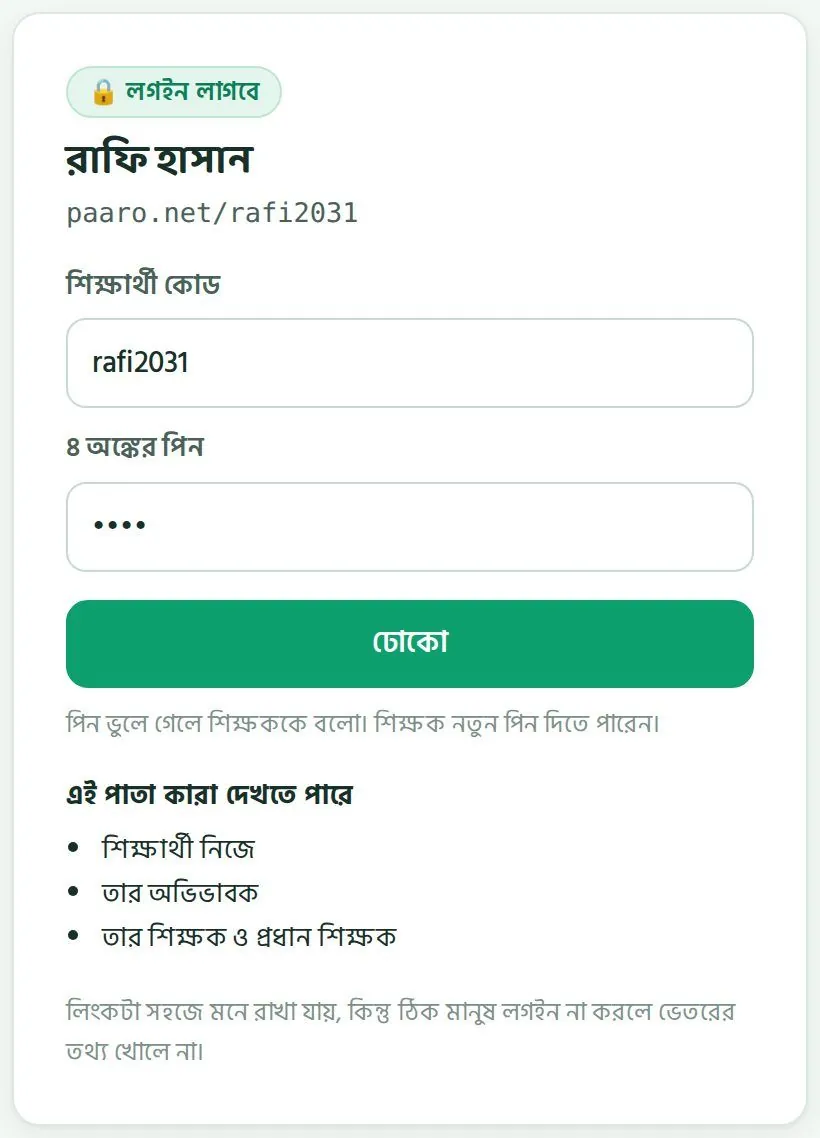
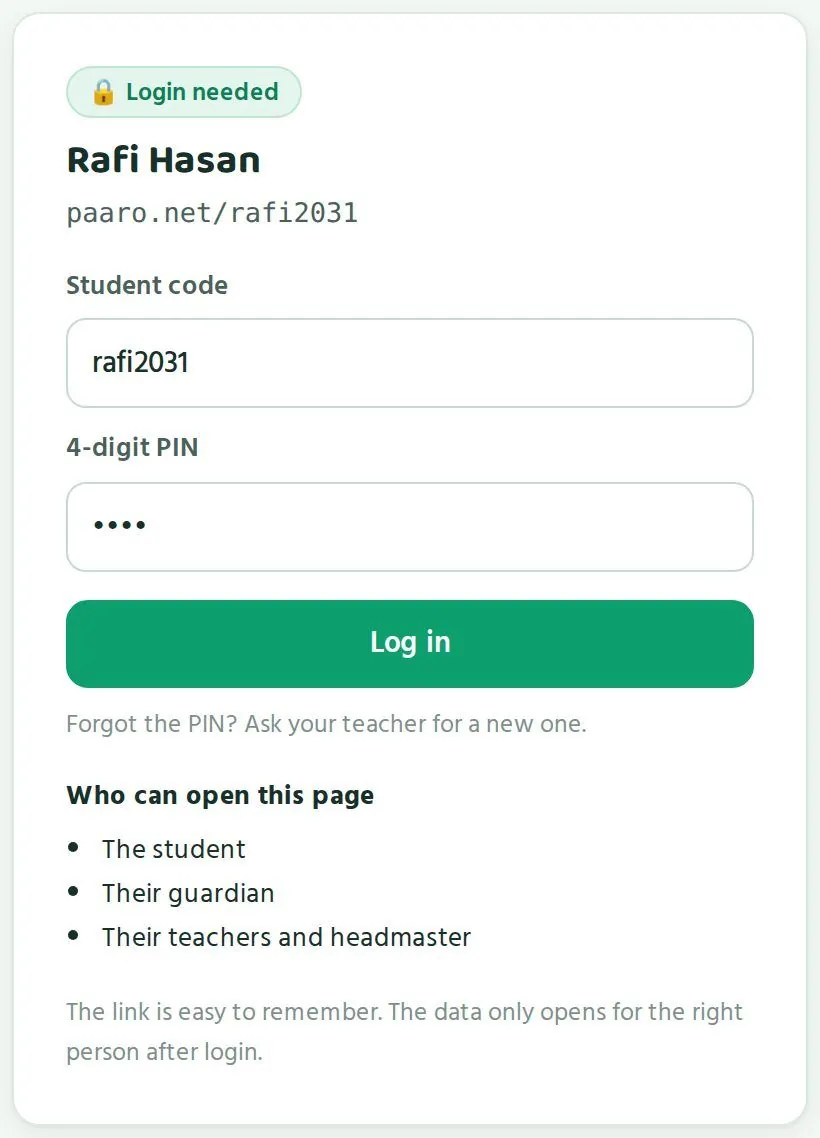
- শিক্ষার্থী ব্রাউজারে নিজের লিংক খোলে, যেমন
paaro.net/rafi2031।The student opens their link in a browser, such aspaaro.net/rafi2031. - শিক্ষার্থী কোড ঘরে কোড লেখে।Types the code in the Student code box.
- ৪ অঙ্কের পিন লেখে।Types the 4-digit PIN.
- ঢোকো চাপে।Taps Log in.
- প্রথমবার ঢুকলে পিন বদলাতে হয়। নতুন পিন এমন হবে যা শুধু সে জানে।At the first login the PIN must be changed. The new PIN should be one only the student knows.
নিরাপত্তার জন্য দুইটা নিয়ম আছে। শিক্ষার্থীর লিংকে কোড থাকুক বা না থাকুক, লগইন পাতা দেখতে একই রকম, তাই কেউ আন্দাজ করে কোড খুঁজে পায় না। আর পরপর ৫ বার ভুল পিন দিলে অ্যাকাউন্ট ১৫ মিনিট বন্ধ থাকে।
There are two safety rules. The student login screen looks the same whether a code exists or not, so nobody can find codes by guessing. And 5 wrong PINs in a row lock the account for 15 minutes.
পিন ভুলে গেলেA forgotten PIN
শিক্ষার্থী পিন ভুলে গেলে আপনাকে বা প্রধান শিক্ষককে বলবে। লগইন পাতাতেই সেটা লেখা আছে। আপনি বা প্রধান শিক্ষক তাকে নতুন পিন দিতে পারেন। নতুন পিন দিয়ে ঢোকার পর সে আবার নিজের পিন বানাবে।
A student who forgets their PIN tells you or the head teacher. The login screen says so. You or the head teacher can give them a new PIN. After logging in with it, the student sets their own PIN again.
ফোনে বা মেসেজে কাউকে পিন দেবেন না, যদি না নিশ্চিত হন যে সেটা শিক্ষার্থী বা তার অভিভাবক। সবচেয়ে ভালো, স্কুলে সামনাসামনি দেওয়া।
Do not give a PIN by phone or message unless you are sure it is the student or their guardian. Best of all, give it face to face at school.
লগইন স্লিপLogin slips
প্রথমবার কোড আর পিন শিক্ষার্থীর হাতে যায় একটা ছোট কাগজে, নাম লগইন স্লিপ। প্রধান শিক্ষক স্কুলের পাতা থেকে এগুলো প্রিন্ট করেন। প্রতিটা স্লিপে শিক্ষার্থীর কোড আর প্রথম পিন থাকে। আপনার কাজ সাধারণত ক্লাসে স্লিপগুলো হাতে হাতে দেওয়া।
The first code and PIN reach the student on a small piece of paper called a login slip. The head teacher prints these from the school page. Each slip has the student's code and first PIN. Your job is usually to hand them out in class.
- প্রত্যেককে নিজের স্লিপ দিন। অন্যের স্লিপ যেন কেউ না দেখে।Give each student their own slip. Nobody should see anyone else's.
- বলুন স্লিপটা বাসায় নিয়ে অভিভাবককে দেখাতে আর যত্নে রাখতে।Tell them to take it home, show their guardian and keep it safe.
- প্রথম দিন ক্লাসেই সবাইকে একবার লগইন করিয়ে পিন বদলে নিতে সাহায্য করুন, যদি ফোন থাকে।If phones are available, help everyone log in once in class on the first day and change their PIN.
রাফির পাতাRafi's page
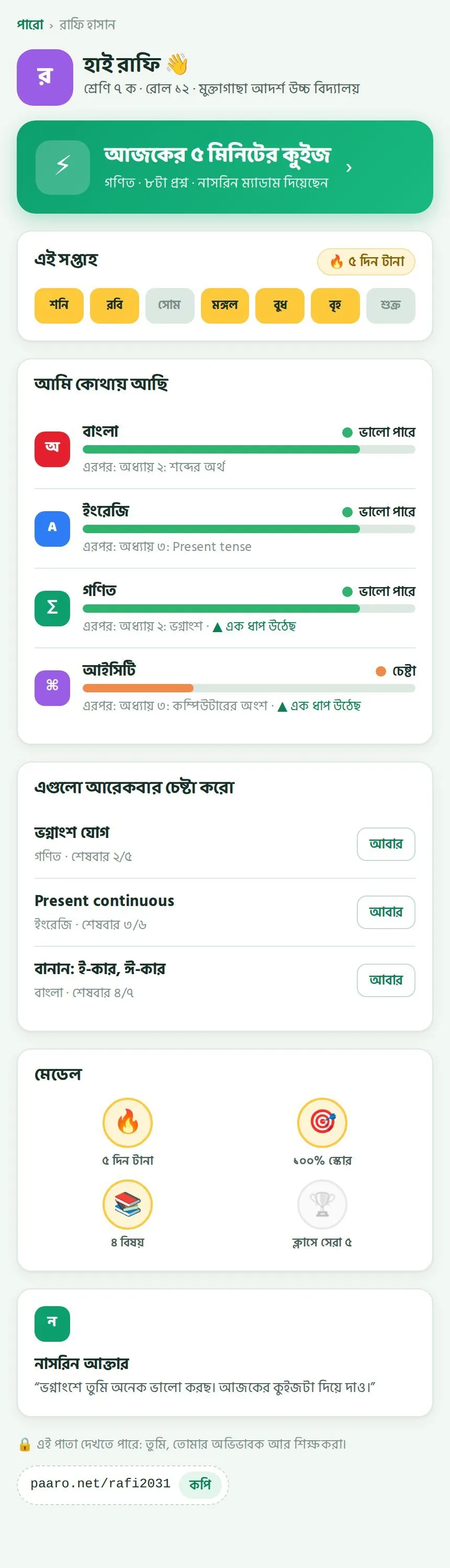
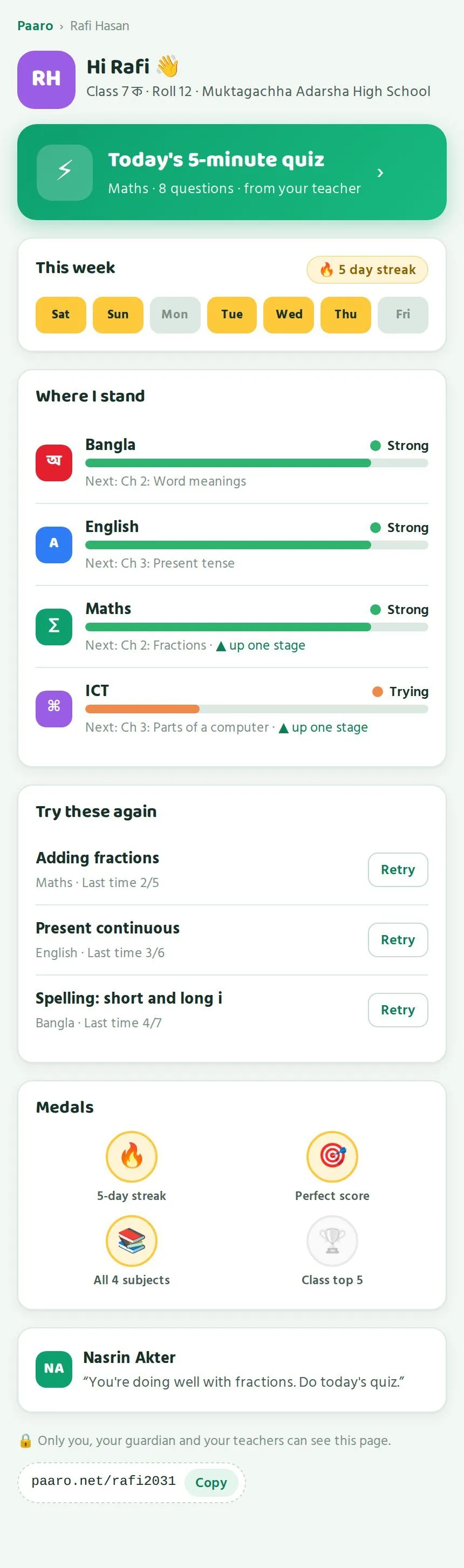
লগইন করলে শিক্ষার্থী নিজের পাতা দেখে। পাতাটা ফোনের জন্য বানানো। ওপর থেকে নিচে যা থাকে:
After logging in, the student sees their own page. It is built for a phone. From top to bottom it shows:
- শুভেচ্ছা, সাথে শ্রেণি, রোল আর স্কুলের নাম।A greeting with class, roll and school.
- বড় সবুজ বোতাম আজকের কুইজ। নিচে বিষয়, কয়টা প্রশ্ন আর কোন শিক্ষক দিয়েছেন।A big green Today's quiz button, showing the subject, number of questions and which teacher set it.
- এই সপ্তাহ: শনি থেকে শুক্র, কোন দিন কুইজ দিয়েছে তা হলুদ রঙে। পাশে কত দিন টানা দিয়েছে।This week: Saturday to Friday, with quiz days in yellow, and the current streak.
- আমি কোথায় আছি: চার বিষয়ে তার ধাপ, এরপর কোন অধ্যায়, আর কোথায় “এক ধাপ উঠেছে”।Where I stand: the stage in each of the four subjects, the next chapter, and any “up one stage” marks.
- এগুলো আরেকবার চেষ্টা করো: যেসব অংশে ভুল হয়েছে, পাশে আবার বোতাম।Try these again: topics with mistakes, each with a Retry button.
- মেডেল: ৫ দিন টানা, ১০০% স্কোর, ৪ বিষয়, ক্লাসে সেরা ৫।Medals: 5-day streak, perfect score, all 4 subjects, class top 5.
- শিক্ষকের কথা, যেমন নাসরিন আক্তারের: “ভগ্নাংশে তুমি অনেক ভালো করছ। আজকের কুইজটা দিয়ে দাও।”A note from the teacher, such as Nasrin Akter's: “You're doing well with fractions. Do today's quiz.”
- নিচে একটা লাইন: এই পাতা দেখতে পারে শুধু সে, তার অভিভাবক আর শিক্ষকরা। সাথে তার লিংক আর কপি বোতাম।A line at the bottom: only the student, their guardian and their teachers can see this page. Then their link with a Copy button.
মেডেল আর টানা দিনের হিসাব শিক্ষার্থীদের খুব টানে। ক্লাসে মাঝে মাঝে জিজ্ঞেস করুন, “কার ৫ দিন টানা হয়েছে?” এতে কুইজ দেওয়া অভ্যাস হয়।
Medals and streaks really motivate students. Now and then ask in class, “Who has a 5-day streak?” It helps make the quiz a habit.
অভিভাবকের লগইনGuardian login
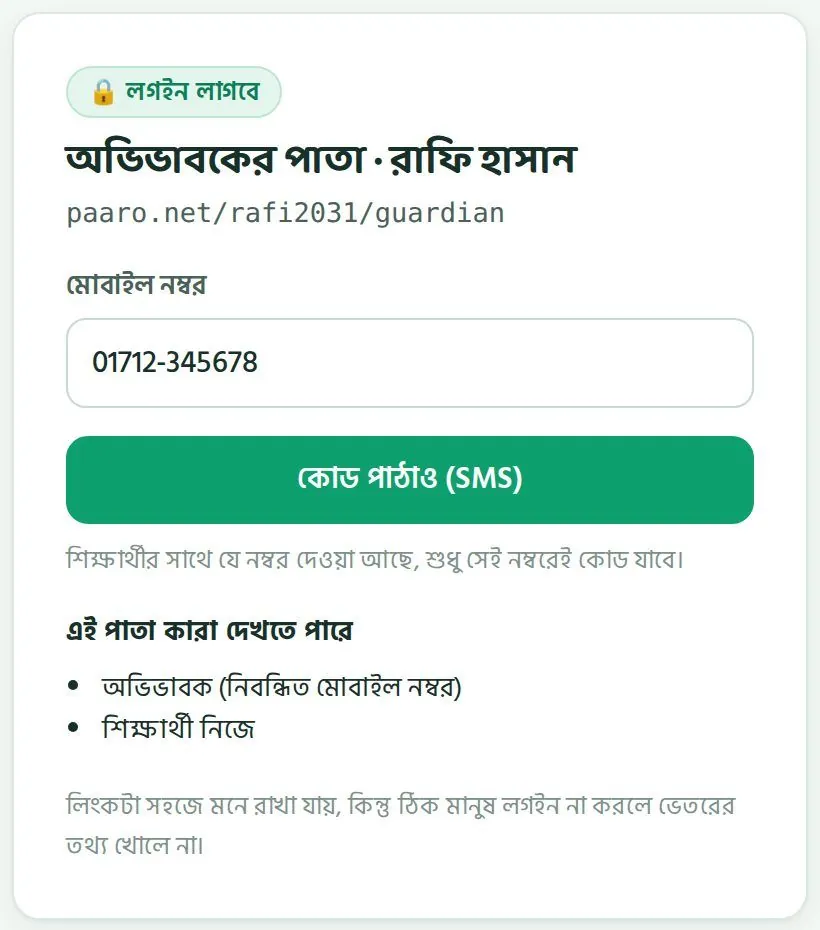
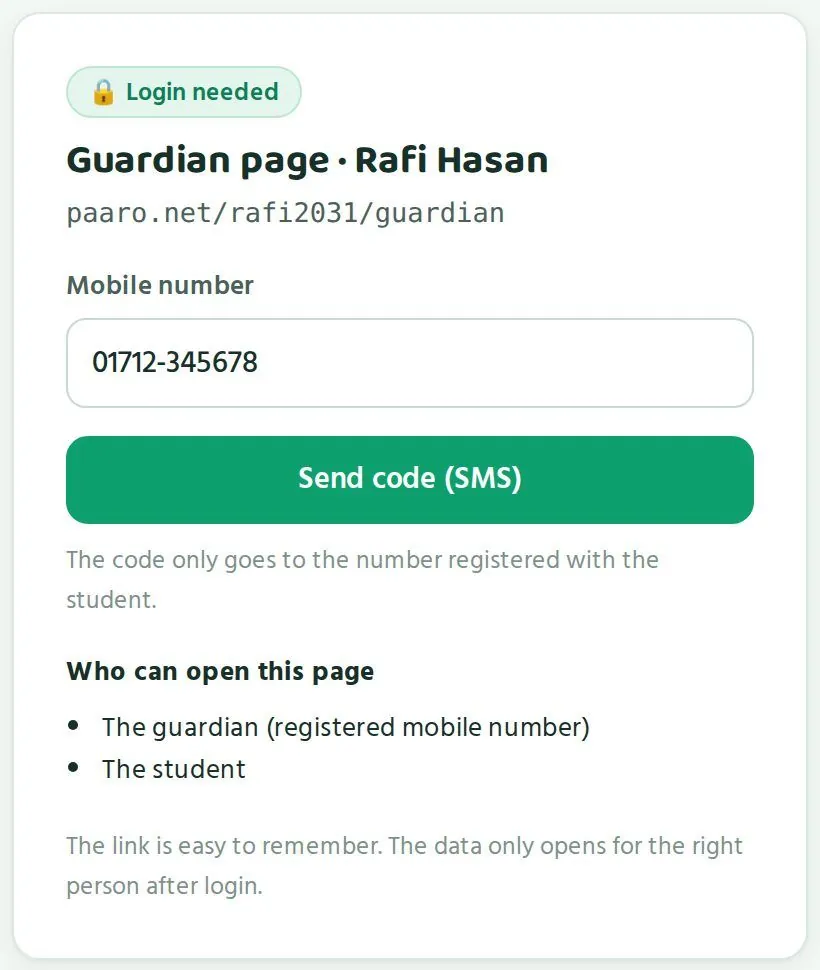
অভিভাবকের লিংক হলো শিক্ষার্থীর লিংকের শেষে /guardian। যেমন paaro.net/rafi2031/guardian। অভিভাবক ঢোকেন মোবাইল নম্বর আর SMS কোড দিয়ে। কোড যায় শুধু সেই নম্বরে যেটা স্কুল শিক্ষার্থীর সাথে দিয়েছে। অন্য নম্বর দিলে কোড যায় না।
A guardian's link is the student's link with /guardian at the end, such as paaro.net/rafi2031/guardian. Guardians log in with their mobile number and an SMS code. The code goes only to the number the school registered with the student. Any other number gets no code.
অভিভাবকের পাতাThe guardian's page
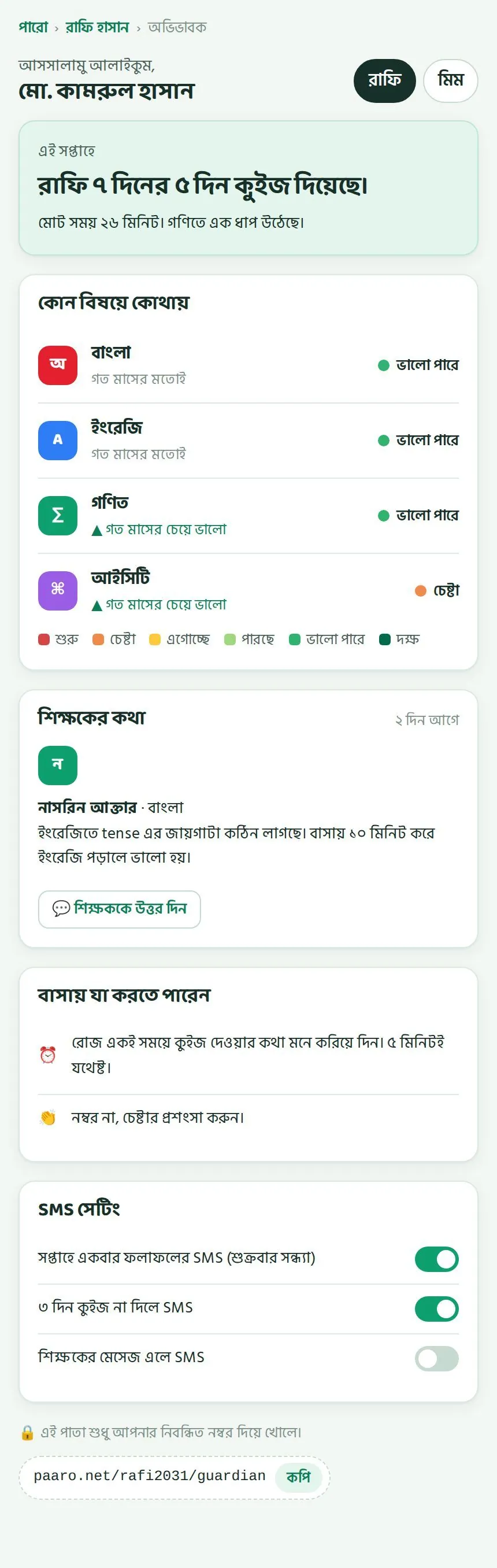
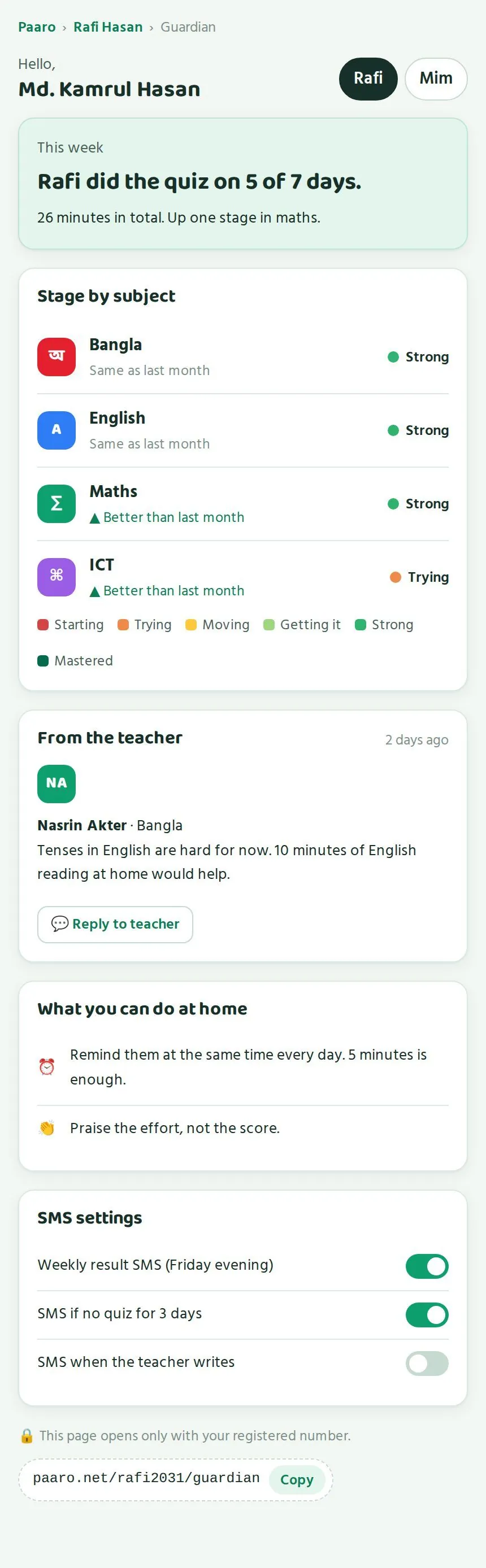
অভিভাবকের পাতা সহজ ভাষায় লেখা, যাতে যেকোনো অভিভাবক বুঝতে পারেন। যেমন রাফির বাবা মো. কামরুল হাসান দেখেন:
The guardian's page is written in plain language so any guardian can follow it. For example, Rafi's father, Md. Kamrul Hasan, sees:
- ওপরে সন্তানদের বোতাম, যেমন রাফি আর মিম। এক ট্যাপে একজন থেকে আরেকজনে যাওয়া যায়।Buttons for each child at the top, such as Rafi and Mim. One tap switches between them.
- এই সপ্তাহে: “রাফি ৭ দিনের ৫ দিন কুইজ দিয়েছে। মোট সময় ২৬ মিনিট। গণিতে এক ধাপ উঠেছে।”This week: “Rafi did the quiz on 5 of 7 days. 26 minutes in all. Up one stage in maths.”
- কোন বিষয়ে কোথায়: চার বিষয়ের ধাপ, সাথে গত মাসের চেয়ে ভালো না একই।Stage by subject: the stage in each of the four subjects, and whether it is better or the same as last month.
- শিক্ষকের কথা: আপনার লেখা মেসেজ, সাথে শিক্ষককে উত্তর দিন বোতাম।From the teacher: your message, with a Reply to teacher button.
- বাসায় যা করতে পারেন: যেমন রোজ একই সময়ে কুইজের কথা মনে করিয়ে দেওয়া, নম্বরের বদলে চেষ্টার প্রশংসা করা। শেষে একটা লাইন: এই পাতা শুধু নিবন্ধিত নম্বর দিয়ে খোলে।What you can do at home: for example, reminding the child at the same time each day, and praising effort instead of marks. A last line says the page opens only with the registered number.
- SMS সেটিং: তিনটা সুইচ।SMS settings: three switches.
| অভিভাবকের SMS সুইচGuardian SMS switch | কখন SMS আসেWhen the SMS comes |
|---|---|
| সপ্তাহে একবার ফলাফলের SMSWeekly result SMS | প্রতি শুক্রবার সন্ধ্যায়Every Friday evening |
| ৩ দিন কুইজ না দিলে SMSSMS if no quiz for 3 days | শিক্ষার্থী টানা ৩ দিন কুইজ না দিলেWhen the student has done no quiz for 3 days |
| শিক্ষকের মেসেজ এলে SMSSMS when the teacher writes | আপনি মেসেজ লিখলেWhen you write a message |
অভিভাবক নিজে ঠিক করেন কোন SMS পাবেন। কোনো অভিভাবক যদি বলেন আপনার মেসেজের খবর পাননি, তাঁকে SMS সেটিং এ শিক্ষকের মেসেজ এলে SMS চালু করতে বলুন।
Guardians choose which SMS they get. If a guardian says they never heard about your message, ask them to turn on SMS when the teacher writes under SMS settings.
প্রশ্ন যাচাইVerifying questions
কেন যাচাই, নিয়ম কী, আর ধাপে ধাপে কীভাবে করবেন।Why we verify, the rules, and how to do it step by step.
পারোর প্রতিটা প্রশ্ন শিক্ষার্থীর সামনে যাওয়ার আগে শিক্ষকরা বই খুলে মিলিয়ে দেখেন। এখন ৭৬৬টা খসড়া প্রশ্ন যাচাইয়ের অপেক্ষায় আছে। একটা ভুল প্রশ্ন শিক্ষার্থীকে ভুল শেখায়, আর ভুল ধাপ দেখায়। তাই এই কাজটা পারোর মান ধরে রাখে। আপনার মতো শিক্ষকরাই এটা সবচেয়ে ভালো পারেন, কারণ বইগুলো আপনি রোজ পড়ান।
Every Paaro question is checked by teachers against the book before any student sees it. There are 766 draft questions waiting now. A wrong question teaches a student something wrong and shows the wrong stage. So this work keeps Paaro's quality up. Teachers like you do it best, because you teach from these books every day.
যাচাইয়ের নিয়মThe rules
- বইয়ের পাতা খুলে উত্তর মিলিয়ে দেখতে হবে। মনে থেকে “ঠিক আছে” দেবেন না।Open the book page and match the answer. Never approve from memory.
- দুইটা আলাদা স্কুলের দুইজন শিক্ষক ঠিক বললে তবেই প্রশ্ন চালু হয়।A question goes live only after two teachers from two different schools approve it.
- নিজের লেখা প্রশ্ন নিজে যাচাই করা যায় না।You cannot verify your own question.
- নিজের স্কুলের শিক্ষকের প্রশ্নও যাচাই করা যায় না।You cannot verify a question from a teacher at your own school.
- প্রথম যাচাইকারী পান ৫ পয়েন্ট, দ্বিতীয়জন ৩।The first to verify earns 5 points, the second 3.
চালু হওয়ার পর কোনো প্রশ্নে ভুল পাওয়া গেলে লেখকের ১০ পয়েন্ট আর প্রত্যেক যাচাইকারীর ৫ পয়েন্ট কাটা যায়। তাই তাড়াহুড়া করবেন না। নিশ্চিত না হলে পরে দেখব চাপুন।
If an error is found after a question goes live, the author loses 10 points and each verifier loses 5. So do not rush. If you are not sure, tap Skip.
যাচাইয়ের তালিকাThe verify queue
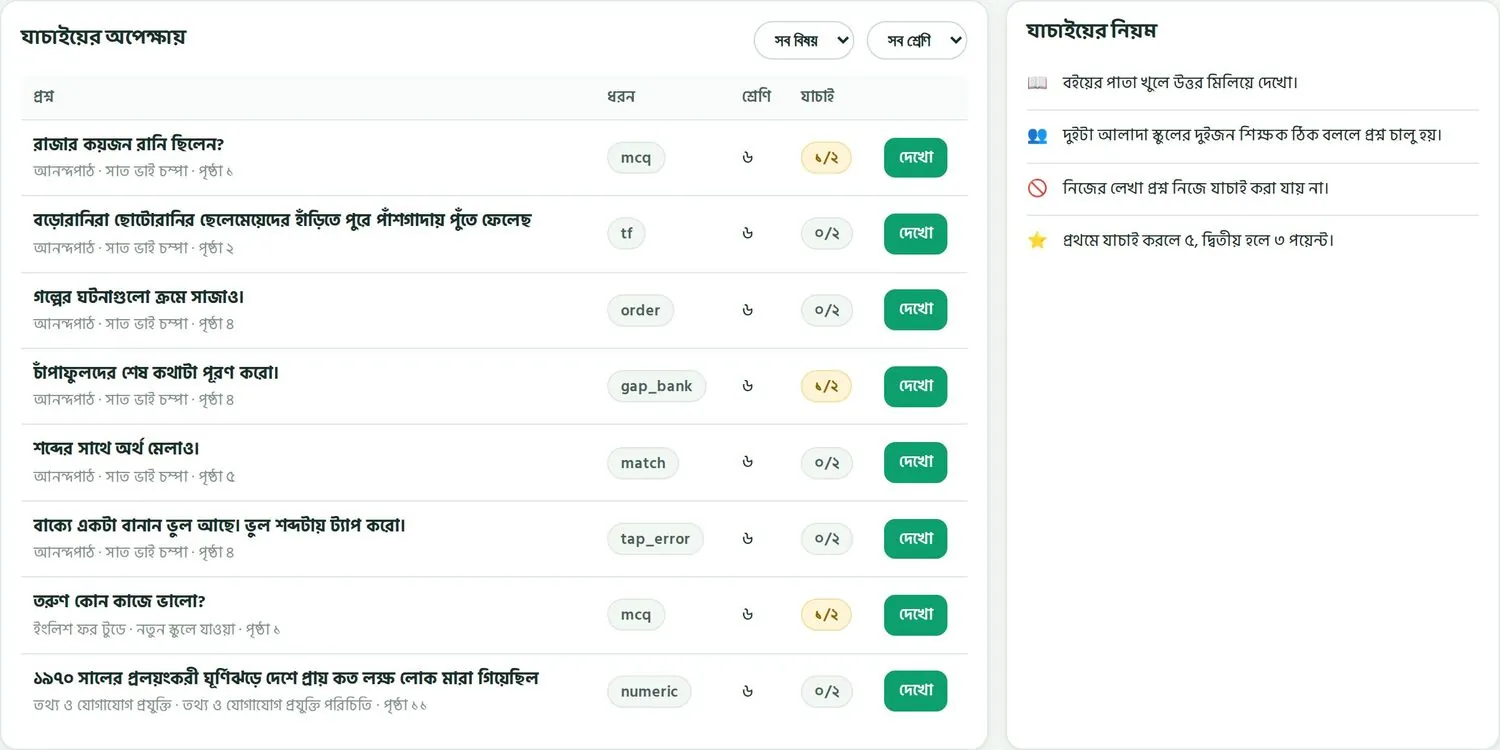
প্রশ্ন যাচাই ট্যাবের পাশে লাল একটা সংখ্যা থাকে, যেমন ৮। মানে ৮টা প্রশ্ন আপনার জন্য অপেক্ষা করছে। ট্যাব খুললে যাচাইয়ের অপেক্ষায় টেবিল আসে। ডান দিকে যাচাইয়ের নিয়ম লেখা থাকে।
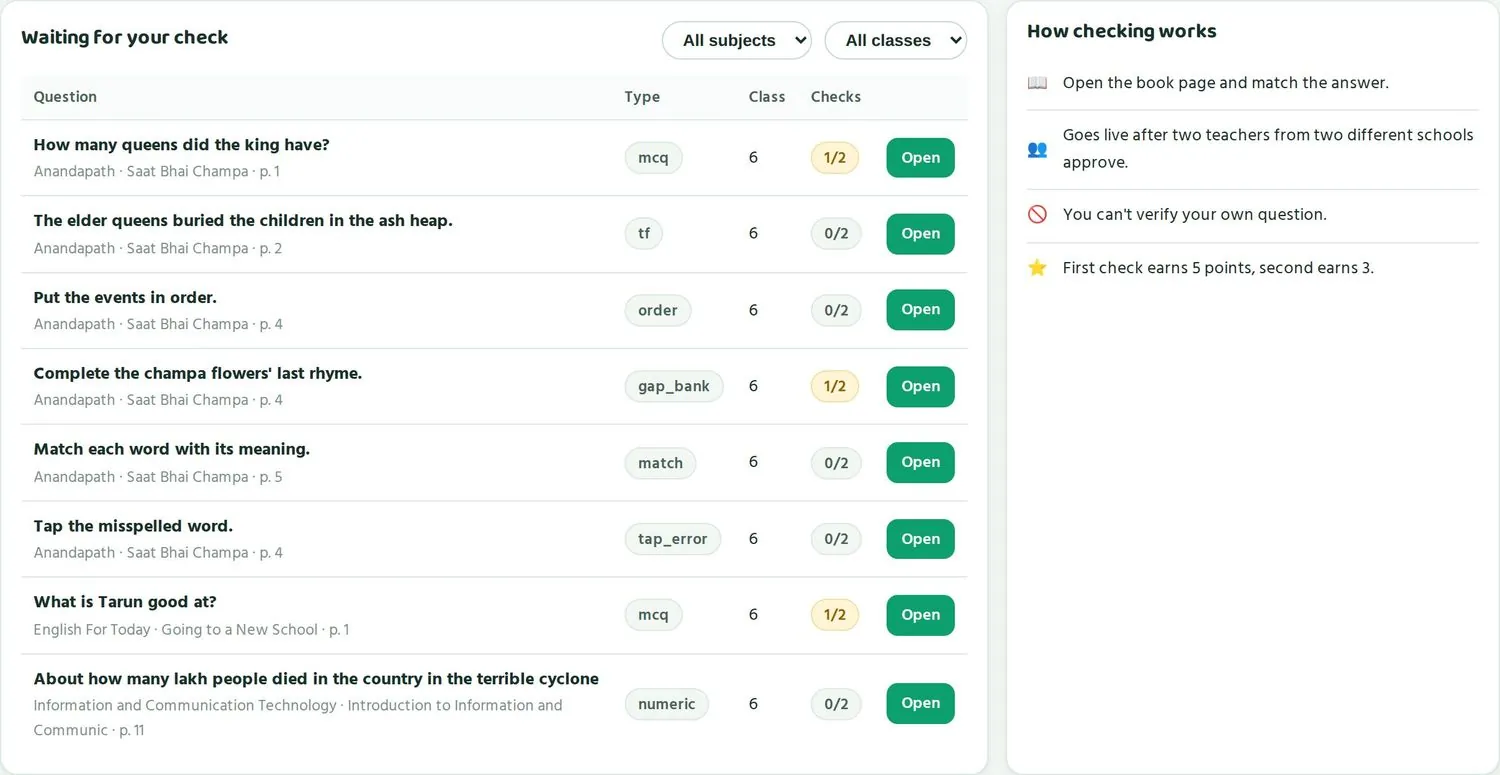
The Verify questions tab has a red number beside it, such as 8. That means 8 questions are waiting for you. Open the tab to see the Waiting for your check table. The rules are listed on the right under How checking works.
| কলামColumn | মানেMeaning |
|---|---|
| প্রশ্নQuestion | প্রশ্নের লেখা। নিচে বইয়ের নাম, অধ্যায় আর পৃষ্ঠা, যেমন আনন্দপাঠ · সাত ভাই চম্পা · পৃষ্ঠা ১The question text. Below it the book, chapter and page, such as Anandapath · Saat Bhai Champa · p. 1 |
| ধরনType | প্রশ্নের ধরন, যেমন mcq, tf, gap_bankThe question type, such as mcq, tf, gap_bank |
| শ্রেণিClass | কোন ক্লাসের প্রশ্নWhich class the question is for |
| যাচাইChecks | ২ জনের মধ্যে কতজন দেখেছেন। ০/২ মানে কেউ না, ১/২ মানে একজন।How many of the 2 checks are done. 0/2 means none, 1/2 means one. |
| দেখোOpen | প্রশ্নটা খুলে যাচাই শুরু করুনOpen the question to start checking |
ওপরে ডান দিকে দুইটা ফিল্টার আছে: সব বিষয় আর সব শ্রেণি। আপনি যে বিষয় আর ক্লাস পড়ান, সেটা বেছে নিন। তাহলে শুধু সেই প্রশ্নগুলো দেখাবে যার বই আপনার হাতের কাছে আছে।
At the top right are two filters: All subjects and All classes. Choose the subject and class you teach. Then you see only questions whose book you have to hand.
১/২ লেখা প্রশ্নগুলো আগে দেখুন। একজন আগেই দেখেছেন, আপনি দেখলে প্রশ্নটা চালু হয়ে শিক্ষার্থীদের কাছে পৌঁছায়। ০/২ প্রশ্নে প্রথম হলে বেশি পয়েন্ট, ৫।
Check the 1/2 questions first. One teacher has already checked them, so your check sends the question live to students. On a 0/2 question you earn more for being first: 5 points.
একটা প্রশ্ন যাচাই, ধাপে ধাপেChecking one question, step by step
- বইটা হাতের কাছে নিন। যেমন ক্লাস ৬-এর আনন্দপাঠ।Keep the book to hand. For example, Anandapath for class 6.
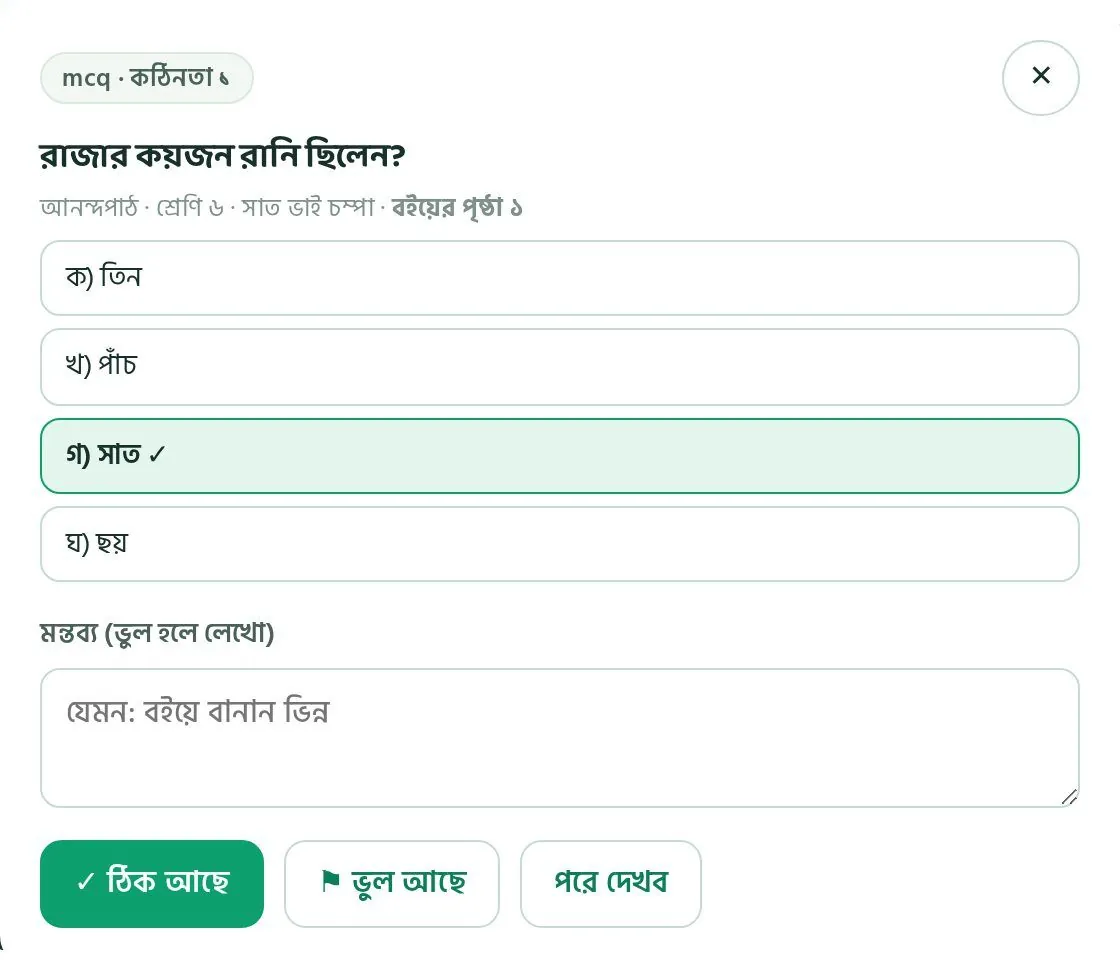
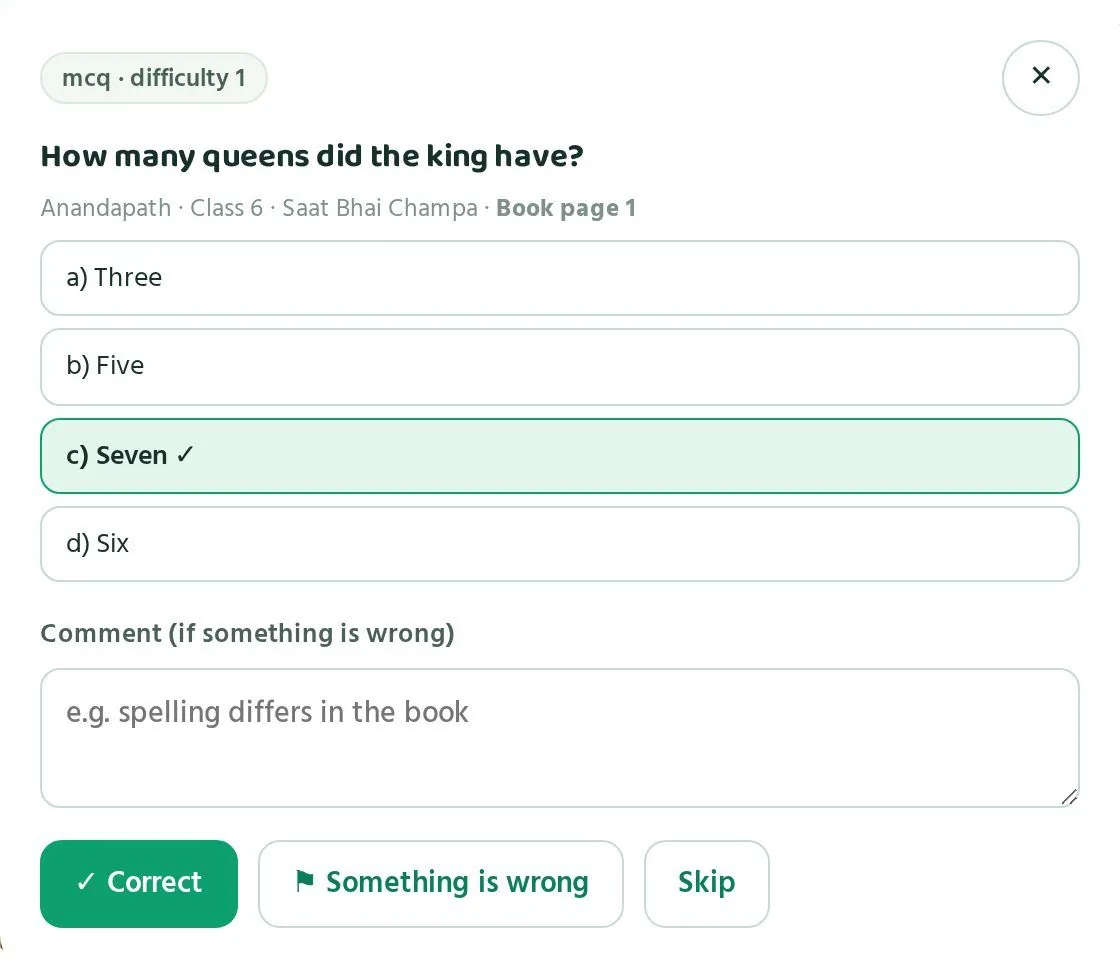
- তালিকায় প্রশ্নের পাশের দেখো চাপুন। প্রশ্নটা একটা ছোট জানালায় খোলে।Tap Open next to a question. It opens in a small window.
- ওপরে দেখুন প্রশ্নের ধরন আর কঠিনতা, যেমন “mcq · কঠিনতা ১”।At the top, see the type and difficulty, such as “mcq · difficulty 1”.
- প্রশ্নের নিচে বই, শ্রেণি, অধ্যায় আর বইয়ের পৃষ্ঠা লেখা। বইয়ের সেই পাতা খুলুন।Under the question are the book, class, chapter and book page. Open the book at that page.
- প্রশ্নটা পড়ুন। পাতায় উত্তরটা খুঁজুন।Read the question. Find the answer on the page.
- উত্তরগুলো দেখুন। সঠিক উত্তরে সবুজ রং আর টিক চিহ্ন থাকে। যেমন “রাজার কয়জন রানি ছিলেন?” প্রশ্নে “গ) সাত ✓”। বইয়ের সাথে মেলে কিনা দেখুন।Look at the options. The right one is green with a tick. For “How many queens did the king have?” it is “c) Seven ✓”. Check it matches the book.
- অন্য উত্তরগুলোও দেখুন। এর কোনোটাও কি ঠিক হতে পারে?Check the other options too. Could any of them also be right?
- সব ঠিক থাকলে ✓ ঠিক আছে চাপুন।If everything is right, tap ✓ Correct.
- কিছু ভুল থাকলে মন্তব্য (ভুল হলে লেখো) ঘরে কী ভুল লিখুন, তারপর ⚑ ভুল আছে চাপুন।If something is wrong, write what in the Comment (if something is wrong) box, then tap ⚑ Something is wrong.
- নিশ্চিত না হলে, বা বই কাছে না থাকলে, পরে দেখব চাপুন। প্রশ্নটা তালিকায় থেকে যায়।If you are not sure, or the book is not with you, tap Skip. The question stays in the list.
কোনটা “ভুল” ধরবেনWhat counts as “wrong”
প্রশ্ন বইয়ের সাথে পুরোপুরি মিলতে হবে। নিচের যেকোনোটা পেলে ⚑ ভুল আছে চাপুন:
A question must match the book exactly. Tap ⚑ Something is wrong if you find any of these:
| সমস্যাProblem | উদাহরণExample |
|---|---|
| বানান বইয়ের সাথে মেলে নাSpelling differs from the book | বইয়ে “চাঁপা”, প্রশ্নে “চাপা”The book says “চাঁপা”, the question says “চাপা” |
| পাতার নম্বর ভুলWrong page | প্রশ্নে পৃষ্ঠা ৪ লেখা, কিন্তু উত্তর আছে পৃষ্ঠা ৫-এThe question says p. 4, yet the answer is on p. 5 |
| সঠিক উত্তর ভুল দাগ দেওয়াThe wrong option is marked right | বইয়ে সাত রানি, কিন্তু সবুজ দাগ “ছয়” এThe book says seven queens, yet “Six” is marked green |
| দুইটা উত্তরই ঠিকTwo answers are right | mcq প্রশ্নে দুইটা উত্তরই বই অনুযায়ী ঠিক হতে পারেIn an mcq, two options could both be right by the book |
| উত্তর বইয়ে নেইThe answer is not in the book | প্রশ্নটা বইয়ের বাইরের জ্ঞান চায়The question needs knowledge from outside the book |
| ভুল ক্লাস বা অধ্যায়Wrong class or chapter | প্রশ্ন ক্লাস ৭-এর বই থেকে, কিন্তু ক্লাস ৬ লেখাThe question is from the class 7 book but is labelled class 6 |
| প্রশ্ন বোঝা যায় নাThe question is unclear | শিক্ষার্থী দুইভাবে বুঝতে পারেA student could read it two ways |
| ধরন কাজ করে নাThe type does not work | ক্রমে সাজানোর প্রশ্নে একটা ঘটনা বাদ পড়েছেA put-in-order question is missing one event |
কাজের মন্তব্য লিখুনWrite a useful comment
আপনার মন্তব্য দেখে প্রশ্নটা ঠিক করা হয়। তাই এমনভাবে লিখুন যাতে পড়েই বোঝা যায় কী বদলাতে হবে। ছোট রাখুন, কিন্তু নির্দিষ্ট করে।
Your comment is used to fix the question. So write it so the reader knows exactly what to change. Keep it short and specific.
| অস্পষ্ট মন্তব্যVague comment | কাজের মন্তব্যUseful comment |
|---|---|
| বানান ভুলSpelling wrong | বইয়ে “চাঁপা” (চন্দ্রবিন্দু সহ), প্রশ্নে “চাপা”Book has “চাঁপা” (with chandrabindu); question has “চাপা” |
| পাতা ঠিক নাPage not right | উত্তর পৃষ্ঠা ৫-এ, দ্বিতীয় অনুচ্ছেদে। পৃষ্ঠা ৪ নয়।Answer is on p. 5, second paragraph. Not p. 4. |
| উত্তর গোলমালAnswer confusing | খ আর ঘ দুইটাই বই অনুযায়ী ঠিক। একটা বদলাতে হবে।Options b and d are both right by the book. One needs changing. |
আপনার দেওয়া সংশোধন গ্রহণ হলে আপনি ৪ পয়েন্ট পান। ভালো মন্তব্য তাই আপনার কাজেও লাগে।
When a fix you suggested is accepted, you earn 4 points. So a good comment pays off for you too.
প্রতিদিন ৫টা প্রশ্ন যাচাই করলে ১০-১৫ মিনিট লাগে। অফ পিরিয়ডে বা বাসায় ফেরার পথে করা যায়, শুধু বইটা সাথে রাখুন।
Checking 5 questions a day takes 10-15 minutes. You can do it in a free period or at home; just keep the book with you.
পয়েন্ট আর পুরস্কারPoints and rewards
কীভাবে পয়েন্ট আসে, কাটা যায়, লেভেল আর পুরস্কার।How points are earned and lost, levels and rewards.
প্রশ্ন যাচাই আর ভালো প্রশ্ন তৈরিতে যে সময় দেন, পারো সেটা পয়েন্ট দিয়ে গোনে। পয়েন্ট থেকে লেভেল হয়, আর লেভেল থেকে সার্টিফিকেট, ট্রেনিংয়ে অগ্রাধিকার আর শিক্ষা সফরের সুযোগ।
Paaro counts the time you give to verifying and building good questions as points. Points lead to levels, and levels lead to certificates, priority for training and a chance to join the exposure visit.
আমার পয়েন্ট ট্যাবThe My points tab
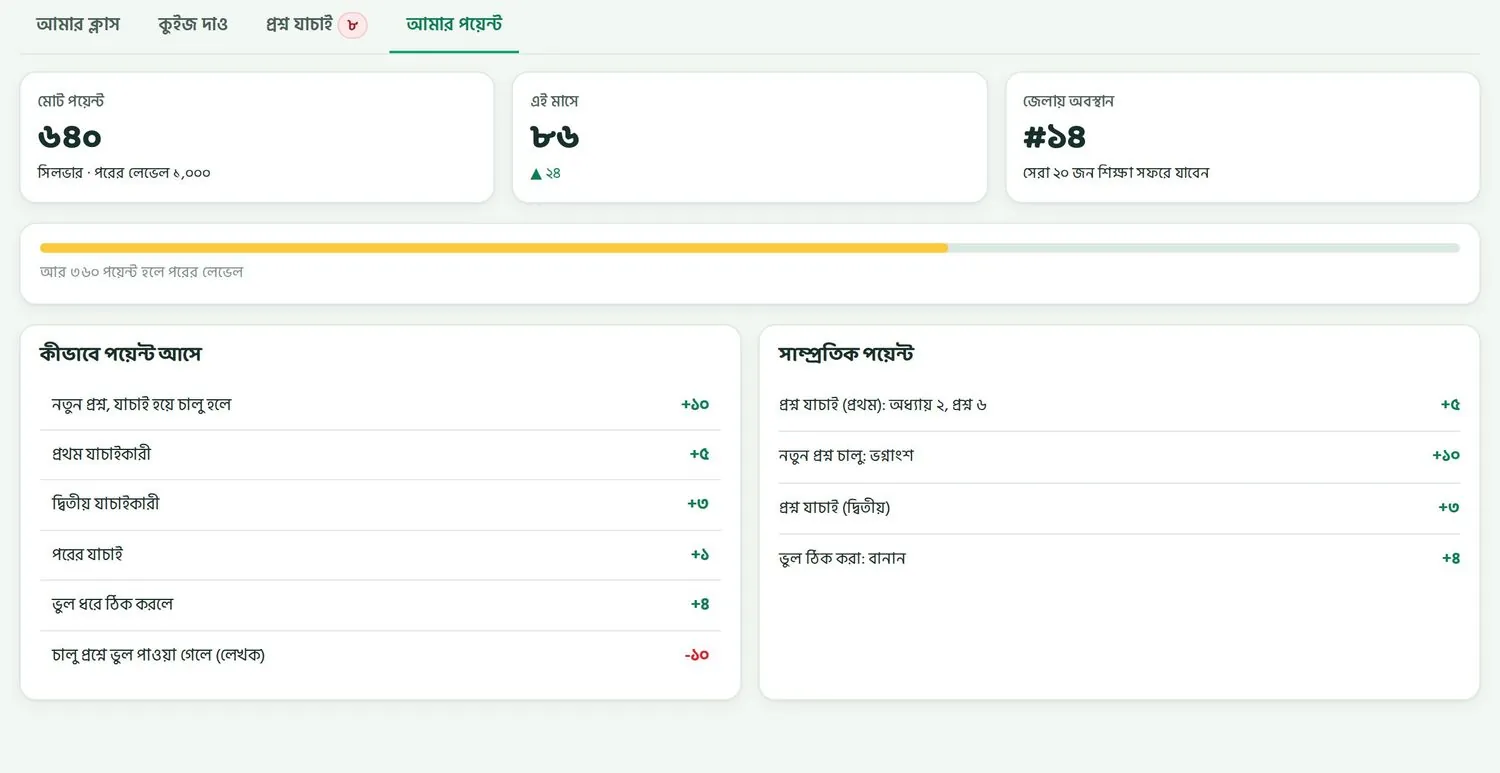
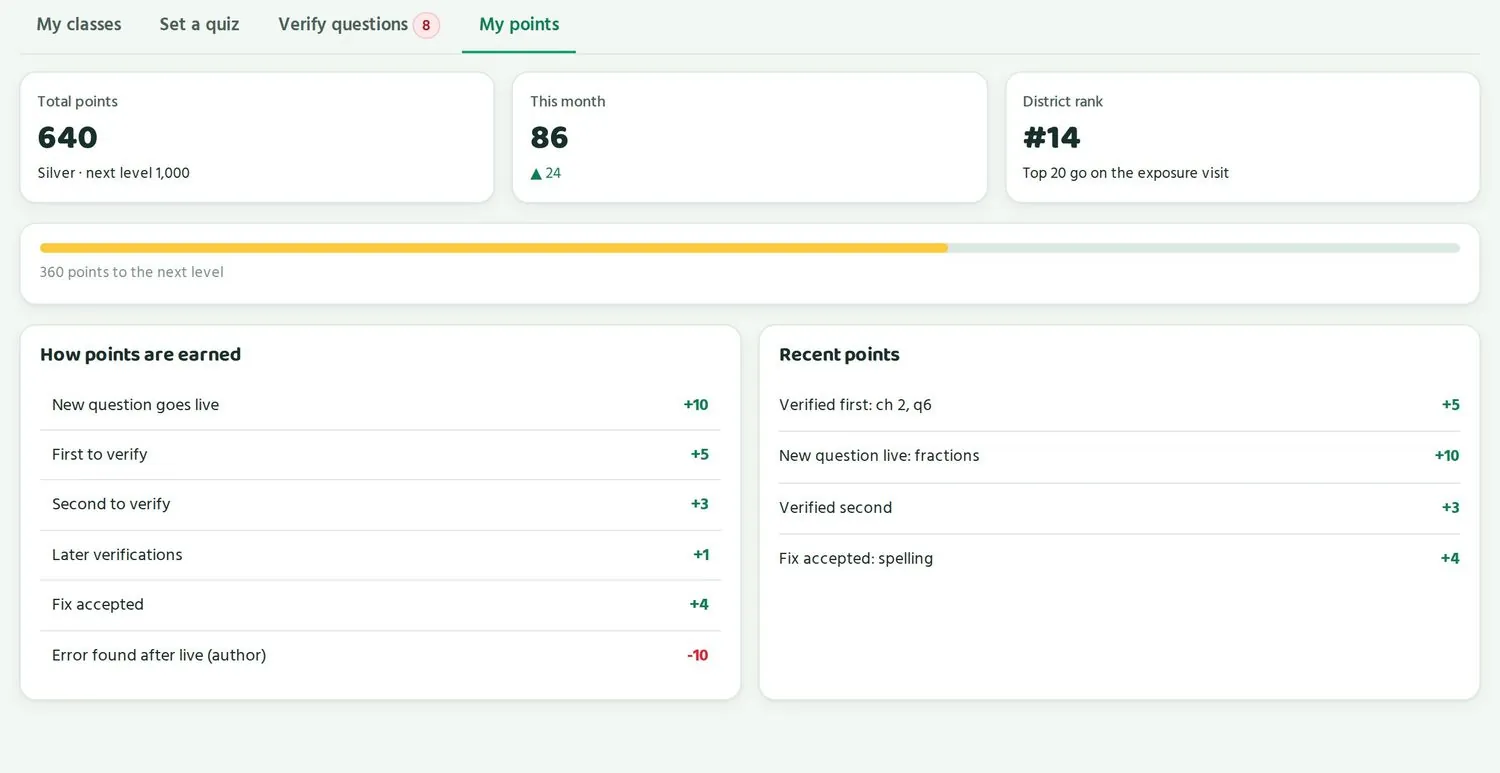
- মোট পয়েন্ট: এখন পর্যন্ত সব মিলিয়ে, যেমন ৬৪০। নিচে লেভেল আর পরের লেভেল কত পয়েন্টে।Total points: everything so far, such as 640. Below it, your level and the points needed for the next level.
- এই মাসে: এই মাসের পয়েন্ট, যেমন ৮৬। তীর দেখায় কতটা বাড়ল।This month: points this month, such as 86. The arrow shows how much it went up.
- জেলায় অবস্থান: জেলার শিক্ষকদের মধ্যে আপনার জায়গা, যেমন #১৪। জেলার সেরা ২০ জন শিক্ষা সফরে যাবেন।District rank: your place among teachers in the district, such as #14. The top 20 go on the exposure visit.
- একটা হলুদ দাগ দেখায় পরের লেভেল কত দূরে, যেমন “আর ৩৬০ পয়েন্ট হলে পরের লেভেল”।A yellow bar shows how close the next level is, such as “360 points to the next level”.
- কীভাবে পয়েন্ট আসে: নিয়মের তালিকা।How points are earned: the rules.
- সাম্প্রতিক পয়েন্ট: শেষ কয়েকবার কোথা থেকে পয়েন্ট পেলেন।Recent points: where your last few points came from.
পয়েন্টের পুরো তালিকাThe full point table
| কাজAction | পয়েন্টPoints |
|---|---|
| আপনার প্রশ্ন যাচাই হয়ে চালু হলেYour question goes live | +১০+10 |
| প্রথম যাচাইকারীFirst to verify | +৫+5 |
| দ্বিতীয় যাচাইকারীSecond to verify | +৩+3 |
| পরের যাচাইLater verifications | +১+1 |
| আপনার দেওয়া সংশোধন গ্রহণ হলেA fix you suggested is accepted | +৪+4 |
| আপনার প্রশ্নে প্রতি ১০০ জন শিক্ষার্থী উত্তর দিলেEvery 100 students who answer your question | +২ (এক প্রশ্নে সর্বোচ্চ ১০)+2 (up to 10 per question) |
| মুক্তপাঠের সার্টিফিকেটMuktopaath certificate | +১৫+15 |
| চালু প্রশ্নে ভুল পাওয়া গেলে, লেখকError found after live, author | -১০-10 |
| চালু প্রশ্নে ভুল পাওয়া গেলে, প্রত্যেক যাচাইকারীError found after live, each verifier | -৫-5 |
দিনের সীমা আর নিয়মDaily cap and rules
- এক দিনে সর্বোচ্চ ৬০ পয়েন্ট পাওয়া যায়। তাই রোজ অল্প অল্প করা সবচেয়ে ভালো।You can earn at most 60 points a day. So a little every day works best.
- নিজের প্রশ্ন নিজে যাচাই করা যায় না।No verifying your own questions.
- নিজের স্কুলের প্রশ্ন যাচাই করা যায় না।No verifying questions from your own school.
- বইয়ের পাতা খুলে মেলাতেই হবে।You must open the book page and match it.
পয়েন্ট কাটার নিয়মটা কেন? কারণ একটা ভুল চালু প্রশ্ন হাজার হাজার শিক্ষার্থীর কাছে যায়। তাড়াহুড়া করে অনেক প্রশ্নে “ঠিক আছে” দেওয়ার চেয়ে মন দিয়ে কয়েকটা দেখা বেশি লাভের।
Why take points away? Because one wrong live question reaches thousands of students. Checking a few questions carefully pays more than rushing through many.
লেভেলLevels
| লেভেলLevel | পয়েন্ট লাগেPoints needed |
|---|---|
| ব্রোঞ্জBronze | ২০০200 |
| সিলভারSilver | ৫০০500 |
| গোল্ডGold | ১,০০০1,000 |
| প্ল্যাটিনামPlatinum | ২,৫০০2,500 |
উদাহরণে নাসরিন আক্তারের ৬৪০ পয়েন্ট। তিনি সিলভার লেভেলে, গোল্ডের জন্য আর ৩৬০ পয়েন্ট লাগবে।
In the example, Nasrin Akter has 640 points. She is at Silver and needs 360 more for Gold.
পুরস্কারRewards
- প্রতিটা লেভেলে একটা সার্টিফিকেট।A certificate at each level.
- উপজেলা বা জেলার বোর্ডে আপনার নাম। এটা শুধু শিক্ষকদের জন্য।Your name on the upazila or district board. This is for teachers only.
- ট্রেনিংয়ের আসনে অগ্রাধিকার, যেমন মুক্তপাঠের আইসিটি কোর্স।Priority for training seats, such as the Muktopaath ICT course.
- প্রতি টার্মে প্রতিটা জেলার সেরা শিক্ষকদের জন্য শিক্ষা সফর।A termly exposure visit for the top teachers in each district.
- স্পনসর করা ছোট পুরস্কার।Small sponsored rewards.
পুরস্কারের অনুরোধRequesting a reward
পুরস্কারের প্রতিটা অনুরোধ পারো টিম দেখে অনুমোদন দেয়। তাঁরা মিলিয়ে দেখেন আপনার পয়েন্ট আর লেভেল ঠিক আছে কিনা। তাই অনুমোদন পেতে কিছু সময় লাগতে পারে। কীভাবে অনুরোধ করবেন বা অনুরোধের কী হলো, সেটা নিয়ে প্রশ্ন থাকলে আপনার প্রধান শিক্ষকের সাথে কথা বলুন।
Every reward request is approved by the Paaro team. They check that your points and level are in order, so approval can take some time. If you have questions about how to request a reward or what happened to a request, talk to your head teacher.
পয়েন্টের সবচেয়ে সহজ পথ: রোজ ১০ মিনিট, ১/২ লেখা প্রশ্ন আগে। মাসে ২০ দিন রোজ ২টা প্রথম যাচাই আর ২টা দ্বিতীয় যাচাই করলেই মাসে ৩২০ পয়েন্ট।
The easiest route to points: 10 minutes a day, 1/2 questions first. Two first checks and two second checks a day, 20 days a month, comes to 320 points a month.
গোপনীয়তা আর ভালো অভ্যাসPrivacy and good practice
কে কী দেখে, পিন কেন গোপন, আর সবার প্রতি ন্যায্য থাকা।Who sees what, why PINs stay private, and being fair to everyone.
পারোতে শিক্ষার্থীদের নাম, ফলাফল আর অভিভাবকের ফোন নম্বর থাকে। এই তথ্য নিরাপদ রাখা সবার দায়িত্ব। পারো নিজে অনেক কিছু করে। বাকিটা আপনার অভ্যাসের ওপর।
Paaro holds students' names, results and guardians' phone numbers. Keeping this safe is everyone's job. Paaro does a lot on its own. The rest depends on your habits.
কে কী দেখতে পারেWho can see what
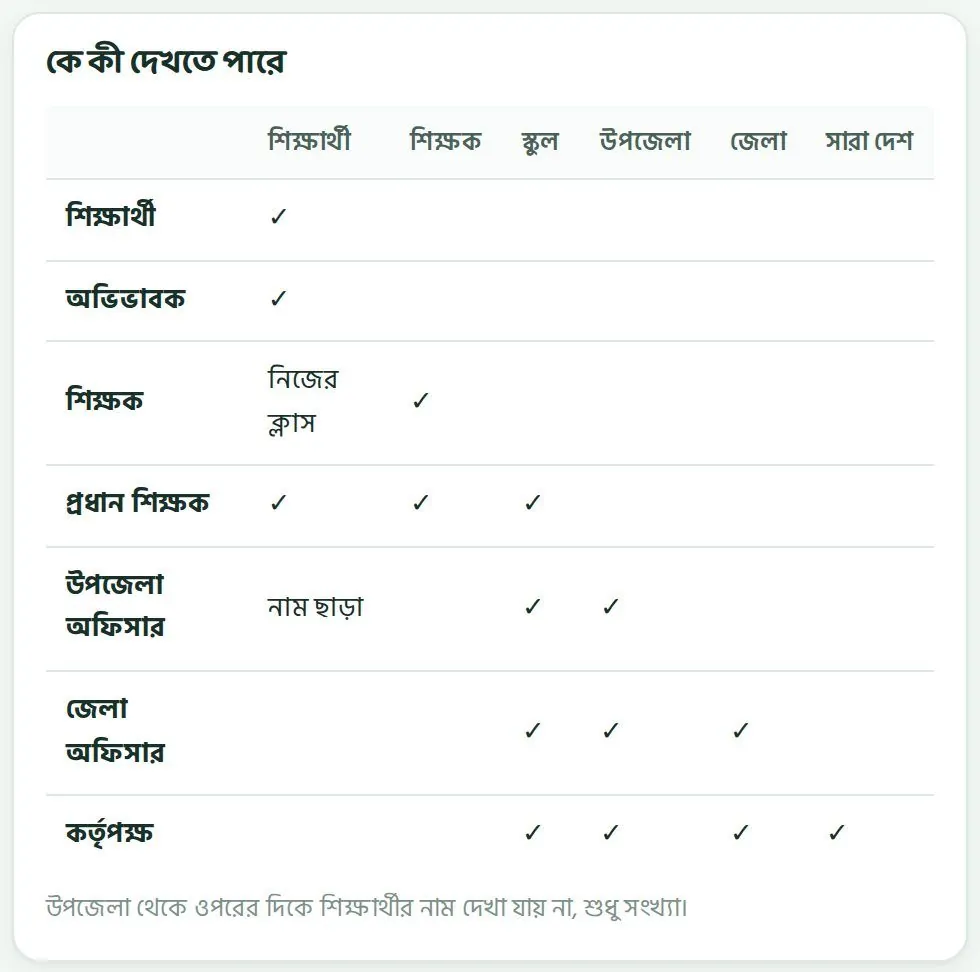
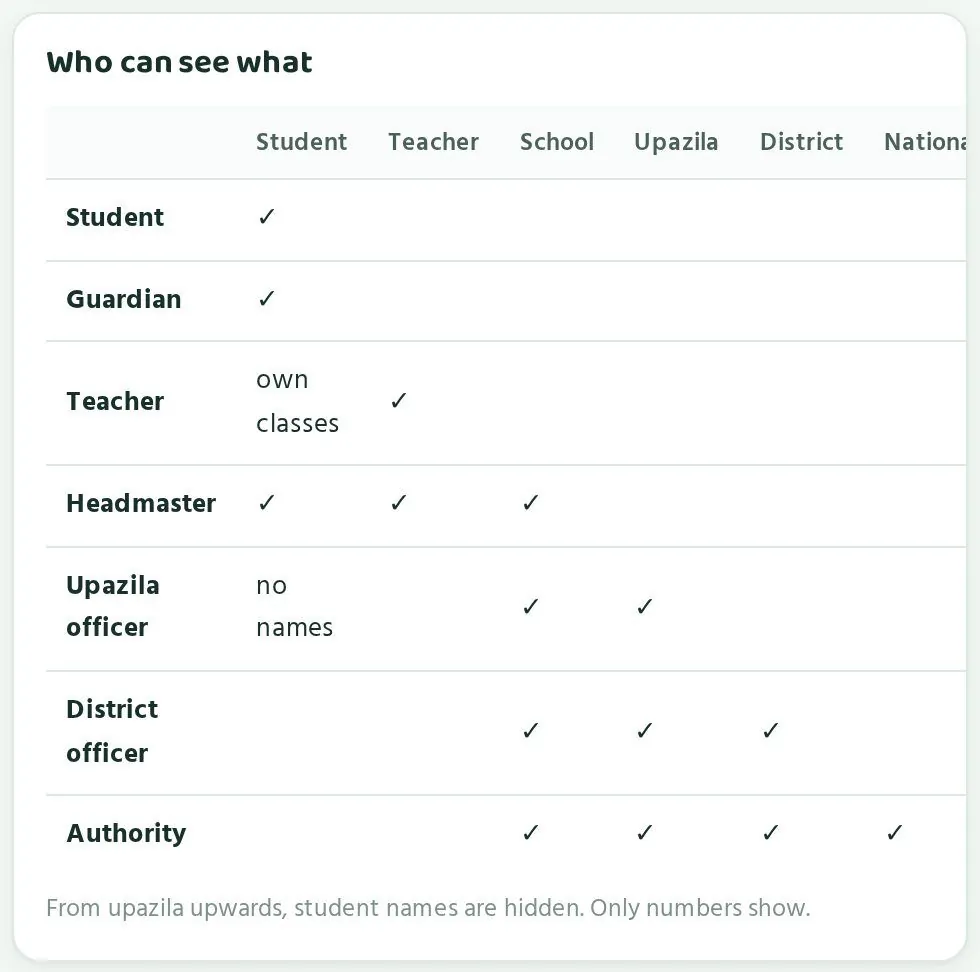
| কেWho | কী দেখতে পারেনWhat they can open |
|---|---|
| শিক্ষার্থীStudent | নিজের পাতাTheir own page |
| অভিভাবকGuardian | নিজের সন্তানদের পাতাTheir own children's pages |
| শিক্ষক (আপনি)Teacher (you) | নিজের পাতা, আর নিজের ক্লাসের শিক্ষার্থীদেরYour own page, and students in your own classes |
| প্রধান শিক্ষকHead teacher | স্কুলের পাতা, স্কুলের সব শিক্ষক আর শিক্ষার্থীThe school page, and all teachers and students in the school |
| উপজেলা অফিসারUpazila officer | উপজেলা আর তার স্কুলগুলো, সংখ্যা আর ধাপে। শিক্ষার্থীর নাম নয়।The upazila and its schools, as numbers and stages. No student names. |
| জেলা অফিসারDistrict officer | জেলা, উপজেলা আর স্কুল, সংখ্যায়। শিক্ষার্থীর নাম নয়।The district, its upazilas and schools, as numbers. No student names. |
| কর্তৃপক্ষThe authority | সব কিছু, সংখ্যায়। শিক্ষার্থীর নাম নয়।Everything, as numbers. No student names. |
মানে, রাফির নাম আর ধাপ দেখতে পারে রাফি, তার অভিভাবক, তার শিক্ষকরা আর প্রধান শিক্ষক। উপজেলা বা জেলা অফিস শুধু দেখে মুক্তাগাছা আদর্শ উচ্চ বিদ্যালয়ের শ্রেণি ৬ক-এ কত ভাগ শিক্ষার্থী কোন ধাপে।
So Rafi's name and stage can be seen by Rafi, his guardian, his teachers and the head teacher. The upazila or district office sees only what share of Class 6ক at Muktagachha Adarsha High School is at each stage.
পারো তথ্য নিরাপদে রাখে। পাইলটের সময় প্রতিদিন ব্যাকআপ নেওয়া হয়, আর অ্যাডমিনের প্রতিটা কাজ লিখে রাখা হয়।
Paaro stores data securely. During the pilot there are daily backups, and every admin action is logged.
পিন কখনো শেয়ার নয়Never share PINs
- শিক্ষার্থীর পিন শুধু শিক্ষার্থী আর তার অভিভাবক জানবে। আপনি জানলেও কাউকে বলবেন না।A student's PIN is for the student and their guardian only. Even if you know it, never tell anyone.
- বন্ধুর পিন দিয়ে কুইজ দিলে দুইজনেরই ধাপ ভুল দেখায়। ক্লাসে এটা খোলাখুলি বলুন।Taking a quiz with a friend's PIN makes both students' stages wrong. Say this openly in class.
- লগইন স্লিপ ক্লাসে ফেলে রাখবেন না। বিলি না হওয়া স্লিপ প্রধান শিক্ষককে ফেরত দিন।Do not leave login slips lying around. Return any you could not hand out to the head teacher.
- আপনার SMS কোডও কাউকে বলবেন না। সহকর্মীকেও না।Never share your own SMS code either. Not even with a colleague.
ক্লাসে ফোনPhones in class
পারোর কুইজ বাসায় দেওয়ার জন্য বানানো, তাই ক্লাসে ফোন লাগে না বললেই চলে। স্কুলে কুইজ দিতে হলে স্কুলের নিয়ম মেনে চলুন। কয়েকটা কথা মাথায় রাখুন:
Paaro quizzes are built to be done at home, so phones are rarely needed in class. If quizzes are done at school, follow your school's rules. A few things to keep in mind:
- স্কুলের একটা ফোন বা স্মার্ট বোর্ড দিয়ে যাদের ফোন নেই তাদের পালা করে কুইজ দেওয়ান।Use a school phone or smart board to let students without phones take turns.
- একজন কুইজ শেষ করলে লগআউট করে তারপর পরের জনকে দিন।When one student finishes, log out before handing it to the next.
- কুইজের সময় কেউ যেন অন্যের স্ক্রিন না দেখে।Make sure nobody looks at another student's screen during a quiz.
সবার প্রতি ন্যায্য থাকাBeing fair to everyone
সব পরিবারে স্মার্টফোন নেই, আর যাদের আছে তাদেরও ফোন সবসময় খালি থাকে না। কুইজ না দেওয়া মানেই অবহেলা নয়। কাউকে শাস্তি দেওয়ার আগে কারণ জানুন।
Not every family has a smartphone, and those that do cannot always spare it. Missing a quiz does not always mean a student does not care. Find out why before any penalty.
- কুইজের শেষ সময় দিন দুই-এক রাত পরে, যাতে ভাগের ফোনেও দেওয়া যায়।Set the due time a night or two ahead, so students sharing a phone can manage.
- পারোর ধাপ দিয়ে পরীক্ষার নম্বর দেবেন না। ধাপ শেখার পথ দেখানোর জন্য।Do not use Paaro stages as exam marks. Stages are there to guide learning.
- ক্লাসের সেরা ৫ মেডেল সবাই পায় না। যারা এক ধাপ উঠল, তাদের প্রশংসাও সমান জোরে করুন।Not everyone gets the class top 5 medal. Praise those who moved up one stage just as loudly.
- ছেলে-মেয়ে, প্রথম বেঞ্চ-শেষ বেঞ্চ, সবার সারি সমান মন দিয়ে দেখুন।Look at every row with the same care: boys and girls, front bench and back bench.
ছকের স্ক্রিনশট নিয়ে হোয়াটসঅ্যাপ গ্রুপে বা ফেসবুকে দেবেন না। এতে শিক্ষার্থীর নাম আর ধাপ সবার কাছে চলে যায়।
Do not screenshot the grid and post it in a WhatsApp group or on Facebook. That puts students' names and stages in front of everyone.
সমস্যা আর প্রশ্নProblems and questions
শিক্ষকরা যা সবচেয়ে বেশি জিজ্ঞেস করেন।What teachers ask most often.
SMS কোড আসছে না। কী করব?My SMS code is not arriving. What should I do?
প্রথমে দেখুন মোবাইল নম্বরটা ঠিক লিখেছেন কিনা। নম্বরটা সেটাই হতে হবে যেটা প্রধান শিক্ষক পারোতে দিয়েছেন। নেটওয়ার্ক দুর্বল থাকলে কয়েক মিনিট অপেক্ষা করুন। এক নম্বরে এক ঘণ্টায় ৩টার বেশি কোড যায় না, তাই বারবার চাপবেন না। Google অ্যাকাউন্ট থাকলে Google দিয়ে ঢোকো চেষ্টা করুন। তারপরও না হলে প্রধান শিক্ষককে জানান।
First check that you typed the mobile number correctly. It must be the number your head teacher gave Paaro. If the network is weak, wait a few minutes. A number gets no more than 3 codes an hour, so do not keep tapping. If you have a Google account, try Continue with Google. If it still fails, tell your head teacher.
কোড এসেছে, কিন্তু কাজ করছে না।The code came, but it does not work.
কোড ৫ মিনিট কাজ করে। দেরি হলে নতুন কোড নিন। একাধিকবার চাপলে শুধু শেষ কোডটা ব্যবহার করুন।
A code works for 5 minutes. If it is late, get a new one. If you tapped more than once, use only the latest code.
শিক্ষার্থী পিন ভুলে গেছে।A student has forgotten their PIN.
আপনি বা প্রধান শিক্ষক তাকে নতুন পিন দিতে পারেন। নতুন পিন দিয়ে ঢোকার পর সে আবার নিজের পিন বানাবে। সম্ভব হলে সামনাসামনি দিন।
You or the head teacher can give them a new PIN. After logging in with it, the student sets their own PIN again. Give it face to face if you can.
শিক্ষার্থী বলছে অ্যাকাউন্ট বন্ধ হয়ে গেছে।A student says their account is locked.
পরপর ৫ বার ভুল পিন দিলে অ্যাকাউন্ট ১৫ মিনিট বন্ধ থাকে। ১৫ মিনিট পর আবার চেষ্টা করতে বলুন। পিন মনে না থাকলে নতুন পিন দিন।
5 wrong PINs in a row lock the account for 15 minutes. Ask them to try again after 15 minutes. If they cannot remember the PIN, give them a new one.
দুই ভাইবোন একই ফোনে কুইজ দেয়। সমস্যা হবে?Two siblings share one phone. Is that a problem?
না। প্রত্যেকের নিজের কোড আর পিন আছে, যেমন rafi2031 আর mim2031। একজন শেষ করে লগআউট করবে, তারপর অন্যজন নিজের কোড দিয়ে ঢুকবে। অভিভাবক এক পাতা থেকেই দুইজনকে দেখতে পারেন।
No. Each has their own code and PIN, such as rafi2031 and mim2031. One finishes and logs out, then the other logs in with their own code. The guardian can see both from one page.
শিক্ষার্থীর বাসায় ইন্টারনেট নেই।A student has no internet at home.
পারো একটা ওয়েবসাইট, আর উত্তর যাচাই হয় সার্ভারে, তাই কুইজ দিতে ইন্টারনেট লাগে। শেষ সময় কয়েক দিন পরে রাখুন, যাতে সুযোগমতো দিতে পারে। স্কুলের ফোন বা স্মার্ট বোর্ডে তার জন্য সময় রাখুন। কুইজ ছোট, অল্প ডেটায় হয়ে যায়।
Paaro is a website and answers are checked on the server, so a quiz needs internet. Set the due time a few days ahead so the student can do it when they can. Make time for them on a school phone or the smart board. A quiz is short and uses little data.
আমার ক্লাসের তালিকায় একজন শিক্ষার্থী নেই, বা ভুল ক্লাসে আছে।A student is missing from my class list, or is in the wrong class.
শিক্ষার্থীর তালিকা পারোতে তোলেন প্রধান শিক্ষক। তাঁকে শিক্ষার্থীর নাম, শ্রেণি, শাখা আর রোল জানান। তিনি ঠিক করে দেবেন।
The head teacher uploads the student list to Paaro. Give them the student's name, class, section and roll. They will put it right.
আমার বিষয় বা ক্লাস ভুল দেখাচ্ছে।My subject or classes are shown wrongly.
আপনার বিষয় আর ক্লাস প্রধান শিক্ষক ঠিক করেন। তাঁকে বলুন।
Your head teacher sets your subject and classes. Ask them.
কুইজের একটা প্রশ্ন ভুল মনে হচ্ছে।A question in a quiz looks wrong.
বইয়ের পাতা খুলে মিলিয়ে দেখুন। প্রতিটা প্রশ্নে পাতা নম্বর আছে। ভুল হলে প্রশ্ন যাচাইয়ের সময় ⚑ ভুল আছে চেপে নির্দিষ্ট মন্তব্য লিখুন। চালু প্রশ্নে ভুল নিশ্চিত হলে প্রধান শিক্ষকের মাধ্যমে পারো টিমকে জানান। ক্লাসে শিক্ষার্থীদের বলুন বইয়ের উত্তরটাই ঠিক।
Open the book page and check. Every question has its page number. If you are verifying it, tap ⚑ Something is wrong and write a specific comment. If you are sure a live question is wrong, tell the Paaro team through your head teacher. Tell students in class that the book's answer is the right one.
লিংক খুললে “এই লিংকে কোনো পাতা নেই” আসছে।My link shows “No page at this link”.
লিংকে টাইপের ভুল আছে কিনা দেখুন। EIIN ৬ অঙ্কের, নাম ইংরেজিতে ছোট হাতের অক্ষরে, যেমন paaro.net/900101/nasrin। একই নামে কেউ থাকলে আপনার লিংক হতে পারে nasrin2। পাতার পরামর্শ বা লিংকের নিয়ম দেখুন। তারপরও না খুললে প্রধান শিক্ষককে জিজ্ঞেস করুন।
Check the link for typing mistakes. The EIIN has 6 digits and the name is in English lowercase, such as paaro.net/900101/nasrin. If someone shares your name, your link may be nasrin2. Look at the suggestion on the page or the link rules. If it still does not open, ask your head teacher.
শিক্ষার্থী বলছে ভুল কোড দিলেও লগইন পাতা আসছে।A student says the login screen appears even with a wrong code.
এটা ইচ্ছা করে করা। কোড থাকুক বা না থাকুক, শিক্ষার্থীর লগইন পাতা একই রকম দেখায়, যাতে কেউ আন্দাজ করে কোড খুঁজে না পায়। স্লিপের কোডটা ঠিকমতো লিখতে বলুন।
That is on purpose. The student login screen looks the same whether a code exists or not, so nobody can find codes by guessing. Ask them to type the code from their slip carefully.
ছকে একটা অধ্যায়ের সব ঘর খালি।A whole chapter is empty in the grid.
খালি ঘর মানে সেই অধ্যায়ে এখনো কুইজ হয়নি। কুইজ দাও থেকে সেই অধ্যায়ের কুইজ দিন। শিক্ষার্থীরা দেওয়ার পর ঘরগুলো রঙিন হবে।
An empty cell means that chapter has not been quizzed yet. Set a quiz on it from Set a quiz. The cells fill with colour once students take it.
আমার অধ্যায়ের প্রশ্ন পাচ্ছি না।I cannot find questions for my chapter.
এখন প্রশ্নব্যাংকে প্রতিটা বইয়ের প্রথম ২-৩টা অধ্যায়ের প্রশ্ন আছে, আর সেগুলো যাচাই হয়ে তবেই চালু হয়। প্রশ্ন যাচাইয়ে অংশ নিলে প্রশ্ন দ্রুত চালু হয়।
The bank now covers the first 2-3 chapters of each book, and questions go live only after verification. Taking part in verifying helps questions go live sooner.
অভিভাবক বলছেন কোড পাচ্ছেন না।A guardian says they get no code.
কোড যায় শুধু সেই নম্বরে যেটা স্কুল শিক্ষার্থীর সাথে দিয়েছে। অভিভাবক অন্য নম্বর দিলে কোড যাবে না। নম্বর বদলাতে হলে প্রধান শিক্ষককে জানান।
The code goes only to the number the school registered with the student. Another number gets no code. If the number needs changing, tell the head teacher.
অভিভাবক অনেক SMS পাচ্ছেন বলে বিরক্ত।A guardian is annoyed by too many SMS.
অভিভাবক নিজের পাতার SMS সেটিং থেকে যেকোনো SMS বন্ধ করতে পারেন। আপনিও কুইজ দেওয়ার সময় অভিভাবককে SMS যাবে সুইচ দরকার ছাড়া বন্ধ রাখুন।
The guardian can turn off any SMS under SMS settings on their page. When you set a quiz, keep Send SMS to guardians off unless it is needed.
পারো নিয়ে আরও প্রশ্ন থাকলে কাকে বলব?Who do I ask about anything else?
প্রথমে আপনার প্রধান শিক্ষককে। প্রধান শিক্ষকরা দরকার হলে পারো টিমের সাথে যোগাযোগ করেন, ঠিকানা hello@paaro.net।
Your head teacher first. Head teachers contact the Paaro team when needed, at hello@paaro.net.
এক নজরেQuick reference
লিংক, রুটিন আর পয়েন্ট, এক পাতায়।Links, routine and points on one page.
লিংকLinks
| কারWhose | লিংকLink |
|---|---|
| আপনারYours | paaro.net/900101/nasrinpaaro.net/900101/nasrin |
| স্কুলেরSchool | paaro.net/900101paaro.net/900101 |
| শিক্ষার্থীরStudent | paaro.net/rafi2031paaro.net/rafi2031 |
| অভিভাবকেরGuardian | paaro.net/rafi2031/guardianpaaro.net/rafi2031/guardian |
লগইনLogin
- শিক্ষক: Google, অথবা মোবাইল আর ৬ অঙ্কের SMS কোড (৫ মিনিট, ঘণ্টায় ৩টা)।Teacher: Google, or mobile and a 6-digit SMS code (5 minutes, 3 an hour).
- শিক্ষার্থী: কোড আর ৪ অঙ্কের পিন। ৫ বার ভুল হলে ১৫ মিনিট বন্ধ।Student: code and 4-digit PIN. 5 wrong tries lock it for 15 minutes.
- অভিভাবক: নিবন্ধিত মোবাইল আর SMS কোড।Guardian: registered mobile and SMS code.
প্রতিদিনEvery day
- আমার ক্লাস খুলে চারটা সংখ্যা দেখুন।Open My classes and look at the four numbers.
- ১০ মিনিটে কয়েকটা প্রশ্ন যাচাই করুন, ১/২ আগে।Verify a few questions in 10 minutes, 1/2 ones first.
প্রতি সপ্তাহেEvery week
- প্রতি ক্লাসে এক-দুইটা কুইজ দিন: ৮টা প্রশ্ন, মিশ্র, বাসা থেকে।Set one or two quizzes per class: 8 questions, mixed, from home.
- ছকে লাল সারি আর লাল কলাম খুঁজুন।Look for red rows and red columns in the grid.
- লাল সারি: শিক্ষার্থীর সাথে কথা, অভিভাবককে SMS, সহজ কুইজ।Red row: talk to the student, SMS the guardian, easier quiz.
- লাল কলাম: অধ্যায়টা আবার পড়ান, আবার কুইজ।Red column: reteach the chapter, quiz again.
- সাম্প্রতিক কুইজ এ দিয়েছে আর গড় নম্বর মেলান।Compare Done and Avg score in Recent quizzes.
পয়েন্টPoints
| কাজAction | পয়েন্টPoints |
|---|---|
| প্রশ্ন চালুQuestion goes live | +১০+10 |
| প্রথম / দ্বিতীয় / পরের যাচাইFirst / second / later check | +৫ / +৩ / +১+5 / +3 / +1 |
| সংশোধন গ্রহণFix accepted | +৪+4 |
| প্রতি ১০০ শিক্ষার্থী উত্তর দিলেPer 100 students answering | +২ (সর্বোচ্চ ১০)+2 (max 10) |
| মুক্তপাঠ সার্টিফিকেটMuktopaath certificate | +১৫+15 |
| চালু প্রশ্নে ভুল: লেখক / যাচাইকারীError after live: author / verifier | -১০ / -৫-10 / -5 |
| দিনে সর্বোচ্চDaily cap | ৬০60 |
- লেভেল: ব্রোঞ্জ ২০০, সিলভার ৫০০, গোল্ড ১,০০০, প্ল্যাটিনাম ২,৫০০।Levels: Bronze 200, Silver 500, Gold 1,000, Platinum 2,500.
- পিন আর SMS কোড কখনো শেয়ার নয়। প্রশ্ন থাকলে প্রধান শিক্ষক।Never share PINs or SMS codes. Questions go to your head teacher.